الحمد لله رب العالمين و الصلاة و السلام على أشرف الأنبياء و المرسلين
أخواني وأخواتي الأعضاء المحترمين. أم بعد..
لقد حلمة بتعريب ألعاب الكنسل منذ صغري وحاولت شتى الطرق إلى تعريب أكبر كم من الألعاب للشعب العربي لكي نظهر للعالم بأننا نستحق أن نستمتع.
بالعلم أنني أدرس الهندسة المدنية, في أخر سنة. حاولت تعلم لغة الجافا لكي أصل إلى برمجة برنامج يساعدني في تعريب الألعاب.
س\ج:
1- لماذا تريد أن تصنع هذا البرنامج ؟
السبب هو أنني إذا إستخدمة الطريقة التقليدية فسوف يستغرق تعريب لعبة واحده بسيطه إلى شهرين على الأقل متواصلة.
كيف؟
أولاً يتم إختراق اللعبة و أستخراج خارطة الاحرف كتالي:
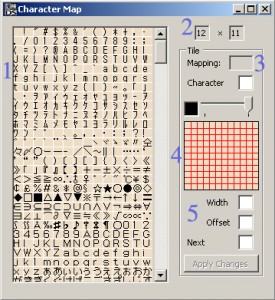
ثانياً يتم رسم الأحرف العربية كتالية:
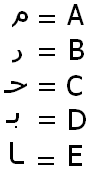
وعند كتابتي لكلمة عربية مثلاً :
قصة بطل
أستبدل الأحرف العربية بالإنجليزية المرادف لها بالعربية مثالاً:
WPB ]NU
وخارطة الأحرف هي كتالي:
B = ب
C = ت
D = ث
E = ج
F = ح
G = خ
H = د
I = ذ
J = ر
K = ز
L = س
M = ش
N = ص
O = ض
P = ط
Q = ظ
R = ع
S = غ
T = ف
U = ق
V = ك
W = ل
X = م
Y = ن
Z = ه
a = و
b = ي
c = ـهـ
d = بـ
e = تـ
f = ثـ
g = جـ
h = حـ
i = خـ
j = سـ
k = شـ
l = صـ
m = ضـ
n = عـ
o = غـ
p = فـ
q = قـ
r = كـ
s = لـ
t = مـ
u = نـ
v = هـ
w = يـ
x = ـا
y = ـلـ
z = ـغـ
" = ـعـ
& = ـه
@ = ـي
, = ـج
$ = ـح
* = ـخ
_ = ـع
; = ـغ
[ = ا
] = ة
A = أ
ماهي المشكلة التي واجهتني في البرنامج الذي صنعتة؟
المشكلة هي بسيطه للخبراء في هذا المجال لقد حاولت و كنت متردداً في إنشاء موضوع للمساعده ولكن أحسست بالتعب من كثرة المحاولات ولاجدوه المشكله هي
صنعة برنامج يحول اللغة الإنجليزية إلى اللغة العربية كما موضح بالجدول التالي:
للعلم الصيغ مثالاً
u0628
مأخوذا من الموقع التالي:
http://en.wikipedia.org/wiki/Arabic_alphabet
\u0628 = B // ب
\u062A = C // ت
\u062B = D // ث
\u062C = E // ج
\u062D = F // ح
\u062E = G // خ
\u062F = H // د
\u0630 = I // ذ
\u0631 = J // ر
\u0632 = K // ز
\u0633 = L // س
\u0634 = M // ش
\u0635 = N // ص
\u0636 = O // ض
\u0637 = P // ط
\u0638 = Q // ظ
\u0639 = R // ع
\u063A = S // غ
\u0641 = T // ف
\u0642 = U // ق
\u0643 = V // ك
\u0644 = W // ل
\u0645 = X // م
\u0646 = Y // ن
\u0647 = Z // ه
\u0648 = a // و
\u064A = b // ي
\uFEEC = c // ـهـ
\uFE91 = d // بـ
\uFE97 = e // تـ
\uFE9B = f // ثـ
\uFE9F = g // جـ
\uFEA3 = h // حـ
\uFEA7 = i // خـ
\uFEB3 = j // سـ
\uFEB7 = k // شـ
\uFEBB = l // صـ
\uFEBF = m // ضـ
\uFECB = n // عـ
\uFECF = o // غـ
\uFED3 = p // فـ
\uFED7 = q // قـ
\uFEDB = r // كـ
\uFEDF = s // لـ
\uFEE3 = t // مـ
\uFEE7 = u // نـ
\uFEEB = v // هـ
\uFEF3 = w // يـ
\uFE8E = x // ـا
\uFEE0 = y // ـلـ
\uFED0 = z // ـغـ
\uFECC = " // ـعـ
\uFEEA = & // ـه
\uFEF2 = @ // ـي
\uFE9E = , // ـج
\uFEA2 = $ // ـح
\uFEA6 = * // ـخ
\uFECA = _ // ـع
\uFECE =; // ـغ
\u0627 = [ // ا
\u0629 = ] // ة
\u0623 = A // أ
وكود الذي صنعتة هو كتالي و المشكلة موضحة بالاصفل:
- package run
- import java.io.BufferedReader
- import java.io.IOException
- import java.io.InputStreamReader
- /**
- * This package holds a collection fo tools for translating english to arabic characters
- * this tool is still in the beta phase!
- *
- * @author Salah bkheet
- */
- public class Boot {
- private static String input = null
- // set up communication with the console (next two lines)
- private static InputStreamReader isr = new InputStreamReader(System.in)
- private static BufferedReader stdin = new BufferedReader(isr)
- private static HelpCodeHandler charTranslater = new HelpCodeHandler()
- public static void main(String[] args) {
- char[] inputAsChars = null
- char[] inputReverseAsChars = null
- char[] translatedAsChars = null
- char[] translatedReverseAsChars = null
- try{
- ///////////CONDITION_FOR_WHILE_LOOP//////////
- boolean continuePrompting = true
- /////////////////START_WHILE/////////////////
- while (continuePrompting){
- // the main menu will be displayed
- printMainMenu()
- // check on the user input
- if(input.equals("1")){
- // set the correct translation table
- charTranslater.setPropertyFile("charListEN.properties")
- // condition for inner while loop
- boolean isDone = false
- // while loop to stay "inside" the tool
- while (!isDone) {
- System.out.println("Please enter the text to be translated: (or type "abc123" to quit)")
- String UserInput_ = stdin.readLine()
- if (UserInput_.equals("abc123")) {
- isDone = true
- } else {
- // the transformation process
- // the input in Chars
- inputAsChars = UserInput_.toCharArray()
- // reversing the input and copying into new Array
- inputReverseAsChars = reverseArray(inputAsChars)
- // printing the English Reversed Array
- System.out.print("The English RtoL:tt")
- System.out.println(inputReverseAsChars)
- // translating the input to arabic
- translatedAsChars = translateArray(inputAsChars)
- // printing the Arabic Array
- System.out.print("The Arabic LtoR:tt")
- System.out.println(translatedAsChars)
- // reversing the arabic version
- translatedReverseAsChars = reverseArray(translatedAsChars)
- // printing the Arabic Reversed Array
- System.out.print("The Arabic RtoL:tt")
- System.out.println(translatedReverseAsChars)
- } // end check on "quit" command
- } // end inner while
- // المشكلة تبداء هنا
- } else if (input.equals("2")){
- // set the correct translation table
- charTranslater.setPropertyFile("charListAR.properties")
- // condition for inner while loop
- boolean isDone = false
- // while loop to stay "inside" the tool
- while (!isDone) {
- System.out.println("Please enter the text to be translated: (or type "abc123" to quit)")
- String UserInput_ = stdin.readLine()
- if (UserInput_.equals("abc123")) {
- isDone = true
- } else {
- // the transformation process
- // the input in Chars
- inputAsChars = UserInput_.toCharArray()
- // reversing the input and copying into new Array
- inputReverseAsChars = reverseArray(inputAsChars)
- // printing the Arabic Reversed Array
- System.out.print("The Arabic LtoR:tt")
- System.out.println(inputReverseAsChars)
- // translating the input to arabic
- translatedAsChars = translateArray(inputAsChars)
- // printing the English Array
- System.out.print("The English RtoL:tt")
- System.out.println(translatedAsChars)
- // reversing the English version
- translatedReverseAsChars = reverseArray(translatedAsChars)
- // printing the English Reversed Array
- System.out.print("The English LtoR:tt")
- System.out.println(translatedReverseAsChars)
- } // end check on "quit" command
- //المشكلة تنتهي هنا
- } // end inner while
- } else if (input.equals("3")){
- System.out.println("Thank you and Goodbye! Salah")
- continuePrompting = false
- } else {
- System.out.println("Please select a valid option.")
- } // end checking on user input
- } // end while
- // terminate program
- System.exit(0)
- } catch (IOException UserInputException){
- System.out.println("An unexpected error occured during the execution of the program.n")
- UserInputException.printStackTrace()
- } // end try-catch
- } // end main()
- /**
- * method: printMainMenu:
- * This methods is responsible for displaying the main menu to the user on the command
- * line. It can throw an IOException as it is using the Buffered Reader and the InputStreamReade
r. - * This is ok as it will only be used inside a try-catch statement.
- *
- * @throws IOException
- */
- private static void printMainMenu() throws IOException {
- System.out.println("######### Translate_Tool ####################")
- System.out.println("1. English to Arabic - Type 1 and enter.")
- System.out.println("2. Arabic to English - Type 2 and enter.")
- System.out.println("3. Quit - Type 3 and enter.")
- System.out.println("######### by Salah bkheet ©2008 ###########")
- input = stdin.readLine()
- } // end printMainMenu()
- /**
- * method: reverseArray:
- * This methods is responsible for reversing the passed Array
- *
- * @param inputAsChars_ The original array
- * @return inputReverseAsChars
- */
- private static char[] reverseArray(char[] inputAsChars_) {
- // compute length of input
- int length = inputAsChars_.length
- // create the reversedInputArray
- char[] inputReverseAsChars = new char[length]
- // last index for loop
- int lastIndex = length - 1
- // reversing the input
- for (int i = 0 i < length i++, lastIndex--){
- inputReverseAsChars[lastIndex] = inputAsChars_
- } // end for - swapping items
- return inputReverseAsChars
- } // end reverseArray()
- /**
- * method: translateArray:
- * This methods is responsible for transforming the English Characters to Arabic ones
- * based on a Properties File created by Salah bkheet
- *
- * @param orignal_ The original English Version
- * @return arabicAsChars
- */
- private static char[] translateArray(char[] original_) {
- // compute length of input
- int length = original_.length
- // create the arabicVersionArray
- char[] arabicAsChars = new char[length]
- // translating the Array
- for (int i = 0 i < length i++){
- // char to string
- String temp = Character.toString(original_)
- // transform to arabic
- temp = charTranslater.getMessage(temp)
- // string to char
- arabicAsChars = temp.charAt(0)
- } // end for
- return arabicAsChars
- } // end translateArray()
- }
المشكلة أن عند أشتباك الأحرف مثالً كلمة : الله
يجب أن تكون هاكذا: [ssZ
وليس هاكذا: [WWZ
المشكلة أنه البرنامج يقراء الأحرف العربية ولايقراء الأحرف المتشابكه على سبيل المثال إذا كتبنا كلمة نعم سوف يقراء ن ع م لكن بالأصل يجب أن يقراء نـ ـعـ م
يا أخوتي إذا أحببتم أن أرفع المصدر المفتوح الرجاء أخبروني.
وإذا كان هناك تقصير في الشرح الرجاء من أخوتي السؤال لكي أوضح أكثر
وشكراً
