الفريق العربي للبرمجةأرشيف المنتديات · 2000 – 2023
نسخة أرشيفية للقراءة فقط — التسجيل والمشاركة مغلقان، والمحتوى محفوظ كما كان.

مشكلة بعد التحويل من اكسس الى فيجول بيسك

مغلق
بدأه eafu في 5 مايو 2006 · 4 رد · 842 مشاهدة · في لغة Ms Visual Basic 6 وما قبلها من إصدارات
مشاركة: واتساب X فيسبوك تيليجرام
#1 صاحب الموضوع

عند التحويل بين اكسس الى فيجول بيسك باستخدام الرنامج

access2vb v3.0

عندما اعمل run

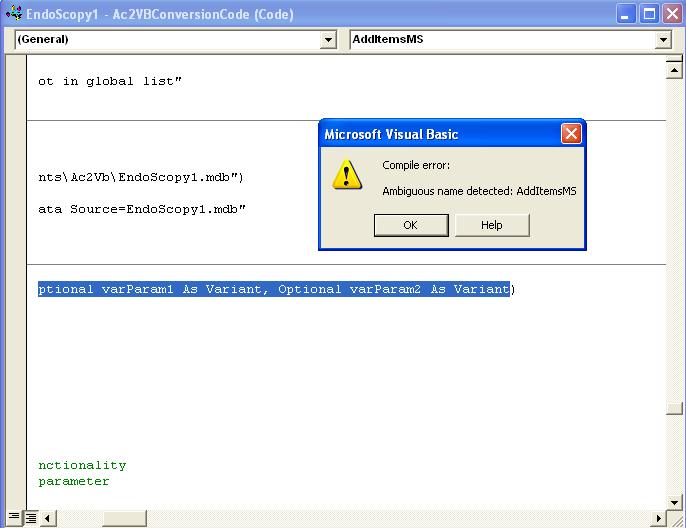
من الفيجول يطلعلي ارور

(مرفق صورة ملف)

ويعلملي على هذا الكود

Function AddItemsMS(qryName As String, ctl As Control, strDBType2 As String, Optional varParam1 As Variant, Optional varParam2 As Variant

الرجاء المساعدة في تصحيح الكود

او اعطائي اي معلومة مفيدة علما بانني مبتدئ
post-78956-1146785660_thumb.jpg

#2

تحويل من اكسس الى فيجول بيسك ؟؟ !!!

اول مرة اسمع الكلام دة ما اعرفة انه يتم ربط الاكسس بالفيجول بيسك ؟

الاكسس (قاعدة بيانات)

الفيجول بيسك (أداة لصنع البرامج وعمل النوافذ ويمكن ربطها بقواعد البيانات اكسس او sql sever او اوركل )

الفريق المصري للبرمجة

تحليل وتصميم برامج قواعد بيانات لاتصال بينا masry4u@hotmail.com

#3

أخي السائل

هذا الخطأ يعني تكرار اسم، وهو AddItemsMS

ومن المعروف أن الأسماء في الفيجوال بيزيك هي عناوين توضع بدلاً من أرقام السطور في البيزيك القديمة، وذلك لتوجيه خط سير البرنامج إليها عند نقطة معينة بدلاً من تسلسل سير البرنامج الطبيعي وهو تنفيذ السطور المتتالية وراء بعضها.

فيرجى مراجعة الكود لتصحيح هذا الخطأ

والله يوفقك

الله في عون العبد ما كان العبد في عون أخيه

#4

شكرا اخي كفاح لكن يبدو انك لم تفهم قصدي ..

شكرا اخي qushisha ولكن ممكن مزيد من التوضيح

وهذي الشفرة

Option Explicit

'*******************************************************************

' Support functions used by the AccessToVB

' © 1996-1998 Greenwich Financial Modeling, Inc.

'

' This module may be freely redistributed in projects created by

' licensed users of AccessToVB.

'

'*******************************************************************

'Global variables used by code created with the Access To Visual Basic

'Converter. The workspace variable is only needed for projects created

'from secured databases

Global db As Database

Global gvarReturn As Variant

Global wks As Workspace

Function AddItemsSS(qryName As String, ctl As Control, strDBType2 As String, Optional varParam1 As Variant, Optional varParam2 As Variant)

'*******************************************************************

' Function to fill Sheridan Data Widget controls in additem mode

' Description of Arguments

' qryName: the name of the query to execute to retrieve data, or the

' string list (from a Value List type listbox)

' ctl: the control to fill with data

' strDBType2: must be either "Jet", "SQL", or "String". A Jet query will

' execute a query against an Access database, a SQL query

' will execute against an ODBC database (oringinally designed

' for SQL Server), and a String type duplicates Value List functionality

' varParam1: Optional. What parameter to pass, for queries expecting a parameter

' varParam2: Optional. Same as varParam1.

'

' Returns the number of rows added to the control

'*******************************************************************

Dim strText As String, rec As Recordset, X As Integer

Dim intParamCount As Integer, intcount As Integer, strDBType As String

Dim intFields As Integer, qry As QueryDef

strDBType = strDBType2

'override passed strDBType2 from control's tag

If Left(qryName, 5) = "Jet " Then

strDBType = "Jet"

qryName = Mid(qryName, 6)

ElseIf Left(qryName, 16) = "SQLPassthrough " Then

strDBType = "SQL"

qryName = Mid(qryName, 17)

End If

If Not IsMissing(varParam1) Then intParamCount = 1

If Not IsMissing(varParam2) Then intParamCount = 1 + intParamCount

ctl.RemoveAll

If qryName = "" Then Exit Function

If ctl.Visible Then ctl.Redraw = False

intcount = 0

On Error Resume Next

If strDBType = "Jet" Then

If intParamCount = 0 Then

Set rec = db.OpenRecordset(qryName, dbOpenSnapshot)

Else

Set qry = db.QueryDefs(qryName)

qry(0) = varParam1

If intParamCount = 2 Then qry(1) = varParam2

Set rec = qry.OpenRecordset(dbOpenSnapshot)

End If

Do Until rec.EOF

intcount = intcount + 1

strText = ""

intFields = rec.Fields.Count

For X = 0 To intFields - 1

If X = 0 Then

strText = rec(X)

Else

'The "~" is the Field Separator character needed by the Sheridan control

'to properly parse the string into columns

strText = strText & "~" & rec(X)

End If

Next

ctl.AddItem strText

'Performance degrades considerably on large lists.

'Uncomment to limit the number of items in the list

'If intCount > 100 Then Exit Do

rec.MoveNext

Loop

ElseIf strDBType = "SQL" Then

Set rec = db.OpenRecordset(qryName, dbOpenSnapshot, dbSQLPassThrough)

Do Until rec.EOF

intcount = intcount + 1

strText = ""

intFields = rec.Fields.Count

For X = 0 To intFields - 1

If X = 0 Then

strText = rec(X)

Else

strText = strText & "~" & rec(X)

End If

Next

ctl.AddItem strText

'If intCount > 100 Then Exit Do

rec.MoveNext

Loop

ElseIf strDBType = "String" Then

'duplicates Value List setting in Access Designed for two column

'Value List controls

X = 1

Do Until Err <> 0

strText = gettoken(qryName, X, ";")

If strText = "" Then Exit Do

strText = strText & "~" & gettoken(qryName, X + 1, ";")

ctl.AddItem strText

strText = ""

X = X + 2

intcount = intcount + 1

Loop

End If

AddItemsSS = intcount

If ctl.Visible Then ctl.Redraw = True

End Function

Function AddItems(qryName As String, ctl As Control, strDBType2 As String, Optional varParam1 As Variant, Optional varParam2 As Variant)

'*******************************************************************

' Function to fill GFM AccessList control in additem mode

' Description of Arguments

' qryName: the name of the query to execute to retrieve data, or the

' string list (from a Value List type listbox)

' ctl: the control to fill with data

' strDBType2: must be either "Jet", "SQL", or "String". A Jet query will

' execute a query against an Access database, a SQL query

' will execute against an ODBC database (oringinally designed

' for SQL Server), and a String type duplicates Value List functionality

' varParam1: Optional. What parameter to pass, for queries expecting a parameter

' varParam2: Optional. Same as varParam1.

'

' Returns the number of rows added to the control

'

' For improved performance, change the declaration of ctl to ctl as AccessList.ALListBox

'*******************************************************************

Dim strText As String, rec As Recordset, X As Integer

Dim intParamCount As Integer, intcount As Integer, strDBType As String

Dim intFields As Integer, qry As QueryDef, res As Recordset

strDBType = strDBType2

'override passed strDBType2 from control's tag

If Left(qryName, 5) = "Jet " Then

strDBType = "Jet"

qryName = Mid(qryName, 6)

ElseIf Left(qryName, 16) = "SQLPassthrough " Then

strDBType = "SQL"

qryName = Mid(qryName, 17)

End If

If Not IsMissing(varParam1) Then intParamCount = 1

If Not IsMissing(varParam2) Then intParamCount = 1 + intParamCount

ctl.Redraw = False

ctl.Rows = ctl.FixedRows

intcount = 0

'On Error Resume Next

If strDBType = "Jet" Then

If intParamCount = 0 Then

Set rec = db.OpenRecordset(qryName, dbOpenSnapshot)

Else

Set qry = db.QueryDefs(qryName)

qry(0) = varParam1

If intParamCount = 2 Then qry(1) = varParam2

Set rec = qry.OpenRecordset(dbOpenSnapshot)

End If

Do Until rec.EOF

strText = ""

intFields = rec.Fields.Count

For X = 0 To intFields - 1

strText = strText & rec(X) & vbTab

Next

ctl.AddItem strText

intcount = intcount + 1

'Performance degrades considerably on large lists.

'Uncomment to limit the number of items in the list

'If intCount > 100 Then Exit Do

rec.MoveNext

Loop

rec.Close

ElseIf strDBType = "SQL" Then

Set res = db.OpenRecordset(qryName, dbForwardOnly)

Do Until res.EOF

strText = ""

intFields = res.Fields.Count

For X = 0 To intFields - 1

'ctl.ListItems(intcount).SubItems(X) = res(X)

Next

intcount = intcount + 1

'If intCount > 100 Then Exit Do

res.MoveNext

Loop

res.Close

ElseIf strDBType = "String" Then

'duplicates Value List setting in Access. Designed for two column

'Value List controls

X = 1

Do Until Err <> 0

strText = gettoken(qryName, X, ";")

If strText = "" Then Exit Do

strText = strText & vbTab & gettoken(qryName, X + 1, ";")

ctl.AddItem strText

strText = ""

X = X + 2

intcount = intcount + 1

Loop

End If

AddItems = intcount

ctl.Redraw = True

End Function

Function gettoken(strFrom As String, intWhich As Integer, strSeparator As String)

'*******************************************************************

' Pull the requested token from strFrom, delimited by

' strSeparator.

' Example: GetToken("23,34,45,56,67", 3, ",")

' would return "45"

' Example: GetToken("This is a test of how this works", 4, " ")

' would return "test"

'*******************************************************************

Dim intPos As Integer

Dim intPos1 As Integer

Dim intcount As Integer

intPos = 0

For intcount = 0 To intWhich - 1

intPos1 = InStr(intPos + 1, strFrom, strSeparator)

If intPos1 = 0 Then

intPos1 = Len(strFrom) + 1

End If

If intcount <> intWhich - 1 Then

intPos = intPos1

End If

Next intcount

If intPos1 > intPos Then

gettoken = Mid$(strFrom, intPos + 1, intPos1 - intPos - 1)

Else

gettoken = Null

End If

End Function

Function AddItemsGT(qryName As String, ctl As Control, strDBType2 As String, Optional varParam1 As Variant, Optional varParam2 As Variant)

'*******************************************************************

' Function to fill Greentree DataList controls in additem mode

' Description of Arguments

' qryName: the name of the query to execute to retrieve data, or the

' string list (from a Value List type listbox)

' ctl: the control to fill with data

' strDBType2: must be either "Jet", "SQL", or "String". A Jet query will

' execute a query against an Access database, a SQL query

' will execute against an ODBC database (oringinally designed

' for SQL Server), and a String type duplicates Value List functionality

' varParam1: Optional. What parameter to pass, for queries expecting a parameter

' varParam2: Optional. Same as varParam1.

'

' Returns the number of rows added to the control

'*******************************************************************

Dim strText As String, rec As Recordset, X As Integer

Dim intParamCount As Integer, intcount As Integer, strDBType As String

Dim intFields As Integer, qry As QueryDef

strDBType = strDBType2

'override passed strDBType2 from control's tag

If Left(qryName, 5) = "Jet " Then

strDBType = "Jet"

qryName = Mid(qryName, 6)

ElseIf Left(qryName, 16) = "SQLPassthrough " Then

strDBType = "SQL"

qryName = Mid(qryName, 17)

End If

If Not IsMissing(varParam1) Then intParamCount = 1

If Not IsMissing(varParam2) Then intParamCount = 1 + intParamCount

ctl.Clear

If qryName = "" Then Exit Function

intcount = 0

On Error Resume Next

If strDBType = "Jet" Then

If intParamCount = 0 Then

Set rec = db.OpenRecordset(qryName, dbOpenSnapshot)

Else

Set qry = db.QueryDefs(qryName)

qry(0) = varParam1

If intParamCount = 2 Then qry(1) = varParam2

Set rec = qry.OpenRecordset(dbOpenSnapshot)

End If

Do Until rec.EOF

strText = ""

ctl.ListItems.Add

intFields = rec.Fields.Count

For X = 0 To intFields - 1

ctl.ListItems(intcount).SubItems(X) = rec(X)

Next

intcount = intcount + 1

'Performance degrades considerably on large lists.

'Uncomment to limit the number of items in the list

'If intCount > 100 Then Exit Do

rec.MoveNext

Loop

ElseIf strDBType = "SQL" Then

Set rec = db.OpenRecordset(qryName, dbOpenSnapshot, dbSQLPassThrough)

Do Until rec.EOF

intcount = intcount + 1

strText = ""

ctl.ListItems.Add

intFields = rec.Fields.Count

For X = 0 To intFields - 1

ctl.ListItems(intcount).SubItems(X) = rec(X)

Next

'If intCount > 100 Then Exit Do

rec.MoveNext

Loop

ElseIf strDBType = "String" Then

'duplicates Value List setting in Access. Designed for two column

'Value List controls

X = 1

Do Until Err <> 0

strText = gettoken(qryName, X, ";")

If strText = "" Then Exit Do

ctl.ListItems.Add

ctl.ListItems(intcount).SubItems(0) = strText

ctl.ListItems(intcount).SubItems(1) = gettoken(qryName, X + 1, ";")

strText = ""

intcount = intcount + 1

X = X + 2

Loop

End If

AddItemsGT = intcount

End Function

Function AddItemsMS(qryName As String, ctl As Control, strDBType2 As String, Optional varParam1 As Variant, Optional varParam2 As Variant)

'*******************************************************************

' Function to fill Microsoft standard drop down controls in additem mode

' Description of Arguments

' qryName: the name of the query to execute to retrieve data, or the

' string list (from a Value List type listbox)

' ctl: the control to fill with data

' strDBType2: must be either "Jet", "SQL", or "String". A Jet query will

' execute a query against an Access database, a SQL query

' will execute against an ODBC database (oringinally designed

' for SQL Server), and a String type duplicates Value List functionality

' varParam1: Optional. What parameter to pass, for queries expecting a parameter

' varParam2: Optional. Same as varParam1.

'

' Returns the number of rows added to the control

' NOTE: checks the Tag property for determining the hidden column

' a value of 0 means that the first column in the query

' or list will be set in the Itemdata property

'*******************************************************************

Dim strText As String, rec As Recordset, X As Integer

Dim intParamCount As Integer, intcount As Integer, strDBType As String

Dim intFields As Integer, qry As QueryDef, iColumn As Integer

strDBType = strDBType2

'override passed strDBType2 from control's tag

If Left(qryName, 5) = "Jet " Then

strDBType = "Jet"

qryName = Mid(qryName, 6)

ElseIf Left(qryName, 16) = "SQLPassthrough " Then

strDBType = "SQL"

qryName = Mid(qryName, 17)

End If

If Not IsMissing(varParam1) Then intParamCount = 1

If Not IsMissing(varParam2) Then intParamCount = 1 + intParamCount

iColumn = Val(ctl.Tag)

ctl.Clear

If qryName = "" Then Exit Function

intcount = 0

On Error Resume Next

Select Case strDBType

Case "Jet"

If intParamCount = 0 Then

Set rec = db.OpenRecordset(qryName, dbOpenSnapshot)

Else

Set qry = db.QueryDefs(qryName)

qry(0) = varParam1

If intParamCount = 2 Then qry(1) = varParam2

Set rec = qry.OpenRecordset(dbOpenSnapshot)

End If

Do Until rec.EOF

If iColumn = 1 Then

ctl.AddItem rec(0)

ctl.ItemData(intcount) = Val(rec(1))

Else

ctl.AddItem rec(1)

ctl.ItemData(intcount) = Val(rec(0))

End If

intcount = intcount + 1

rec.MoveNext

Loop

Case "SQL"

Set rec = db.OpenRecordset(qryName, dbOpenSnapshot, dbSQLPassThrough)

Do Until rec.EOF

If iColumn = 1 Then

ctl.AddItem rec(0)

ctl.ItemData(intcount) = Val(rec(1))

Else

ctl.AddItem rec(1)

ctl.ItemData(intcount) = Val(rec(0))

End If

intcount = intcount + 1

rec.MoveNext

Loop

Case "String"

'duplicates Value List setting in Access Designed for two column

'Value List controls

X = 1

Do Until Err <> 0

strText = gettoken(qryName, X, ";")

If strText = "" Then Exit Do

If iColumn = 1 Then

ctl.AddItem strText

ctl.ItemData(intcount) = Val(gettoken(qryName, X + 1, ";"))

Else

ctl.AddItem gettoken(qryName, X + 1, ";")

ctl.ItemData(intcount) = Val(strText)

End If

strText = ""

X = X + 2

intcount = intcount + 1

Loop

End Select

AddItemsMS = intcount

End Function

Function SysCmdVB(iAction As Integer, Optional vTextOrObjectType As Variant, Optional vValueOrObjectName As Variant) As Variant

'*******************************************************************

' Duplicates some of the functionality of Access' SysCmd function.

' Actions not supported will raise an error (Invalid Procedure Call)

' Requires the MDIParent form for progress meter functionality

'*******************************************************************

Dim frm As Form

Select Case iAction

Case 1 'acSysCmdInitMeter Or SYSCMD_INITMETER

MDIParent.progStatus.max = CInt(vValueOrObjectName)

MDIParent.lblStatusBarCaption.Caption = CStr(vTextOrObjectType)

MDIParent.progStatus.Left = MDIParent.lblStatusBarCaption.Left + MDIParent.lblStatusBarCaption.Width + 75

MDIParent.progStatus.Visible = True

Case 2 'acSysCmdUpdateMeter Or SYSCMD_UPDATEMETER

MDIParent.progStatus.Value = CInt(vTextOrObjectType)

Case 3 'acSysCmdRemoveMeter Or SYSCMD_REMOVEMETER

MDIParent.progStatus.Visible = False

MDIParent.lblStatusBarCaption.Caption = ""

Case 4 'acSysCmdSetStatus Or SYSCMD_SETSTATUS

If MDIParent.progStatus.Visible Then MDIParent.progStatus.Visible = False

MDIParent.lblStatusBarCaption.Caption = CStr(vTextOrObjectType)

Case 5 'acSysCmdClearStatus Or SYSCMD_CLEARSTATUS

If MDIParent.progStatus.Visible Then MDIParent.progStatus.Visible = False

MDIParent.lblStatusBarCaption.Caption = ""

Case 13 'acSysCmdGetWorkgroupFile

#If Win16 Then

SysCmdVB = DBEngine.IniPath

#Else

SysCmdVB = DBEngine.SystemDB

#End If

Case 10 'acSysCmdGetObjectState Or SYSCMD_GETOBJECTSTATE

' only works for forms, and only returns if the form is loaded

' other arguments raise an error

If CInt(vTextOrObjectType) = 2 Then

SysCmdVB = 0

For Each frm In Forms

If LCase(frm.Name) = LCase(CStr(vValueOrObjectName)) Then

SysCmdVB = 1

Exit For

End If

Next

Else

Err.Raise 5

End If

Case Else

Err.Raise 5

End Select

End Function

Public Function NZ(var As Variant, Optional var2 As Variant)

'*******************************************************************

' Duplicates the Access NZ function.

'*******************************************************************

If IsNull(var) Then

If IsMissing(var2) Then NZ = 0 Else NZ = var2

Else

NZ = var

End If

End Function

Public Function OptionGroupValue(ctlOptionGroup As Object) As Integer

'*******************************************************************

' Returns the value of an option group control array.

' Each occurrence of an option group value call in Access should

' have this function wrapped around it, as the option group control

' array in VB does not have a Value property

'*******************************************************************

Dim optCtl As OptionButton

If ctlOptionGroup.Count < 2 Then Exit Function

'For Each used in case option group values not consecutive

For Each optCtl In ctlOptionGroup

If optCtl.Value = True Then

OptionGroupValue = optCtl.Index

Exit For

End If

Next

End Function

Public Function DSum(Expr As String, Domain As String, Optional Criteria As String) As Variant

Dim rec As Recordset

If IsMissing(Criteria) Then

Set rec = db.OpenRecordset("Select Sum(" & Expr & ") From " & Domain, dbOpenForwardOnly)

Else

Set rec = db.OpenRecordset("Select Sum(" & Expr & ") From " & Domain & " Where " & Criteria, dbOpenForwardOnly)

End If

DSum = rec(0)

rec.Close

End Function

Public Function DCount(Expr As String, Domain As String, Optional Criteria As String) As Variant

Dim rec As Recordset

If IsMissing(Criteria) Then

Set rec = db.OpenRecordset("Select Count(" & Expr & ") From " & Domain, dbOpenForwardOnly)

Else

Set rec = db.OpenRecordset("Select Count(" & Expr & ") From " & Domain & " Where " & Criteria, dbOpenForwardOnly)

End If

DCount = rec(0)

rec.Close

End Function

Public Function DAvg(Expr As String, Domain As String, Optional Criteria As String) As Variant

Dim rec As Recordset

If IsMissing(Criteria) Then

Set rec = db.OpenRecordset("Select Avg(" & Expr & ") From " & Domain, dbOpenForwardOnly)

Else

Set rec = db.OpenRecordset("Select Avg(" & Expr & ") From " & Domain & " Where " & Criteria, dbOpenForwardOnly)

End If

DSum = rec(0)

rec.Close

End Function

Public Function DFirst(Expr As String, Domain As String, Optional Criteria As String) As Variant

Dim rec As Recordset

If IsMissing(Criteria) Then

Set rec = db.OpenRecordset("Select First(" & Expr & ") From " & Domain, dbOpenForwardOnly)

Else

Set rec = db.OpenRecordset("Select First(" & Expr & ") From " & Domain & " Where " & Criteria, dbOpenForwardOnly)

End If

DFirst = rec(0)

rec.Close

End Function

Public Function DLast(Expr As String, Domain As String, Optional Criteria As String) As Variant

Dim rec As Recordset

If IsMissing(Criteria) Then

Set rec = db.OpenRecordset("Select Last(" & Expr & ") From " & Domain, dbOpenForwardOnly)

Else

Set rec = db.OpenRecordset("Select Last(" & Expr & ") From " & Domain & " Where " & Criteria, dbOpenForwardOnly)

End If

DLast = rec(0)

rec.Close

End Function

Public Function DMin(Expr As String, Domain As String, Optional Criteria As String) As Variant

Dim rec As Recordset

If IsMissing(Criteria) Then

Set rec = db.OpenRecordset("Select Max(" & Expr & ") From " & Domain, dbOpenForwardOnly)

Else

Set rec = db.OpenRecordset("Select Max(" & Expr & ") From " & Domain & " Where " & Criteria, dbOpenForwardOnly)

End If

DMin = rec(0)

rec.Close

End Function

Public Function DMax(Expr As String, Domain As String, Optional Criteria As String) As Variant

Dim rec As Recordset

If IsMissing(Criteria) Then

Set rec = db.OpenRecordset("Select Max(" & Expr & ") From " & Domain, dbOpenForwardOnly)

Else

Set rec = db.OpenRecordset("Select Max(" & Expr & ") From " & Domain & " Where " & Criteria, dbOpenForwardOnly)

End If

DMax = rec(0)

rec.Close

End Function

Public Function DStDev(Expr As String, Domain As String, Optional Criteria As String) As Variant

Dim rec As Recordset

If IsMissing(Criteria) Then

Set rec = db.OpenRecordset("Select StDev(" & Expr & ") From " & Domain, dbOpenForwardOnly)

Else

Set rec = db.OpenRecordset("Select StDev(" & Expr & ") From " & Domain & " Where " & Criteria, dbOpenForwardOnly)

End If

DStDev = rec(0)

rec.Close

End Function

Public Function DStDevP(Expr As String, Domain As String, Optional Criteria As String) As Variant

Dim rec As Recordset

If IsMissing(Criteria) Then

Set rec = db.OpenRecordset("Select StDevP(" & Expr & ") From " & Domain, dbOpenForwardOnly)

Else

Set rec = db.OpenRecordset("Select StDevP(" & Expr & ") From " & Domain & " Where " & Criteria, dbOpenForwardOnly)

End If

DStDevP = rec(0)

rec.Close

End Function

Public Function DVar(Expr As String, Domain As String, Optional Criteria As String) As Variant

Dim rec As Recordset

If IsMissing(Criteria) Then

Set rec = db.OpenRecordset("Select Var(" & Expr & ") From " & Domain, dbOpenForwardOnly)

Else

Set rec = db.OpenRecordset("Select Var(" & Expr & ") From " & Domain & " Where " & Criteria, dbOpenForwardOnly)

End If

DVar = rec(0)

rec.Close

End Function

Public Function DVarP(Expr As String, Domain As String, Optional Criteria As String) As Variant

Dim rec As Recordset

If IsMissing(Criteria) Then

Set rec = db.OpenRecordset("Select VarP(" & Expr & ") From " & Domain, dbOpenForwardOnly)

Else

Set rec = db.OpenRecordset("Select VarP(" & Expr & ") From " & Domain & " Where " & Criteria, dbOpenForwardOnly)

End If

DVarP = rec(0)

rec.Close

End Function

Public Function DLookup(Expr As String, Domain As String, Optional Criteria As String) As Variant

Dim rec As Recordset

If IsMissing(Criteria) Then

Set rec = db.OpenRecordset("Select " & Expr & " From " & Domain, dbOpenForwardOnly)

Else

Set rec = db.OpenRecordset("Select " & Expr & " From " & Domain & " Where " & Criteria, dbOpenForwardOnly)

End If

DLookup = rec(0)

rec.Close

End Function

Public Function GetFormFromName(FormName As String) As Form

Select Case FormName

Case "AnaesthiaConsultant": Set GetFormFromName = AnaesthiaConsultant

Case "BillItiems": Set GetFormFromName = BillItiems

Case "Bills SubForm": Set GetFormFromName = Bills_SubForm

Case "bills2": Set GetFormFromName = bills2

Case "ConsultantEndoscopist": Set GetFormFromName = ConsultantEndoscopist

Case "EndscopysAddNew": Set GetFormFromName = EndscopysAddNew

Case "Form_ PatiEndo": Set GetFormFromName = Form__PatiEndo

Case "Form_Patient-Endo": Set GetFormFromName = Form_Patient_Endo

Case "Form1": Set GetFormFromName = Form1

Case "Frm_AddItems": Set GetFormFromName = Frm_AddItems

Case "Frm_Customers": Set GetFormFromName = Frm_Customers

Case "Frm_Invoices1": Set GetFormFromName = Frm_Invoices1

Case "Frm_PriceNames": Set GetFormFromName = Frm_PriceNames

Case "Frm_ScopyDetails": Set GetFormFromName = Frm_ScopyDetails

Case "Frm_ScopysNames": Set GetFormFromName = Frm_ScopysNames

Case "Frm_SuppliersName": Set GetFormFromName = Frm_SuppliersName

Case "HelicobacterPylori(Urease)TesT": Set GetFormFromName = HelicobacterPylori_Urease_TesT

Case "IndicationForProcedure": Set GetFormFromName = IndicationForProcedure

Case "InstrumentUsed": Set GetFormFromName = InstrumentUsed

Case "invoices2": Set GetFormFromName = invoices2

Case "MedicationForProcedure": Set GetFormFromName = MedicationForProcedure

Case "one": Set GetFormFromName = one

Case "Patient": Set GetFormFromName = Patient

Case "Rectalsinp": Set GetFormFromName = Rectalsinp

Case "Report3": Set GetFormFromName = Report3

Case "Result": Set GetFormFromName = Result

Case "SupliersSuana": Set GetFormFromName = SupliersSuana

Case "Switchboard": Set GetFormFromName = Switchboard

Case "Table_Suama2": Set GetFormFromName = Table_Suama2

Case Else

Err.Raise Number:=vbObjectError + 31004, Description:="Form name not in global list"

End Select

End Function

Public Sub Main()

Set db = DBEngine(0).OpenDatabase("C:\Documents and Settings\AMR\My Documents\Ac2Vb\EndoScopy1.mdb")

Set pConn = New ADODB.Connection

pConn.Open "Provider=Microsoft.Jet.OLEDB.4.0;Persist Security Info=False;Data Source=EndoScopy1.mdb"

MDIParent.Show

End Sub

Function AddItemsMS(qryName As String, ctl As Control, strDBType2 As String, Optional varParam1 As Variant, Optional varParam2 As Variant) هنا الخطأ

'*******************************************************************

' Function to fill Microsoft standard drop down controls in additem mode

' Description of Arguments

' qryName: the name of the query to execute to retrieve data, or the

' string list (from a Value List type listbox)

' ctl: the control to fill with data

' strDBType2: must be either "Jet", "SQL", or "String". A Jet query will

' execute a query against an Access database, a SQL query

' will execute against an ODBC database (oringinally designed

' for SQL Server), and a String type duplicates Value List functionality

' varParam1: Optional. What parameter to pass, for queries expecting a parameter

' varParam2: Optional. Same as varParam1.

'

' Returns the number of rows added to the control

' NOTE: checks the Tag property for determining the hidden column

' a value of 0 means that the first column in the query

' or list will be set in the Itemdata property

'*******************************************************************

Dim vntText As String, rec As ADODB.Recordset, X As Integer

Dim intParamCount As Integer, intcount As Integer, strDBType As String

Dim intFields As Integer, qry As ADODB.Command, intColumn As Integer

strDBType = strDBType2

'override passed strDBType2 from control's tag

If Left(qryName, 5) = "Jet " Then

strDBType = "Jet"

qryName = Mid(qryName, 6)

ElseIf Left(qryName, 16) = "SQLPassthrough " Then

strDBType = "SQL"

qryName = Mid(qryName, 17)

End If

If Not IsMissing(varParam1) Then intParamCount = 1

If Not IsMissing(varParam2) Then intParamCount = 1 + intParamCount

intColumn = Val(ctl.Tag)

ctl.Clear

If qryName = "" Then Exit Function

intcount = 0

Set rec = New ADODB.Recordset

On Error Resume Next

Select Case strDBType

Case "Jet", "SQL"

If intParamCount = 0 Then

rec.Open qryName, pConn, adOpenForwardOnly

Else

Set qry = New ADODB.Command

qry.CommandText = qryName

qry.Parameters(0) = varParam1

If intParamCount = 2 Then qry.Parameters(1) = varParam2

Set rec = qry.Execute

End If

If Err.Number <> 0 Then Exit Function

Do Until rec.EOF

If intColumn = 0 Then

ctl.AddItem rec(0)

If rec.Fields.Count > 1 Then ctl.ItemData(intcount) = Val(rec(1))

Else

ctl.AddItem rec(1)

ctl.ItemData(intcount) = Val(rec(0))

End If

intcount = intcount + 1

rec.MoveNext

Loop

Case "String"

'duplicates Value List setting in Access Designed for two column

'Value List controls

X = 0

Do Until Err <> 0

If UBound(Split(qryName, ";")) < X Then Exit Do

vntText = Split(qryName, ";")(X)

If intColumn = 0 Then

ctl.AddItem CStr(vntText)

Else

ctl.AddItem Split(qryName, ";")(X + 1)

ctl.ItemData(X) = Val(vntText)

X = X + 1

End If

X = X + 1

intcount = intcount + 1

Loop

End Select

AddItemsMS = intcount

End Function

Function AddItemsMSF(qryName As String, ctl As Control, strDBType2 As String, Optional varParam1 As Variant, Optional varParam2 As Variant)

'*******************************************************************

' Function to fill MS Forms combo box control in additem mode

' Description of Arguments

' qryName: the name of the query to execute to retrieve data, or the

' string list (from a Value List type listbox)

' ctl: the control to fill with data

' strDBType2: must be either "Jet", "SQL", or "String". A Jet query will

' execute a query against an Access database, a SQL query

' will execute against an ODBC database (oringinally designed

' for SQL Server), and a String type duplicates Value List functionality

' varParam1: Optional. What parameter to pass, for queries expecting a parameter

' varParam2: Optional. Same as varParam1.

'

' Returns the number of rows added to the control

'

' For improved performance, change the declaration of ctl to ctl as MSForms.Combobox

'*******************************************************************

Dim vntText As Variant, rec As ADODB.Recordset, X As Integer

Dim intParamCount As Integer, intcount As Integer, strDBType As String

Dim intFields As Integer, qry As ADODB.Command, res As ADODB.Recordset

strDBType = strDBType2

'override passed strDBType2 from control's tag

If Left(qryName, 5) = "Jet " Then

strDBType = "Jet"

qryName = Mid(qryName, 6)

ElseIf Left(qryName, 16) = "SQLPassthrough " Then

strDBType = "SQL"

qryName = Mid(qryName, 17)

End If

If Not IsMissing(varParam1) Then intParamCount = 1

If Not IsMissing(varParam2) Then intParamCount = 1 + intParamCount

ctl.Clear

intcount = 0

intFields = ctl.ColumnCount

Set rec = New ADODB.Recordset

On Error Resume Next

If strDBType = "Jet" Or strDBType = "SQL" Then

If intParamCount = 0 Then

rec.Open qryName, pConn, adOpenForwardOnly

Else

Set qry = New ADODB.Command

qry.CommandText = qryName

qry.Parameters(0) = varParam1

If intParamCount = 2 Then qry.Parameters(1) = varParam2

Set rec = qry.Execute

End If

If Err.Number <> 0 Then Exit Function

Do Until rec.EOF

intFields = rec.Fields.Count

ctl.AddItem rec(0)

For X = 1 To intFields - 1

ctl.List(ctl.ListCount - 1, X) = rec(X)

Next

intcount = intcount + 1

'Performance degrades considerably on large lists.

'Uncomment to limit the number of items in the list

'If intCount > 100 Then Exit Do

rec.MoveNext

Loop

rec.Close

ElseIf strDBType = "String" Then

'duplicates Value List setting in Access

Do Until Err <> 0

If UBound(Split(qryName, ";")) < intcount * intFields + 1 Then Exit Do

vntText = Split(qryName, ";")(intcount * intFields)

ctl.AddItem CStr(vntText)

For X = 1 To intFields - 1

ctl.List(ctl.ListCount - 1, X) = Split(qryName, ";")(intcount * intFields + 1 + X)

Next

intcount = intcount + 1

Loop

End If

AddItemsMSF = intcount

End Function

Public Function DLookup(Expr As String, Domain As String, Optional Criteria As String) As Variant

Dim rec As DAO.Recordset

If Criteria = vbNullString Then

Set rec = db.OpenRecordset("Select " & Expr & " From " & Domain, dbOpenForwardOnly)

Else

Set rec = db.OpenRecordset("Select " & Expr & " From " & Domain & " Where " & Criteria, dbOpenForwardOnly)

End If

DLookup = rec(0)

rec.Close

End Function

#5

يا اخوان مافي احد عنده اي معلومة تفيدنا جزاكم الله خير

هذا الموضوع مغلق.

مواضيع مشابهة