الفريق العربي للبرمجةأرشيف المنتديات · 2000 – 2023
نسخة أرشيفية للقراءة فقط — التسجيل والمشاركة مغلقان، والمحتوى محفوظ كما كان.

اريد تعديل هذا الكود و استخدم Border مع الفورم

مغلق
بدأه نجمه في 28 أغسطس 2005 · 4 رد · 799 مشاهدة · في JavaSE
مشاركة: واتساب X فيسبوك تيليجرام
#1 صاحب الموضوع

السلام عليكم

كان بودي اعمل بالفورم الشكل الي بالصوره تحت بس للاسف ما طلعت عندي وهذا الكور ارجو من لديه الخبره ان يدلني وين الخطأ في الكود

import java.awt.*;
import javax.swing.*;
import java.awt.event.*;

class MainForm extends JFrame{
   
        Container c;
	JButton b1,b2;
        JLabel lb;
       MainForm(){
        c=getContentPane();
        c.setLayout(new GridLayout(3,2));
       lb =new JLabel("School District 192 ");
        b1=new JButton("Enter");
	b2=new JButton("Exit");

        c.add(lb);
        c.add(b1);
	c.add(b2);

        }
	public static void main(String s[]){
  MainForm mf=new MainForm();
  mf.setSize(300,300);
  mf.setDefaultCloseOperation(JFrame.EXIT_ON_CLOSE);
  mf.setVisible(true);
                mf.setTitle("General Form");
	}
}
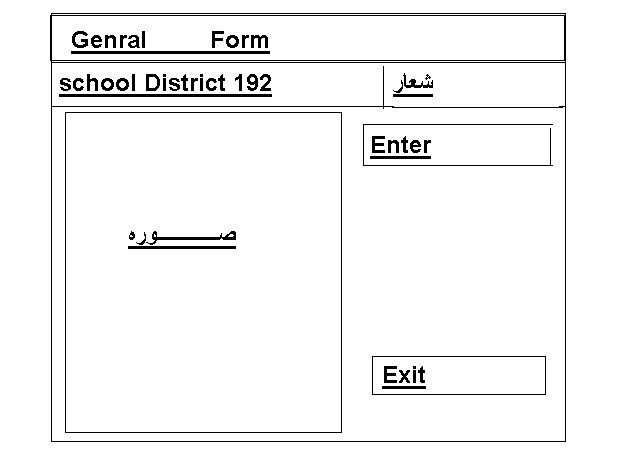
post-52267-1125253226_thumb.gif

تم تعديل هذه المشاركة بواسطة مجدي محمود في 29 أغسطس 2005 في 01:53

#2

هذا الكود يوضح الفكرة: واذا تبغى تضح الحدود كما في الصورة.. فعليك استخدام ال Border ...

الكود بعد التعديل:

import java.awt.*;
import javax.swing.*;
import java.awt.event.*;

class MainForm extends JFrame{
  
       Container c;
JButton b1,b2;
       JLabel lb;
      MainForm(){
       c=getContentPane();
      
       JPanel north = new JPanel(new GridLayout(2,1));
       JPanel generalForm = new JPanel(new GridLayout(1,2));
       JPanel schoolDistrict = new JPanel(new GridLayout(1,2));
       
       JLabel genearlFormL = new JLabel("General Form");
       JLabel schoolDistrictL = new JLabel("School District 192");
       
       generalForm.add(genearlFormL);
       generalForm.add(new JLabel());
       
       schoolDistrict.add(schoolDistrictL);
       schoolDistrict.add(new JLabel());
       
       north.add(generalForm);
       north.add(schoolDistrict);
       
       JPanel center = new JPanel(new GridLayout(1,2));
       
       JPanel picturePanel = new JPanel();
       picturePanel.setBackground(Color.cyan);
       
       JPanel enterExit = new JPanel(new BorderLayout());
       JPanel enterExitNorth = new JPanel(new FlowLayout());
       enterExitNorth.add(new JButton("Enter"));
       
       JPanel enterExitSouth = new JPanel(new FlowLayout());
       enterExitSouth.add(new JButton("Exit"));
       
       enterExit.add("North",enterExitNorth);
       enterExit.add("South",enterExitSouth);

       
       center.add(picturePanel);
       center.add(enterExit);
       
       
       c.setLayout(new BorderLayout());
       c.add("North", north);
       c.add("Center",center);

       }
public static void main(String s[]){
 MainForm mf=new MainForm();
 mf.setSize(300,300);
 mf.setDefaultCloseOperation(JFrame.EXIT_ON_CLOSE);
 mf.setVisible(true);
               mf.setTitle("General Form");
}
}

اسف سوف اقطعك من كتابة الكود، ادخل هنا لدقيقتين فقط

http://www.shbab1.com/2minutes.htm

#3

هذا كود مع اني للأسف ماني فاهم بالضبط المطلوب من الفورم يعني هل هناك tabs أم انها فقط labels خاصة بالنسبة لكلمة "شعار" و "School District 192"

/****************************************************************/
/*                      MainForm                             */
/*                                                              */
/****************************************************************/
import java.awt.*;
import java.awt.event.*;
import javax.swing.*;
/**
 * Summary description for MainForm
 *
 */
public class MainForm extends JFrame
{
	// Variables declaration
	private JLabel lblTitle;
	private JLabel lblLogo;
	private JButton btnEnter;
	private JButton btnExit;
	private JPanel contentPane;
	//-----
	private JLabel jLabel4;
	private JPanel pnlImage;
	//-----
	// End of variables declaration


	public MainForm()
	{
  super();
  initializeComponent();
  //
  // TODO: Add any constructor code after initializeComponent call
  //

  this.setVisible(true);
	}

	/**
  * This method is called from within the constructor to initialize the form.
  * WARNING: Do NOT modify this code. The content of this method is always regenerated
  * by the Windows Form Designer. Otherwise, retrieving design might not work properly.
  * Tip: If you must revise this method, please backup this GUI file for JFrameBuilder
  * to retrieve your design properly in future, before revising this method.
  */
	private void initializeComponent()
	{
  lblTitle = new JLabel();
  lblLogo = new JLabel();
  btnEnter = new JButton();
  btnExit = new JButton();
  contentPane = (JPanel)this.getContentPane();
  //-----
  jLabel4 = new JLabel();
  pnlImage = new JPanel();
  //-----

  //
  // lblTitle
  //
  lblTitle.setText("School District 192 ");
  //
  // lblLogo
  //
  lblLogo.setHorizontalAlignment(SwingConstants.CENTER);
  lblLogo.setHorizontalTextPosition(SwingConstants.CENTER);
  lblLogo.setText("Logo");
  //
  // btnEnter
  //
  btnEnter.setText("Enter");
  btnEnter.addActionListener(new ActionListener() {
 	 public void actionPerformed(ActionEvent e)
 	 {
    btnEnter_actionPerformed(e);
 	 }

  });
  //
  // btnExit
  //
  btnExit.setText("Exit");
  btnExit.addActionListener(new ActionListener() {
 	 public void actionPerformed(ActionEvent e)
 	 {
    btnExit_actionPerformed(e);
 	 }

  });
  //
  // contentPane
  //
  contentPane.setLayout(null);
  addComponent(contentPane, lblTitle, 29,41,256,18);
  addComponent(contentPane, lblLogo, 302,41,135,18);
  addComponent(contentPane, btnEnter, 305,112,133,42);
  addComponent(contentPane, btnExit, 305,267,133,42);
  addComponent(contentPane, pnlImage, 27,76,259,303);
  //
  // jLabel4
  //
  jLabel4.setText("Image");
  //
  // pnlImage
  //
  pnlImage.setLayout(new FlowLayout(FlowLayout.CENTER, 5, 5));
  pnlImage.add(jLabel4, 0);
  pnlImage.setBackground(new Color(203, 203, 204));
  //
  // MainForm
  //
  this.setTitle("General Form");
  this.setLocation(new Point(0, 0));
  this.setSize(new Dimension(476, 441));
	}

	/** Add Component Without a Layout Manager (Absolute Positioning) */
	private void addComponent(Container container,Component c,int x,int y,int width,int height)
	{
  c.setBounds(x,y,width,height);
  container.add(c);
	}

	//
	// TODO: Add any appropriate code in the following Event Handling Methods
	//
	private void btnEnter_actionPerformed(ActionEvent e)
	{
  System.out.println("\nbtnEnter_actionPerformed(ActionEvent e) called.");
  // TODO: Add any handling code here

	}

	private void btnExit_actionPerformed(ActionEvent e)
	{
  System.out.println("\nbtnExit_actionPerformed(ActionEvent e) called.");
  // TODO: Add any handling code here

	}

	//
	// TODO: Add any method code to meet your needs in the following area
	//


//============================= Testing ================================//
//=                                                                    =//
//= The following main method is just for testing this class you built.=//
//= After testing,you may simply delete it.                            =//
//======================================================================//
	public static void main(String[] args)
	{
  JFrame.setDefaultLookAndFeelDecorated(true);
  JDialog.setDefaultLookAndFeelDecorated(true);
  try
  {
 	 UIManager.setLookAndFeel("com.sun.java.swing.plaf.windows.WindowsLookAndFeel");
  }
  catch (Exception ex)
  {
 	 System.out.println("Failed loading L&F: ");
 	 System.out.println(ex);
  }
  new MainForm();
	}
//= End of Testing =


}

عموماً فيه برامج ممتازة تساعد في تصميم الفريم بشكل جيد

إذا كنت مبتدئة لا أنصحك بمثل هذه البرامج ، حاولي عملها بنفسك حتى تتعلمي جيداً

أما اذا كنتي متمرسة و تبحثن عما يساعدك فقط لاختصار الوقت .. فهناك برامج مثل JFrameBuilder و JFrameDesigner وغيرها

#4

السلام عليكم

مشكورين اخي مبتدئ جدا واخي خالد

ولكنني اريد ان اضع مكان logo وال image صور واظن انكم اعتبرتوهم label ارجوا انكم توضحوا لي

وكم جزيل الشكر

#5
labelName.setIcon(new ImageIcon("imagePath"));

اسف سوف اقطعك من كتابة الكود، ادخل هنا لدقيقتين فقط

http://www.shbab1.com/2minutes.htm

هذا الموضوع مغلق.

مواضيع مشابهة