السلام عليكم ورحمة الله وبركاته
أريد أن أتحكم في حجم الفورم على الشاشة
وشكراً لكم
السلام عليكم ورحمة الله وبركاته
أريد أن أتحكم في حجم الفورم على الشاشة
وشكراً لكم
وعليكم السلام ورحمه الله وبركاته,,
يمكن تحديده بطريقتين لكن الاسهل هو ان تحدد الحجم من عرض التصميم بحيث تقوم بتصغير منطقة العمل في النموذج عن طريق الفاره وتحديد الحجم المناسب لك..
تحياتي :rolleyes:
شكر أخوي على هذا التجاوب
لكن ألي أقصده أني أريد تحديد الحجم على الشاشة يعني بعد الانتهاء من تنفيذ البرنامج بحيث يكون الفورم جاهز للاستخدام
أي لا يمكن استخدام أزرار التصغير والتكبير الموجودة في أعلى النافذة
لقد أرفقت صورة كمثال
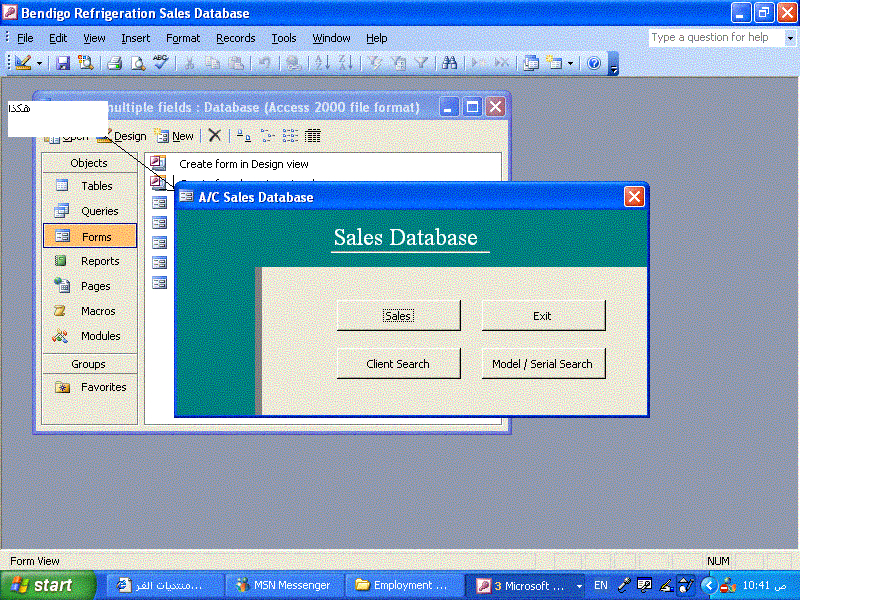
يتم ذلك من خلال خصائص النموذج في وضع التصميم و لك منها عدة خيارات قم بتجربتها, حتى تصل الى ما تريده.
__016 دبر عمرك
المطلوب التحكم في حجم الفورم
Option Compare Database
Option Explicit
'*************************************************************
' Class module: clFormWindow *
'*************************************************************
' Moves and resizes a window in the coordinate system *
' of its parent window. *
' N.B.: This class was developed for use on Access forms *
' and has not been tested for use with other window *
' types. *
'*************************************************************
'*************************************************************
' Type declarations
'*************************************************************
Private Type RECT 'RECT structure used for API calls.
Left As Long
Top As Long
Right As Long
Bottom As Long
End Type
Private Type POINTAPI 'POINTAPI structure used for API calls.
X As Long
Y As Long
End Type
'*************************************************************
' Member variables
'*************************************************************
Private m_hWnd As Long 'Handle of the window.
Private m_rctWindow As RECT 'Rectangle describing the sides of the last polled location of the window.
'*************************************************************
' Private error constants for use with RaiseError procedure
'*************************************************************
Private Const m_ERR_INVALIDHWND = 1
Private Const m_ERR_NOPARENTWINDOW = 2
'*************************************************************
' API function declarations
'*************************************************************
Private Declare Function apiIsWindow Lib "user32" Alias "IsWindow" (ByVal hWnd As Long) As Long
Private Declare Function apiMoveWindow Lib "user32" Alias "MoveWindow" (ByVal hWnd As Long, ByVal X As Long, ByVal Y As Long, _
ByVal nWidth As Long, ByVal nHeight As Long, ByVal bRepaint As Long) As Long
'Moves and resizes a window in the coordinate system of its parent window.
Private Declare Function apiGetWindowRect Lib "user32" Alias "GetWindowRect" (ByVal hWnd As Long, lpRect As RECT) As Long
'After calling, the lpRect parameter contains the RECT structure describing the sides of the window in screen coordinates.
Private Declare Function apiScreenToClient Lib "user32" Alias "ScreenToClient" (ByVal hWnd As Long, lpPoint As POINTAPI) As Long
'Converts lpPoint from screen coordinates to the coordinate system of the specified client window.
Private Declare Function apiGetParent Lib "user32" Alias "GetParent" (ByVal hWnd As Long) As Long
'Returns the handle of the parent window of the specified window.
'*************************************************************
' Private procedures
'*************************************************************
Private Sub RaiseError(ByVal lngErrNumber As Long, ByVal strErrDesc As String)
'Raises a user-defined error to the calling procedure.
Err.Raise vbObjectError + lngErrNumber, "clFormWindow", strErrDesc
End Sub
Private Sub UpdateWindowRect()
'Places the current window rectangle position (in pixels, in coordinate system of parent window) in m_rctWindow.
Dim ptCorner As POINTAPI
If m_hWnd = 0 Or apiIsWindow(m_hWnd) Then
apiGetWindowRect m_hWnd, m_rctWindow 'm_rctWindow now holds window coordinates in screen coordinates.
If Not Me.Parent Is Nothing Then
'If there is a parent window, convert top, left of window from screen coordinates to parent window coordinates.
With ptCorner
.X = m_rctWindow.Left
.Y = m_rctWindow.Top
End With
apiScreenToClient Me.Parent.hWnd, ptCorner
With m_rctWindow
.Left = ptCorner.X
.Top = ptCorner.Y
End With
'If there is a parent window, convert bottom, right of window from screen coordinates to parent window coordinates.
With ptCorner
.X = m_rctWindow.Right
.Y = m_rctWindow.Bottom
End With
apiScreenToClient Me.Parent.hWnd, ptCorner
With m_rctWindow
.Right = ptCorner.X
.Bottom = ptCorner.Y
End With
End If
Else
RaiseError m_ERR_INVALIDHWND, "The window handle " & m_hWnd & " is no longer valid."
End If
End Sub
'*************************************************************
' Public read-write properties
'*************************************************************
Public Property Get hWnd() As Long
'Returns the value the user has specified for the window's handle.
If m_hWnd = 0 Or apiIsWindow(m_hWnd) Then
hWnd = m_hWnd
Else
RaiseError m_ERR_INVALIDHWND, "The window handle " & m_hWnd & " is no longer valid."
End If
End Property
Public Property Let hWnd(ByVal lngNewValue As Long)
'Sets the window to use by specifying its handle.
'Only accepts valid window handles.
If lngNewValue = 0 Or apiIsWindow(lngNewValue) Then
m_hWnd = lngNewValue
Else
RaiseError m_ERR_INVALIDHWND, "The value passed to the hWnd property is not a valid window handle."
End If
End Property
'----------------------------------------------------
Public Property Get Left() As Long
'Returns the current position (in pixels) of the left edge of the window in the coordinate system of its parent window.
If m_hWnd = 0 Or apiIsWindow(m_hWnd) Then
UpdateWindowRect
Left = m_rctWindow.Left
Else
RaiseError m_ERR_INVALIDHWND, "The window handle " & m_hWnd & " is no longer valid."
End If
End Property
Public Property Let Left(ByVal lngNewValue As Long)
'Moves the window such that its left edge falls at the position indicated
'(measured in pixels, in the coordinate system of its parent window).
If m_hWnd = 0 Or apiIsWindow(m_hWnd) Then
UpdateWindowRect
With m_rctWindow
apiMoveWindow m_hWnd, lngNewValue, .Top, .Right - .Left, .Bottom - .Top, True
End With
Else
RaiseError m_ERR_INVALIDHWND, "The window handle " & m_hWnd & " is no longer valid."
End If
End Property
'----------------------------------------------------
Public Property Get Top() As Long
'Returns the current position (in pixels) of the top edge of the window in the coordinate system of its parent window.
If m_hWnd = 0 Or apiIsWindow(m_hWnd) Then
UpdateWindowRect
Top = m_rctWindow.Top
Else
RaiseError m_ERR_INVALIDHWND, "The window handle " & m_hWnd & " is no longer valid."
End If
End Property
Public Property Let Top(ByVal lngNewValue As Long)
'Moves the window such that its top edge falls at the position indicated
'(measured in pixels, in the coordinate system of its parent window).
If m_hWnd = 0 Or apiIsWindow(m_hWnd) Then
UpdateWindowRect
With m_rctWindow
apiMoveWindow m_hWnd, .Left, lngNewValue, .Right - .Left, .Bottom - .Top, True
End With
Else
RaiseError m_ERR_INVALIDHWND, "The window handle " & m_hWnd & " is no longer valid."
End If
End Property
'----------------------------------------------------
Public Property Get Width() As Long
'Returns the current width (in pixels) of the window.
If m_hWnd = 0 Or apiIsWindow(m_hWnd) Then
UpdateWindowRect
With m_rctWindow
Width = .Right - .Left
End With
Else
RaiseError m_ERR_INVALIDHWND, "The window handle " & m_hWnd & " is no longer valid."
End If
End Property
Public Property Let Width(ByVal lngNewValue As Long)
'Changes the width of the window to the value provided (in pixels).
If m_hWnd = 0 Or apiIsWindow(m_hWnd) Then
UpdateWindowRect
With m_rctWindow
apiMoveWindow m_hWnd, .Left, .Top, lngNewValue, .Bottom - .Top, True
End With
Else
RaiseError m_ERR_INVALIDHWND, "The window handle " & m_hWnd & " is no longer valid."
End If
End Property
'----------------------------------------------------
Public Property Get Height() As Long
'Returns the current height (in pixels) of the window.
If m_hWnd = 0 Or apiIsWindow(m_hWnd) Then
UpdateWindowRect
With m_rctWindow
Height = .Bottom - .Top
End With
Else
RaiseError m_ERR_INVALIDHWND, "The window handle " & m_hWnd & " is no longer valid."
End If
End Property
Public Property Let Height(ByVal lngNewValue As Long)
'Changes the height of the window to the value provided (in pixels).
If m_hWnd = 0 Or apiIsWindow(m_hWnd) Then
UpdateWindowRect
With m_rctWindow
apiMoveWindow m_hWnd, .Left, .Top, .Right - .Left, lngNewValue, True
End With
Else
RaiseError m_ERR_INVALIDHWND, "The window handle " & m_hWnd & " is no longer valid."
End If
End Property
'*************************************************************
' Public read-only properties
'*************************************************************
Public Property Get Parent() As clFormWindow
'Returns the parent window as a clFormWindow object.
'For forms, this should be the Access MDI window.
Dim fwParent As New clFormWindow
Dim lngHWnd As Long
If m_hWnd = 0 Then
Set Parent = Nothing
ElseIf apiIsWindow(m_hWnd) Then
lngHWnd = apiGetParent(m_hWnd)
fwParent.hWnd = lngHWnd
Set Parent = fwParent
Else
RaiseError m_ERR_INVALIDHWND, "The window handle " & m_hWnd & " is no longer valid."
End If
Set fwParent = Nothing
مع تحياتي
__026
End Property
لا مكان مثل الوطن
شكرا لك أخوي على هذا التجاوب ماشاء الله على هذا الكود
طويل مره الله يعطيك العافيه
مش فاهم اي حاجة
تقريبن ان هذا الكود بيعمل حاجة بس انا مش عارف فين استخدمة وفين اضعة وخايف من استخدماه
إستخدم الشفره التاليه
Private Sub Form_Load()
' Right,Down,width,hight
DoCmd.MoveSize 400, 150, 14250, 9350
End Sub
أخوي ايش رايك
أرسل لي الفورم اللي تريده وحدد المقاس والشكل مربع أو دائري
وأنا اعدله ثم وارسله مع الأكواد والأوامر
أيش رايك ..
ــــــــــــــــــــــــــــــــــــــــــــــــــــــــ
للمعلومية جميع أعضاء المنتدى يمتازوم بالصدق والنزاهه ولايمكن أن نرسل لك
أي كود يضر بالبرنامج أو الجهاز :angry:
تحياتي
لا مكان مثل الوطن
هذا الموضوع مغلق.
المتواجدون خلال آخر ساعة · يتحدّث كل ٣٠ ثانية
جارٍ التحقق من المتواجدين…