ازاى اقدر اضيف اى Resources لملف .exe
او اعدل على ال Resource الموجودة ؟؟؟؟
ازاى اقدر اضيف اى Resources لملف .exe
او اعدل على ال Resource الموجودة ؟؟؟؟

<marquee>
مش موجود بصفة دايمة للامتحانات
</marquee>
لأ انا اقصد لو كان عندى ملف exe جاهز زى ال Notepad.exe او اى ملف من غير ال Source Code بتاعه
<marquee>
مش موجود بصفة دايمة للامتحانات
</marquee>
بطريقة مشابهة عن طريق استخدام Assembly.Load
وحدن بيبقو متل زهر البيلسان وحدهن بيقطفو وراق الزمان
بيسكرو الغابي بيضلهن متل الشتي يدقوا على بوابي على بوابي
يا زمان يا عشب داشر فوق هالحيطان ضويت ورد الليل عكتابي
برج الحمام مسور و عالي هج الحمام بقيت لحالي لحالي
يا ناطرين التلج ما عاد بدكن ترجعو صرخ عليهن بالشتي يا ديب بلكي بيسمعو
http://www.mazikana.com/Songs/F/Fayrouz/mp...uz---Wahdon.mp3
ahabdeen كتب:لأ انا اقصد لو كان عندى ملف exe جاهز زى ال Notepad.exe او اى ملف من غير ال Source Code بتاعه
أعتقد ان هذا شيء صعب بما ان الـ exe ليس مكتوب بالدوت نت.
لو هناك رأي آخر أرجو أن يدلي به احد.
رأس الحكمة الإيمان بالله
لقد ارفقت ملف يحوي برنامج ملف dll وفيه لوغو الفريق العربي للبرمجة وملفا اخر يستخرج هذه الصورة ويظهرها
الجزء المهم من الكود التالي هو اخر جزء
using System;
using System.Drawing;
using System.Collections;
using System.ComponentModel;
using System.Windows.Forms;
using System.Data;
using System.Resources;

namespace GettingResources
{
	/// <summary>
	/// Zusammenfassung für Form1.
	/// </summary>
	public class Form1 : System.Windows.Forms.Form
	{
  private System.Windows.Forms.Button button1;
  private System.Windows.Forms.PictureBox pictureBox1;
  /// <summary>
  /// Erforderliche Designervariable.
  /// </summary>
  private System.ComponentModel.Container components = null;

  public Form1()
  {
 	 //
 	 // Erforderlich für die Windows Form-Designerunterstützung
 	 //
 	 InitializeComponent();

 	 //
 	 // TODO: Fügen Sie den Konstruktorcode nach dem Aufruf von InitializeComponent hinzu
 	 //
  }

  /// <summary>
  /// Die verwendeten Ressourcen bereinigen.
  /// </summary>
  protected override void Dispose( bool disposing )
  {
 	 if( disposing )
 	 {
    if (components != null)
    {
   	 components.Dispose();
    }
 	 }
 	 base.Dispose( disposing );
  }

  #region Vom Windows Form-Designer generierter Code
  /// <summary>
  /// Erforderliche Methode für die Designerunterstützung.
  /// Der Inhalt der Methode darf nicht mit dem Code-Editor geändert werden.
  /// </summary>
  private void InitializeComponent()
  {
 	 this.button1 = new System.Windows.Forms.Button();
 	 this.pictureBox1 = new System.Windows.Forms.PictureBox();
 	 this.SuspendLayout();
 	 //
 	 // button1
 	 //
 	 this.button1.Location = new System.Drawing.Point(32, 48);
 	 this.button1.Name = "button1";
 	 this.button1.TabIndex = 0;
 	 this.button1.Text = "button1";
 	 this.button1.Click += new System.EventHandler(this.button1_Click);
 	 //
 	 // pictureBox1
 	 //
 	 this.pictureBox1.Location = new System.Drawing.Point(24, 80);
 	 this.pictureBox1.Name = "pictureBox1";
 	 this.pictureBox1.Size = new System.Drawing.Size(240, 112);
 	 this.pictureBox1.TabIndex = 1;
 	 this.pictureBox1.TabStop = false;
 	 //
 	 // Form1
 	 //
 	 this.AutoScaleBaseSize = new System.Drawing.Size(5, 13);
 	 this.ClientSize = new System.Drawing.Size(292, 266);
 	 this.Controls.Add(this.pictureBox1);
 	 this.Controls.Add(this.button1);
 	 this.Name = "Form1";
 	 this.Text = "Form1";
 	 this.ResumeLayout(false);

  }
  #endregion

  /// <summary>
  /// Der Haupteinstiegspunkt für die Anwendung.
  /// </summary>
  [STAThread]
  static void Main()
  {
 	 Application.Run(new Form1());
  }

  private void button1_Click(object sender, System.EventArgs e)
  {
 	 System.Reflection.Assembly a = System.Reflection.Assembly.LoadFile(Environment.CurrentDirectory + "\\"+ "ClassLibrary1.dll");
 	 Bitmap b = new Bitmap(a.GetManifestResourceStream("ClassLibrary1.Logo.jpg"));
 	 pictureBox1.Image = b;
  }

	}
}وحدن بيبقو متل زهر البيلسان وحدهن بيقطفو وراق الزمان
بيسكرو الغابي بيضلهن متل الشتي يدقوا على بوابي على بوابي
يا زمان يا عشب داشر فوق هالحيطان ضويت ورد الليل عكتابي
برج الحمام مسور و عالي هج الحمام بقيت لحالي لحالي
يا ناطرين التلج ما عاد بدكن ترجعو صرخ عليهن بالشتي يا ديب بلكي بيسمعو
http://www.mazikana.com/Songs/F/Fayrouz/mp...uz---Wahdon.mp3
جميل جدا الكود بس الجزء المهم هو ازاى اغير الصورة الى فى الملف ال Dll من غير ما اعمل Compile
يعنى لما Click على ال Button تتغير الصورة لصورة انا عايزها؟؟؟؟
<marquee>
مش موجود بصفة دايمة للامتحانات
</marquee>
أحمد،
المثال الذي أرفقه الاخ HMS في الرابط الذي بردي الاول يجاوب على سؤالك.
رأس الحكمة الإيمان بالله
انا مش قصدى كدا خالص
انا كل الى عندى ملف exe من غير الكود بتاعه يعنى مش حاعرف اعمله Compile
والى انا عايزه هو ازاى اغير ال Resources المتخزنة فيه
زى طريقة برامج التعريب؟؟؟؟؟
على العموم شكرا محمد عبد العليم
انت شكلك online معايا دلوقتى
add me
ahabdeen@hotmail.com
<marquee>
مش موجود بصفة دايمة للامتحانات
</marquee>
يمكنك استخدام أي Disassembler، عن نفسي افضل Reflector.
يمكن ان تفتح أي Assembly مكتوب بالدوت نت و مشاهدة محتواياته...
اقتباسانت شكلك online معايا دلوقتىadd me
للأسف لن أستطع ذلك، فالـ MSN عندي فيه مشاكل و بيهنج الكمبيوتر كل ما بفتحه..
اسف جداً..
تم تعديل هذه المشاركة بواسطة محمد عبد العليم في 7 نوفمبر 2004 في 00:22
رأس الحكمة الإيمان بالله
ال Reflector مجرد مستعرض لل ال Resources بس اكيد فى طريقة للكتابة على الملفات ال exe و تغير ال resources بتاعتها؟؟؟؟؟
<marquee>
مش موجود بصفة دايمة للامتحانات
</marquee>
نعم هناك طريقة، شريطة أن يكون الـ exe مكتوب بالدوت نت،
المثال الذي كتبه DotNetExpert يشرح كيف...
على العموم، يمكنك القاء نظرة على الـ System.Reflection namespace
فهو مسؤل عن التعامل مع الـ Resources أثناء الـ Runtime.
تم تعديل هذه المشاركة بواسطة محمد عبد العليم في 7 نوفمبر 2004 في 00:33
رأس الحكمة الإيمان بالله
انا لقيت مثال فى ال MSDN الفكرة انه بينشىء ملف جديد exe يال Resources المطلوبة
الطريقة صعبة فى انه بينشىء الملف بلغة ال IL ولازم يعرف كل method ,type,.....
<marquee>
مش موجود بصفة دايمة للامتحانات
</marquee>
using System;

namespace ConsoleApplication1
{
	using System;
	using System.Text;
	using System.Threading;
	using System.Reflection;
	using System.Reflection.Emit;

	// The Point class is the class we will reflect on and copy into our
	// dynamic assembly. The public static function PointMain() will be used
	// as our entry point.
	//
	// We are constructing the type seen here dynamically, and will write it
	// out into a .exe file for later execution from the command-line.
	// ---
	// class Point {
	//
	//   private int x;
	//   private int y;
	//
	//   public Point(int ix, int iy) {
	//
	//       this.x = ix;
	//        this.y = iy;
	//
	//   }
	//
	//   public int DotProduct (Point p) {
	//
	//       return ((this.x * p.x) + (this.y * p.y));
	//
	//   }
	//
	//   public static void PointMain() {
	//
	//     Console.Write("Enter the 'x' value for point 1: ");
	//     int x1 = Convert.ToInt32(Console.ReadLine());
	//
	//     Console.Write("Enter the 'y' value for point 1: ");
	//     int y1 = Convert.ToInt32(Console.ReadLine());
	//
	//     Console.Write("Enter the 'x' value for point 2: ");
	//     int x2 = Convert.ToInt32(Console.ReadLine());
	//
	//     Console.Write("Enter the 'y' value for point 2: ");
	//     int y2 = Convert.ToInt32(Console.ReadLine());
	//
	//     Point p1 = new Point(x1, y1);
	//     Point p2 = new Point(x2, y2);
	//
	//     Console.WriteLine("({0}, {1}) . ({2}, {3}) = {4}.",
	//               x1, y1, x2, y2, p1.DotProduct(p2));
	//
	//   }
	//
	// }
	// ---

	class AssemblyBuilderDemo
	{

  public static Type BuildDynAssembly()
  {

 	 Type pointType = null;

 	 AppDomain currentDom = Thread.GetDomain();

 	 Console.Write("Please enter a name for your new assembly: ");
 	 StringBuilder asmFileNameBldr = new StringBuilder();
 	 asmFileNameBldr.Append(Console.ReadLine());
 	 asmFileNameBldr.Append(".exe");
 	 string asmFileName = asmFileNameBldr.ToString();

 	 AssemblyName myAsmName = new AssemblyName();
 	 myAsmName.Name = "MyDynamicAssembly";

 	 AssemblyBuilder myAsmBldr = currentDom.DefineDynamicAssembly(
    myAsmName,
    AssemblyBuilderAccess.RunAndSave);

 	 // We've created a dynamic assembly space - now, we need to create a module
 	 // within it to reflect the type Point into.

 	 ModuleBuilder myModuleBldr = myAsmBldr.DefineDynamicModule(asmFileName,
    asmFileName);

 	 TypeBuilder myTypeBldr =  myModuleBldr.DefineType("Point");

 	 FieldBuilder xField = myTypeBldr.DefineField("x", typeof(int),
    FieldAttributes.Private);
 	 FieldBuilder yField = myTypeBldr.DefineField("y", typeof(int),
    FieldAttributes.Private);

 	 // Build the constructor.

 	 Type objType = Type.GetType("System.Object");
 	 ConstructorInfo objCtor = objType.GetConstructor(new Type[0]);

 	 Type[] ctorParams = new Type[] {typeof(int), typeof(int)};
 	 ConstructorBuilder pointCtor = myTypeBldr.DefineConstructor(
    MethodAttributes.Public,
    CallingConventions.Standard,
    ctorParams);
 	 ILGenerator ctorIL = pointCtor.GetILGenerator();
 	 ctorIL.Emit(OpCodes.Ldarg_0);
 	 ctorIL.Emit(OpCodes.Call, objCtor);
 	 ctorIL.Emit(OpCodes.Ldarg_0);
 	 ctorIL.Emit(OpCodes.Ldarg_1);
 	 ctorIL.Emit(OpCodes.Stfld, xField);
 	 ctorIL.Emit(OpCodes.Ldarg_0);
 	 ctorIL.Emit(OpCodes.Ldarg_2);
 	 ctorIL.Emit(OpCodes.Stfld, yField);
 	 ctorIL.Emit(OpCodes.Ret);

 	 // Build the DotProduct method.

 	 Console.WriteLine("Constructor built.");

 	 MethodBuilder pointDPBldr = myTypeBldr.DefineMethod("DotProduct",
    MethodAttributes.Public,
    typeof(int),
    new Type[] {myTypeBldr});

 	 ILGenerator dpIL = pointDPBldr.GetILGenerator();
 	 dpIL.Emit(OpCodes.Ldarg_0);
 	 dpIL.Emit(OpCodes.Ldfld, xField);
 	 dpIL.Emit(OpCodes.Ldarg_1);
 	 dpIL.Emit(OpCodes.Ldfld, xField);
 	 dpIL.Emit(OpCodes.Mul_Ovf_Un);
 	 dpIL.Emit(OpCodes.Ldarg_0);
 	 dpIL.Emit(OpCodes.Ldfld, yField);
 	 dpIL.Emit(OpCodes.Ldarg_1);
 	 dpIL.Emit(OpCodes.Ldfld, yField);
 	 dpIL.Emit(OpCodes.Mul_Ovf_Un);
 	 dpIL.Emit(OpCodes.Add_Ovf_Un);
 	 dpIL.Emit(OpCodes.Ret);

 	 // Build the PointMain method.

 	 Console.WriteLine("DotProduct built.");

 	 MethodBuilder pointMainBldr = myTypeBldr.DefineMethod("PointMain",
    MethodAttributes.Public |
    MethodAttributes.Static,
    typeof(void),
    null);
 	 pointMainBldr.InitLocals = true;
 	 ILGenerator pmIL = pointMainBldr.GetILGenerator();

 	 // We have four methods that we wish to call, and must represent as
 	 // MethodInfo tokens:
 	 // - void Console.WriteLine(string)
 	 // - string Console.ReadLine()
 	 // - int Convert.Int32(string)
 	 // - void Console.WriteLine(string, object[])

 	 MethodInfo writeMI = typeof(Console).GetMethod(
    "Write",
    new Type[] {typeof(string)});
 	 MethodInfo readLineMI = typeof(Console).GetMethod(
    "ReadLine",
    new Type[0]);
 	 MethodInfo convertInt32MI = typeof(Convert).GetMethod(
    "ToInt32",
    new Type[] {typeof(string)});
 	 Type[] wlParams = new Type[] {typeof(string), typeof(object[])};
 	 MethodInfo writeLineMI = typeof(Console).GetMethod(
    "WriteLine",
    wlParams);

 	 // Although we could just refer to the local variables by
 	 // index (short ints for Ldloc/Stloc, bytes for LdLoc_S/Stloc_S),
 	 // this time, we'll use LocalBuilders for clarity and to
 	 // demonstrate their usage and syntax.

 	 LocalBuilder x1LB = pmIL.DeclareLocal(typeof(int));
 	 LocalBuilder y1LB = pmIL.DeclareLocal(typeof(int));
 	 LocalBuilder x2LB = pmIL.DeclareLocal(typeof(int));
 	 LocalBuilder y2LB = pmIL.DeclareLocal(typeof(int));
 	 LocalBuilder point1LB = pmIL.DeclareLocal(myTypeBldr);
 	 LocalBuilder point2LB = pmIL.DeclareLocal(myTypeBldr);
 	 LocalBuilder tempObjArrLB = pmIL.DeclareLocal(typeof(object[]));

 	 pmIL.Emit(OpCodes.Ldstr, "Enter the 'x' value for point 1: ");
 	 pmIL.EmitCall(OpCodes.Call, writeMI, null);
 	 pmIL.EmitCall(OpCodes.Call, readLineMI, null);
 	 pmIL.EmitCall(OpCodes.Call, convertInt32MI, null);
 	 pmIL.Emit(OpCodes.Stloc, x1LB);

 	 pmIL.Emit(OpCodes.Ldstr, "Enter the 'y' value for point 1: ");
 	 pmIL.EmitCall(OpCodes.Call, writeMI, null);
 	 pmIL.EmitCall(OpCodes.Call, readLineMI, null);
 	 pmIL.EmitCall(OpCodes.Call, convertInt32MI, null);
 	 pmIL.Emit(OpCodes.Stloc, y1LB);

 	 pmIL.Emit(OpCodes.Ldstr, "Enter the 'x' value for point 2: ");
 	 pmIL.EmitCall(OpCodes.Call, writeMI, null);
 	 pmIL.EmitCall(OpCodes.Call, readLineMI, null);
 	 pmIL.EmitCall(OpCodes.Call, convertInt32MI, null);
 	 pmIL.Emit(OpCodes.Stloc, x2LB);

 	 pmIL.Emit(OpCodes.Ldstr, "Enter the 'y' value for point 2: ");
 	 pmIL.EmitCall(OpCodes.Call, writeMI, null);
 	 pmIL.EmitCall(OpCodes.Call, readLineMI, null);
 	 pmIL.EmitCall(OpCodes.Call, convertInt32MI, null);
 	 pmIL.Emit(OpCodes.Stloc, y2LB);

 	 pmIL.Emit(OpCodes.Ldloc, x1LB);
 	 pmIL.Emit(OpCodes.Ldloc, y1LB);
 	 pmIL.Emit(OpCodes.Newobj, pointCtor);
 	 pmIL.Emit(OpCodes.Stloc, point1LB);

 	 pmIL.Emit(OpCodes.Ldloc, x2LB);
 	 pmIL.Emit(OpCodes.Ldloc, y2LB);
 	 pmIL.Emit(OpCodes.Newobj, pointCtor);
 	 pmIL.Emit(OpCodes.Stloc, point2LB);

 	 pmIL.Emit(OpCodes.Ldstr, "({0}, {1}) . ({2}, {3}) = {4}.");
 	 pmIL.Emit(OpCodes.Ldc_I4_5);
 	 pmIL.Emit(OpCodes.Newarr, typeof(Object));
 	 pmIL.Emit(OpCodes.Stloc, tempObjArrLB);

 	 pmIL.Emit(OpCodes.Ldloc, tempObjArrLB);
 	 pmIL.Emit(OpCodes.Ldc_I4_0);
 	 pmIL.Emit(OpCodes.Ldloc, x1LB);
 	 pmIL.Emit(OpCodes.Box, typeof(int));
 	 pmIL.Emit(OpCodes.Stelem_Ref);

 	 pmIL.Emit(OpCodes.Ldloc, tempObjArrLB);
 	 pmIL.Emit(OpCodes.Ldc_I4_1);
 	 pmIL.Emit(OpCodes.Ldloc, y1LB);
 	 pmIL.Emit(OpCodes.Box, typeof(int));
 	 pmIL.Emit(OpCodes.Stelem_Ref);

 	 pmIL.Emit(OpCodes.Ldloc, tempObjArrLB);
 	 pmIL.Emit(OpCodes.Ldc_I4_2);
 	 pmIL.Emit(OpCodes.Ldloc, x2LB);
 	 pmIL.Emit(OpCodes.Box, typeof(int));
 	 pmIL.Emit(OpCodes.Stelem_Ref);

 	 pmIL.Emit(OpCodes.Ldloc, tempObjArrLB);
 	 pmIL.Emit(OpCodes.Ldc_I4_3);
 	 pmIL.Emit(OpCodes.Ldloc, y2LB);
 	 pmIL.Emit(OpCodes.Box, typeof(int));
 	 pmIL.Emit(OpCodes.Stelem_Ref);

 	 pmIL.Emit(OpCodes.Ldloc, tempObjArrLB);
 	 pmIL.Emit(OpCodes.Ldc_I4_4);
 	 pmIL.Emit(OpCodes.Ldloc, point1LB);
 	 pmIL.Emit(OpCodes.Ldloc, point2LB);
 	 pmIL.EmitCall(OpCodes.Callvirt, pointDPBldr, null);

 	 pmIL.Emit(OpCodes.Box, typeof(int));
 	 pmIL.Emit(OpCodes.Stelem_Ref);
 	 pmIL.Emit(OpCodes.Ldloc, tempObjArrLB);
 	 pmIL.EmitCall(OpCodes.Call, writeLineMI, null);

 	 pmIL.Emit(OpCodes.Ret);

 	 Console.WriteLine("PointMain (entry point) built.");

 	 pointType = myTypeBldr.CreateType();

 	 Console.WriteLine("Type completed.");

 	 myAsmBldr.SetEntryPoint(pointMainBldr);

 	 myAsmBldr.Save(asmFileName);

 	 Console.WriteLine("Assembly saved as '{0}'.", asmFileName);
 	 Console.WriteLine("Type '{0}' at the prompt to run your new " +
    "dynamically generated dot product calculator.",
    asmFileName);

 	 // After execution, this program will have generated and written to disk,
 	 // in the directory you executed it from, a program named
 	 // <name_you_entered_here>.exe. You can run it by typing
 	 // the name you gave it during execution, in the same directory where
 	 // you executed this program.

 	 return pointType;

  }

  public static void Main()
  {

 	 Type myType = BuildDynAssembly();
 	 Console.WriteLine("---");

 	 // Let's invoke the type 'Point' created in our dynamic assembly.

 	 object ptInstance = Activator.CreateInstance(myType, new object[] {0,0});

 	 myType.InvokeMember("PointMain",
    BindingFlags.InvokeMethod,
    null,
    ptInstance,
    new object[0]);

  }
	}
}
<marquee>
مش موجود بصفة دايمة للامتحانات
</marquee>
Technical Lead Developer
اللهم قنى شر الجهل و الجهلاء
( اقْتَرَبَ لِلنَّاسِ حِسَابُهُمْ وَهُمْ فِي غَفْلَةٍ مَّعْرِضُونَ ) {الأنبياء:1}
هيا دى بالظبت الفكرة الى انا قصدى عليها
بس تنفع فى ال .net??????
<marquee>
مش موجود بصفة دايمة للامتحانات
</marquee>
نعم تعمل فى الدوت نيت لان ال IL فى النهايه ستتحول ل Machine Language
اما طريقة محمد عبد العليم باستخدام ال System.Reflection ففعاله فى حالة إنشاء الكائنات و لكن فى وجود ال CLR
للمزيد من الاسئله حول هذ الموضوع يفضل ان تنقله لمنتدى الاسيمبلى
Technical Lead Developer
اللهم قنى شر الجهل و الجهلاء
( اقْتَرَبَ لِلنَّاسِ حِسَابُهُمْ وَهُمْ فِي غَفْلَةٍ مَّعْرِضُونَ ) {الأنبياء:1}
اقتباسهو ممكن اكتب اكواد Asm فى ال C#?????
لا، ماذا تريد أن تفعل بالضبط يا أحمد؟؟؟
رأس الحكمة الإيمان بالله
اقتباسلا، ماذا تريد أن تفعل بالضبط يا أحمد؟؟؟
محمد عبد العليم هل انت واثق لاننى اعتقد بعكس هذا و لا اعلم كيف حتى الان كل ما اعرفه هو استخدام ال DLL المصنوعه بالاسيمبلى داخل اى لغه اما ما يقصده ahabdeen بكتابة كود اسيمبلى داخل محرر الدوت نيت فهذا ما ابحث عنه الان
تم تعديل هذه المشاركة بواسطة طارق إبراهيم في 8 نوفمبر 2004 في 01:45
Technical Lead Developer
اللهم قنى شر الجهل و الجهلاء
( اقْتَرَبَ لِلنَّاسِ حِسَابُهُمْ وَهُمْ فِي غَفْلَةٍ مَّعْرِضُونَ ) {الأنبياء:1}
أنا لا أعلم assembly و لكن لو كان ahabdeen يقصد استخدام COM object مكتوب بالاسمبلي في الـ #C فيمكن ذلك عن طريق:
CCW - COM Callable Wrapper
أما استخدام كود غير #C في محرره فهذا لا يجوز حتى مع أي لغة من لغات الدوت نت.
أعني أنه حتى لا يجوز كتابة كود VB.Net في محرر الـ #C أو العكس.
تم تعديل هذه المشاركة بواسطة محمد عبد العليم في 8 نوفمبر 2004 في 02:20
رأس الحكمة الإيمان بالله
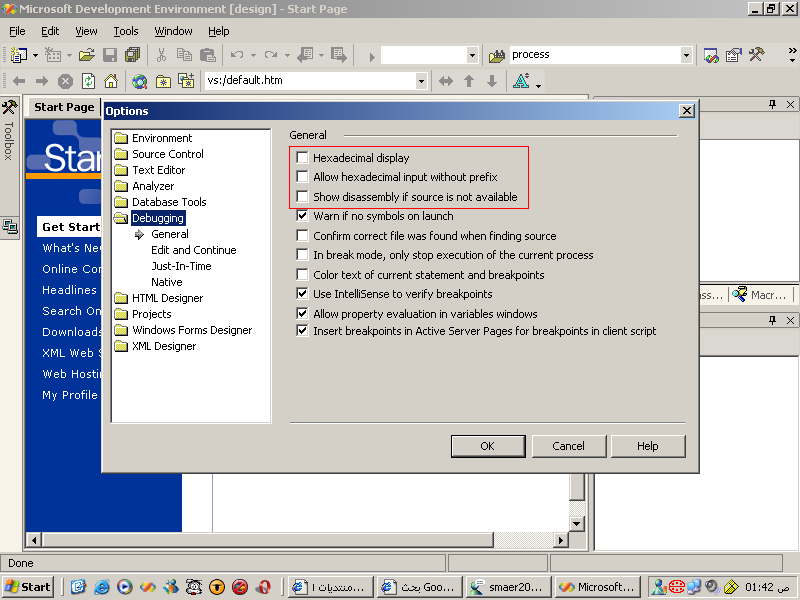
ممكن حد يفسر اللى فى الصوره
Technical Lead Developer
اللهم قنى شر الجهل و الجهلاء
( اقْتَرَبَ لِلنَّاسِ حِسَابُهُمْ وَهُمْ فِي غَفْلَةٍ مَّعْرِضُونَ ) {الأنبياء:1}
هذا الموضوع مغلق.
المتواجدون خلال آخر ساعة · يتحدّث كل ٣٠ ثانية
جارٍ التحقق من المتواجدين…