الفريق العربي للبرمجةأرشيف المنتديات · 2000 – 2023
نسخة أرشيفية للقراءة فقط — التسجيل والمشاركة مغلقان، والمحتوى محفوظ كما كان.

كيفية الاتصال بين الجافا و اكسس

مغلق
بدأه شاب مسلم في 11 أكتوبر 2004 · 21 رد · 1,705 مشاهدة · في JavaSE
مشاركة: واتساب X فيسبوك تيليجرام
#1 صاحب الموضوع

السلام عليكم ورحمة الله وبركاته

عندي برنامج ولكنه معقد نوعا ما

اريد من احد الاخوة ان يساعدني في فهم وظيفه كل سطر في الكود وعمل كود هذا البرنامج

====

1.	Create a MS Access database called MovieCollection.mdb. This database must contain a Cassette_Table and DVD_Table. 

The Cassette_Table will contain the following fields:

Title of cassette  type=text
Date of release  type=text
Description 	 type=text
Recording quality (LP/SP)  type=text

The DVD_Table must contain the following fields:	

Title of DVD  type=text
Date of release	type=text
Description  type=text

2.	Register this database as a data source in ODBC. Call the datasource MovieCollectionDatabase.

3.    Create a socket server class called MovieCollectionServer. This server program must provide access to the MovieCollectionDatabase system using JDBC. The server must be able to carry out the following:

a.	Query the database for a list of all movies in the collection.
b.	Query the database for a list of all DVD titles.
c.	Pass the results of the queries back to a requesting client.

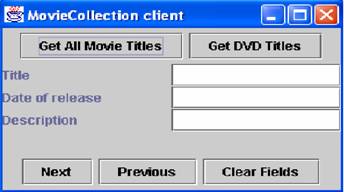
4.    Create a client program called MovieClient of type JFrame that contains JButton’s, JTextField’s and JLabels as follows: (NOTE: The labels need to reflect the information retrieved from the database)
post-43-1097516264_thumb.jpg

تم تعديل هذه المشاركة بواسطة مجدي محمود في 11 أكتوبر 2004 في 21:22

#2
How the program should work:
The user can select to get all movies or get all DVDs using the buttons at the top of the client application. The client then connects to the server and requests the correct information (i.e. list of all movies or all DVDs). The server accesses the database and retrieves the requested information and returns it to the client. The client will then display the first movie/DVD in the client window, the user may then browse the list of movies or DVDs using the Next and Previous buttons. The user of the client GUI can at any stage clear the current fields.

NOTE: THE SERVER IS RESPONSIBLE FOR JDBC INTERFACING WITH THE LIBRARY DATABASE

تم تعديل هذه المشاركة بواسطة مجدي محمود في 11 أكتوبر 2004 في 21:23

#3

اخي العزيز ... كما تلاحظ عنوان الموضوع مخالف و انت تطلب وظيفة من بداية العام الدراسي...

عدل مشاركتك و الا سوف اضطر الى اغلق المشاركة ...

و اهلا بك بعد طول غياب

Theory is when you know something, but it doesn't work. Practice is when something works, but you don't know why. Programmers combine theory and practice: Nothing works and they don't know why

#4

اخي الكريم رامي

لا اعرف بالضبط ما هو المطلبو ان افعله لتكون مشاركتي غير مخالفه

واعذرني حيث اني منذ فترة طويلة لم ادخل على المنتدى .

وتقبل فائق الاحترام والتقدير

#5

للعلم اخي الكريم هذه ليست وظيفه دراسية ولكن هذا تمرين عادي لم يطلب منا ان نقدمه بل اذا قمنا بتنفيذه سنفهم اكثر من اربع محاضرات مجتمعه

وكما تعلم الدراسة في الجامعه عندنا سريعه فلا يقف الدكتور ليشرح كل جزء

ولكن يجب على الطالب ان يذاكر في وقته الخاص

====

ولكن الوظيفة المدرسية سوف أطلبها منكم بعد اسبوعين حينما تقدم لنا

واتمنى ان تساعدوني فيها اذا تعثرت .

والسلام عليكم ورحمة الله وبركاته

#6

اخي طبعا نحن هنا لمساعدتك و المخالفة واضحة في عنوان الموضوع سوف اعدلها لك...

من" محاولة للفهم من يساعدني"

الى " كيفية الاتصال بين الجافا و قواعد بيانات الاكسس"

و انا اعذرك بسبب غيابك الطويل و اعرف تماما انك لم تتقصد المخالفة

Theory is when you know something, but it doesn't work. Practice is when something works, but you don't know why. Programmers combine theory and practice: Nothing works and they don't know why

#7
رامي العيساوي كتب:
اخي طبعا نحن هنا لمساعدتك و المخالفة واضحة في عنوان الموضوع سوف اعدلها لك...

من" محاولة للفهم من يساعدني"

الى " كيفية الاتصال بين الجافا و قواعد بيانات الاكسس"

و انا اعذرك بسبب غيابك الطويل و اعرف تماما انك لم تتقصد المخالفة

جزاكم الله خيرا على تفهمك اخي الكريم

#8

هل لهذه الدرجه الموضوع صعب

اكثر من 75 زيارة

ولا رد واحد حول الموضوع !!!!

#9

السلام عليكم

اذا كنت تبحث عن كيف يمكن ان تعمل اتصال بين الجافا والاكسس

فهذا الموقع يمكن أن يفيدك

http://www.javacoffeebreak.com/articles/jdbc/

1+1=10

#10

الاخت الكريمة آيه

السلام عليكم ورحمة الله وبركاته

في واقع الامر المشكلة في الربط بين ثلاث اشياء

قاعدة البيانات ( الاكسس) وبين السرفر والمتصفح (Client)

انا نجحت في اني اعمل اتصال بين كل اثنين على حده

مثال ان تعمل اتصال بين الجافا والاكسس

او ان يكون هناك اتصال بين الجافا وال( Client )

ولكن ان يكون هناك اتصال بين قاعدة البيانات والClient ولكن عن طريق السرفر هذه التي فشلت فيها حتى الان

ولكن المحاولات جارية

ونسأل الله ان يعلمنا ما جهلنا

#11

هي الكود بالمزبوط بدون عمل driver

 Connection conn;
التعريفات 
    Statement stmt;
    ResultSet rs;
    ResultSetMetaData md;
    String url="jdbc:odbc:Ms Access DataBase;DBQ=اسم المشروع.mdb";
    String DriverName="sun.jdbc.odbc.JdbcOdbcDriver";
    String databaseUser=" ";
    String databasepassword=" ";
/********************************************************/

 void  connect()
  {
 	 
  try {
 	 Class.forName(DriverName);
   	 System.out.println("\n Opening The DataBase Connection");
 	 conn=DriverManager.getConnection(url);
 	 stmt=conn.createStatement();
 	 System.out.println("......................success");
 	 }
 	 catch (ClassNotFoundException ex)
 	 {
    System.err.println("\n Cannot Open The Data Base Driver");
    }
    catch (SQLException ex){
   	 System.err.println("\nConnot Connect The Data base");
   	 }
  
  }

تم تعديل هذه المشاركة بواسطة مجدي محمود في 24 أكتوبر 2004 في 00:06

نموت وتحيا ...................فلسطين .

#12
اقتباس
/*التعريفات */

Connection conn;

    Statement stmt;

    ResultSet rs;

    ResultSetMetaData md;

    String url="jdbc:odbc:Ms Access DataBase;DBQ=Project.mdb" ;/*اسم  قاعدة البيانات*/

    String DriverName="sun.jdbc.odbc.JdbcOdbcDriver";

    String databaseUser=" ";

    String databasepassword=" ";

/********************************************************/

الربط

void  connect()

  {


  try {

  Class.forName(DriverName);

    System.out.println("\n Opening The DataBase Connection");

  conn=DriverManager.getConnection(url);

  stmt=conn.createStatement();

  System.out.println("......................success");

  }

  catch (ClassNotFoundException ex)

  {

    System.err.println("\n Cannot Open The Data Base Driver");

    }

    catch (SQLException ex){

    System.err.println("\nConnot Connect The Data base");

    }


  }


اذا ما طلع الكلام مزبوط هي الكود مع ملف مرفق

conn.txt

نموت وتحيا ...................فلسطين .

#13

شرط طبعا تضع قاعدة البيانات في مجلد المشروع ضروري جدا .

نموت وتحيا ...................فلسطين .

#14

اخي الكريم جزاكم الله خيرا

ولكني سوف اضع لك الكود الذي انا منذ اسبوع اشتغل فيه

ولكن هناك بعض المشاكل

اتمنى من بعض الاخوة ان يساعدوني فيها

#15

هذا الكود الاول

كود السرفر

import javax.swing.*;
import java.util.*;
import java.sql.*;
import java.io.*;
import java.net.*;

public class DatabaseServer extends JFrame {

  protected JTextArea displayArea;
  protected ResultSet queryResult;
  protected ServerSocket socketServer;
  protected Socket connection;
  protected ResultSetMetaData queryMetaData;
  protected ObjectInputStream input;
  protected ObjectOutputStream output;
  protected Connection dbConnection;
  protected String url = "jdbc:odbc:Data";
  protected String username = "yes";
  protected String password = "123";
  protected Vector resultVector;
  protected JScrollPane scroller;

  public DatabaseServer() {
    displayArea = new JTextArea();
    scroller = new JScrollPane(displayArea);
    getContentPane().add(scroller);
    setSize(500,500);
    setVisible(true);
    connectToDatabase(url,username,password);
    runServer();

  }

  public void runServer() {
    String request;

    try {
      //create a server object which awaits client connects
      socketServer = new ServerSocket(7000,10);
      //wait for clients to connect
      while(true) {
        connection = socketServer.accept();

        displayArea.append("Client has connected\n");

        //Get the input and output streams for communications with client
        output = new ObjectOutputStream(connection.getOutputStream());
        output.flush();
        input = new ObjectInputStream(connection.getInputStream());

        //read first command from client
        do {
          request = (String)input.readObject();
          displayArea.append("Received " + request + " from server\n");
          if(request.equals("cd")) {
            runQuery("cd");
            outputData();
          }
          else if(request.equals("dvd")) {
            runQuery("dvd");
            outputData();
          }
          else if(request.equals("Add")) {
          //  addRecord();
          }

          else {
            System.err.print("Unrecognised request");
          }
        }
        while(!request.equals("Close"));

        connection.close();

      }
    }
    catch(IOException e) {
      JOptionPane.showMessageDialog(this,"Server failure","Client Connect",JOptionPane.ERROR_MESSAGE);
    }
    catch(ClassNotFoundException e) {
      JOptionPane.showMessageDialog(this,"Read input failed","IO Failure",JOptionPane.ERROR_MESSAGE);
    }
  }


  public void connectToDatabase(String dbName, String username, String password) {
    try {
      Class.forName("sun.jdbc.odbc.JdbcOdbcDriver");

      dbConnection = DriverManager.getConnection(dbName,username,password);
    }
    catch(ClassNotFoundException e) {
      JOptionPane.showMessageDialog(this,"Failed to load JDBC Driver","DB Connect",JOptionPane.ERROR_MESSAGE);
    }
    catch(SQLException e) {
      JOptionPane.showMessageDialog(this,"Failed to connect to database","DB Connect",JOptionPane.ERROR_MESSAGE);
    }
  }

  public void runQuery(String query) {
    String selectStatement = "SELECT * FROM ";
    query = selectStatement + query;
    try {
      displayArea.append("Running " + query + "\n");
      Statement queryStatement = dbConnection.createStatement();
      queryResult = queryStatement.executeQuery(query);
      buildVector();
      sendToClient();
    }
    catch (SQLException e) {
      JOptionPane.showMessageDialog(this,"Failed send query to database","DB Query",JOptionPane.ERROR_MESSAGE);
    }
  }

  public void sendToClient() {
    try {
      displayArea.append("Sending vector to client...");
      output.writeObject(resultVector);
    }
    catch (IOException e) {
      JOptionPane.showMessageDialog(this,"Failed to send to client","Client Send",JOptionPane.ERROR_MESSAGE);
    }
  }

  public void outputData() {
    displayArea.append("Output\n");
    for(int i = 0; i < resultVector.size(); i++) {
      Vector currentRow = (Vector)resultVector.elementAt(i);
      for(int j = 0; j < currentRow.size();j++) {
        displayArea.append((String)currentRow.elementAt(j) + "\t");
      }
      displayArea.append("\n");
    }
  }

  public void buildVector() {
    try {
      resultVector = new Vector();

      while(queryResult.next()) {
        resultVector.addElement(getNextRow(queryResult.getMetaData()));
      }
    }
    catch (SQLException e) {
      JOptionPane.showMessageDialog(this,"Problem traversing results","RESULT ERROR",JOptionPane.ERROR_MESSAGE);
    }
  }

  private Vector getNextRow(ResultSetMetaData rsmd ) throws SQLException {
    Vector currentRow = new Vector();

      for ( int i = 1; i <= rsmd.getColumnCount(); i++ ) {
        currentRow.addElement(queryResult.getString(i));
      }

    return currentRow;
  }

  public static void main(String[] args) {
    new DatabaseServer();
  }
}
#16

وهذا الكود الثاني Client

ولكن فيه بعض المشاكل

import java.awt.*;
import java.awt.event.*;
import javax.swing.*;
import java.util.*;
import java.net.*;
import java.io.*;

public class MyClient extends JFrame implements ActionListener

{
  private  JPanel northPanel, centerPanel, southPanel;
  private  JTextField titleFld,kindFld,winFld,companyFld;
  private  JLabel titleLbl,kindLbl,winLbl,companyLbl;
  private  JButton CDbtn, DVDbtn,nextBtn, previousBtn, clearBtn;

  private  Socket socketConnection;
  private  Vector vector;

  private final int CURRENT=0;
  private final int PREVIOUS=-1;
  private final int NEXT=1;

  private  boolean cdSelected=true;
  private  ObjectOutputStream output;
  private  ObjectInputStream input;
  private  int currentIndex;
  private  Vector currentRow;

  public MyClient()
  {

    northPanel = new JPanel(new FlowLayout());
	CDbtn = new JButton("CD");
	DVDbtn = new JButton("DVD");
	northPanel.add(CDbtn);
	northPanel.add(DVDbtn);
	CDbtn.addActionListener(this);
	DVDbtn.addActionListener(this);
    getContentPane().add(northPanel,BorderLayout.NORTH);

    centerPanel = new JPanel(new GridLayout(4,1));
	titleFld = new JTextField();
	kindFld = new JTextField();
	winFld = new JTextField();
	companyFld = new JTextField();


	titleLbl = new JLabel("Title");
	centerPanel.add(titleLbl);
	centerPanel.add(titleFld);
	titleFld.addActionListener(this);

     kindLbl = new JLabel("Kind");
     centerPanel.add(kindLbl);
     centerPanel.add(kindFld);
     kindFld.addActionListener(this);

     winLbl = new JLabel("Type Of Windows");
     centerPanel.add(winLbl);
     centerPanel.add(winFld);
     winFld.addActionListener(this);

     companyLbl = new JLabel("Company");
     centerPanel.add(companyLbl);
     centerPanel.add(companyFld);
     companyFld.addActionListener(this);

    getContentPane().add(centerPanel);

    southPanel = new JPanel();
    nextBtn = new JButton("Next");
     southPanel.add(nextBtn);
     nextBtn.addActionListener(this);

    previousBtn = new JButton("Previous");
    southPanel.add(previousBtn);
    previousBtn.addActionListener(this);

    clearBtn = new JButton("Clear Fields");
     southPanel.add(clearBtn);
     clearBtn.addActionListener(this);

    getContentPane().add(southPanel,BorderLayout.SOUTH);

    setSize(400,300);
    setVisible(true);

    connectToServer();

    this.addWindowListener(new WindowAdapter()
    {
      public void windowClosing(WindowListener wl)
      {
        System.exit(0);
      }
    });
  }


  public void connectToServer()
  {
    try {
      socketConnection = new Socket("127.0.0.1",7000);

      output = new ObjectOutputStream(socketConnection.getOutputStream());
      output.flush();
      input = new ObjectInputStream(socketConnection.getInputStream());
       }
    catch (IOException e)
    {
      JOptionPane.showMessageDialog
     	 (this,"is not connecting to server","Server Failure",JOptionPane.ERROR_MESSAGE);
      e.printStackTrace();
    }
  }

  public void sendQuery(String str)
  {
    try {
      output.writeObject(str);
      }
    catch(IOException e)
    {
      JOptionPane.showMessageDialog
      (this,"Error sending request","Comm Error",JOptionPane.ERROR_MESSAGE);
    }
  }

  public void retrieveFields(int i)
  {
	currentIndex = currentIndex + i;
    try {
  //currentRow = (Vector)vector.elementAt(currentIndex);

  titleFld.setText((String)vector.elementAt(0));
  kindFld.setText((String)vector.elementAt(1));
  winFld.setText((String)vector.elementAt(2));
     	 companyFld.setText((String)vector.elementAt(3));

    }
    catch(ArrayIndexOutOfBoundsException e)
    {
      JOptionPane.showMessageDialog
      (centerPanel,"No More Records","Data Error",JOptionPane.ERROR_MESSAGE);
    }
    catch(Exception e) {
      JOptionPane.showMessageDialog
      (centerPanel,"Error setting fields","Output Error",JOptionPane.ERROR_MESSAGE);
    }
    finally{
      clearFields();
  }
  }

  public void clearFields()
  {
    titleFld.setText("");
    kindFld.setText("");
    winFld.setText("");
    companyFld.setText("");

  }

  public String[] retrieveInputText()
  {
    String[] data;

    data = new String[4];
    data[0] = titleFld.getText();
    data[1] = kindFld.getText();
    data[2] = winFld.getText();
    data[3] = companyFld.getText();

    for(int i=0;i<data.length;i++)
    {
        System.out.println(data );
    }

    return data;
  }

  public void dvdQuery()
  {
    try
    {
      cdSelected=false;
      currentIndex=0;
      sendQuery("dvd");
      vector = (Vector)input.readObject();
      retrieveFields(CURRENT);
    }
    catch(IOException e)
    {
      JOptionPane.showMessageDialog
      (centerPanel,"dvd query falied","Query Error",JOptionPane.ERROR_MESSAGE);
    }
    catch(ClassNotFoundException e)
    {
      JOptionPane.showMessageDialog
      (centerPanel,"dvd query falied","Query Error",JOptionPane.ERROR_MESSAGE);
    }

  }

  public void cdQuery()
  {
    try {
       cdSelected=true;
      currentIndex=0;
      sendQuery("cd");
      vector = (Vector)input.readObject();
      retrieveFields(CURRENT);
    }
    catch(IOException e)
    {
      JOptionPane.showMessageDialog
      (centerPanel,"cd query falied","Query Error",JOptionPane.ERROR_MESSAGE);
    }
    catch(ClassNotFoundException e)
    {
      JOptionPane.showMessageDialog
      (centerPanel,"cd query falied","Query Error",JOptionPane.ERROR_MESSAGE);
    }
  }

  public void actionPerformed(ActionEvent e)
  {
    try {

      if(e.getSource()==CDbtn)
      {
       cdQuery();
      }
      else if (e.getSource()==DVDbtn)
      {
        dvdQuery();
      }

        else if (e.getSource()==nextBtn)
        {
        retrieveFields(NEXT);
       }
      else if (e.getSource()==previousBtn)
      {
        retrieveFields(PREVIOUS);
      }

      else if (e.getSource()==clearBtn)
      {
        clearFields();
      }
    }
    catch (Exception ex)
    {
      ex.printStackTrace();
      JOptionPane.showMessageDialog
      (this,"Error processing request","Process Error",JOptionPane.ERROR_MESSAGE);
    }
  }

  public boolean dvdBlankFields()
  {
    if(titleFld.getText().equals("") ||
         kindFld.getText().equals("")||
         winFld.getText().equals("")||
         companyFld.getText().equals(""))
      return true;
    else
      return false;
  }

  public boolean cdBlankFields()
  {
    if(dvdBlankFields())
       return true;
    else
      return false;
  }

  public boolean blankFields()
  {
    if(cdSelected)
    {
      return cdBlankFields();
    }
    else
    {
      return dvdBlankFields();
    }
  }
  public static void main(String[] args)
 {
    new MyClient();
  }

}
#17

لا ادري لماذا لا استطيع ان ارفق لكم ملف قاعدة البيانات

تم تعديل هذه المشاركة بواسطة شاب مسلم في 24 أكتوبر 2004 في 12:44

#18

جرب اضغطه... ربما السبب هو الامتداد

Theory is when you know something, but it doesn't work. Practice is when something works, but you don't know why. Programmers combine theory and practice: Nothing works and they don't know why

#19

محاولة بعد ضغط الملف

Data.zip

#20

هذا الكود كاملا

1) السرفر

2) المستخدم

3) قاعدة البيانات

ولكن هناك بعض المشاكل

ارجو من الاخوة مساعدتي فيها

الكود.zip

#21

سوف احمل الملف و احاول المساعدة و لكنني لا اعدك بشئ بسبب انشغالي الكبير في هذه الفترة... ارجو معذرتي

Theory is when you know something, but it doesn't work. Practice is when something works, but you don't know why. Programmers combine theory and practice: Nothing works and they don't know why

#22

انتظر ردك ان تيسر لك ذلك

هذا الموضوع مغلق.

مواضيع مشابهة