الفريق العربي للبرمجةأرشيف المنتديات · 2000 – 2023
نسخة أرشيفية للقراءة فقط — التسجيل والمشاركة مغلقان، والمحتوى محفوظ كما كان.

ربط القاعدة الاساسية للبيانات بالجداول بطريقة احترافية

بدأه kafi في 2 نوفمبر 2014 · 28 رد · 4,678 مشاهدة · في قواعد بيانات Microsoft Access
مشاركة: واتساب X فيسبوك تيليجرام
#1 صاحب الموضوع

بسم الله الرحمن الرحيم

السلام عليكم ورحمة الله وبركاته


ببساطة لدي مثالين ( الرجاء وضع الامثلة على سطح المكتب لديكم حتى يظبط الشرح على الامثلة المرفقة)

كلمة السر هي 1


1- المثال الاول : Ex Q01  ( الرجاء ان يكون المجلد هكذا على سطح المكتب لديكم)

المثال يعمل بشكل اكثر من رائع مائة بالمائة

في هذا المثال:  قاعدة البيانات مربوطة مع ال Data 2015

ولو كان هناك رغبة من المستثمر بالربط بقاعدة البيانات Data 2014

فالامر بسيط جدا من خلال الزر الموضوع بالاعلى والمسمى ربط بملف قاعدة البيانات

حيث يتم الوصول الى  Dat 2014 بكل بساطة وسلاسة


المشكلة تتضح من خلال المثال الثاني : EX Q02

هنا تظهر رسالة خطاً، بسبب عدم صحة ارتباط الجداول بقاعدة البيانات وهذا امر طبيعي


ولكن المشكلة، هي  انني لا استطيع ان اظهر للمستثمر الشاشة التي تكلمت عنها بالاعلى، والتي هي سهلة للغاية من اجل اجراء عملية الارتباط


هنا سوف اضطر الى ان اترك للمستثمر شريط الادوات،  وان اخبره بكيفية الربط من خلال الرز ( ادارة الجداول المرتبطة)


سؤالي :


كيف لي ( بالمثال الثاني)  التغلب على مشكلة عدم صحة ارتباط الجداول بالقاعدة الاساسية للبيانات، بحيث ان افتح المجال للمستثمر الوصول الى الشاشة الاولى ببرنامجي والتي عليها زر ربط بملف قاعدة البيانات


ارجو ان يكون السؤال قد اتضح


ارجو المساعدة

والف شكر


post-32358-0-62611800-1414956841_thumb.jpost-32358-0-58545000-1414956884_thumb.jpost-32358-0-36996100-1414956917_thumb.jpost-32358-0-51846000-1414956993_thumb.j

Ex Q01.rar

Ex Q02.rar

post-32358-0-56327300-1414956730_thumb.j

post-32358-0-33209800-1414956772_thumb.j

تم تعديل هذه المشاركة بواسطة kafi في 2 نوفمبر 2014 في 22:42

#2

وعليكم السلام :)


هذه طريقتي :)


ضع البرنامج في اي مجلد ، وشغله بدون ان تمسك زر الشفت :)


جعفر

kafi.zip

#3

شكرا اخي جعفر

على اجابتك


أولا - الملف المرفق لم يفتح عندي وأعطى رسالة

           لا يكمن التعرف على تنسيق قاعدة البيانات


ولكن مالفت نظري ان الملف المرفق هو ملف وحيد، وانا سؤالي ان الجداول منفصلة عن القاعدة ( أي يجب ان يكون هناك ملفان - ملف للقاعدة الأساسية وملف للجداول)


ارجو المساعدة والتوضيح

والف شكر

#4

شكرا اخي جعفر

على اجابتك


أولا - الملف المرفق لم يفتح عندي وأعطى رسالة

           لا يكمن التعرف على تنسيق قاعدة البيانات


ولكن مالفت نظري ان الملف المرفق هو ملف وحيد، وانا سؤالي ان الجداول منفصلة عن القاعدة ( أي يجب ان يكون هناك ملفان - ملف للقاعدة الأساسية وملف للجداول)


ارجو المساعدة والتوضيح

والف شكر


post-32358-0-25280400-1414960730_thumb.j

#5

:)


جرب هذا الملف :)


استخدم احد ملفاتك التي بها الجداول :)


جعفر

kafi.zip

#6

شكرا اخي جعفر

على تواصلك معي

بارك الله فيك


ولكـــــــــــــــــن
كأن الملف المرسل معطوب.


كما انني لاحظت أن ما بداخله ملف وحيد ؟؟؟


ارجو المساعدة


post-32358-0-02223200-1414962251_thumb.j

post-32358-0-46655100-1414962329_thumb.j

#7

شكرا اخي جعفر
على تواصلك

بارك الله فيك


ولكن الملف المرسل معطوب


post-32358-0-80683900-1414962527_thumb.j

#8
kafi كتب:


كما انني لاحظت أن ما بداخله ملف وحيد ؟؟؟


لوسمحت تستعمل الملف اللي عندك اللي فيها الجداول للربط :)


جرب هذا الملف


جعفر

kafi2.zip

#9

شكرا اخي جعفر.


الملف تم فك الضغط عنه

وتم نسخ القاعدة التي بها الجداول الى جانبه


ولكن عند محاولة فتح الملف الأخير الذي قمت بارساله،

يعطي رسالة

لايمكن التعرف على تنسيق قاعدة البيانات


ارجو ارشادي الى أماكن التعديلات التي اجريتها حتى اتجنب مشكلة عدم فتح الملف لدي


بارك الله فيك


post-32358-0-44850300-1414963760_thumb.j

#10

انا اعتذر منك :( 


لكني لازلت احاول :)


جرب هذا الملف لوسمحت :)


جعفر

kafi3.zip

#11

السلام عليكم

شكرا اخي جعفر

على استمرارك في المحاولة لايجاد حل


ولكن الملف الاخير الذي ارسلته اخي الكريم، كان ايضا معطوب.


والف شكر

post-32358-0-83294800-1415021094_thumb.j

#12

وعليكم السلام :)


في برنامج Kafi (اي برنامج الواجهات ، وليس برنامج الجداول) ،

احفظ هذا الكود في وحدة نمطية ، سميها basJStreetAccessRelinker :

'-----------------------------------------------
'VERSION 2 BETA
'- Supports both 32-bit and 64-bit versions of Access 2010.
'- Supports encrypted (password-protected) back-end Access databases.  The password is stored in the front-end database unencrypted, so care should be taken to protect the front-end application.
'-----------------------------------------------

'This database contains the module and macros necessary to implement an automatic linked Access table validity checker.
'It also allows the user to change the current backend databases (whether currently valid or not).
'You can try this feature using the ChangeTableLinks macro.

'This utility supports multiple back-end Access databases.  It does not need a separate "list of tables" in a table,
'INI file or anywhere else.  In order to have it check and relink new tables, just link them.

'This version of the utility supports only Access linked tables.  It does not support ODBC tables such as SQL Server,
'SharePoint linked table, or any other kind of linked tables.  Linked tables other than Access tables are ignored.

'To implement, import all modules and macros into an Access database.  If there is already an AutoExec macro,
'copy the one line from this one into the existing one.

'Note: Since Access doesn't always refresh the TableDefs collection when a new table is first linked,
'you may need to close and reopen the database when you first link new tables so that the utility will detect them.

'On startup, all linked tables will be checked automatically.

'For slow networks, or for databases with many (say over 100) linked tables, you can use the "Quick" mode.
'This checks only 1 table in each backend database, and assumes the rest are okay.
'You can use this mode by calling jstCheckTableLinks_Quick.

'To change backend databases, even if the current one is valid, have a form button invoke the code:
'jstCheckTableLinks_Prompt
'This can be useful for switching the backend database between Production, Test and Training, for example.

'For any selected mode (Full, Prompt or Quick) a fourth, optional parameter called CheckAppFolder forces table links
'to a database that resides in the same folder as the application.  For example, if a table in ProjectApplication.mdb is
'linked to \\Server\Share\Folder\ProjectData.mdb and there is a database of the same name in the same folder
'as the application, then the table link will be changed to reference the ProjectData.mdb file in the application folder.
'This behavior overrides all prompting for a new location; tables linked to a database in the same folder as the
'application will never be prompted.  This mode is helpful for local "work databases" or single user applications.

'If you are using the Display Form default in Access you will need to change that default to (None) so that the
'AutoExec macro will execute to link the files before your first form is displayed.
'To get the form you want to display after the files are linked you need to add a line of code to Open Form
'at the end of the AutoExec.

'This code requires the DAO library to be selected in your References List (e.g.  “Microsoft DAO 3.6 Object Library”)

'For more information from the function (such as whether the links are okay and whether the user changed them) call
'Sub jstCheckTableLinks directly and check the value of its output parameters.  See the comments in the Sub for more
'details.

'This utility has been used successfully in Access 95, 97, 2000, XP/2002, 2003, 2007 and 2010.  It works with MDB and
'ACCDB back-end databases.  To link to ACCDB/ACCDE back-end databases, this code must be running in an ACCDB/ACCDE
'front-end application.

'This utility contains some techniques that are backward compatible with older versions of Access, such as InStrRight.

'You may use and distribute this code in your own applications, provided that you leave all comments and notices intact.
'J Street Technology offers this code "as is" and does not assume any liability for bugs or problems with any of the code.
'In addition, we do not provide free technical support for this code.

'Developed by J Street Technology, Inc.
'Www.JStreetTech.com
'© 1997 - 2011


'--------------------------------------------------------------------
'
' Copyright 1996-2013 J Street Technology, Inc.
' www.JStreetTech.com
'
' This code may be used and distributed as part of your application
' provided that all comments remain intact.
'
' J Street Technology offers this code "as is" and does not assume
' any liability for bugs or problems with any of the code.  In
' addition, we do not provide free technical support for this code.
'
' Code for Password-masked InputBox was originally written by
' Daniel Klann in March 2003 and has been adapted & updaed for 64-bit
' compatiblity
'--------------------------------------------------------------------
Option Compare Database
Option Explicit

'Revised Type Declare for compatability with NT
'Re-revised for 64-bit compatibility
#If VBA7 Then
    Type tagOPENFILENAME
        lStructSize         As Long
        hwndOwner           As LongPtr
        hInstance           As LongPtr
        lpstrFilter         As String
        lpstrCustomFilter   As Long
        nMaxCustFilter      As Long
        nFilterIndex        As Long
        lpstrFile           As String
        nMaxFile            As Long
        lpstrFileTitle      As String
        nMaxFileTitle       As Long
        lpstrInitialDir     As String
        lpstrTitle          As String
        Flags               As Long
        nFileOffset         As Integer
        nFileExtension      As Integer
        lpstrDefExt         As String
        lCustData           As LongPtr
        lpfnHook            As LongPtr
        lpTemplateName      As Long
    End Type
    
    
    Private Declare PtrSafe Function GetOpenFileName Lib "comdlg32.dll" _
        Alias "GetOpenFileNameA" (OPENFILENAME As tagOPENFILENAME) As Boolean

'APIs for Password-masked Inputbox
    Private Declare PtrSafe Function CallNextHookEx Lib "user32" ( _
        ByVal hHook As LongPtr, _
        ByVal ncode As Long, _
        ByVal wParam As LongPtr, _
        lparam As Any _
    ) As LongPtr
    
    Private Declare PtrSafe Function GetModuleHandle Lib "kernel32" Alias "GetModuleHandleA" ( _
        ByVal lpModuleName As String _
    ) As LongPtr

    Private Declare PtrSafe Function SetWindowsHookEx Lib "user32" Alias "SetWindowsHookExA" ( _
        ByVal idHook As Long, _
        ByVal lpfn As LongPtr, _
        ByVal hmod As LongPtr, _
        ByVal dwThreadId As Long _
    ) As LongPtr
    
    Private Declare PtrSafe Function UnhookWindowsHookEx Lib "user32" ( _
        ByVal hHook As LongPtr _
    ) As Long

    Private Declare PtrSafe Function SendDlgItemMessage Lib "user32" Alias "SendDlgItemMessageA" ( _
        ByVal hDlg As LongPtr, _
        ByVal nIDDlgItem As Long, _
        ByVal wMsg As Long, _
        ByVal wParam As LongPtr, _
        ByVal lparam As LongPtr _
    ) As LongPtr
    
    Private Declare PtrSafe Function GetClassName Lib "user32" Alias "GetClassNameA" ( _
        ByVal hWnd As LongPtr, _
        ByVal lpClassName As String, _
        ByVal nMaxCount As Long _
    ) As Long

    Private Declare PtrSafe Function GetCurrentThreadId Lib "kernel32" () As Long
    
    Private hHook As LongPtr
#Else
    Type tagOPENFILENAME
        lStructSize         As Long
        hwndOwner           As Long
        hInstance           As Long
        lpstrFilter         As String
        lpstrCustomFilter   As Long
        nMaxCustFilter      As Long
        nFilterIndex        As Long
        lpstrFile           As String
        nMaxFile            As Long
        lpstrFileTitle      As String
        nMaxFileTitle       As Long
        lpstrInitialDir     As String
        lpstrTitle          As String
        Flags               As Long
        nFileOffset         As Integer
        nFileExtension      As Integer
        lpstrDefExt         As String
        lCustData           As Long
        lpfnHook            As Long
        lpTemplateName      As Long
    End Type
    
    Private Declare Function GetOpenFileName Lib "comdlg32.dll" _
        Alias "GetOpenFileNameA" (OPENFILENAME As tagOPENFILENAME) As Long
        
'APIs for Password-masked Inputbox
    Private Declare Function CallNextHookEx Lib "user32" ( _
        ByVal hHook As Long, _
        ByVal ncode As Long, _
        ByVal wParam As Long, _
        lparam As Any _
    ) As Long
    
    Private Declare Function GetModuleHandle Lib "kernel32" Alias "GetModuleHandleA" ( _
        ByVal lpModuleName As String _
    ) As Long

    Private Declare Function SetWindowsHookEx Lib "user32" Alias "SetWindowsHookExA" ( _
        ByVal idHook As Long, _
        ByVal lpfn As Long, _
        ByVal hmod As Long, _
        ByVal dwThreadId As Long _
    ) As Long
    
    Private Declare Function UnhookWindowsHookEx Lib "user32" ( _
        ByVal hHook As Long _
    ) As Long

    Private Declare Function SendDlgItemMessage Lib "user32" Alias "SendDlgItemMessageA" ( _
        ByVal hDlg As Long, _
        ByVal nIDDlgItem As Long, _
        ByVal wMsg As Long, _
        ByVal wParam As Long, _
        ByVal lparam As Long _
    ) As Long
    
    Private Declare Function GetClassName Lib "user32" Alias "GetClassNameA" ( _
        ByVal hWnd As Long, _
        ByVal lpClassName As String, _
        ByVal nMaxCount As Long _
    ) As Long

    Private Declare Function GetCurrentThreadId Lib "kernel32" () As Long
    
    Private hHook As Long
#End If

'Constants used by Password-masked Inputbox
Private Const EM_SETPASSWORDCHAR As Long = &HCC
Private Const WH_CBT As Long = 5
Private Const HCBT_ACTIVATE As Long = 5
Private Const HC_ACTION As Long = 0
 
Private Sub HandleError(strLoc As String, strError As String, intError As Integer)
    MsgBox strLoc & ": " & strError & " (" & intError & ")", 16, "CheckTableLinks"
End Sub

Private Function TableLinkOkay(strTableName As String) As Boolean
'Function accepts a table name and tests first to determine if linked
'table, then tests link by performing refresh link.
'Error causes TableLinkOkay = False, else TableLinkOkay = True
    Dim CurDB As DAO.Database
    Dim tdf As TableDef
    Dim strFieldName As String
    On Error GoTo TableLinkOkayError
    Set CurDB = DBEngine.Workspaces(0).Databases(0)
    Set tdf = CurDB.TableDefs(strTableName)
    TableLinkOkay = True
    If tdf.Connect <> "" Then
        '#BGC updated to be more thorough in checking the link by opening a recordset
        'ACS 10/31/2013 Added brackets to support spaces in table and field names
        strFieldName = CurDB.OpenRecordset("SELECT TOP 1 [" & tdf.Fields(0).Name & "] FROM [" & tdf.Name & "];", dbOpenSnapshot, dbReadOnly).Fields(0).Name  'Do not test if nonlinked table
    End If
    TableLinkOkay = True
TableLinkOkayExit:
    Exit Function
TableLinkOkayError:
    TableLinkOkay = False
    GoTo TableLinkOkayExit
End Function

'----------------------------------------------------------------
Private Function Relink(tdf As TableDef) As Boolean
'Function accepts a tabledef and tests first to determine if linked
'table, then links table by performing refresh link.
'Error causes Relink = False, else Relink = True
    On Error GoTo RelinkError
    Relink = True
    If tdf.Connect <> "" Then
        tdf.RefreshLink     'Do not test if local or system table
    End If
    Relink = True
RelinkExit:
        Exit Function
RelinkError:
    Relink = False
    GoTo RelinkExit
End Function

'---------------------------------------------------------------------------
Private Sub RelinkTables(strCurConnectProp As String, intResultcode As Integer)
'This subroutine accepts a table connect property and displays a dialog to allow
'modification of table links.  Routine verifies link for each modification.
'intResultcode = 0 if cancel ocx or no link change, 1 if new links OK, and
'2 if link check fails.

    Dim CurDB As DAO.Database
    Dim NewDB As Database
    Dim tdf As TableDef
    Dim strFilter As String
    Dim strDefExt As String
    Dim strTitle As String
    Dim OPENFILENAME As tagOPENFILENAME
    Dim strFileName As String
    Dim strFileTitle As String
    Dim APIResults As Long
    Dim intSlashLoc As Integer
    Dim intConnectCharCt As Integer
    Dim strDBName As String
    Dim strPath As String
    Dim strNewConnectProp As String
    Dim intNumTables As Integer
    Dim intTableIndex As Integer
    Dim strTableName As String
    Dim strSaveCurConnectProp As String
    Dim strMsg As String
    Dim varReturnVal
    Dim strAccExt As String
    Dim strPassword As String
    
    Const OFN_PATHMUSTEXIST = &H1000
    Const OFN_FILEMUSTEXIST = &H800
    Const OFN_HIDEREADONLY = &H4
    
    On Error GoTo RelinkTablesError
    
    'Returned by GetOpenFileName
    'Revised to handle to the Win32 structure
    'strFileName = Space$(256)
    'strFileTitle = Space$(256)
    strFileName = String(256, 0)
    strFileTitle = String(256, 0)
    
    Set CurDB = DBEngine.Workspaces(0).Databases(0)
    strSaveCurConnectProp = strCurConnectProp
    
    'Parse table connect property to get data base name
        intSlashLoc = 1
        intConnectCharCt = Len(strCurConnectProp)
        Do Until InStr(intSlashLoc, strCurConnectProp, "\") = 0
            intSlashLoc = InStr(intSlashLoc, strCurConnectProp, "\") + 1
        Loop
        strDBName = Right$(strCurConnectProp, intConnectCharCt - intSlashLoc + 1)
        strPath = Right$(strCurConnectProp, intConnectCharCt - 10)
        strPath = Left$(strPath, intSlashLoc - 12)
        
    'Set up display of dialog
    'October 2009 - now handles Access 2007 formats ACCDB and ACCDE
    strAccExt = "*.accdb; *.mdb; *.mda; *.accda; *.mde; *.accde"
    strFilter = "Microsoft Office Access (" & strAccExt & ")" & Chr$(0) & strAccExt & Chr$(0) & _
                "All Files (*.*)" & Chr$(0) & "*.*" & _
                Chr$(0) & Chr$(0)
    strTitle = "Find new location of " & strDBName
    strDefExt = "mdb"
    
    'Revisions to handle to the Win32 structure
    'See changes to type declare
    'Changed from Len to LenB for 64-bit compatibility
    '-----------------------------------------------------------
    With OPENFILENAME
        .lStructSize = LenB(OPENFILENAME)
        .hwndOwner = Application.hWndAccessApp
        .lpstrFilter = strFilter
        .nFilterIndex = 1
        .lpstrFile = strDBName & String(256 - Len(strDBName), 0)
        .nMaxFile = Len(strFileName) - 1
        .lpstrFileTitle = strFileTitle
        .nMaxFileTitle = Len(strFileTitle) - 1
        .lpstrTitle = strTitle
        .Flags = OFN_PATHMUSTEXIST Or OFN_FILEMUSTEXIST Or OFN_HIDEREADONLY
        .lpstrDefExt = strDefExt
        .hInstance = 0
        .lpstrCustomFilter = 0
        .nMaxCustFilter = 0
        .lpstrInitialDir = strPath
        .nFileOffset = 0
        .nFileExtension = 0
        .lCustData = 0
        .lpfnHook = 0
        .lpTemplateName = 0
    End With
    '-----------------------------------------------------------
    APIResults = GetOpenFileName(OPENFILENAME)
    intResultcode = APIResults
    If APIResults = 1 Then      '1 if user selected file
        strNewConnectProp = ";DATABASE=" & OPENFILENAME.lpstrFile
        If Trim(strNewConnectProp) <> Trim(strSaveCurConnectProp) Then
        
    'Open New Database and create New Connect Property
            DoCmd.Hourglass True
            
            '#BGC Moved to a separate routine and handle the password
            'Set NewDB = OpenDatabase(OPENFILENAME.lpstrFile, False, True)
            strPassword = ExtractPassword(strSaveCurConnectProp)
            Set NewDB = GetDatabase(OPENFILENAME.lpstrFile, strPassword)
            If Not NewDB Is Nothing Then
    'Set tables connect property to new connect & test
                If Len(strPassword) Then
                    strNewConnectProp = "MS Access;PWD=" & strPassword & strNewConnectProp
                End If
                intNumTables = CurDB.TableDefs.Count
                varReturnVal = SysCmd(acSysCmdInitMeter, "Linking Access Database", intNumTables)
                For intTableIndex = 0 To intNumTables - 1
                    DoEvents
                    varReturnVal = SysCmd(acSysCmdUpdateMeter, intTableIndex)
                    Set tdf = CurDB.TableDefs(intTableIndex)
                    If tdf.Connect = strCurConnectProp Then
                        tdf.Connect = strNewConnectProp
                        strTableName = tdf.Name
                        If Not Relink(tdf) Then
                            'Link failed, restore previous connect property and generate msgs
                            tdf.Connect = strCurConnectProp
                            intResultcode = 2       'Link failed
                            '#BGC changed the Right to Mid$ and searching on the DATABASE key to handle different starting length
                            strSaveCurConnectProp = Mid$(strSaveCurConnectProp, InStr(1, strSaveCurConnectProp, ";DATABASE=") + 10)
                            strMsg = "Access Table: " & strTableName & " link failed using selected database." & vbCrLf & vbCrLf & "Table is still linked to previous database path: " & strSaveCurConnectProp & "."
                            strTitle = "Failed Access Table Link"
                            MsgBox strMsg, 16, strTitle
                        End If
                    End If
                Next intTableIndex
                varReturnVal = SysCmd(acSysCmdRemoveMeter)
            Else
                'Unable to connect to the database, return link failed
                intResultcode = 2
                strMsg = "Relinking selected database failed." & vbCrLf & vbCrLf & "Table(s) are still linked to previous database path: " & Mid$(strSaveCurConnectProp, InStr(1, strSaveCurConnectProp, ";DATABASE=") + 10) & "."
                strTitle = "Failed Access Table Link"
                MsgBox strMsg, 16, strTitle
            End If
        Else
            intResultcode = 0   'No change in Link
        End If
    End If
        
RelinkTablesExit:
    Exit Sub
    
RelinkTablesError:
    HandleError "RelinkTables", Error, Err
    Resume RelinkTablesExit
    Resume
End Sub

'------------------------------------------------------------------
Public Sub jstCheckTableLinks(CheckMode As String, LinksChanged As Boolean, LinksOK As Boolean, Optional CheckAppFolder As Boolean)
'
'INPUT:
'CheckMode = "prompt", Subroutine queries operator for location of
'   each database required by linked tables.  Msgbox for each failed link
'   and summary Msgbox on final link status (success or failure) if any
'   links were changed.  If no links changed, then no summary status.
'
'CheckMode = "full", Subroutine identifies invalid table links
'   and queries operator for location of database(s) required to satisfy
'   failed links.  Msgbox for each failed link and summary Msgbox
'   if link failures.  No Msgbox appears if all links are valid.
'
'CheckMode = "quick", same as "full" except that only the first table for
'   each linked database is checked.  If the link is not valid, the user is
'   is prompted for the location of the database and all tables in that
'   database are relinked.
'
'CheckAppFolder = True, override linked table connections if the same database name
'   exists in the application folder.  If False or not specified, no override occurs.
'
'OUTPUT:
'LinksChanged = true if at least one table link was changed.
'               false if no links where changed.
'LinksOK =      true if all links are OK upon subroutine exit.
'               false if least one table link was not successful.
'--------------------------------------------------------------------

    Dim CurDB As Database
    Dim tdf As TableDef
    Dim TableConnectPropBadArray() As String, intDBBadCount As Integer
    Dim TableConnectPropChkArray() As String, intDBChkCount As Integer
    Dim UniquePathArray() As Variant, intDBCount As Integer, intDBIndex As Integer, intDBOverrideIndex As Integer
    Dim bOverride As Boolean
    Dim bPathFound As Boolean
    Dim strUniqueDBPath As String
    Dim strFileSearch As String
    Dim intTableIndex As Integer
    Dim intNumTables As Integer
    Dim strTableName As String
    Dim strFieldName As String
    Dim intBadIndex As Integer
    Dim intChkIndex As Integer
    Dim fFound As Integer
    Dim fAllFound As Integer
    Dim fLinkGood As Integer
    Dim strCurConnectProp As String
    Dim intResultcode As Integer
    Dim strMsg As String
    Dim strTitle As String
    Dim intNoLinksChanged As Integer
    Dim varReturnVal As Variant
    Dim strPassword As String
                                                    
    On Error GoTo CheckTableLinksError
    DoCmd.Hourglass True
    varReturnVal = SysCmd(acSysCmdSetStatus, "Checking linked databases.")
    Set CurDB = DBEngine.Workspaces(0).Databases(0)
    
    'Get number of tables.
    intNumTables = CurDB.TableDefs.Count
    ReDim TableConnectPropBadArray(intNumTables)     'Set largest size
    ReDim TableConnectPropChkArray(intNumTables)     'Set largest size
    ReDim UniquePathArray(intNumTables, 1)
        
    'If app configured to first check in applicaiton folder for linked databases
    If CheckAppFolder = True Then
        For intTableIndex = 0 To intNumTables - 1
            Set tdf = CurDB.TableDefs(intTableIndex)
            'If there is a connect string
            If tdf.Connect & "" <> "" Then
'#BGC Commented -- the loop is not needed when doing CheckAppFolder since we're overriding
'                bPathFound = False
'                'Loop through the array to check for pre-existence of database to preserve uniqueness of db paths
'                For intDBIndex = 0 To (intNumTables - 1)
'                    If tdf.Connect = UniquePathArray(intTableIndex, 0) Then
'                        bPathFound = True
'                        Exit For
'                    End If
'                Next
                        
'                'If the path was not found in the array, add it to the unique array of paths.
'                If bPathFound = False Then
                    UniquePathArray(intDBCount, 1) = 0
                    UniquePathArray(intDBCount, 0) = tdf.Connect
                    intDBCount = intDBCount + 1
'                End If
            End If
        Next
        
        'Loop through all databases in array; set Override 'flag'(second column of array)
        For intDBIndex = 0 To intDBCount
            strUniqueDBPath = UniquePathArray(intDBIndex, 0)
            UniquePathArray(intDBIndex, 1) = ExistsInAppFolder(strUniqueDBPath)
        Next
        
    End If
    
    'Set up Array of Databases (all if forcelink is true, failed links if
    '   forcelink is false) (local and system tables will pass test).
    varReturnVal = SysCmd(acSysCmdInitMeter, "Checking linked databases.", intNumTables)
    LinksOK = True   'Assume success
    For intTableIndex = 0 To intNumTables - 1
        DoEvents
        varReturnVal = SysCmd(acSysCmdUpdateMeter, intTableIndex)
        Set tdf = CurDB.TableDefs(intTableIndex)
        fFound = False
          
        If tdf.Connect Like "*;DATABASE=*" Then
            'BGC -- changed from NOT "ODBC" to = ";DATABASE=" explicitly to get Access tables only
          
            strCurConnectProp = tdf.Connect
                            
            If CheckAppFolder = True Then
                bOverride = False
                    For intDBOverrideIndex = 0 To intDBCount
                        If tdf.Connect & "" <> "" And tdf.Connect = UniquePathArray(intDBOverrideIndex, 0) And UniquePathArray(intDBOverrideIndex, 1) = True Then
                            bOverride = True
                            strFileSearch = UniquePathArray(intDBOverrideIndex, 0)
                            strPassword = ExtractPassword(tdf.Connect)
                            If Len(strPassword) Then
                                strPassword = "MS Access;PWD=" & strPassword
                            End If
                            tdf.Connect = strPassword & ";DATABASE=" & PathOnly(CurDB.Name) & FileOnly(strFileSearch)
                            Exit For
                        End If
                    Next
    
            End If
            
            If bOverride = True Then
                If Not Relink(tdf) Then
                    'Link failed, restore previous connect property and generate msgs
                    tdf.Connect = strCurConnectProp
                    'intResultcode = 2       'Link failed
                    strMsg = "Application Folder Table: " & tdf.Name & " link failed." & vbCrLf & vbCrLf & "The current path for this linked table is: " & Mid$(strCurConnectProp, InStr(1, strCurConnectProp, ";DATABASE=") + 10) & "."
                    strTitle = "Failed Table Link"
                    MsgBox strMsg, 16, strTitle
                End If
            Else ' regular table, not overridden
            
                Select Case CheckMode
                Case "prompt"
                    ' put each connect string into the Bad array to force prompting later
                    For intBadIndex = 0 To intDBBadCount
                        If tdf.Connect = TableConnectPropBadArray(intBadIndex) Then
                            fFound = True
                            Exit For
                        End If
                    Next intBadIndex
                    If Not fFound Then
                        TableConnectPropBadArray(intDBBadCount) = tdf.Connect
                        intDBBadCount = intDBBadCount + 1
                    End If
                
                Case "full"
                    ' check each link, and put each bad connect string into
                    ' the Bad array to prompt later
                    For intBadIndex = 0 To intDBBadCount
                        If tdf.Connect = TableConnectPropBadArray(intBadIndex) Then
                            fFound = True
                            Exit For
                        End If
                    Next intBadIndex
                    If Not fFound Then
                        If Not TableLinkOkay(tdf.Name) Then
                            TableConnectPropBadArray(intDBBadCount) = tdf.Connect
                            intDBBadCount = intDBBadCount + 1
                            LinksOK = False
                        End If
                    End If
                
                Case "quick"
                    ' for each link, see if it has already been checked.
                    ' if it hasn't, add it to the checked array,
                    ' and check it.  If the link is bad, add it to the bad array to prompt later.
                    For intChkIndex = 0 To intDBChkCount
                        If tdf.Connect = TableConnectPropChkArray(intChkIndex) Then
                            fFound = True
                            Exit For
                        End If
                    Next intChkIndex
                    If Not fFound Then
                        TableConnectPropChkArray(intDBChkCount) = tdf.Connect
                        intDBChkCount = intDBChkCount + 1
                        If Not TableLinkOkay(tdf.Name) Then
                            TableConnectPropBadArray(intDBBadCount) = tdf.Connect
                            intDBBadCount = intDBBadCount + 1
                            LinksOK = False
                        End If
                    End If
            
                Case Else
                    MsgBox "CheckMode parameter """ & CheckMode & """ is not valid.  It must be ""prompt"", ""full"" or ""quick"".", vbCritical + vbOKOnly
                    LinksChanged = False
                    GoTo CheckTableLinksExit
                    
                End Select
            End If ' overridden table
        End If ' an Access linked table
            
        
    Next intTableIndex
    varReturnVal = SysCmd(acSysCmdRemoveMeter)
    
    'Prompt user to locate each database in TableConnectPropBadArray.
    varReturnVal = SysCmd(acSysCmdSetStatus, "Linking databases.")
    fAllFound = True   'Assume success in relinking all tables.
    intNoLinksChanged = 0    'Avoid successful message if no links were changed.
    For intBadIndex = 0 To intDBBadCount - 1
        DoEvents
        strCurConnectProp = TableConnectPropBadArray(intBadIndex)
        RelinkTables strCurConnectProp, intResultcode
        intNoLinksChanged = intNoLinksChanged + intResultcode
        If CheckMode = "prompt" Then
            If intResultcode = 2 Then fAllFound = False   'Failed relink.
        Else
            If Not intResultcode = 1 Then fAllFound = False
        End If
    Next intBadIndex
    
    'Display summary messages based upon forcelink value
    strTitle = "Database Links"
    If fAllFound = False Then
        strMsg = "One or more Access database tables may not be correctly linked."
        MsgBox strMsg, 16, strTitle
        LinksOK = False
    Else
        If CheckMode = "prompt" And intNoLinksChanged <> 0 Then
            strMsg = "All Access databases were linked successfully."
            MsgBox strMsg, 0, strTitle
        End If
        If CheckMode <> "prompt" Then LinksOK = True
    End If
    
    'Setup links changed flag.
    If intNoLinksChanged = 0 Then
        LinksChanged = False
    Else
        LinksChanged = True
    End If

CheckTableLinksExit:
    DoCmd.Hourglass False
    varReturnVal = SysCmd(acSysCmdClearStatus)
    Exit Sub
CheckTableLinksError:
    HandleError "CheckTableLinks", Error, Err
    Resume CheckTableLinksExit
End Sub

Public Function jstCheckTableLinks_Prompt()
    'prompt for new database locations of linked tables
    jstCheckTableLinks CheckMode:="prompt", LinksChanged:=False, LinksOK:=False, CheckAppFolder:=False
End Function

Public Function jstCheckTableLinks_Full()
    'check linked tables
    jstCheckTableLinks CheckMode:="full", LinksChanged:=False, LinksOK:=False, CheckAppFolder:=False
End Function

Public Function jstCheckTableLinks_Quick()
    'check linked tables, only the first per database
    jstCheckTableLinks CheckMode:="quick", LinksChanged:=False, LinksOK:=False, CheckAppFolder:=False
End Function

Private Function ExistsInAppFolder(strPath As String) As Boolean
    On Error GoTo Err_ExistsInAppFolder

    Dim db As Database
    Dim i As Integer
    Dim lngPos As Long
    Dim strDBName As String
    Dim strAppPath As String
    Dim strCurrPath As String
    
    ExistsInAppFolder = False
    
    Set db = CurrentDb
     
    strDBName = FileOnly(strPath)
    strCurrPath = PathOnly(db.Name)
         
    If FileExists(strCurrPath & strDBName) Then
        ExistsInAppFolder = True
    End If
     
Exit_ExistsInAppFolder:
    On Error Resume Next
    db.Close
    Set db = Nothing
    Exit Function

Err_ExistsInAppFolder:
    ExistsInAppFolder = False
    Resume Exit_ExistsInAppFolder
    Resume
End Function

Private Function FileExists(Path As Variant) As Boolean
    On Error GoTo Err_FileExists
    
    Dim varRet As Variant
    
    If IsNull(Path) Then
        FileExists = False
        Exit Function
    End If
    
    varRet = Dir(Path)
    
    If Not IsNull(varRet) And varRet <> "" Then
        FileExists = True
    Else
        FileExists = False
    End If

Exit_FileExists:
    Exit Function

Err_FileExists:
    FileExists = False
    Resume Exit_FileExists

End Function

Private Function FileOnly(WholePath As Variant) As Variant
    On Error GoTo Err_FileOnly
    
    Dim FileOnlyPos
    
    If IsNull(WholePath) Then
        FileOnly = Null
        Exit Function
    End If
    
    FileOnlyPos = InStrRight(WholePath, "\") + 1
    
    FileOnly = Mid(WholePath, FileOnlyPos)
    
Exit_FileOnly:
    Exit Function
Err_FileOnly:
    MsgBox Err.Number & ", " & Err.Description
    Resume Exit_FileOnly
End Function

Private Function PathOnly(WholePath As Variant) As Variant
    On Error GoTo Err_PathOnly
    
    Dim FileOnlyPos
    
    If IsNull(WholePath) Then
        PathOnly = Null
        Exit Function
    End If
    
    FileOnlyPos = InStrRight(WholePath, "\") + 1
    
    PathOnly = Left(WholePath, FileOnlyPos - 1)
    
Exit_PathOnly:
    Exit Function
Err_PathOnly:
    MsgBox Err.Number & ", " & Err.Description
    Resume Exit_PathOnly
End Function

Private Function InStrRight(SearchString As Variant, soughtString As Variant) As Variant
    On Error GoTo Err_InStrRight
    Dim SoughtLen As Integer
    Dim Found As Integer
    Dim Pos As Integer
    
    If IsNull(SearchString) Or IsNull(soughtString) Then
        InStrRight = Null
        Exit Function
    End If
    
    If SearchString = "" Or soughtString = "" Then
        InStrRight = 0
        Exit Function
    End If
    
    SoughtLen = Len(soughtString)
    Found = False
    Pos = Len(SearchString) - SoughtLen + 1
    
    Do While Pos > 0 And Not Found
        If Mid(SearchString, Pos, SoughtLen) = soughtString Then
            Found = True
        Else
            Pos = Pos - 1
        End If
    Loop
    
    InStrRight = Pos
Exit_InStrRight:
    Exit Function
Err_InStrRight:
    MsgBox Err.Number & ", " & Err.Description
    Resume Exit_InStrRight
End Function

Private Function GetDatabase( _
    strDatabasePath As String, _
    strPassword As String _
) As DAO.Database
    Dim db As DAO.Database
    Dim lngTries As Long
        
    Do
        On Error GoTo NoPasswordErrHandler
        Set db = DBEngine.OpenDatabase(strDatabasePath, False, True, "MS Access;PWD=" & strPassword)
        On Error GoTo ErrHandler
        If db Is Nothing Then
            If Len(strPassword) Then
                MsgBox "Invalid password.", vbCritical, "Try again."
            End If
            strPassword = InputBoxDK("The database requires a password to open. Please provide a password.", "Password-protected database.")
            lngTries = lngTries + 1
            If Len(strPassword) = 0 Then
                Exit Do
            End If
        End If
    Loop While db Is Nothing And lngTries < 3
    
    Set GetDatabase = db
    
ExitProc:
    On Error Resume Next
    Exit Function
NoPasswordErrHandler:
    If Err.Number = 3031 Then
        Set db = Nothing
        Resume Next
    End If
ErrHandler:
    Select Case Err.Number
        Case Else
            VBA.MsgBox "Error " & Err.Number & " (" & Err.Description & ")"
    End Select
    Resume ExitProc
    Resume 'for Debugging
End Function

Private Function ExtractPassword(strConnectionString As String) As String
    Dim lngleft As Long
    Dim lngRight As Long
    
    Const pwd As String = "PWD="
    
    On Error GoTo ErrHandler
    
    lngleft = InStr(1, strConnectionString, pwd)
    If lngleft Then
        lngleft = lngleft + Len(pwd)
        lngRight = InStr(lngleft, strConnectionString, ";")
        If lngRight = 0 Then
            'No ending semicolon was found; return the whole substring
            lngRight = Len(strConnectionString)
        End If
        ExtractPassword = Mid$(strConnectionString, lngleft, lngRight - lngleft)
    Else
        ExtractPassword = vbNullString
    End If
    
ExitProc:
    On Error Resume Next
    Exit Function
ErrHandler:
    Select Case Err.Number
        Case Else
            VBA.MsgBox "Error " & Err.Number & " (" & Err.Description & ")"
    End Select
    Resume ExitProc
    Resume 'for Debugging
End Function

#If VBA7 Then
Private Function InputBoxPasswordMaskProc( _
    ByVal lngCode As Long, _
    ByVal wParam As LongPtr, _
    ByVal lparam As LongPtr _
) As LongPtr
#Else
Private Function InputBoxPasswordMaskProc( _
    ByVal lngCode As Long, _
    ByVal wParam As Long, _
    ByVal lparam As Long _
) As Long
#End If
    'DO NOT PUT IN VBA ERROR HANDLING
    'This is a Windows procedure called by Message loop.
    On Error Resume Next
    
    'Originally written by Daniel Klann
    'Updated for 64-bit compatibility
    
    Dim RetVal
    Dim strClassName As String
    Dim lngBuffer As Long
 
    If lngCode < HC_ACTION Then
        InputBoxPasswordMaskProc = CallNextHookEx(hHook, lngCode, wParam, lparam)
        Exit Function
    End If
 
    strClassName = String$(256, " ")
    lngBuffer = 255
 
    If lngCode = HCBT_ACTIVATE Then    'A window has been activated
        RetVal = GetClassName(wParam, strClassName, lngBuffer)
 
        If Left$(strClassName, RetVal) = "#32770" Then  'Class name of the Inputbox
            'This changes the edit control so that it display the password character *.
            'You can change the Asc("*") as you please.
            SendDlgItemMessage wParam, &H1324, EM_SETPASSWORDCHAR, Asc("*"), &H0
        End If
    End If
 
    'This line will ensure that any other hooks that may be in place are
    'called correctly.
    CallNextHookEx hHook, lngCode, wParam, lparam
End Function
 
Private Function InputBoxDK( _
    Prompt, _
    Optional Title, _
    Optional Default, _
    Optional XPos, _
    Optional YPos, _
    Optional HelpFile, _
    Optional Context _
) As String
    'Originally written by Daniel Klann
    'Updated for 64-bit compatibility
    
    'Replicate the functionality of Inputbox function
    'while providing password masking.
#If VBA7 Then
    Dim lngModHwnd As LongPtr
#Else
    Dim lngModHwnd As Long
#End If
    Dim lngThreadID As Long
 
    On Error GoTo ErrHandler

    lngThreadID = GetCurrentThreadId
    lngModHwnd = GetModuleHandle(vbNullString)
 
    hHook = SetWindowsHookEx(WH_CBT, AddressOf InputBoxPasswordMaskProc, lngModHwnd, lngThreadID)
 
    InputBoxDK = InputBox(Prompt, Title, Default, XPos, YPos, HelpFile, Context)
    UnhookWindowsHookEx hHook

ExitProc:
    On Error Resume Next
    Exit Function
ErrHandler:
    Select Case Err.Number
        Case Else
            VBA.MsgBox "Error " & Err.Number & " (" & Err.Description & ")"
    End Select
    Resume ExitProc
    Resume 'for Debugging
End Function  'Hope someone can use it!

اعمل Macro ، واحفظه باسم autoexec (هذا معناه بانه سيكون اول شئ يشتغل في قاعدة البيانات لما تفتح) ،

في السطر الاول اختر:

Runcode
ثم ضع السطر التالي كاسم للكود:
jstCheckTableLinks_Full()


وبعدها تقدر ان تضع سطر آخر ليفتح اي نموذج.


الكود سيفحص الجداول ، واذا لم يجد الرابط ، سيسمح للمستخدم ان يختار برنامج الجداول ، وبسهولة :)


جعفر

1
#13

الف شكر

اخي جعفر على كود الالفية


اول مرة اشوف كود بهذه الضخامة


قمت بنسخ الكود ولصقه في وحدة نمطية كما اشرت


المشكلة ان ارقام الاسطر التي هي على يسار كل سطر، انتسخت مع الكود


الامر الذي سوف يتطلب ازالتها يدويا

وهذا امر مرهق جدا


اخي جعفر

بارك الله فيك

هل لديك نسخة من الكود موضوعة ضمن وحدة نمطية


اذا كان لديك

الرجاء ارسالها ضمن ملف

حتى يسهل اخذ الكود


بارك الله فيك

تم تعديل هذه المشاركة بواسطة kafi في 4 نوفمبر 2014 في 02:02

#14

قمت بإضافة الكود الطويل وعمل بشكل ممتاز

بارك الله فيك استاذ جعفر


في المرفقات موديول الكود ابو 1000 سطر قم بسحبه وإفلاته في برنامجك في محرر الأكواد VBA

basJStreetAccessRelinker.rar

حسابي على الفيسبوك


حسابي على التويتـــر


صفحتي الشخصية في منتدى أوفيسنا


اعذروني ففي الفترة القادمة سيكون تواجدي في المنتدى ضيق جداً وذلك للانشغال في دورة لمدة 6 شهور بعد الدوام

#15

رائع اخي الكريم جعفر ،،، 


دائما متألق ،،، كل الاحترام والتقدير 


+1


ملاحظة لصاحب الموضوع الأخ Kafi 


انت اكيد تستخدم اوفيس 2007 ولم يعمل معك الملف الذي ارسله لك الاخ جعفر لان الاوفيس لديك يحتاج الى 

تحديث الحزم Sp1+sp2+sp3


قم بتحديث الاوفيس بهذه الحزم وسوف يعمل معك ملف الاستاذ جعفر فورا


تحياتي

اذا دعتـــك قدرتك على ظلـــم الناس   فتذكر قدرة الله عليــــــك

#16

وعليكم السلام :)

شكرا اخي عبدالله وأخي مراد :)

اخي عبدالفتاح ، الكود التالي خاص ببرنامجك فقط:

ورجاء عمل ماكرو مثل ما شرحت لك سابقا وسميه autoexec ،

واعمل Runcode ، واكتب اﻻسم Relink_Be ()

وهذا الكود بدون ترقيم :)

Option Compare Database

Function Relink_BE()

'check if the BE is connected

Dim rst As DAO.Recordset

Dim stSQL As String

'Type=6 is linked tables'

'Name is the Linked Table bane

'Database is where the BE was last linked ok, with path

'1. check BE tables

stSQL = "SELECT * FROM MSysObjects WHERE Type=6 AND Name = 'Zatea'"

Set rst = CurrentDb.OpenRecordset(stSQL)

rst.MoveLast: rst.MoveFirst

Dim strFilter As String

Dim strInputFileName As String

Dim sLast As String

Dim sData As String

sData = rst!Database

'check if BE is at the same location as last linked,

'we are checking the 1st value only, which is enough, as all are have the same value

If Dir(rst!Database) = "" Then

'does not exists

'BE Tables are NOT where FE can see

DoCmd.OpenForm "Basic_Connect_Data"

Else

DoCmd.OpenForm "PassWord Main"

End If 'Dir BE tables

rst.Close: Set rst = Nothing

End Function

جعفر

1
#17
kafi كتب:


المشكلة ان ارقام الاسطر التي هي على يسار كل سطر، انتسخت مع الكود


غريبة ، انا لما انسخ الكود اعلاه والصقه في module ، ارقام الاسطر لا تظهر في الكود :)


جعفر

#18

الف الف شكر

اخي جعفر

جزاك الله عني كل خير

بارك الله فيك


شكرا اخي عبد الله المجرب / واخي مراد على ماتفضلتم به بارك الله فيكم.


الحمد لله نجح الامر مع الكود المختصر الذي تفضلت به حضرتك

وتم تطبيقه، والحمد لله نجح الامر


اخي الكريم

المثال بحاجة الى بعض اللمسات، حتى يأخذ شكله الاحترافي


اولاً :
عندما لا يكون هناك ربط صحيح بالداتا ... تظهر رسالة باسم ملف الداتا الغير مرتبط بالقاعدة الاصلية للبرنامج..... ( صورة 16) وهي شكلها بعيد عن شاشات البرنامج

       صممت شاشة تتلائم مع شكل شاشات البرنامج وفيها نفس عبارة التحذير صورة 17

         سؤالي : هل بالامكان عدم اظهار شاشة التحذير العائدة للاكسس واظهار الشاشة المشار اليها بالصورة 17


ثانياً :

عندما لا يكون هناك ربط صحيح بالداتا، وظهور رسالة التنبيه العائدة للاكسس ثم ظهور شاشتي التي من خلالها يتم الربط بملف البيانات

هنا لاحظت انه بعد ان يتم الربط ..........لا يعود البرنامج الى الشاشة الافتتاحية PassWord Main

ويبقى بدون اظهار اي شئ للمستثمر والمفترض ان تظهر شاشة Password Main


هل هناك من حل لهذه المشكلة


ثالثاً :

انا بحاجة في الماكرو Autoexec  بالاضافة الى الاجراء Relink الذي تفضلت به حضرتك الى الاجراء الذي يعمل على عدم اتاحة الضغط على زر الاغلاق للاكسس صورة 18

كيف لي ان افعل كلا الاجرائين


والف الف شكر

post-32358-0-59216400-1415127780_thumb.jpost-32358-0-66978700-1415127853_thumb.jpost-32358-0-45571600-1415127916_thumb.j

Ex Q02 up.rar

تم تعديل هذه المشاركة بواسطة kafi في 4 نوفمبر 2014 في 22:12

#19

الف الف شكر

اخي جعفر


جزاك الله عني كل خير


بارك الله فيك


الحمد لله نجح الامر مع الكود المختصر الذي تفضلت به حضرتك

وتم تطبيقه، والحمد لله نجح الامر


اخي الكريم

المثال بحاجة الى بعض اللمسات، حتى يأخذ شكله الاحترافي


اولاً :
عندما لا يكون هناك ربط صحيح بالداتا ... تظهر رسالة باسم ملف الداتا الغير مرتبط بالقاعدة الاصلية للبرنامج..... ( صورة 16) وهي شكلها بعيد عن شاشات البرنامج

       صممت شاشة تتلائم مع شكل شاشات البرنامج وفيها نفس عبارة التحذير صورة 17

         سؤالي : هل بالامكان عدم اظهار شاشة التحذير العائدة للاكسس واظهار الشاشة المشار اليها بالصورة 17


ثانياً :

عندما لا يكون هناك ربط صحيح بالداتا، وظهور رسالة التنبيه العائدة للاكسس ثم ظهور شاشتي التي من خلالها يتم الربط بملف البيانات

هنا لاحظت انه بعد ان يتم الربط ..........لا يعود البرنامج الى الشاشة الافتتاحية PassWord Main

ويبقى بدون اظهار اي شئ للمستثمر والمفترض ان تظهر شاشة Password Main


هل هناك من حل لهذه المشكلة


ثالثاً :

انا بحاجة في الماكرو Autoexec  بالاضافة الى الاجراء Relink الذي تفضلت به حضرتك الى الاجراء الذي يعمل على عدم اتاحة الضغط على زر الاغلاق للاكسس صورة 18

كيف لي ان افعل كلا الاجرائين


والف الف شكر

post-32358-0-59216400-1415127780_thumb.jpost-32358-0-66978700-1415127853_thumb.jpost-32358-0-45571600-1415127916_thumb.j

#20

وعليكم السلام :)


يعني ان متقصد تسألني اسئلة صعبة :(

يأ أخي انا نفسي اجاوب على سؤال سهل ، احله بدون ما احك راسي :)


الاجابة:

1. لا اعرف ، قد يكون موجود ، ويمكنك البحث عنه في الموسوعة الكبرى ، الانترنت :)

2+3. ضع كود فتح النموذج Password Main بين الكودين اللي انت وضحتهم في الـ autoexec Macro :)


جعفر

#21

بالنسبة للصورة 16 (انت وضعت السؤال في الصورة :( )


استعمل هذا الكود بدل السابق:

Option Compare Database
Public DB_Name As String

Function Relink_BE()


    'check if the BE is connected
    Dim rst As DAO.Recordset
    Dim stSQL As String

    'Type=6 is linked tables'
    'Name is the Linked Table bane
    'Database is where the BE was last linked ok, with path
    '1. check BE tables
    stSQL = "SELECT * FROM MSysObjects WHERE Type=6 AND Name = 'Zatea'"
    Set rst = CurrentDb.OpenRecordset(stSQL)
    rst.MoveLast: rst.MoveFirst
             
    Dim strFilter As String
    Dim strInputFileName As String
    Dim sLast As String
    Dim sData As String
    
    sData = rst!Database
    DB_Name = Mid(rst!Database, InStrRev(rst!Database, "\") + 1)
    
    'check if BE is at the same location as last linked,
    'we are checking the 1st value only, which is enough, as all are have the same value
    If Dir(rst!Database) = "" Then
        'does not exists
        'BE Tables are NOT where FE can see
        DoCmd.OpenForm "Basic_Connect_Data"
        
    Else
    
        DoCmd.OpenForm "PassWord Main"
    End If  'Dir BE tables

        rst.Close: Set rst = Nothing

End Function

فيه سطرين اضافيين ، السطر الثاني وسطر آخر ،

انا جعلت اسم قاعدة البيانات موجودة في الكود باسم DB_Name ،

فكل اللي يجب ان تعمله هو ، انك تكتب التنبيه في كود الحقل:

me.warning="تنبيه ، قاعدة البيانات: " & DB_Name

وبدون اقواس :)


جعفر

#22

السلام عليكم


اخي جعفر

بارك الله فيك


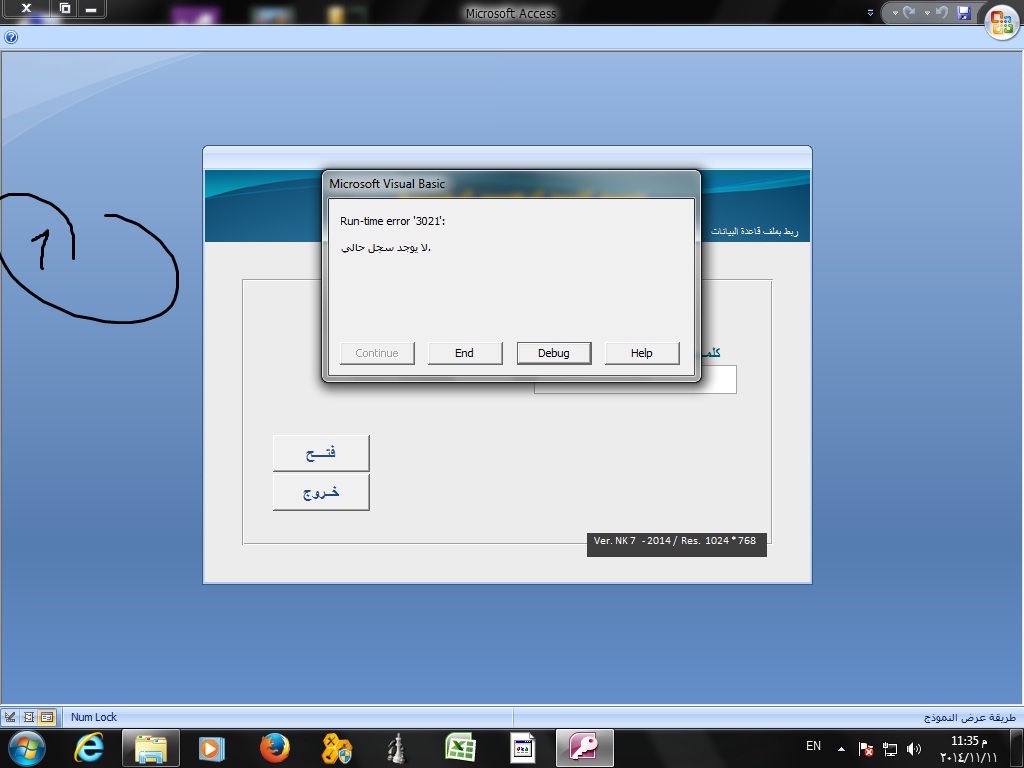
قمت بارجاع الجدوال الى نفس قاعدة البيانات، وتفاجئت بأنه عند تشغيل البرنامج تظهر رسالة خطأ

( انا ارغب بأن يظل الكود داخل برنامجي الاساسي، في حال كان رغبة المستثمر بأن تكون الداتا منفصلة، اقوم بفصل الجداول عن القاعدة الاساسية واعطيه البرنامج، من غير ان اعدل على البرنامج الاساسي)


ارجو المساعدة


والف شكر


post-32358-0-98013400-1415742484_thumb.j

post-32358-0-61974400-1415742539_thumb.j

Ex Q03.rar

تم تعديل هذه المشاركة بواسطة kafi في 12 نوفمبر 2014 في 01:00

#23

وعليكم السلام :)


اكتب السطر الثاني:

Function Relink_DB()on error goto err_Relink_DB

ثم نأتي في اسفل الكود ، ونكتب:

exit sub
err_Relink_DB:

if err.number=3021 then
'No Records
resume next
else
msgbox err.number & vbcrlf & err.description
endif

end sub

جعفر

تم تعديل هذه المشاركة بواسطة jjafferr في 13 نوفمبر 2014 في 00:09

#24

اخي kafi


ما رايك ان تكتب الامر

DoCmd.RunCommand acCmdLinkedTableManager
 
وتجعل المستثمر هو من يحدد مكان القاعدة .
 
نشكر الاستاذ جعر لقد مررنا بحلقات تعليمية في هذه المشاركة.
واذكر فقط بامكانية استخدام امرين مهمين اذا كنا نريد الربط عن طريق الكود 
connect بالنسبة للربط بالقاعدة البعيدة
refreshlink بالنسبة للجدول طبعا وضعه في حلقة تكرارية للمرور على كل الجداول المرتبطة.
 
وهذا المرجع
 
بالتوفيق

خبير تحليل النظم

خبير Business Process ونظم ERPs

خبير قواعد بيانات وبرمجة اكسس


abc_2_me@hotmail.com

#25

كل شئ جديد ، حيّاه الله ، وحياك الله اخي رمهان :)


جعفر

مواضيع مشابهة

عدد الزوار حالياً

المتواجدون خلال آخر دقيقتين · يتحدّث كل ٣٠ ثانية

—الإجمالي—أعضاء مسجّلون—زوار بدون تسجيل

جارٍ التحقق من المتواجدين…