الفريق العربي للبرمجةأرشيف المنتديات · 2000 – 2023
نسخة أرشيفية للقراءة فقط — التسجيل والمشاركة مغلقان، والمحتوى محفوظ كما كان.

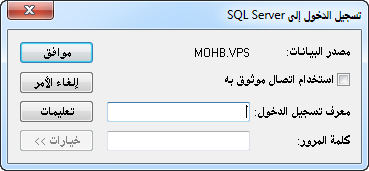
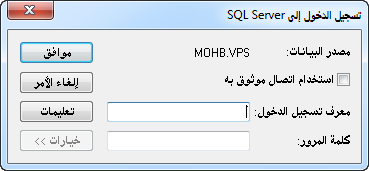
كيفية الدخول الى sql server من خلال الأكسس

بدأه ابو سلاف في 10 يونيو 2014 · 7 رد · 1,054 مشاهدة · في قواعد بيانات Microsoft Access
مشاركة: واتساب X فيسبوك تيليجرام
#1 صاحب الموضوع

السلام عليكم ورحمة الله وبركاته

كل عام وأنتم بخير

في المرفق قاعدة بيانات تحوي جدول واحد ونموذج واحد فقط

لدي قاعدة بيانات sql server مرتبطة بالأكسس

اريد تعديل نموذج الدخول في المثال بحيث يكون اسم السيرفر واسم المستخدم وكلمة المرور "متغير" .


ولكم جزيل الشكر والتقدير

test.rar

#2

الرفع للأهمية

#3

H6Dlky.png


أو هل يمكن تغيير هذه النافذة بأخرى كوضع كود اتصال في حدث النموذج ؟

post-233766-0-36917800-1402417317.png

post-233766-0-57175700-1402417355.png

#4

UP

#5

ماهي نسخة (SQL SERVER) التي تستخدمها؟

إذا كانت نسختك هي إصدار 2005 فمادون أو يمكن أن تقبل بهذا،  ونسخة الأكسس هي إصدار 2007 أو أعلى، فنصيحتي لك أن تحول قاعدة بياناتك التقليدية إلى قواعد بيانات أكسس للمشاريع. وهي قواعد البيانات التي تعرف باللاحقة (YourDatabase.adp).

لأن هذه الأخيرة مصممة للعمل مع (SQL SERVER).

وبعد لك يمكن أن نبني وصلة الاتصال بقاعدة البيانات.

#6

استخدام sql server 2012

أكسس 2013

#7

نرجو ممن لديه الإجابة التفضل بها , تحياتي للجميع

#8

X0Ptq.jpg

هل هذا الأمر هو مانحتاجه ؟


You can use a DSN to create linked SQL Server tables in Microsoft Access. But when you move the database to another computer, you must re-create the DSN on that computer. This procedure may be problematic when you have to perform it on more than one computer. When this procedure is not performed correctly, the linked tables may not be able to locate the DSN. Therefore, the linked tables may not be able to connect to SQL Server.

When you want to create a link to a SQL Server table but do not want to hard-code a DSN in the Data Sources dialog box, use one of the following methods to create a DSN-less connection to SQL Server.

Method 1: Use the CreateTableDef method

The CreateTableDef method lets you create a linked table. To use this method, create a new module, and then add the following AttachDSNLessTable function to the new module.

'//Name     :   AttachDSNLessTable
'//Purpose  :   Create a linked table to SQL Server without using a DSN
'//Parameters
'//     stLocalTableName: Name of the table that you are creating in the current database
'//     stRemoteTableName: Name of the table that you are linking to on the SQL Server database
'//     stServer: Name of the SQL Server that you are linking to
'//     stDatabase: Name of the SQL Server database that you are linking to
'//     stUsername: Name of the SQL Server user who can connect to SQL Server, leave blank to use a Trusted Connection
'//     stPassword: SQL Server user password
Function AttachDSNLessTable(stLocalTableName As String, stRemoteTableName As String, stServer As String, stDatabase As String, Optional stUsername As String, Optional stPassword As String)
    On Error GoTo AttachDSNLessTable_Err
    Dim td As TableDef
    Dim stConnect As String
    
    For Each td In CurrentDb.TableDefs
        If td.Name = stLocalTableName Then
            CurrentDb.TableDefs.Delete stLocalTableName
        End If
    Next
      
    If Len(stUsername) = 0 Then
        '//Use trusted authentication if stUsername is not supplied.
        stConnect = "ODBC;DRIVER=SQL Server;SERVER=" & stServer & ";DATABASE=" & stDatabase & ";Trusted_Connection=Yes"
    Else
        '//WARNING: This will save the username and the password with the linked table information.
        stConnect = "ODBC;DRIVER=SQL Server;SERVER=" & stServer & ";DATABASE=" & stDatabase & ";UID=" & stUsername & ";PWD=" & stPassword
    End If
    Set td = CurrentDb.CreateTableDef(stLocalTableName, dbAttachSavePWD, stRemoteTableName, stConnect)
    CurrentDb.TableDefs.Append td
    AttachDSNLessTable = True
    Exit Function

AttachDSNLessTable_Err:
    
    AttachDSNLessTable = False
    MsgBox "AttachDSNLessTable encountered an unexpected error: " & Err.Description

End Function

To call the AttachDSNLessTable function, add code that is similar to one of the following code examples in the AutoExecmacro or in the startup form Form_Open event:

  • When you use the AutoExec macro, call the AttachDSNLessTable function, and then pass parameters that are similar to the following from the RunCode action.
    AttachDSNLessTable ("authors", "authors", "(local)", "pubs", "", "")
  • When you use the startup form, add code that is similar to the following to the Form_Open event.
  • Private Sub Form_Open(Cancel As Integer)
        If AttachDSNLessTable("authors", "authors", "(local)", "pubs", "", "") Then
            '// All is okay.
        Else
            '// Not okay.
        End If
    End Sub
    Method 2: Use the DAO.RegisterDatabase method

    The DAO.RegisterDatabase method lets you create a DSN connection in the AutoExec macro or in the startup form. Although this method does not remove the requirement for a DSN connection, it does help you resolve the issue by creating the DSN connection in code. To use this method, create a new module, and then add the following CreateDSNConnection function to the new module.

    • Note You must adjust your programming logic when you add more than one linked table to the Access database.
  • '//Name     :   CreateDSNConnection
    '//Purpose  :   Create a DSN to link tables to SQL Server
    '//Parameters
    '//     stServer: Name of SQL Server that you are linking to
    '//     stDatabase: Name of the SQL Server database that you are linking to
    '//     stUsername: Name of the SQL Server user who can connect to SQL Server, leave blank to use a Trusted Connection
    '//     stPassword: SQL Server user password
    Function CreateDSNConnection(stServer As String, stDatabase As String, Optional stUsername As String, Optional stPassword As String) As Boolean
        On Error GoTo CreateDSNConnection_Err
    
        Dim stConnect As String
        
        If Len(stUsername) = 0 Then
            '//Use trusted authentication if stUsername is not supplied.
            stConnect = "Description=myDSN" & vbCr & "SERVER=" & stServer & vbCr & "DATABASE=" & stDatabase & vbCr & "Trusted_Connection=Yes"
        Else
            stConnect = "Description=myDSN" & vbCr & "SERVER=" & stServer & vbCr & "DATABASE=" & stDatabase & vbCr 
        End If
        
        DBEngine.RegisterDatabase "myDSN", "SQL Server", True, stConnect
            
        '// Add error checking.
        CreateDSNConnection = True
        Exit Function
    CreateDSNConnection_Err:
        
        CreateDSNConnection = False
        MsgBox "CreateDSNConnection encountered an unexpected error: " & Err.Description
        
    End Function

    Note If the RegisterDatabase method is called again, the DSN is updated.

    To call the CreateDSNConnection function, add code that is similar to one of the following code examples in the AutoExecmacro or in the startup form Form_Open event:

    • When you use the AutoExec macro, call the CreateDSNConnection function, and then pass parameters that are similar to the following from the RunCode action.
      CreateDSNConnection ("(local)", "pubs", "", "")
    • When you use the startup form, add code that is similar to the following to the Form_Open event.
    • Private Sub Form_Open(Cancel As Integer)
          If CreateDSNConnection("(local)", "pubs", "", "") Then
              '// All is okay.
          Else
              '// Not okay.
          End If
      End Sub

      Note This method assumes that you have already created the SQL Server linked tables in the Access database by using "myDSN" as the DSN name.


--------------------------

ايضاً :

Function LinkTable(DbName As String, SrcTblName As String, _
                   Optional TblName As String = "", _
                   Optional ServerName As String = DEFAULT_SERVER_NAME, _
                   Optional DbFormat As String = "ODBC") As Boolean
Dim db As dao.Database
Dim TName As String, td As TableDef

    On Error GoTo Err_LinkTable

    If Len(TblName) = 0 Then
        TName = SrcTblName
    Else
        TName = TblName
    End If

    'Do not overwrite local tables.'
    If DCount("*", "msysObjects", "Type=1 AND Name=" & Qt(TName)) > 0 Then
        MsgBox "There is already a local table named " & TName
        Exit Function
    End If

    Set db = CurrentDb
    'Drop any linked tables with this name'
    If DCount("*", "msysObjects", "Type In (4,6,8) AND Name=" & Qt(TName)) > 0 Then
        db.TableDefs.Delete TName
    End If

    With db
        Set td = .CreateTableDef(TName)
        td.Connect = BuildConnectString(DbFormat, ServerName, DbName)
        td.SourceTableName = SrcTblName
        .TableDefs.Append td
        .TableDefs.Refresh
        LinkTable = True
    End With

Exit_LinkTable:
    Exit Function
Err_LinkTable:
    'Replace following line with call to error logging function'
    MsgBox Err.Description
    Resume Exit_LinkTable
End Function


Private Function BuildConnectString(DbFormat As String, _
                                    ServerName As String, _
                                    DbName As String, _
                                    Optional SQLServerLogin As String = "", _
                                    Optional SQLServerPassword As String = "") As String
    Select Case DbFormat
    Case "NativeClient10"
        BuildConnectString = "ODBC;" & _
                             "Driver={SQL Server Native Client 10.0};" & _
                             "Server=" & ServerName & ";" & _
                             "Database=" & DbName & ";"
        If Len(SQLServerLogin) > 0 Then
            BuildConnectString = BuildConnectString & _
                                 "Uid=" & SQLServerLogin & ";" & _
                                 "Pwd=" & SQLServerPassword & ";"
        Else
            BuildConnectString = BuildConnectString & _
                                 "Trusted_Connection=Yes;"
        End If

    Case "ADO"
        If Len(ServerName) = 0 Then
            BuildConnectString = "Provider=Microsoft.Jet.OLEDB.4.0;" & _
                                 "Data Source=" & DbName & ";"
        Else
            BuildConnectString = "Provider=sqloledb;" & _
                                 "Server=" & ServerName & ";" & _
                                 "Database=" & DbName & ";"
            If Len(SQLServerLogin) > 0 Then
                BuildConnectString = BuildConnectString & _
                                     "UserID=" & SQLServerLogin & ";" & _
                                     "Password=" & SQLServerPassword & ";"
            Else
                BuildConnectString = BuildConnectString & _
                                     "Integrated Security=SSPI;"
            End If
        End If
    Case "ODBC"
        BuildConnectString = "ODBC;" & _
                             "Driver={SQL Server};" & _
                             "Server=" & ServerName & ";" & _
                             "Database=" & DbName & ";"
        If Len(SQLServerLogin) > 0 Then
            BuildConnectString = BuildConnectString & _
                                 "Uid=" & SQLServerLogin & ";" & _
                                 "Pwd=" & SQLServerPassword & ";"
        Else
            BuildConnectString = BuildConnectString & _
                                 "Trusted_Connection=Yes;"
        End If
    Case "MDB"
        BuildConnectString = ";Database=" & DbName
    End Select
End Function


Function Qt(Text As Variant) As String
Const QtMark As String = """"
    If IsNull(Text) Or IsEmpty(Text) Then
        Qt = "Null"
    Else
        Qt = QtMark & Replace(Text, QtMark, """""") & QtMark
    End If
End Function

تم تعديل هذه المشاركة بواسطة ابو سلاف في 18 يونيو 2014 في 01:53

1

مواضيع مشابهة