السلام عليكم
اخواني ممكن كود لرسم دائرة حمراء بواسطة برنامج C++ win32 project وان امكن ارفاق المثال .
ولكم جزيل الشكر
السلام عليكم
اخواني ممكن كود لرسم دائرة حمراء بواسطة برنامج C++ win32 project وان امكن ارفاق المثال .
ولكم جزيل الشكر
السلام عليكم
انا جرب هذا الكود ولكن ظهرت لي الكثير من الاخطاء
وجزاك الله خير .
// rami.cpp : Defines the entry point for the application.
//

#include "stdafx.h"
#include "rami.h"
#include<stdio.h>
#include<conio.h>
#include<rami.h>
void draw_circle(int xc,int yc,int x,int y)
{
putpixel(xc+x,yc+y,2);
putpixel(xc+x,yc-y,2);
putpixel(xc-x,yc+y,2);
putpixel(xc-x,yc-y,2);
putpixel(xc+y,yc+x,2);
putpixel(xc-y,yc+x,2);
putpixel(xc+y,yc-x,2);
putpixel(xc-y,yc-x,2);
}
void main()
{
int x=0,y,xc=200,yc=200,gd=DETECT,gm,p,r=100;
initgraph(&gd,&gm,"C:\\tc\\BGI");
y=r;
p=1-r;
while(x<y)
{
draw_circle(xc,yc,x,y);
x++;
if(p<0)
{
p=p+2*x+1;
}
else
{
y--;
p=p+2*(x-y)+1;
}
draw_circle(xc,yc,x,y);
}
getch();
}


#define MAX_LOADSTRING 100

// Global Variables:
HINSTANCE hInst;								// current instance
TCHAR szTitle[MAX_LOADSTRING];					// The title bar text
TCHAR szWindowClass[MAX_LOADSTRING];			// the main window class name

// Forward declarations of functions included in this code module:
ATOM				MyRegisterClass(HINSTANCE hInstance);
BOOL				InitInstance(HINSTANCE, int);
LRESULT CALLBACK	WndProc(HWND, UINT, WPARAM, LPARAM);
INT_PTR CALLBACK	About(HWND, UINT, WPARAM, LPARAM);

int APIENTRY _tWinMain(HINSTANCE hInstance,
                     HINSTANCE hPrevInstance,
                     LPTSTR    lpCmdLine,
                     int       nCmdShow)
{
	UNREFERENCED_PARAMETER(hPrevInstance);
	UNREFERENCED_PARAMETER(lpCmdLine);

 	// TODO: Place code here.
	MSG msg;
	HACCEL hAccelTable;

	// Initialize global strings
	LoadString(hInstance, IDS_APP_TITLE, szTitle, MAX_LOADSTRING);
	LoadString(hInstance, IDC_RAMI, szWindowClass, MAX_LOADSTRING);
	MyRegisterClass(hInstance);

	// Perform application initialization:
	if (!InitInstance (hInstance, nCmdShow))
	{
		return FALSE;
	}

	hAccelTable = LoadAccelerators(hInstance, MAKEINTRESOURCE(IDC_RAMI));

	// Main message loop:
	while (GetMessage(&msg, NULL, 0, 0))
	{
		if (!TranslateAccelerator(msg.hwnd, hAccelTable, &msg))
		{
			TranslateMessage(&msg);
			DispatchMessage(&msg);
		}
	}

	return (int) msg.wParam;
}


//
//  FUNCTION: MyRegisterClass()
//
//  PURPOSE: Registers the window class.
//
//  COMMENTS:
//
//    This function and its usage are only necessary if you want this code
//    to be compatible with Win32 systems prior to the 'RegisterClassEx'
//    function that was added to Windows 95. It is important to call this function
//    so that the application will get 'well formed' small icons associated
//    with it.
//
ATOM MyRegisterClass(HINSTANCE hInstance)
{
	WNDCLASSEX wcex;

	wcex.cbSize = sizeof(WNDCLASSEX);

	wcex.style			= CS_HREDRAW | CS_VREDRAW;
	wcex.lpfnWndProc	= WndProc;
	wcex.cbClsExtra		= 0;
	wcex.cbWndExtra		= 0;
	wcex.hInstance		= hInstance;
	wcex.hIcon			= LoadIcon(hInstance, MAKEINTRESOURCE(IDI_RAMI));
	wcex.hCursor		= LoadCursor(NULL, IDC_ARROW);
	wcex.hbrBackground	= (HBRUSH)(COLOR_WINDOW+1);
	wcex.lpszMenuName	= MAKEINTRESOURCE(IDC_RAMI);
	wcex.lpszClassName	= szWindowClass;
	wcex.hIconSm		= LoadIcon(wcex.hInstance, MAKEINTRESOURCE(IDI_SMALL));

	return RegisterClassEx(&wcex);
}

//
//   FUNCTION: InitInstance(HINSTANCE, int)
//
//   PURPOSE: Saves instance handle and creates main window
//
//   COMMENTS:
//
//        In this function, we save the instance handle in a global variable and
//        create and display the main program window.
//
BOOL InitInstance(HINSTANCE hInstance, int nCmdShow)
{
   HWND hWnd;

   hInst = hInstance; // Store instance handle in our global variable

   hWnd = CreateWindow(szWindowClass, szTitle, WS_OVERLAPPEDWINDOW,
      CW_USEDEFAULT, 0, CW_USEDEFAULT, 0, NULL, NULL, hInstance, NULL);

   if (!hWnd)
   {
      return FALSE;
   }

   ShowWindow(hWnd, nCmdShow);
   UpdateWindow(hWnd);

   return TRUE;
}

//
//  FUNCTION: WndProc(HWND, UINT, WPARAM, LPARAM)
//
//  PURPOSE:  Processes messages for the main window.
//
//  WM_COMMAND	- process the application menu
//  WM_PAINT	- Paint the main window
//  WM_DESTROY	- post a quit message and return
//
//
LRESULT CALLBACK WndProc(HWND hWnd, UINT message, WPARAM wParam, LPARAM lParam)
{
	int wmId, wmEvent;
	PAINTSTRUCT ps;
	HDC hdc;

	switch (message)
	{
	case WM_COMMAND:
		wmId    = LOWORD(wParam);
		wmEvent = HIWORD(wParam);
		// Parse the menu selections:
		switch (wmId)
		{
		case IDM_ABOUT:
			DialogBox(hInst, MAKEINTRESOURCE(IDD_ABOUTBOX), hWnd, About);
			break;
		case IDM_EXIT:
			DestroyWindow(hWnd);
			break;
		default:
			return DefWindowProc(hWnd, message, wParam, lParam);
		}
		break;
	case WM_PAINT:
		hdc = BeginPaint(hWnd, &ps);
		// TODO: Add any drawing code here...
		EndPaint(hWnd, &ps);
		break;
	case WM_DESTROY:
		PostQuitMessage(0);
		break;
	default:
		return DefWindowProc(hWnd, message, wParam, lParam);
	}
	return 0;
}

// Message handler for about box.
INT_PTR CALLBACK About(HWND hDlg, UINT message, WPARAM wParam, LPARAM lParam)
{
	UNREFERENCED_PARAMETER(lParam);
	switch (message)
	{
	case WM_INITDIALOG:
		return (INT_PTR)TRUE;

	case WM_COMMAND:
		if (LOWORD(wParam) == IDOK || LOWORD(wParam) == IDCANCEL)
		{
			EndDialog(hDlg, LOWORD(wParam));
			return (INT_PTR)TRUE;
		}
		break;
	}
	return (INT_PTR)FALSE;
}الأخ عبد العزيز، إذا كنت لا تزال مهتماً بالموضوع فإليك الحل..
الحل بسيط، أنت فقط بحاجة لتذكر دوال sin و cos الرياضية التي نأخذها بالمرحلة الإعدادية من المدرسة..
هذا الكود هو الكود الأساسي في البرنامج:
//
// Circle project
//
#define WIN32_LEAN_AND_MEAN
#define _USE_MATH_DEFINES
#include <windows.h>
#include <math.h>

#define IDD_MAIN		1001
#define CIRCLE_R_2		75


INT_PTR CALLBACK DialogProc(HWND hDlg, UINT uMsg, WPARAM wParam, LPARAM lParam) {
	switch (uMsg) {
		case WM_COMMAND:
			if (LOWORD(wParam) == IDCANCEL) EndDialog(hDlg, 0);
			break;

		case WM_PAINT: {
			PAINTSTRUCT	Ps;
			HDC			hDC;
			RECT		rcCli;
			int			iDegree;
			float		fRadian;


			GetClientRect(hDlg, &rcCli);
			hDC = BeginPaint(hDlg, &Ps);

			for (iDegree = 0; iDegree < 360; iDegree++) {
				fRadian = iDegree * (M_PI / 180.0);
				SetPixel(hDC, (rcCli.right / 2) + (CIRCLE_R_2 * sin(fRadian)), (rcCli.bottom / 2) + (CIRCLE_R_2 * cos(fRadian)), RGB(0, 0, 0));
			}

			EndPaint(hDlg, &Ps);
			break;
		}
	}

	return FALSE;
}


int WINAPI WinMain(HINSTANCE hInstance, HINSTANCE hPrevInstance, LPSTR lpCmdLine, int nShowCmd) {
	return DialogBox(hInstance, MAKEINTRESOURCE(IDD_MAIN), NULL, DialogProc);
}
وهذا الكود هو كود ملف الموارد Resources:#include <windows.h>
LANGUAGE LANG_ENGLISH,SUBLANG_ENGLISH_US
1001 DIALOGEX DISCARDABLE 6, 18, 298, 194
STYLE DS_SHELLFONT|WS_POPUP|DS_MODALFRAME|DS_3DLOOK|DS_CENTER|WS_CAPTION|WS_SYSMENU|WS_MINIMIZEBOX|WS_VISIBLE
EXSTYLE WS_EX_APPWINDOW|WS_EX_CONTROLPARENT
CAPTION "Circle"
FONT 8, "Tahoma", 0, 0, 1
{
}وهذه صورة البرنامج بعد التنفيذ:
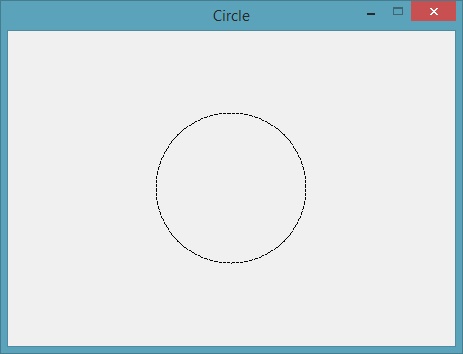
وقد أرفقت أيضا ملفات المشروع كاملة لسهولة المراجعة والتعلم.
تحياتي
المتواجدون خلال آخر ساعة · يتحدّث كل ٣٠ ثانية
جارٍ التحقق من المتواجدين…