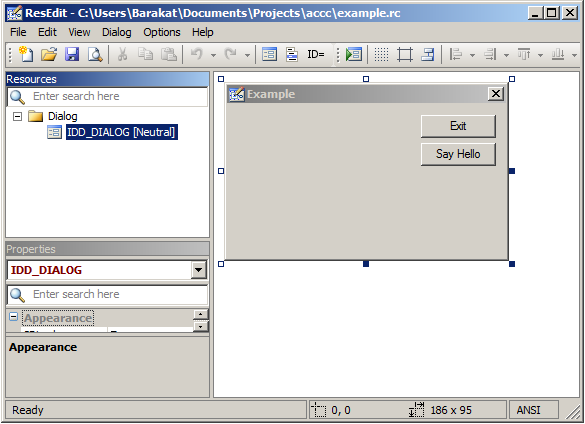
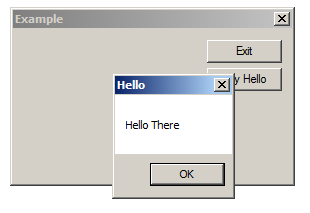
السلام عليكم ورحمة الله تعالى و بركاته :)
لقد برمجت تطبيق صغير بلغة الأسمبلي 32 بت ، لكن حينما أردت برمجة نفس البرنامج بلغة السي واجهتني مشكلة عويصة و هي تتجسد في كيفية عمل هذه الخطوات الثلاث :
أولا مناداة الدالة GetModuleHandle ...
ثم مناداة الدالة DialogBoxParam ...
وفي الأخير ، مناداة الدالة ExitProcess ...
إليكم المثال :lol: ،،،
.486
.model flat,stdcall ;; 32 bit Memory Model
option casemap:none ;; case sensitive
include windows.inc ;; for Win Api Functions
include kernel32.inc ;; necessary Header File
include user32.inc ;; necessary Header File
includelib user32.lib    ;; Calling User32 Library
includelib kernel32.lib ;; Calling Kernel32 Library
.data	  ;; Data Section
;; Space		   EQU		  20h ;; 32
;; Enter (\n)	  EQU		  0Dh ;; 10
DialogWindow	    DB		  "TEST",0 ;; The ID Name of my Test.res
WhenClosed		  DB		  20h,20h,20h,20h,"Thanks for using my Application",13,10,13,10
				    DB		  20h,20h,20h,20h,20h,20h,20h,20h,20h,20h,20h,20h,20h,20h,20h,20h,20h,20h,20h
				    DB		  "By the Hidden Ghost <img src='http://www.rohitab.com/discuss/public/style_emoticons/<#EMO_DIR#>/smile.png' class='bbc_emoticon' alt=':)' />",0
MessageBoxCaption   DB		  "Thanks From The Hidden Ghost",0
SendMySpecialText   DB		  "I believe I can fly, I believe I can Touch the Sky !!!",0
SendMyOldText	   DB		  "Welcome to the Hidden Ghost Application",0
CreatedByHamza	  DB		  "Created By Hamza Qdider",0
GetText			 DB		  100 DUP(0) ;; for getting the Caption of the Group-Box Control - ID 2014 -
										   ;; char GetText[100];

.code  ;; Code Section
WinProcedure PROTO :DWORD,:DWORD,:DWORD,:DWORD ;; Declaration of My Window Procedure
begin: ;;;;;;;;;;;;;;;;;;;;;;; Start of Program ;;;;;;;;;;;;;;;;;;;;;;;;;;;;
invoke GetModuleHandle,0 ;; Like Loading Test.res in My program
invoke DialogBoxParam,eax,addr DialogWindow,0,addr WinProcedure,0 ;; the Handle of my dialog is stored in eax for showing my dialog form
invoke ExitProcess,0 ;; Like return 0 in C Language
WinProcedure PROC hwnd:DWORD,messages:DWORD,wparam:DWORD,lparam:DWORD ;; My Window Procedure
;;;;;;;;;;;;;;;;;;;;;;;;; Wparam Story ;;;;;;;;;;;;;;;;;;;;;;;;;;
;; When we have an event, each event, Like Clicking on		 ;;
;; Command Button or some thing else, this event is stored	 ;;
;; in Wparam .Is not the event but the ID was stored in Wparam ;;
;;;;;;;;;;;;;;;;;;;;;;;;;;;;;;;;;;;;;;;;;;;;;;;;;;;;;;;;;;;;;;;;;
.if messages == WM_COMMAND ;; if we have a click on Command Button
	 mov eax,wparam ;; store the Command Button ID in eax

.if eax == 2013 ;; if eax = the ID of my Only Command Button which is ID 2013

    invoke SetDlgItemText,hwnd,2014,addr SendMySpecialText ;; write a text in ID : 2014
    invoke SetDlgItemText,hwnd,1,addr CreatedByHamza ;; Write a text in ID 1 which is the Label
    ret ;; return

.endif

.endif
.if messages == WM_MOUSEMOVE ;; if we have a Mouse Mouvement

  invoke GetDlgItemText,hwnd,2014,addr GetText,LENGTHOF SendMyOldText ;; Getting the text of the ID 2014 and store it in GetText Variable, with a length same as SendMyOldText Variable
  mov edx,DWORD PTR[GetText] ;; Store the text in edx register
  cmp edx,DWORD PTR[SendMyOldText] ;; Comparing the Same Text with the text stored in edx
  jne Write ;; if isn't the same goto Write Label and Changing the Value of each ID
  jmp return ;; if is the same goto return Label - nothing do -

  Write:

  invoke SetDlgItemText,hwnd,1,addr SendMyOldText ;; Change the text of the Label - ID 1 -
  invoke SetDlgItemText,hwnd,2014,addr SendMyOldText ;; Change the text of the Group-Box Control - ID 2014 -

  return : ret
.endif
.if messages == WM_CLOSE ;; if we have a click on the Red X hhhhh
    invoke MessageBox,0,addr WhenClosed,addr MessageBoxCaption,MB_OK ;; Show this Message
invoke EndDialog,hwnd,0 ;; End the Dialog Sir !!!
ret

.endif
xor eax,eax ;; eax = 0
ret
WinProcedure endp ;; End of My Window Procedure
end begin ;;;;;;;;;;;;;;;;;;;;; End of Program ;;;;;;;;;;;;;;;;;;;;;;;;;;
أريد أن أبرمج نفس البرنامج بلغة السي،،، :D
خلاصة الموضوع أنني أريد معرفة طريقة دمج ملف الرسورس مع السورس كود و من تم المناداة على نافذة الحوار من خلال GetModuleHandle و DialogBoxParam ... كما نفعل في لغة الأسمبلي ،،،
C:\MASM32\BIN\Cvtres.exe /machine:ix86 Test.res

C:\Masm32\Bin\ML.EXE /c /coff /Cp /nologo /I"C:\Masm32\Include" TheHiddenGhostApplication.asm

C:\Masm32\Bin\LINK.EXE /SUBSYSTEM:WINDOWS /RELEASE /VERSION:4.0 /LIBPATH:"C:\Masm32\Lib" TheHiddenGhostApplication.obj Test.obj
في انتظار الإجابة ،،، :P