برنامج ساعة الحائط - لسطح مكتب الويندوز بالسورس كود !
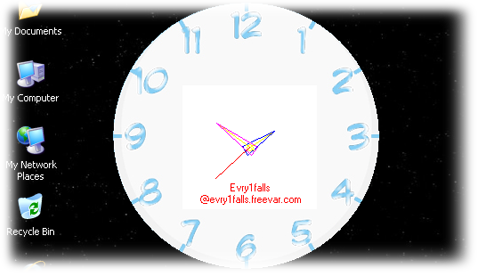
السورس كود
Option Explicit
'===================================================
'Analog Clock
'--------------------------------------------------
'Creates a round(circle) shaped form
'and draws H, M, S indicators
'I made it easy to understand for VB6.0 beginers
'--------------------------------------------------
'Author: Evry1falls
'Date: 2013
'Visit : http://vb6access2003.blogspot.com
'All lines of code are explained in the Blog, Visit :
'http://vb6access2003.blogspot.com/2013/02/VB6-Analog-Clock.html
'--------------------------------------------------
'Reference:
'Larry Serflaten, Dipak Auddy
'Everything
'Google : evry1falls
'===================================================
'API to create windowless form
Private Declare Function SetWindowRgn Lib "user32" (ByVal hwnd As Long, _
ByVal hRgn As Long, _
ByVal bRedraw As Boolean) As Long
Private Declare Function CreateEllipticRgn Lib "gdi32" (ByVal X1 As Long, _
ByVal Y1 As Long, _
ByVal X2 As Long, _
ByVal Y2 As Long) As Long
Private Declare Function DeleteObject Lib "gdi32" (ByVal hObject As Long) As Long

'API to move windowless form
Private Const HTCAPTION As Long = 2
Private Const WM_NCLBUTTONDOWN As Long = &HA1
Private Declare Function SendMessage Lib "user32" Alias "SendMessageA" (ByVal hwnd As Long, _
ByVal wMsg As Long, _
ByVal wParam As Long, _
lParam As Any) As Long
Private Declare Function ReleaseCapture Lib "user32" () As Long

'The length of H,M,S indicators...
Private Const hWidth As Long = 1100
Private Const mWidth As Long = 1400
Private Const sWidth As Long = 1500

'Globals to store canvas(Picture Object)'s
'center co-ord.
Private X As Single
Private Y As Single
Private PI2 As Double
Private Sub Form_Load()
Dim RGN As Long
' PI / 2
PI2 = Atn(1) * 2
With Me
.BackColor = vbWhite
.Width = Me.Width
.Height = Me.Height
'Let's save the points...
X = .Width / 2
Y = .Height / 2
End With 'me
Label1.Caption = "Evry1falls" & vbCrLf & "@evry1falls.freevar.com"
'Make a round windowless! form...
RGN = CreateEllipticRgn(0, 0, 310, 310)
Call SetWindowRgn(Me.hwnd, RGN, True)
Call DeleteObject(RGN)
End Sub
Private Sub Form_MouseDown(Button As Integer, _
Shift As Integer, _
X As Single, _
Y As Single)
'Moving the form using mouse button from any location on the form held with mouse
If Button = 1 Then
ReleaseCapture
SendMessage Me.hwnd, WM_NCLBUTTONDOWN, HTCAPTION, ByVal 0&
End If
End Sub
Private Sub Form_Unload(Cancel As Integer)
'Stop the timer
Timer1.Enabled = False
End Sub
Private Sub Label1_MouseDown(Button As Integer, _
Shift As Integer, _
X As Single, _
Y As Single)
'Move form when drag the label
Form_MouseDown Button, Shift, X, Y
End Sub
Private Sub lblClose_Click()
'Exit App.
Unload Me
End Sub
Private Sub Timer1_Timer()
Dim Angle, PX, PY, OX, OY, WX, WY
Me.Cls
'Get Hr Angle...
Angle = (180 - (Hour(Now) * 6) * 5 - (Minute(Now) * 6) / 12) * 3.1415 / 180
'Hr. point
PX = X + (hWidth * Sin(Angle))
PY = Y + (hWidth * Cos(Angle))
'Opposite side
OX = X - (Sin(Angle) * 100)
OY = Y - (Cos(Angle) * 100)
'Hand width
WX = Sin(Angle + PI2) * 90
WY = Cos(Angle + PI2) * 90
'Draw Hr. hand...
Me.Line (OX, OY)-(PX, PY), vbYellow ' From opposite side to pointer
Me.Line -(OX + WX, OY + WY), vbBlue ' To one opposite side
Me.Line -(OX - WX, OY - WY), vbBlue ' To other opposite side
Me.Line -(PX, PY), vbBlue ' Back to pointer
Me.Circle (X, Y), 50, vbYellow
'Get Min Angle...
Angle = (180 - (Minute(Now) * 6)) * 3.1415 / 180
'Min point
PX = X + (mWidth * Sin(Angle))
PY = Y + (mWidth * Cos(Angle))
'Opposite side
OX = X - (Sin(Angle) * 100)
OY = Y - (Cos(Angle) * 100)
'Hand width
WX = Sin(Angle + PI2) * 90
WY = Cos(Angle + PI2) * 90
'Draw Min. hand...
Me.Line (OX, OY)-(PX, PY), vbYellow ' From opposite side to pointer
Me.Line -(OX + WX, OY + WY), vbMagenta ' To one opposite side
Me.Line -(OX - WX, OY - WY), vbMagenta ' To other opposite side
Me.Line -(PX, PY), vbMagenta ' Back to pointer
Me.Circle (X, Y), 50, vbYellow
'Get Sec Angle...
Angle = (180 - (Second(Now) * 6)) * 3.1415 / 180
'Draw Sec. hand...
Me.Line (X, Y)-(X + (sWidth * Sin(Angle)), Y + (sWidth * Cos(Angle))), vbRed
End Sub
الشرح + السورس كود من هنا