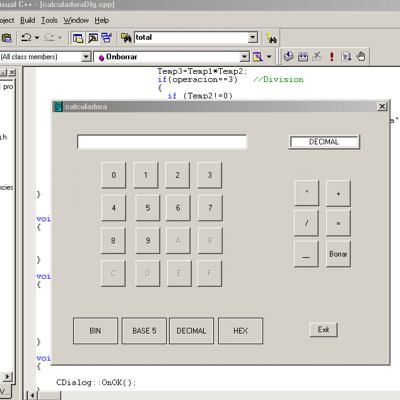
اليوم جايبلكم اداة تشبة الحاسبة العلمية ولكن تقوم بتحويل ( BINARY , DECIMAL, HEXADECIMAL, ,) هذة الانواع فيما بينها والاهم انها مكتوبة بلغة السي++
BINARY=النظام الثنائي
DECIMAL=نظام العد العشري
HEXADECIMAL=نظام العد الستعشري
//{{NO_DEPENDENCIES}}
// Microsoft Developer Studio generated include file.
// Used by calculadora.rc
//
#define IDM_ABOUTBOX                    0x0010
#define IDD_ABOUTBOX                    100
#define IDS_ABOUTBOX                    101
#define IDD_CALCULADORA_DIALOG          102
#define IDR_MAINFRAME                   128
#define idc_1                           1000
#define idc_2                           1001
#define idc_3                           1002
#define idc_4                           1003
#define idc_5                           1004
#define idc_6                           1005
#define idc_7                           1006
#define idc_8                           1007
#define idc_9                           1008
#define idc_0                           1009
#define idc_A                           1010
#define idc_B                           1011
#define idc_C                           1012
#define idc_D                           1013
#define idc_E                           1014
#define idc_F                           1015
#define idc_bin                         1016
#define idc_base                        1017
#define idc_decimal                     1018
#define idc_hex                         1019
#define idc_borrar                      1020
#define idc_salir                       1021
#define idc_suma                        1022
#define idc_resta                       1023
#define idc_igual                       1024
#define idc_resultado                   1025
#define idc_multiplicacion              1026
#define idc_division                    1027
#define idc_tipo                        1028

// Next default values for new objects
//
#ifdef APSTUDIO_INVOKED
#ifndef APSTUDIO_READONLY_SYMBOLS
#define _APS_NEXT_RESOURCE_VALUE        129
#define _APS_NEXT_COMMAND_VALUE         32771
#define _APS_NEXT_CONTROL_VALUE         1026
#define _APS_NEXT_SYMED_VALUE           101
#endif
#endif
// calculadora.h : main header file for the CALCULADORA application
//
#if !defined(AFX_CALCULADORA_H__1BA7B970_6BD6_4476_90E7_93EF9D49F5D1__INCLUDED_)
#define AFX_CALCULADORA_H__1BA7B970_6BD6_4476_90E7_93EF9D49F5D1__INCLUDED_
#if _MSC_VER > 1000
#pragma once
#endif // _MSC_VER > 1000
#ifndef __AFXWIN_H__
#error include 'stdafx.h' before including this file for PCH
#endif
#include "resource.h" // main symbols
/////////////////////////////////////////////////////////////////////////////
// CCalculadoraApp:
// See calculadora.cpp for the implementation of this class
//
class CCalculadoraApp : public CWinApp
{
public:
CCalculadoraApp();
// Overrides
// ClassWizard generated virtual function overrides
//{{AFX_VIRTUAL(CCalculadoraApp)
public:
virtual BOOL InitInstance();
//}}AFX_VIRTUAL
// Implementation
//{{AFX_MSG(CCalculadoraApp)
// NOTE - the ClassWizard will add and remove member functions here.
// DO NOT EDIT what you see in these blocks of generated code !
//}}AFX_MSG
DECLARE_MESSAGE_MAP()
};
/////////////////////////////////////////////////////////////////////////////
//{{AFX_INSERT_LOCATION}}
// Microsoft Visual C++ will insert additional declarations immediately before the previous line.
#endif // !defined(AFX_CALCULADORA_H__1BA7B970_6BD6_4476_90E7_93EF9D49F5D1__INCLUDED_); CLW file contains information for the MFC ClassWizard [General Info] Version=1 LastClass=CCalculadoraApp LastTemplate=CDialog NewFileInclude1=#include "stdafx.h" NewFileInclude2=#include "calculadora.h" ClassCount=3 Class1=CCalculadoraApp Class2=CCalculadoraDlg Class3=CAboutDlg ResourceCount=6 Resource1=IDD_ABOUTBOX Resource2=IDR_MAINFRAME Resource3=IDD_CALCULADORA_DIALOG Resource4=IDD_DIALOG1 Resource5=IDD_ABOUTBOX (Spanish (Modern)) Resource6=IDD_CALCULADORA_DIALOG (Spanish (Modern)) [CLS:CCalculadoraApp] Type=0 HeaderFile=calculadora.h ImplementationFile=calculadora.cpp Filter=N [CLS:CCalculadoraDlg] Type=0 HeaderFile=calculadoraDlg.h ImplementationFile=calculadoraDlg.cpp Filter=D BaseClass=CDialog VirtualFilter=dWC LastObject=idc_0 [CLS:CAboutDlg] Type=0 HeaderFile=calculadoraDlg.h ImplementationFile=calculadoraDlg.cpp Filter=D BaseClass=CDialog VirtualFilter=dWC [DLG:IDD_ABOUTBOX] Type=1 ControlCount=4 Control1=IDC_STATIC,static,1342177283 Control2=IDC_STATIC,static,1342308352 Control3=IDC_STATIC,static,1342308352 Control4=IDOK,button,1342373889 Class=CAboutDlg [DLG:IDD_CALCULADORA_DIALOG] Type=1 ControlCount=3 Control1=IDOK,button,1342242817 Control2=IDCANCEL,button,1342242816 Control3=IDC_STATIC,static,1342308352 Class=CCalculadoraDlg [DLG:IDD_CALCULADORA_DIALOG (Spanish (Modern))] Type=1 Class=CCalculadoraDlg ControlCount=29 Control1=idc_borrar,button,1342242816 Control2=idc_salir,button,1342242816 Control3=idc_1,button,1342242816 Control4=idc_2,button,1342242816 Control5=idc_3,button,1342242816 Control6=idc_4,button,1342242816 Control7=idc_5,button,1342242816 Control8=idc_6,button,1342242816 Control9=idc_7,button,1342242816 Control10=idc_8,button,1342242816 Control11=idc_9,button,1342242816 Control12=idc_0,button,1342242816 Control13=idc_A,button,1342242816 Control14=idc_B,button,1342242816 Control15=idc_C,button,1342242816 Control16=idc_D,button,1342242816 Control17=idc_E,button,1342242816 Control18=idc_F,button,1342242816 Control19=idc_bin,button,1342275584 Control20=idc_base,button,1342275584 Control21=idc_decimal,button,1342275584 Control22=idc_hex,button,1342275584 Control23=idc_suma,button,1342242816 Control24=idc_resta,button,1342242816 Control25=idc_igual,button,1342242816 Control26=idc_resultado,edit,1350631554 Control27=idc_multiplicacion,button,1342242816 Control28=idc_division,button,1342242816 Control29=idc_tipo,edit,1350639753 [DLG:IDD_ABOUTBOX (Spanish (Modern))] Type=1 Class=CAboutDlg ControlCount=4 Control1=IDC_STATIC,static,1342177283 Control2=IDC_STATIC,static,1342308480 Control3=IDC_STATIC,static,1342308352 Control4=IDOK,button,1342373889 [DLG:IDD_DIALOG1] Type=1 Class=? ControlCount=2 Control1=IDOK,button,1342242817 Control2=IDCANCEL,button,1342242816
// calculadora.h : main header file for the CALCULADORA application
//

#if !defined(AFX_CALCULADORA_H__1BA7B970_6BD6_4476_90E7_93EF9D49F5D1__INCLUDED_)
#define AFX_CALCULADORA_H__1BA7B970_6BD6_4476_90E7_93EF9D49F5D1__INCLUDED_

#if _MSC_VER > 1000
#pragma once
#endif // _MSC_VER > 1000

#ifndef __AFXWIN_H__
	#error include 'stdafx.h' before including this file for PCH
#endif

#include "resource.h"		// main symbols

/////////////////////////////////////////////////////////////////////////////
// CCalculadoraApp:
// See calculadora.cpp for the implementation of this class
//

class CCalculadoraApp : public CWinApp
{
public:
	CCalculadoraApp();

// Overrides
	// ClassWizard generated virtual function overrides
	//{{AFX_VIRTUAL(CCalculadoraApp)
	public:
	virtual BOOL InitInstance();
	//}}AFX_VIRTUAL

// Implementation

	//{{AFX_MSG(CCalculadoraApp)
		// NOTE - the ClassWizard will add and remove member functions here.
		//    DO NOT EDIT what you see in these blocks of generated code !
	//}}AFX_MSG
	DECLARE_MESSAGE_MAP()
};


/////////////////////////////////////////////////////////////////////////////

//{{AFX_INSERT_LOCATION}}
// Microsoft Visual C++ will insert additional declarations immediately before the previous line.

#endif // !defined(AFX_CALCULADORA_H__1BA7B970_6BD6_4476_90E7_93EF9D49F5D1__INCLUDED_)// calculadoraDlg.h : header file
//
#if !defined(AFX_CALCULADORADLG_H__06DFACA5_A664_49F6_846F_1BF54E143369__INCLUDED_)
#define AFX_CALCULADORADLG_H__06DFACA5_A664_49F6_846F_1BF54E143369__INCLUDED_
#if _MSC_VER > 1000
#pragma once
#endif // _MSC_VER > 1000
/////////////////////////////////////////////////////////////////////////////
// CCalculadoraDlg dialog
class CCalculadoraDlg : public CDialog
{
// Construction
public:
CCalculadoraDlg(CWnd* pParent = NULL); // standard constructor
int operacion,base;
char numero[30],numero2[30],resultado[30];
// Dialog Data
//{{AFX_DATA(CCalculadoraDlg)
enum { IDD = IDD_CALCULADORA_DIALOG };
CString m_resultado;
CString m_caption;
//}}AFX_DATA
// ClassWizard generated virtual function overrides
//{{AFX_VIRTUAL(CCalculadoraDlg)
protected:
virtual void DoDataExchange(CDataExchange* pDX); // DDX/DDV support
//}}AFX_VIRTUAL
// Implementation
protected:
HICON m_hIcon;
// Generated message map functions
//{{AFX_MSG(CCalculadoraDlg)
virtual BOOL OnInitDialog();
afx_msg void OnSysCommand(UINT nID, LPARAM lParam);
afx_msg void OnPaint();
afx_msg HCURSOR OnQueryDragIcon();
afx_msg void On0();
afx_msg void On1();
afx_msg void On2();
afx_msg void On3();
afx_msg void On4();
afx_msg void On5();
afx_msg void On6();
afx_msg void On7();
afx_msg void On8();
afx_msg void On9();
afx_msg void OnA();
afx_msg void OnB();
afx_msg void OnC();
afx_msg void OnD();
afx_msg void OnE();
afx_msg void OnF();
afx_msg void Onbin();
afx_msg void Onbase();
afx_msg void Ondecimal();
afx_msg void Onhex();
afx_msg void Onsalir();
afx_msg void Onsuma();
afx_msg void Onigual();
afx_msg void Onresta();
afx_msg void Onborrar();
afx_msg void Ondivision();
afx_msg void Onmultiplicacion();
//}}AFX_MSG
DECLARE_MESSAGE_MAP()
};
//{{AFX_INSERT_LOCATION}}
// Microsoft Visual C++ will insert additional declarations immediately before the previous line.
#endif // !defined(AFX_CALCULADORADLG_H__06DFACA5_A664_49F6_846F_1BF54E143369__INCLUDED_)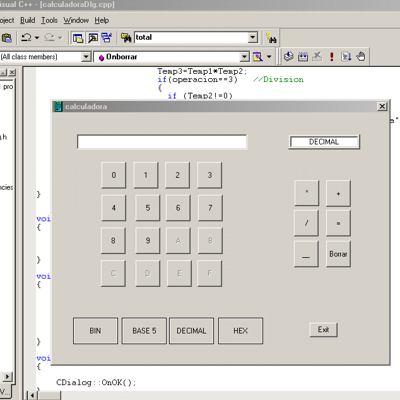

 ؟ الجواب :


 ، شكرا لك على التوضيح أخي