الفريق العربي للبرمجةأرشيف المنتديات · 2000 – 2023
نسخة أرشيفية للقراءة فقط — التسجيل والمشاركة مغلقان، والمحتوى محفوظ كما كان.

برنامج يطرح اسئلة للمستخدم .. ويعطينه النتيجة

بدأه kiubo في 22 أبريل 2012 · 4 رد · 796 مشاهدة · في JavaSE
مشاركة: واتساب X فيسبوك تيليجرام
#1 صاحب الموضوع

السلام عليكم ورحمة الله وبركاته ..

اريد عمل برنامج يتعامل مع اسئلة وااجوبة للمستخدم

الاسئلة نصيه والاجوبة تكون ب نعم او لا فقط

فمثلا عندما المستخدم نضع علامه على نعم على السؤال الاول تندرج تحته اسئله مختلفه عن اختيار ب لا بسؤال الاول...

فمثلا":

هل ذهب الطالب اليوم الى المدرسه ؟نعم

هل حضر الطالب حصة الرياضيات ؟نعم

انت طالب جيد ..

---------------------------------------------------------

هل ذهب الطالب اليوم الى المدرسه ؟نعم

هل حضرت الطالب حصة الرياضيات ؟لا

انت طالب غير جيد ..

------------------------------------------------------------

هل ذهب الطالب اليوم الى المدرسه ؟لا

لا تغب عن المدرسه مرة اخرى

وهنا الرسمة البيانية توضح ذلك....

طبعاً الهدف من المثال الفهم فقط :wink:
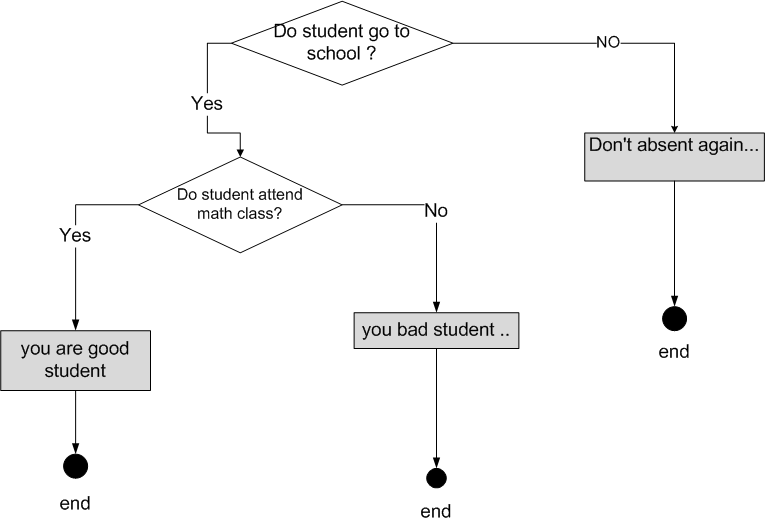
post-250413-030258500 1335094358_thumb.p

هذا يسمى expert system

لكن بالبرنامج اريد تطبيق الواجهة وكيفية سيرها اما ال core code الخاص ب expert system موجود بالغه اخرى تفهم الاجوبة , وتعطيني الحل النهائي بعد برمجتها طبعاً :wink: .. وهذا كله لايوجد مشاكل

مشكلتي الان اريد منهجيه معينه استطيع اتباعها لتمكين مااريد فعله بسهوله وفعالية .. في سير طرح الاسئله وفي اختيار المستخدم للأجوبه والتعامل معاها..

هذا الملف المصدري للكود

/*
 * To change this template, choose Tools | Templates
 * and open the template in the editor.
 */

/*
 * ques.java
 *
 * Created on Apr 22, 2012, 1:56:09 PM
 */

package testexam;

import javax.swing.JOptionPane;

/**
 *
 * @author Home
 */
public class ques extends javax.swing.JFrame {

    /** Creates new form ques */
    public ques() {
        initComponents();
    }

    /** This method is called from within the constructor to
     * initialize the form.
     * WARNING: Do NOT modify this code. The content of this method is
     * always regenerated by the Form Editor.
     */
    @SuppressWarnings("unchecked")
    // <editor-fold defaultstate="collapsed" desc="Generated Code">
    private void initComponents() {

        buttonGroup1 = new javax.swing.ButtonGroup();
        jPanel1 = new javax.swing.JPanel();
        no_radio = new javax.swing.JRadioButton();
        yes_radio = new javax.swing.JRadioButton();
        question1_label = new javax.swing.JLabel();
        ok_button = new javax.swing.JToggleButton();

        setDefaultCloseOperation(javax.swing.WindowConstants.EXIT_ON_CLOSE);
        setTitle("Question program");

        jPanel1.setBorder(javax.swing.BorderFactory.createTitledBorder("questions"));

        buttonGroup1.add(no_radio);
        no_radio.setText("no");

        buttonGroup1.add(yes_radio);
        yes_radio.setText("yes");

        question1_label.setText("Do student go to school ?");

        ok_button.setText("ok");
        ok_button.addMouseListener(new java.awt.event.MouseAdapter() {
            public void mouseClicked(java.awt.event.MouseEvent evt) {
                ok_buttonMouseClicked(evt);
            }
        });
        ok_button.addActionListener(new java.awt.event.ActionListener() {
            public void actionPerformed(java.awt.event.ActionEvent evt) {
                ok_buttonActionPerformed(evt);
            }
        });

        javax.swing.GroupLayout jPanel1Layout = new javax.swing.GroupLayout(jPanel1);
        jPanel1.setLayout(jPanel1Layout);
        jPanel1Layout.setHorizontalGroup(
            jPanel1Layout.createParallelGroup(javax.swing.GroupLayout.Alignment.LEADING)
            .addGroup(javax.swing.GroupLayout.Alignment.TRAILING, jPanel1Layout.createSequentialGroup()
                .addContainerGap(57, Short.MAX_VALUE)
                .addComponent(question1_label, javax.swing.GroupLayout.PREFERRED_SIZE, 263, javax.swing.GroupLayout.PREFERRED_SIZE)
                .addContainerGap())
            .addGroup(jPanel1Layout.createSequentialGroup()
                .addGap(111, 111, 111)
                .addComponent(yes_radio)
                .addGap(18, 18, 18)
                .addComponent(no_radio)
                .addContainerGap(115, Short.MAX_VALUE))
            .addGroup(javax.swing.GroupLayout.Alignment.TRAILING, jPanel1Layout.createSequentialGroup()
                .addContainerGap(240, Short.MAX_VALUE)
                .addComponent(ok_button)
                .addGap(47, 47, 47))
        );

        jPanel1Layout.linkSize(javax.swing.SwingConstants.HORIZONTAL, new java.awt.Component[] {no_radio, yes_radio});

        jPanel1Layout.setVerticalGroup(
            jPanel1Layout.createParallelGroup(javax.swing.GroupLayout.Alignment.LEADING)
            .addGroup(jPanel1Layout.createSequentialGroup()
                .addGap(26, 26, 26)
                .addComponent(question1_label)
                .addGap(18, 18, 18)
                .addGroup(jPanel1Layout.createParallelGroup(javax.swing.GroupLayout.Alignment.BASELINE)
                    .addComponent(yes_radio)
                    .addComponent(no_radio))
                .addGap(29, 29, 29)
                .addComponent(ok_button)
                .addContainerGap(119, Short.MAX_VALUE))
        );

        javax.swing.GroupLayout layout = new javax.swing.GroupLayout(getContentPane());
        getContentPane().setLayout(layout);
        layout.setHorizontalGroup(
            layout.createParallelGroup(javax.swing.GroupLayout.Alignment.LEADING)
            .addGroup(layout.createSequentialGroup()
                .addContainerGap()
                .addComponent(jPanel1, javax.swing.GroupLayout.DEFAULT_SIZE, javax.swing.GroupLayout.DEFAULT_SIZE, Short.MAX_VALUE)
                .addContainerGap())
        );
        layout.setVerticalGroup(
            layout.createParallelGroup(javax.swing.GroupLayout.Alignment.LEADING)
            .addGroup(layout.createSequentialGroup()
                .addContainerGap()
                .addComponent(jPanel1, javax.swing.GroupLayout.DEFAULT_SIZE, javax.swing.GroupLayout.DEFAULT_SIZE, Short.MAX_VALUE)
                .addContainerGap())
        );

        pack();
    }// </editor-fold>

    private void ok_buttonActionPerformed(java.awt.event.ActionEvent evt) {

    if ( yes_radio.isSelected()) {


System.out.println("Q1:yes");

question1_label.setText("");
buttonGroup1.clearSelection();
question1_label.setText("Q2:Do student attend math class?");

if ( yes_radio.isSelected()) {
    System.out.println("Q2:yes");
    JOptionPane.showMessageDialog(null,"you are good student ..");

        }else{
    System.out.println("Q2:no");
         JOptionPane.showMessageDialog(null,"you are bad student ..");
        }

    } else {
                if ( no_radio.isSelected()) {
System.out.println("Q1:no");
JOptionPane.showMessageDialog(null,"Don't absent again... ");
                }
            }

        // TODO add your handling code here:
    }

    private void ok_buttonMouseClicked(java.awt.event.MouseEvent evt) {
        // TODO add your handling code here:
    }

    /**
    * @param args the command line arguments
    */
    public static void main(String args[]) {
        java.awt.EventQueue.invokeLater(new Runnable() {
            public void run() {
                new ques().setVisible(true);
            }
        });
    }

    // Variables declaration - do not modify
    private javax.swing.ButtonGroup buttonGroup1;
    private javax.swing.JPanel jPanel1;
    private javax.swing.JRadioButton no_radio;
    private javax.swing.JToggleButton ok_button;
    private javax.swing.JLabel question1_label;
    private javax.swing.JRadioButton yes_radio;
    // End of variables declaration

}

الكود يوجد به مشاكل غير منطقية وغير صحيحه ...

اخواتي شاركوني التفكير ..

بالمناسبه المشكله فقط في طرح الاسئله وطريقة سيرها فقط التفاصيل الاخرى خاصه ب expert system
المرفقات
questioln example.png

كن مثل طابع البريد ، التصق بهدفك...حتى تصل الى هناك!

#2

استخدمي تراكيب البيانات أختي

اقترح علي الشجرة الثنائية مادامت أسئلتك كلها نعم أو لا

تحياتي

1
حزمة المحرك الإصدارة 0.8

أي أحد يجد أني ظلمته فليراسلني

وبإذن الله لو كان له حق سيأخذه

728x90.png

#3
علاء الصالحي كتب:

استخدمي تراكيب البيانات أختي

اقترح علي الشجرة الثنائية مادامت أسئلتك كلها نعم أو لا

تحياتي

فقط اريد عرض الاسئله .. وتحديد الاجابه

استخدمت ال layered pane

(تقبل بأن يكون الcomponert فوق بعض واتحكم بعرضها ب setVisibe()l لكل JRadio button)

ووضعت كل سؤال له JRadio button خاص فيه ..

هذا الكود الخاص به

وضعت زر اضافي كي يقوم بااعادة الأسئله مره اخرى..

/*
* To change this template, choose Tools | Templates
* and open the template in the editor.
*/

/*
* ques.java
*
* Created on Apr 22, 2012, 1:56:09 PM
*/

package testexam;

import javax.swing.JOptionPane;
import javax.swing.JRadioButton;

/**
*
* @author Home
*/
public class ques extends javax.swing.JFrame {


    private javax.swing.JRadioButton radio;
    /** Creates new form ques */
    public ques() {
        initComponents();
yes_radio2.setVisible(false);
no_radio2.setVisible(false);
jButton2.setVisible(false);

        }

    /** This method is called from within the constructor to
* initialize the form.
* WARNING: Do NOT modify this code. The content of this method is
* always regenerated by the Form Editor.
*/
    @SuppressWarnings("unchecked")
    // <editor-fold defaultstate="collapsed" desc="Generated Code">
    private void initComponents() {

        buttonGroup1 = new javax.swing.ButtonGroup();
        buttonGroup2 = new javax.swing.ButtonGroup();
        buttonGroup3 = new javax.swing.ButtonGroup();
        jPanel1 = new javax.swing.JPanel();
        question1_label = new javax.swing.JLabel();
        jLayeredPane1 = new javax.swing.JLayeredPane();
        no_radio1 = new javax.swing.JRadioButton();
        yes_radio1 = new javax.swing.JRadioButton();
        yes_radio2 = new javax.swing.JRadioButton();
        no_radio2 = new javax.swing.JRadioButton();
        jButton1 = new javax.swing.JButton();
        jButton2 = new javax.swing.JButton();

        setDefaultCloseOperation(javax.swing.WindowConstants.EXIT_ON_CLOSE);
        setTitle("Question program");

        jPanel1.setBorder(javax.swing.BorderFactory.createTitledBorder("questions"));

        question1_label.setText("Do student go to school ?");

        buttonGroup1.add(no_radio1);
        no_radio1.setText("no");
        no_radio1.addActionListener(new java.awt.event.ActionListener() {
            public void actionPerformed(java.awt.event.ActionEvent evt) {
                no_radio1ActionPerformed(evt);
            }
        });
        no_radio1.setBounds(60, 0, 50, 23);
        jLayeredPane1.add(no_radio1, javax.swing.JLayeredPane.DEFAULT_LAYER);

        buttonGroup1.add(yes_radio1);
        yes_radio1.setText("yes");
        yes_radio1.setBounds(60, 20, 60, 23);
        jLayeredPane1.add(yes_radio1, javax.swing.JLayeredPane.DEFAULT_LAYER);

        buttonGroup2.add(yes_radio2);
        yes_radio2.setText("yes");
        yes_radio2.setBounds(60, 20, 50, 23);
        jLayeredPane1.add(yes_radio2, javax.swing.JLayeredPane.DEFAULT_LAYER);

        buttonGroup2.add(no_radio2);
        no_radio2.setText("no");
        no_radio2.setBounds(60, 0, 60, 23);
        jLayeredPane1.add(no_radio2, javax.swing.JLayeredPane.DEFAULT_LAYER);

        jButton1.setText("Ok");
        jButton1.addActionListener(new java.awt.event.ActionListener() {
            public void actionPerformed(java.awt.event.ActionEvent evt) {
                jButton1ActionPerformed(evt);
            }
        });

        jButton2.setText("again");
        jButton2.addActionListener(new java.awt.event.ActionListener() {
            public void actionPerformed(java.awt.event.ActionEvent evt) {
                jButton2ActionPerformed(evt);
            }
        });

        javax.swing.GroupLayout jPanel1Layout = new javax.swing.GroupLayout(jPanel1);
        jPanel1.setLayout(jPanel1Layout);
        jPanel1Layout.setHorizontalGroup(
            jPanel1Layout.createParallelGroup(javax.swing.GroupLayout.Alignment.LEADING)
            .addGroup(jPanel1Layout.createSequentialGroup()
                .addContainerGap()
                .addGroup(jPanel1Layout.createParallelGroup(javax.swing.GroupLayout.Alignment.LEADING)
                    .addGroup(jPanel1Layout.createSequentialGroup()
                        .addComponent(jLayeredPane1, javax.swing.GroupLayout.PREFERRED_SIZE, 194, javax.swing.GroupLayout.PREFERRED_SIZE)
                        .addPreferredGap(javax.swing.LayoutStyle.ComponentPlacement.RELATED)
                        .addComponent(jButton1)
                        .addContainerGap(54, Short.MAX_VALUE))
                    .addGroup(javax.swing.GroupLayout.Alignment.TRAILING, jPanel1Layout.createSequentialGroup()
                        .addComponent(question1_label, javax.swing.GroupLayout.PREFERRED_SIZE, 263, javax.swing.GroupLayout.PREFERRED_SIZE)
                        .addContainerGap())
                    .addGroup(javax.swing.GroupLayout.Alignment.TRAILING, jPanel1Layout.createSequentialGroup()
                        .addComponent(jButton2)
                        .addContainerGap())))
        );
        jPanel1Layout.setVerticalGroup(
            jPanel1Layout.createParallelGroup(javax.swing.GroupLayout.Alignment.LEADING)
            .addGroup(jPanel1Layout.createSequentialGroup()
                .addComponent(jButton2)
                .addGap(3, 3, 3)
                .addComponent(question1_label)
                .addPreferredGap(javax.swing.LayoutStyle.ComponentPlacement.UNRELATED)
                .addGroup(jPanel1Layout.createParallelGroup(javax.swing.GroupLayout.Alignment.LEADING)
                    .addGroup(jPanel1Layout.createSequentialGroup()
                        .addGap(41, 41, 41)
                        .addComponent(jButton1))
                    .addComponent(jLayeredPane1, javax.swing.GroupLayout.PREFERRED_SIZE, 58, javax.swing.GroupLayout.PREFERRED_SIZE))
                .addContainerGap(137, Short.MAX_VALUE))
        );

        javax.swing.GroupLayout layout = new javax.swing.GroupLayout(getContentPane());
        getContentPane().setLayout(layout);
        layout.setHorizontalGroup(
            layout.createParallelGroup(javax.swing.GroupLayout.Alignment.LEADING)
            .addGroup(layout.createSequentialGroup()
                .addContainerGap()
                .addComponent(jPanel1, javax.swing.GroupLayout.DEFAULT_SIZE, javax.swing.GroupLayout.DEFAULT_SIZE, Short.MAX_VALUE)
                .addContainerGap())
        );
        layout.setVerticalGroup(
            layout.createParallelGroup(javax.swing.GroupLayout.Alignment.LEADING)
            .addGroup(layout.createSequentialGroup()
                .addContainerGap()
                .addComponent(jPanel1, javax.swing.GroupLayout.DEFAULT_SIZE, javax.swing.GroupLayout.DEFAULT_SIZE, Short.MAX_VALUE)
                .addContainerGap())
        );

        pack();
    }// </editor-fold>

    private void no_radio1ActionPerformed(java.awt.event.ActionEvent evt) {

    }


    private void jButton1ActionPerformed(java.awt.event.ActionEvent evt) {

    if ( yes_radio1.isSelected()) {


System.out.println("Q1:yes");

question1_label.setText("");
buttonGroup1.clearSelection();
no_radio1.setVisible(false);
 yes_radio1.setVisible(false);
 no_radio2.setVisible(true);
 yes_radio2.setVisible(true);
question1_label.setText("Q2:Do student attend math class?");

        }
     if (no_radio1.isSelected()) {

System.out.println("Q1:no");
JOptionPane.showMessageDialog(null,"Don't absent again... ");
                buttonGroup1.clearSelection();
                question1_label.setText("end");
                no_radio1.setVisible(false);
 yes_radio1.setVisible(false);
                jButton1.setVisible(false);
jButton2.setVisible(true);
            }
        if (yes_radio2.isSelected()) {


    System.out.println("Q2:yes");
    JOptionPane.showMessageDialog(null,"you are good student ..");
buttonGroup2.clearSelection();
question1_label.setText("end");
no_radio2.setVisible(false);
 yes_radio2.setVisible(false);
jButton1.setVisible(false);
jButton2.setVisible(true);

        }
        if (no_radio2.isSelected()) {
    System.out.println("Q2:no");
         JOptionPane.showMessageDialog(null,"you are bad student ..");
buttonGroup2.clearSelection();
question1_label.setText("end");
jButton1.setVisible(false);
no_radio2.setVisible(false);
 yes_radio2.setVisible(false);
jButton1.setVisible(false);
jButton2.setVisible(true);


        }


        // TODO add your handling code here:
    }

    private void jButton2ActionPerformed(java.awt.event.ActionEvent evt) {
question1_label.setText("Do student go to school ?");
        yes_radio2.setVisible(false);
     no_radio2.setVisible(false);
      no_radio1.setVisible(true);
 yes_radio1.setVisible(true);
 jButton2.setVisible(false);
jButton1.setVisible(true);

        // TODO add your handling code here:
    }

    /**
* @param args the command line arguments
*/
    public static void main(String args[]) {
        java.awt.EventQueue.invokeLater(new Runnable() {
            public void run() {
                new ques().setVisible(true);
            }
        });
    }

    // Variables declaration - do not modify
    private javax.swing.ButtonGroup buttonGroup1;
    private javax.swing.ButtonGroup buttonGroup2;
    private javax.swing.ButtonGroup buttonGroup3;
    private javax.swing.JButton jButton1;
    private javax.swing.JButton jButton2;
    private javax.swing.JLayeredPane jLayeredPane1;
    private javax.swing.JPanel jPanel1;
    private javax.swing.JRadioButton no_radio1;
    private javax.swing.JRadioButton no_radio2;
    private javax.swing.JLabel question1_label;
    private javax.swing.JRadioButton yes_radio1;
    private javax.swing.JRadioButton yes_radio2;
    // End of variables declaration

}

الكود شغال بمثل مااريد..ربما الطريقة التي برمجت فيها غير صحيحه او غير فعاله... لذا ارائكم مهمه بانسبة الي

تراكيب البيانات ..قلت بردي السابق اني استخدمت لغة او اداة او script ثانيه وهي Java expert system shell وهي المسؤوله عن فهم هذة القرارت والنتيجه النهائيه ..

تم تعديل هذه المشاركة بواسطة kiubo في 24 أبريل 2012 في 10:21

كن مثل طابع البريد ، التصق بهدفك...حتى تصل الى هناك!

#4

بإمكانك أن تستخدمي CardLayout

ابحثي عنها في المنتدى وستجدي الكثير إن شاء الله

layeredPane تستخدم عندما تحتاجي فعلاً لأن يكون لديك كذا طبقة في العرض

تحياتي

حزمة المحرك الإصدارة 0.8

أي أحد يجد أني ظلمته فليراسلني

وبإذن الله لو كان له حق سيأخذه

728x90.png

#5
علاء الصالحي كتب:

بإمكانك أن تستخدمي CardLayout

ابحثي عنها في المنتدى وستجدي الكثير إن شاء الله

layeredPane تستخدم عندما تحتاجي فعلاً لأن يكون لديك كذا طبقة في العرض

تحياتي

يعني

الفكره

مجموعة من ال JPanel

ثم نتحكم بظهورها ب CardLayout

او من خلال هذا السطر

CardLayout c1 =(CardLayout)(main.getLayout());
        c1.show(main,"card1");

عملت مثال صغير , واشتغلت معي ,,, موجود بالمرفقات لمن اردا الفائدة

لأن الامثلة الموجودة بالمنتدى لم تشتغل معي ....

التعامل مع JPanel غير سلس فمثلا تريد تحريك ال panel رقم 1 يتحرك لك ذو الرقم 2 على اعتبار ان لدينا panel 1 and panel 2

:mad:

هل من طريقة كا عمل قفل ل Jpanel محدد

اذن طريقتي سيئه للغايه :sleep:

الحمدلله اني وجدت الطريقة الجيده بهذا المنتدى قبل الشروع في تكملة البرنامج :lol:

طيب ممكن سؤال ايهما افضل ان اقوم بعمل class لكل Jpanel ثم اقوم بمانادتها في JFream ام اجمعها جميع ال Jpanel في JFrame ؟

مع العلم ان ممكن ان يكون لكل سؤال Jpanel خاص به ....

شكراً جزيلاً

example.zip

كن مثل طابع البريد ، التصق بهدفك...حتى تصل الى هناك!

مواضيع مشابهة

عدد الزوار حالياً

المتواجدون خلال آخر دقيقتين · يتحدّث كل ٣٠ ثانية

—الإجمالي—أعضاء مسجّلون—زوار بدون تسجيل

جارٍ التحقق من المتواجدين…