السلام عليكم ورحمة الله وبركاته
الرجاء كيف اقوم بتصميم الالسنة ب HTML
والف الف شكر
السلام عليكم ورحمة الله وبركاته
الرجاء كيف اقوم بتصميم الالسنة ب HTML
والف الف شكر
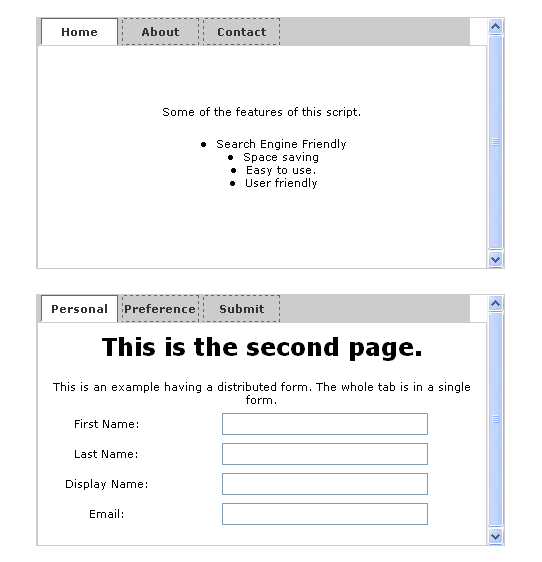
<!DOCTYPE HTML PUBLIC "-//W3C//DTD HTML 4.01 Transitional//EN" "http://www.w3.org/TR/html4/loose.dtd">
<head>
<title>Tab View Script</title>
<meta http-equiv="Content-Type" content="text/html;charset=utf-8" />
<script type="text/javascript">
function TabView(id, current){
    if(typeof(TabView.cnt) == "undefined"){
        TabView.init();
    }
    current = (typeof(current) == "undefined") ? 0 : current;
    this.newTab(id, current);
}
TabView.init = function(){
    TabView.cnt = 0;
    TabView.arTabView = new Array();
}
TabView.switchTab = function(TabViewIdx, TabIdx){
    TabView.arTabView[TabViewIdx].TabView.switchTab(TabIdx);
}
TabView.prototype.newTab = function(id, current){
    var TabViewElem, idx = 0, el = '', elTabs = '', elPages = '';
    TabViewElem = document.getElementById(id);
    TabView.arTabView[TabView.cnt] = TabViewElem;
    this.TabElem = TabViewElem;
    this.TabElem.TabView = this;
    this.tabCnt = 0;
    this.arTab = new Array();
    // Loop throught the elements till the object with
    // classname 'Tabs' is obtained
    elTabs = TabViewElem.firstChild;
    while(elTabs.className != "Tabs" )elTabs = elTabs.nextSibling;
    el = elTabs.firstChild;
    do{
        if(el.tagName == "A"){
            el.href = "javascript:TabView.switchTab(" + TabView.cnt + "," + idx + ");";
            this.arTab[idx] = new Array(el, 0);
            this.tabCnt = idx++;
        }
    }while (el = el.nextSibling);

    // Loop throught the elements till the object with
    // classname 'Pages' is obtained
    elPages = TabViewElem.firstChild;
    while (elPages.className != "Pages")elPages = elPages.nextSibling;
    el = elPages.firstChild;
    idx = 0;
    do{
        if(el.className == "Page"){
            this.arTab[idx][1] = el;
            idx++;
        }
    }while (el = el.nextSibling);
    this.switchTab(current);
    // Update TabView Count
    TabView.cnt++;
}
TabView.prototype.switchTab = function(TabIdx){
    var Tab;
    if(this.TabIdx == TabIdx)return false;
    for(idx in this.arTab){
        Tab = this.arTab[idx];
        if(idx == TabIdx){
            Tab[0].className = "ActiveTab";
            Tab[1].style.display = "block";
            Tab[0].blur();
        }else{
            Tab[0].className = "InactiveTab";
            Tab[1].style.display = "none";
        }
    }
    this.TabIdx = TabIdx;

}
function init(){
    t1 = new TabView('TabView1');
    t2 = new TabView('TabView2', 1);
}
</script>
<style type="text/css">
body,div,table{font:normal 11px Verdana, Arial, sans-serif;}
.TabView{
    width:450px;height:250px;border:1px #CCC solid;overflow-y:scroll;margin:25px;
}
.TabView .Tabs {
  height:26px;display:block;background:#CCC;
}
.TabView .Tabs a {
    display:block;float:left;width:75px;height:25px;line-height:25px;color:#333;text-align:center;text-decoration:none;font-weight:bold;border:1px #666 dashed;margin:0px 2px;
}
.TabView .Tabs a.ActiveTab{
    background:#FFF;border:1px #666 solid;border-bottom:1px #FFF solid;
}
.TabView .Tabs a.InactiveTab{

}
.TabView .Pages{
    width:100%;
}
.TabView .Pages .Page{
    border:1px #CCC solid;height:222px;
}
</style>
</head>
<body onload="init()">
<table style="width:100%;height:100%;">
<tr><td>
<center>
<!--Begin TabView Block-->
<!--First Tab-->
<div class="TabView" id="TabView1">
    <!--Tabs-->
    <div class="Tabs"><a>Home</a> <a>About</a> <a>Contact</a></div>
    <!--Pages-->
    <div class="Pages">
        <!--Page 1-->
        <div class="Page">
            <table cellspacing="0" cellpadding="0" height="100%">
            <tr><td>Some of the features of this script.<br/>
            <ul>
            <li>Search Engine Friendly</li>
            <li>Space saving</li>
            <li>Easy to use.</li>
            <li>User friendly</li>
            </ul></td>
            </table>
        </div>
        <!--Page 2-->
        <div class="Page">
            <table cellspacing="0" cellpadding="0" style="margin:5px;">
            <tr><td><h2>This is the second page.</h2>
            <p>As you can see, the process can be broken down into clearly-identifiable segments. There's the connection phase (which opens a connection to the FTP server); the authentication phase (where the user identifies himself or herself and is permitted access to the FTP site); the transaction phase (which involves operations like directory navigation, file listing, and file GET or PUT); and the disconnection phase (which terminates the FTP connection cleanly). Nice and symmetrical, right?</p>
            <p><B>...In With The New</B><BR>Initiating an FTP connection in PHP follows the same basic principles: open an FTP connection, send authentication information, and then use built-in PHP functions to navigate through directories or transfer files. Let's take a look at the PHP version of the session you just saw.</td>
          </table>
        </div>
        <div class="Page">
        <!--Page 3 -->
            <form action="contact.php" method="post" style="height:90%;">
            <table cellspacing="0" cellpadding="0" style="margin:10px;height:100%;">
            <tr><td colspan="2"><center>This is an example with a form.</center></td></tr>
            <tr><td>Name: </td><td><input style="width:200px;" type="text" name="name" /></td></tr>
            <tr><td>Email: </td><td><input style="width:200px;" type="text" name="email" /></td></tr>
            <tr><td>Location: </td><td><input style="width:200px;" type="text" name="location" /></td></tr>
            <tr><td>Comment: </td><td><textarea name="comment" style="width:200px;" rows="4" cols="22"></textarea></td></tr>
            <tr><td colspan="2"><center><input type="submit" value="Submit" /></center></td></tr>
            </table>
            </form>
        </div>
    </div>
</div>
<!--Second Tab-->
<form method="post" action="preference.php">
<div class="TabView" id="TabView2">
    <!--Tabs-->
    <div class="Tabs"><a>Personal</a> <a>Preference</a> <a>Submit</a></div>
    <!--Pages-->
    <div class="Pages">
        <!--Page 1-->
        <div class="Page">
            <table cellspacing="2" cellpadding="2" style="margin:5px;">
            <tr><td colspan="2"><h2>This is the second page.</h2>
            <p>This is an example having a distributed form. The whole tab is in a single form.</p></td></tr>
            <tr><td>First Name: </td><td><input type="text" style="width:200px;" name="name1"/></td></tr>
            <tr><td>Last Name: </td><td><input type="text" style="width:200px;" name="name2"/></td></tr>
            <tr><td>Display Name: </td><td><input type="text" style="width:200px;" name="name3"/></td></tr>
            <tr><td>Email: </td><td><input type="text" style="width:200px;" name="name4"/></td></tr>
            </td>
          </table>
        </div>
        <!--Page 2-->
        <div class="Page">
            <form action="contact.php" method="post" style="height:90%;">
            <table cellspacing="0" cellpadding="0" style="height:100%;">
            <tr><td colspan="2"><b>My area of preference.</b></td></tr>
            <tr><td><input type="checkbox" name=""/>C</td><td><input type="checkbox" name=""/>C++</td></tr>
            <tr><td><input type="checkbox" name=""/>Java</td><td><input type="checkbox" name=""/>PHP</td></tr>
            <tr><td><input type="checkbox" name=""/>JavaScript</td><td><input type="checkbox" name=""/>Perl</td></tr>
            <tr><td><input type="checkbox" name=""/>Visual Basic</td><td><input type="checkbox" name=""/>C Sharp</td></tr>
            <tr><td><input type="checkbox" name=""/>ASP</td><td><input type="checkbox" name=""/>ASP.Net</td></tr>
            <tr><td colspan="2"><b>Database I prefer</b></td></tr>
            <tr><td><input type="checkbox" name=""/>MySQL</td><td><input type="checkbox" name=""/>PostgresSQL</td></tr>
            <tr><td><input type="checkbox" name=""/>MSSQL</td><td><input type="checkbox" name=""/>Oracle</td></tr>
            </table>
            </form>
        </div>
        <div class="Page">
        <!--Page 3 -->
            <table cellspacing="0" cellpadding="0" style="margin:5px;">
            <tr><td><h2>Let's go through this step by step:</h2>
            <p>In order to initiate an FTP connection, PHP offers the ftp_connect() function, which takes a host name and port number as parameters. In the example above, the host name is "ftp.server.com"; since a port is not specified, PHP will attempt a connection to the default FTP port, 21.</p>
            <p><input type="checkbox" name="terms" id="terms"/><label for="terms">I agree to the terms of service</label></p>
            <center><input type="submit" value="Save Changes"/></center>
          </table>
        </div>
    </div>
</div>
</form>
</center></td></tr></table>
</body>
</html>
CMS Sfhati , Website Generator
نظام إدارة المحتوى صفحتي ... جربه الآن

المتواجدون خلال آخر ساعة · يتحدّث كل ٣٠ ثانية
جارٍ التحقق من المتواجدين…