السلام عليكم
انا كنت لما افتح ملفات الوورد او اي لف تاني داخل ال متصفح باستخدام <iframe>
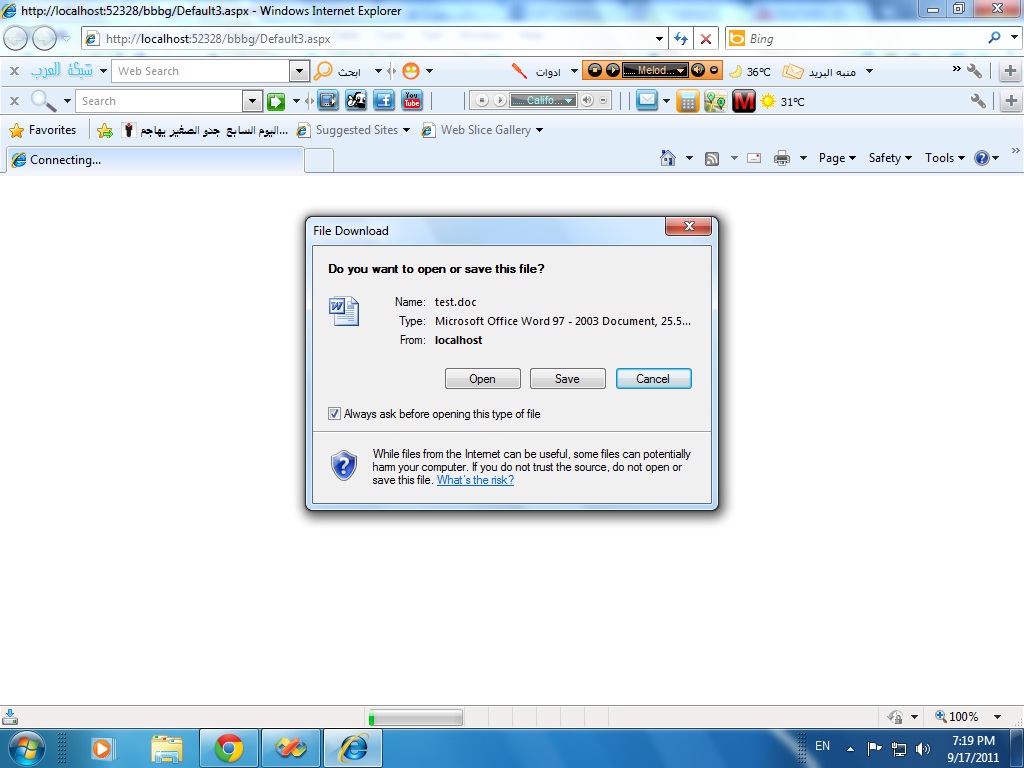
الامر يزبط عادي اما هلا بطل ينفع ليش طيب صار يعطيني اني افتحة او احملة ويفتح لحالة يعني مش ضمن الاكسبلورر
السلام عليكم
انا كنت لما افتح ملفات الوورد او اي لف تاني داخل ال متصفح باستخدام <iframe>
الامر يزبط عادي اما هلا بطل ينفع ليش طيب صار يعطيني اني افتحة او احملة ويفتح لحالة يعني مش ضمن الاكسبلورر
السلام عليكم ورحمه الله وبركاته
اختي جرب الكود التالي لعرض الملف داخل المتصفح
File file = new File(Server.MapPath("test.doc"));
Response.ClearContent();
Response.AddHeader("Content-Disposition", "inline;filename=" + file.Name);
Respone.AddHeader("Content-Length", file.Length.ToString());
Response.ContentType = "application/msword";
Reponse.TransmitFile(file.FullName);
Response.End();
شوفي الرابط التالي للفائدة http://support.microsoft.com/kb/306654
تم تعديل هذه المشاركة بواسطة VB Helper في 17 سبتمبر 2011 في 09:59
.:: Wish to become better and better ::.
اعطاني هذا الخطأ
Compilation Error
Description: An error occurred during the compilation of a resource required to service this request. Please review the following specific error details and modify your source code appropriately.
Compiler Error Message: CS0723: Cannot declare a variable of static type 'System.IO.File'
Source Error:
Line 20: protected void Button1_Click(object sender, EventArgs e)
Line 21: {
Line 22: File file = new File(Server.MapPath("test.doc"));
Line 23: Response.ClearContent();
Line 24: Response.AddHeader("Content-Disposition", "inline;filename=" + file.Name);
السلام عليكم ورحمه الله وبركاته
اختي عذرا قومي بتغيير السطر الاول الى
FileInfo file = new FileInfo(Server.MapPath("test.doc"));ولاتنسي تصريح System.IO وان شاء الله كل شيء سيضبط
.:: Wish to become better and better ::.
اخي نفس المشكلة وانا شفت لك مثال سابق عن ال pdf بنفس الطريقة وكان مرة يزبط ومرة يفتح بدون ما يفتح بال متصفح
شوف الصورة اخي هيك بعطيني
للتذكير
السلام عليكم
هذا التابع لقراءة محتويات ملف word كـ Text
يستعمل المكتبة
using Microsoft.Office.Interop.Word;
لإضافة المكتبة : ToolBox --> choos Items -->COM Components --> Microsoft.Office.Interop.Word
    private void readFileContent(string path)
    {
        Microsoft.Office.Interop.Word.ApplicationClass wordApp = new ApplicationClass();
        object file = path;
        object nullobj = System.Reflection.Missing.Value;

        Microsoft.Office.Interop.Word.Document doc = wordApp.Documents.Open(
        ref file, ref nullobj, ref nullobj,
        ref nullobj, ref nullobj, ref nullobj,
        ref nullobj, ref nullobj, ref nullobj,
        ref nullobj, ref nullobj, ref nullobj);
        doc.ActiveWindow.Selection.WholeStory();
        doc.ActiveWindow.Selection.Copy();
        string txt = doc.Content.Text;
        doc.Close(ref nullobj, ref nullobj, ref nullobj);
        wordApp.Quit(ref nullobj, ref nullobj, ref nullobj);
        Response.Write(txt);
    }
نستدعي التابع و ندرج مسار الملف المطلوب
readFileContent(Server.MapPath("test3.docx"));فيقوم بكتابة محتويات الملف في الصفحة و طبعا يمكن كتابتها في أي Control
و إذا كان عند أحد فكرة عن قراءة التنسيقات أيضا فليعلمنا إياها جزاه الله خيرا
باسل بوشناق كتب:السلام عليكم
هذا التابع لقراءة محتويات ملف word كـ Text
يستعمل المكتبة
using Microsoft.Office.Interop.Word;لإضافة المكتبة : ToolBox --> choos Items -->COM Components --> Microsoft.Office.Interop.Word
    private void readFileContent(string path)
    {
        Microsoft.Office.Interop.Word.ApplicationClass wordApp = new ApplicationClass();
        object file = path;
        object nullobj = System.Reflection.Missing.Value;

        Microsoft.Office.Interop.Word.Document doc = wordApp.Documents.Open(
        ref file, ref nullobj, ref nullobj,
        ref nullobj, ref nullobj, ref nullobj,
        ref nullobj, ref nullobj, ref nullobj,
        ref nullobj, ref nullobj, ref nullobj);
        doc.ActiveWindow.Selection.WholeStory();
        doc.ActiveWindow.Selection.Copy();
        string txt = doc.Content.Text;
        doc.Close(ref nullobj, ref nullobj, ref nullobj);
        wordApp.Quit(ref nullobj, ref nullobj, ref nullobj);
        Response.Write(txt);
    }
نستدعي التابع و ندرج مسار الملف المطلوب
readFileContent(Server.MapPath("test3.docx"));فيقوم بكتابة محتويات الملف في الصفحة و طبعا يمكن كتابتها في أي Control
و إذا كان عند أحد فكرة عن قراءة التنسيقات أيضا فليعلمنا إياها جزاه الله خيرا
شكراً اخي الكريم
بس انا دورة على المكتبة
Microsoft.Office.Interop.Wod
وما لقيتها وين بجدها اخي ما لقيتها مع المكتبات التانية
اخي هل للمكتبة اسم آخر
؟؟؟
السلام عليكم ورحمه الله وبركاته
اختي قومي باضافتها من Add Reference
.:: Wish to become better and better ::.
مش موجودة
السلام عليكم ورحمة الله وبركاته
Add Reference
From Com tab select
Microsoft Word 12.0 Object Library اذا كنتي تستخدمين اوفيس 07
اما اذا كنتي من مستخدمين اوفيس 2003 سيظهر باسم Microsoft Word 11.0 Object Library
((إِنَّ اللَّهَ وَمَلائِكَتَهُ يُصَلُّونَ عَلَى النَّبِيِّ يَا أَيُّهَا الَّذِينَ آمَنُوا صَلُّوا عَلَيْهِ وَسَلِّمُوا تَسْلِيمًا))
Rose Muhammed كتب:السلام عليكم ورحمة الله وبركاته
Add Reference
From Com tab select
Microsoft Word 12.0 Object Library اذا كنتي تستخدمين اوفيس 07
اما اذا كنتي من مستخدمين اوفيس 2003 سيظهر باسم Microsoft Word 11.0 Object Library
وعليكم السلام ورحمة الله وبركاته
اخي الكود فيه مشكلة طلعلي خط ازرق تحت كلمات word ولما حذفت الكلمات برضة اعطاني خطا
اخي انا بشتغل ويب asp.net
ممكن عشان هيك ما بشتغل
طيب جملة
readFileContent(Server.MapPath("test3.docx"));
جملة ويب ليش عندك بشتغل وعندي لا
ارجو تزويدي بمثال
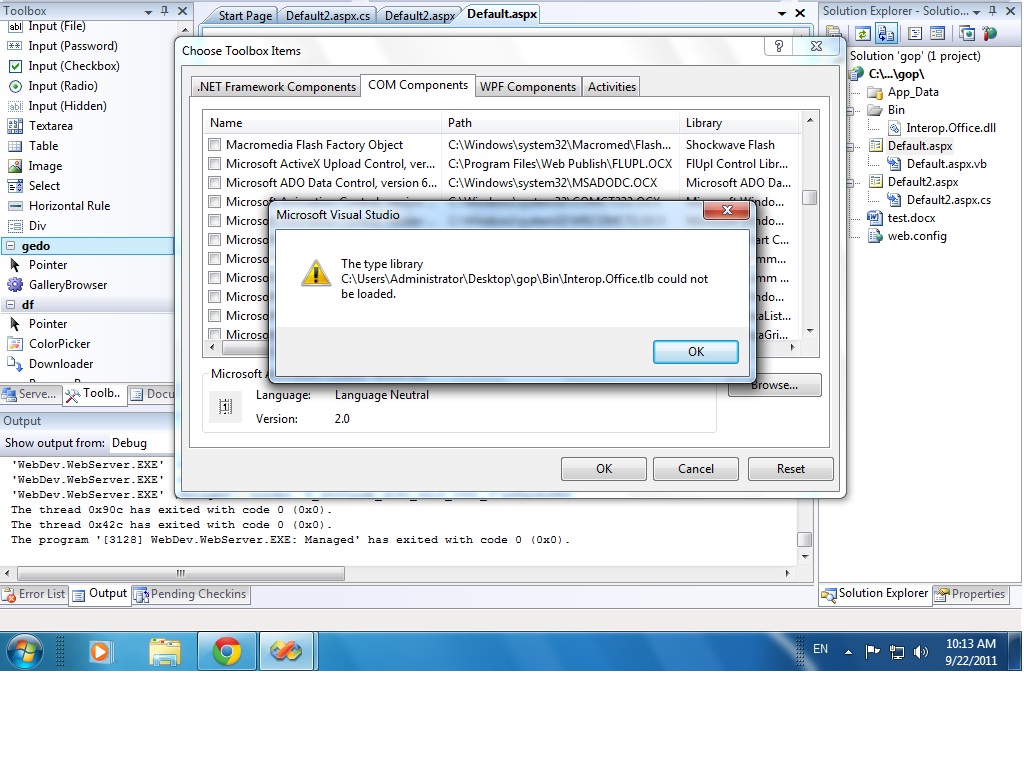
حملة المكتبة من الانترنت ولما اجيت اعمل choose item ما زبط كمان عطاني هاد المسج
تم تعديل هذه المشاركة بواسطة easy_3a3 في 22 سبتمبر 2011 في 09:19
المتواجدون خلال آخر ساعة · يتحدّث كل ٣٠ ثانية
جارٍ التحقق من المتواجدين…