الفريق العربي للبرمجةأرشيف المنتديات · 2000 – 2023
نسخة أرشيفية للقراءة فقط — التسجيل والمشاركة مغلقان، والمحتوى محفوظ كما كان.

أدخل عددين فى نافذه رسوميه واحده

بدأه دنية القوى في 19 مايو 2011 · 37 رد · 1,760 مشاهدة · في JavaSE
مشاركة: واتساب X فيسبوك تيليجرام
#1 صاحب الموضوع

السلام عليكم

مساء الخير

أنا عندى بر نامج يعمل بهذى الطريقه وريد عمل بر نامج أخر بحيث يكون المدخلان فى نغس الا يقونه والديه خيارت فيها

public class Month {
// main method begins execution of Java application
public static void main( String args[] )
{
int month; // number of month number entered
String input; // month number typed by user
String name; // name of month
// Processing phase
// prompt for input and read Month number from user
input = JOptionPane.showInputDialog(
"Enter Month number" );
// convert grade from a String to an integer
month = Integer.parseInt( input );
switch ( month )
{
case 1:name="JAN";break;
case 2:name="FEB";break;
case 3:name="MAR";break;
case 4:name="APR";break;
case 5:name="MAY";break;
case 6:name="JUN";break;
case 7:name="JUL";break;
case 8:name="AUG";break;
case 9:name="SEP";break;
case 10:name="OCT";break;
case 11:name="NOV";break;
case 12:name="DEC";break;
default :name=" invalid Month number ";
}
// display name of month number
JOptionPane.showMessageDialog( null,
"the Month is " + name ,
"Class Month", JOptionPane.INFORMATION_MESSAGE );
System.exit( 0 ); // terminate application
} // end method mai
#2

كمثال بسيط

JDialog j = new JDialog();
JTextField f= new JTextField("");
JTextField e = new JTextField("");
j.add(e);
j.add(f);
j.setLayout(new FlowLayout());
j.setVisible(true);

عليكي ايضا اضافه ازرار والاستجابة للاحداث التي تاتي من هذه الازرار

تم تعديل هذه المشاركة بواسطة mental-driller في 19 مايو 2011 في 16:33

No intellectual battle was ever won through retreat
You do not watch Gintama? Dude, you are missing a lot!


صورةmsrgb1485.gif ocajavase7programmerclr.gif

#3

كما يعنى أدخل عدين بحيث يكون الاول والثانى على نفس شاشه الرسوميه

Write a java program to convert between Celsius and Fahrenheit with
a graphical user interface as shown below.
The user inputs the temperature in Celsius and press convert, the reslt
is show in the fahrenheit
#4

اعتقد انه باستخدام JFrame بعدين تعملي Add لبقيه المكونات ، ممكن توريني الرسمه؟

No intellectual battle was ever won through retreat
You do not watch Gintama? Dude, you are missing a lot!


صورةmsrgb1485.gif ocajavase7programmerclr.gif

#5
mental-driller كتب:

اعتقد انه باستخدام JFrame بعدين تعملي Add لبقيه المكونات ، ممكن توريني الرسمه؟

مانى عارفه كيف أضيف الرسومه ياليت توضح الخطوات

#6

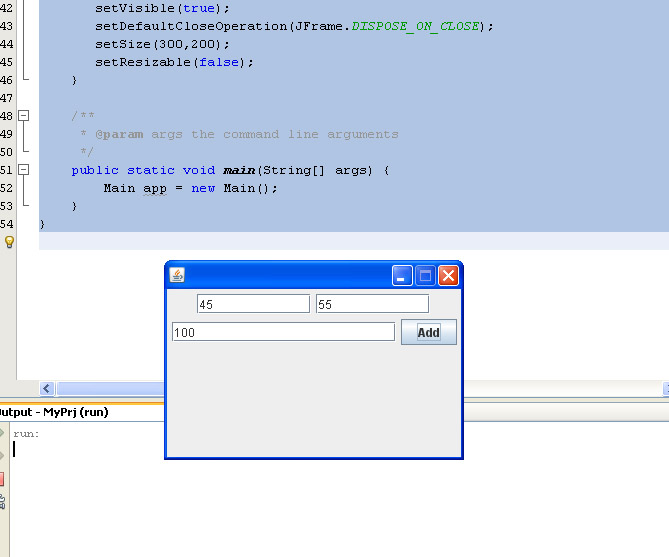
هذا مثال بسيط على جمع عددين وانت بالمثل اعملي على حقك الكود

/*
 * To change this template, choose Tools | Templates
 * and open the template in the editor.
 */
package myprj;

import java.awt.FlowLayout;
import java.awt.event.ActionEvent;
import java.awt.event.ActionListener;
import javax.swing.*;

/**
 *
 * @author PSYCHO_ MANTIS
 */
public class Main extends JFrame {

    private JButton button;
    private JTextField field1;
    private JTextField field2;
    private JTextField field3;

    public Main() {
        button = new JButton("Add");
        button.addActionListener(new ActionListener() {

            public void actionPerformed(ActionEvent e) {
                field3.setText(Integer.toString(Integer.parseInt(field1.getText()) + Integer.parseInt(field2.getText())));
            }
        });
       field1 = new JTextField();
       field2 = new JTextField();
       field3 = new JTextField();
       field1.setColumns(10);
       field2.setColumns(10);
       field3.setColumns(20);
       setLayout(new FlowLayout());
       add(field1);
       add(field2);
       add(field3);
       add(button);
       setVisible(true);
       setDefaultCloseOperation(JFrame.DISPOSE_ON_CLOSE);
       setSize(300,200);
       setResizable(false);
    }

    /**
     * @param args the command line arguments
     */
    public static void main(String[] args) {
        Main app = new Main();
    }
}

post-244925-021107600 1305813921_thumb.j

المرفقات
Untitled-1.jpg

No intellectual battle was ever won through retreat
You do not watch Gintama? Dude, you are missing a lot!


صورةmsrgb1485.gif ocajavase7programmerclr.gif

#7

السلام عليكم

حولات أطبق على البرنامج الاعندى بس مانى عارفه أستخدم عملEX5CS105.jarيه التحويل

وهذى هوى run المفروض يخراج

#8

يا اختي انتي في هذه الحالة بتعملي زرين

الزر الاول زي اللي انا عملته بس بدل ما تعملي جمع في الداله actionPerformed

اعملي تحويل

الزر الثاني في الداله actionPerformed حقه اعملي

textField1.setText("");
textField2.setText("");

يعني خلي النص يرجع زي ماكان فاضي، انا اديت لك المثال اللي فوق على علشان تستخدميه كقالب لعمل البرنامج حقك

No intellectual battle was ever won through retreat
You do not watch Gintama? Dude, you are missing a lot!


صورةmsrgb1485.gif ocajavase7programmerclr.gif

#9

السلام عليكم

هذا البرنامج حولت أكتبه بس فى أخطأ أريد منكم التوضيح

/*
 * To change this template, choose Tools | Templates
 * and open the template in the editor.
 */
package myprj;

import java.awt.FlowLayout;
import java.awt.event.ActionEvent;
import java.awt.event.ActionListener;
import javax.swing.*;

/**
 *
 * @author PSYCHO_ MANTIS
 */
public class Main extends JFrame {

    private JButton button;
    private JTextField field1;
    private JTextField field2;
    private JTextField field3;

    public Main() {
        button = new JButton("convert");
        button = new JButton("clear");
          int x,y;

        button. convert ctionListener(new ActionListener() {

            public void actionPerformed(ActionEvent e) {
                field3.setText(Integer.toString(Integer.parseInt(field1.getText()) + Integer.parseInt(field2.getText())));
            }
        });
       field1 = new JTextField();
       field2 = new JTextField();
       field3 = new JTextField();
       x = Integer.parseInt(textField.getText());
        textField2.setText(Integer.toString(y));


       setLayout(new FlowLayout());
       textField1.setText("");
      textField2.setText("");                              
       setVisible(true);
       setDefaultCloseOperation(JFrame.DISPOSE_ON_CLOSE);
       setSize(300,200);
       setResizable(false);
    }

    /**
     * @param args the command line arguments
     */
    public static void main(String[] args) {
        Main app = new Main();
    }
}

وشكرا.

#10

اول شي معاكي زرين يعني واحد سميه button1 والثاني سميه button2 انتي هنا سميتي الاثنين button

button. convert ctionListener(new ActionListener() {

المفروض انه

button.addActionListener(new ActionListener() {

ملاحظة اذا اردتي التحويل بين درجات الحرارة اعملي داخل الدالة actionPerformed

y= 5/9 (x -32);

على اساس انكي تحولي من فهرنهايت الى درجه مئوية قبل هذا السطر

 textField2.setText(Integer.toString(y));

No intellectual battle was ever won through retreat
You do not watch Gintama? Dude, you are missing a lot!


صورةmsrgb1485.gif ocajavase7programmerclr.gif

#11

بعض التعديلات سويته على البرنامج بس فى أخطأ على البرنامج ما يشتغل

أرجو منكم المساعده وتوضيح

/*
 * To change this template, choose Tools | Templates
 * and open the template in the editor.
 */
package myprj;

import java.awt.FlowLayout;
import java.awt.event.ActionEvent;
import java.awt.event.ActionListener;
import javax.swing.*;

/**
 *
 * @author PSYCHO_ MANTIS
 */
public class Main extends JFrame {

    private JButton button;
    private JTextField field1;
    private JTextField field2;
    private JTextField field3;

    public Main() {
        button 1= new JButton("convert");
        button2 = new JButton("clear");
          int x,y;

        button1.addActionListener(new ActionListener() {

            public void actionPerformed(ActionEvent e) {
                field3.setText(Integer.toString(Integer.parseInt(field1.getText()) + Integer.parseInt(field2.getText())));
            }
        });
       field1 = new JTextField();
       field2 = new JTextField();
       field3 = new JTextField();
       x = Integer.parseInt(textField.getText());
y= 5/9 (x -32);                 

        textField2.setText(Integer.toString(y));


       setLayout(new FlowLayout());
       textField1.setText("");
      textField2.setText("");                              
       setVisible(true);
       setDefaultCloseOperation(JFrame.DISPOSE_ON_CLOSE);
       setSize(300,200);
       setResizable(false);
    }

    /**
     * @param args the command line arguments
     */
    public static void main(String[] args) {
        Main app = new Main();
    }
}
#12

ليش عاملة فراغ في اسم المتغير button 2?

شيلي هذه الاسطر لداخل الدالة actionPerformed

 x = Integer.parseInt(textField.getText());
y= 5/9 (x -32);                 

        textField2.setText(Integer.toString(y));

اطبعي لي رسالة الخطأ

No intellectual battle was ever won through retreat
You do not watch Gintama? Dude, you are missing a lot!


صورةmsrgb1485.gif ocajavase7programmerclr.gif

#13

حسنا اختي الكريمة انا جلبت لكي الحل بكود اتمنى ان يلبي رغبتك ويكون طلبك

import java.awt.*;
import java.awt.event.*;
import javax.swing.*;

public class TextFieldDemo extends JFrame
  implements ActionListener {
  private JTextField jtfCelsius = new JTextField(10);
  private JTextField jtfFahrenheit = new JTextField(10);

  /** Main method */
  public static void main(String[] args) {
    TextFieldDemo frame = new TextFieldDemo();
    frame.pack();
    frame.setTitle("TextFieldDemo");
    frame.setDefaultCloseOperation(JFrame.EXIT_ON_CLOSE);
    frame.setVisible(true);
  }

  public TextFieldDemo() {
    // Panel p1 to hold labels
    JPanel p1 = new JPanel();
    p1.setLayout(new GridLayout(2, 1));
    p1.add(new JLabel("Celsius"));
    p1.add(new JLabel("Fahrenheit"));

    // Panel p2 to hold text fields
    JPanel p2 = new JPanel();
    p2.setLayout(new GridLayout(2, 1));
    p2.add(jtfCelsius);
    p2.add(jtfFahrenheit);

    // Add p1 and p3 to the frame
    getContentPane().add(p1, BorderLayout.WEST);
    getContentPane().add(p2, BorderLayout.CENTER);

    // Set horizontal alignment to RIGHT for text fields
    jtfCelsius.setHorizontalAlignment(JTextField.RIGHT);
    jtfFahrenheit.setHorizontalAlignment(JTextField.RIGHT);

    // Register listener
    jtfCelsius.addActionListener(this);
    jtfFahrenheit.addActionListener(this);
  }

  /** Handle ActionEvent */
  public void actionPerformed(ActionEvent e) {
    if (e.getSource() == jtfCelsius) {
      double celsius =
        Double.parseDouble(jtfCelsius.getText().trim());
      double fahrenheit = (9.0 / 5.0) * celsius + 32;
      jtfFahrenheit.setText(new Double(fahrenheit).toString());
      jtfFahrenheit.requestFocusInWindow();
    }
    else {
      double fahrenheit =
        Double.parseDouble(jtfFahrenheit.getText().trim());
      double celsius = (5.0 / 9.0) * (fahrenheit - 32);
      jtfCelsius.setText(new Double(celsius).toString());
      jtfCelsius.requestFocusInWindow();
    }
  }
}

هذا الكود يحول بين درجات الحراة من والي فرنهايت وسليسيوس

يحتوي على حقلي ادخال بمجرد ادخال الرقم باحد الحقلين اضغطي انتر فتحصلين على النتيجة

وبالتوفيق

إذا نظــرتَ نيـوب اللـّيـثِ بـارزةً         فـلا تظــنَنَ أَنَّ اللـّيـــثَ يبْتسـِـــمُ


رسم المخططات البيانية بواسطة الجافا


كتاب تحليل وتصميم نظم المعلومات


#14

السلام عليكم

مساء الخير

شكراز أخى على المساعده الحمد الله البر نامج أشتغل بس ناقص الا أزار فى المخرجات بحيث يكون 2أزرار أحدهم يقوم بعمليت التحويل والآخر يفضى الخنات كما هوى موجود فى الملف المرفق السابق كيفيه طريقه أضفتها الكود

#15

قومي باضافة JButton تحت السطر الذي يضيف JtextField

واعملي الكود حق التحويل في actionPerformed تبع الزر حق التحويل و اخلاء النص الكود حقه كتبته لك في الاعلى اعمليه داخل الداله action Perfromed حق الزر الثاني

هذا اذا بتعملي handler منفصل لكل زر بس لو الزرين تشتي تعملي لهم hanlder واحد اعرفي اي زر تم ضغطه باستدعاء الداله getResource()

No intellectual battle was ever won through retreat
You do not watch Gintama? Dude, you are missing a lot!


صورةmsrgb1485.gif ocajavase7programmerclr.gif

#16

بالنسبه الكود الآول عملت عليه بعض التعديلات بس فى أخطأ أرجو منكم المساعده

/*
 * To change this template, choose Tools | Templates
 * and open the template in the editor.
 */
package myprj;

import java.awt.FlowLayout;
import java.awt.event.ActionEvent;
import java.awt.event.ActionListener;
import javax.swing.*;

/**
 *
 * @author PSYCHO_ MANTIS
 */
public class Main extends JFrame {

    private JButton button;
    private JTextField field1;
    private JTextField field2;
    private JTextField field3;

    public Main() {
        button 1= new JButton("convert");
        button2= new JButton("clear");

        button1.addActionListener(new ActionListener() {

            public void actionPerformed(ActionEvent e) {
                field3.setText(Integer.toString(Integer.parseInt(field1.getText()) + Integer.parseInt(field2.getText())));
            }
        });
       field1 = new JTextField();
       field2 = new JTextField();
       field3 = new JTextField();


       setLayout(new FlowLayout());
       textField1.setText("");
      textField2.setText("");                              
       setVisible(true);
       setDefaultCloseOperation(JFrame.DISPOSE_ON_CLOSE);
       setSize(300,200);
       setResizable(false);
    }

    /**
     * @param args the command line arguments
     */
    public static void main(String[] args) {
        Main app = new Main();
Int x,y;         
       x = Integer.parseInt(textField.getText());
y= 5/9 *(x -32);                 

        textField2.setText(Integer.toString(y));

    }
}

وهذى المخرجات

Exception in thread "main" java.lang.NullPointerException
	at myprj.Main.<init>(Main.java:40)
	at myprj.Main.main(Main.java:53)
#17

كذا ينفع؟

package javaapplication31;

import java.awt.FlowLayout;
import java.awt.event.ActionEvent;
import java.awt.event.ActionListener;
import javax.swing.*;

/**
 *
 * @author PSYCHO_ MANTIS
 */
public class Main extends JFrame {

    private JButton button1;
    private JButton button2 ;
    private JTextField field1;
    private JTextField field2;


    public Main() {
        button1= new JButton("convert");
        button2= new JButton("clear");

        button1.addActionListener(new ActionListener() {

            public void actionPerformed(ActionEvent e) {
                    double x,y;
                    x = Integer.parseInt(field1.getText());
                    field2.setText(Integer.toString( (int)((5.0/9 *(x -32)))));

            }
        });
        button2.addActionListener(new ActionListener() {

            public void actionPerformed(ActionEvent e) {
                field1.setText("");
                field2.setText("");
            }
        });
       field1 = new JTextField();
       field2 = new JTextField();

       field1.setColumns(10);
       field2.setColumns(10);


       setLayout(new FlowLayout());
       add(field1);
       add(field2);
      add(button1);
      add(button2);
       setVisible(true);
       setDefaultCloseOperation(JFrame.DISPOSE_ON_CLOSE);
       setSize(300,200);
       setResizable(false);
    }

    /**
     * @param args the command line arguments
     */
    public static void main(String[] args) {
        Main app = new Main();


    }
}

No intellectual battle was ever won through retreat
You do not watch Gintama? Dude, you are missing a lot!


صورةmsrgb1485.gif ocajavase7programmerclr.gif

#18

الحمد الله أشتغل البرنامج بس هناك يوجد فى الكودخطوط الونها أصفر على بعض الكلمات

أريد يكون أن يكتب قدم كل مدخل أسمه وتكون الخانات تحت ويمكن التحكم فى شاشه المخرجات بحيث تكون مرانه ويمكن التحكم منحبه العرض والطول العر بعض ويكون مثل EX5CS105.jarهذى المخرج

ما هوى الكود الذى يقو بتالى

#19

علشان تكتبي قدامه اسمه استخدمي JLabel

العبي بالقيم حق الsetSize لما يطبق معاك

اللون الاصفر مش مشكله بس بياشر لك على اسم المتغير

No intellectual battle was ever won through retreat
You do not watch Gintama? Dude, you are missing a lot!


صورةmsrgb1485.gif ocajavase7programmerclr.gif

#20

سويت تعديلات بس فى أخطأ

pa

ckage javaapplication31;

import java.awt.FlowLayout;
import java.awt.event.ActionEvent;
import java.awt.event.ActionListener;
import javax.swing.*;

/**
 *
 * @author PSYCHO_ MANTIS
 */
public class Main extends JFrame {

    private JButton button1;
    private JButton button2 ;
    private JTextField field1;
    private JTextField field2;


    public Main() {
        button1= new JButton("convert");
        button2= new JButton("clear");

        button1.addActionListener(new ActionListener() {

            public void actionPerformed(ActionEvent e) {
                    double x,y;
                    x = Integer.parseInt(field1.getText());
                    field2.setText(Integer.toString( (int)((5.0/9 *(x -32)))));

            }
        });
        button2.addActionListener(new ActionListener() {

            public void actionPerformed(ActionEvent e) {
                field1.setText("");
                field2.setText("");
            }
        });
       field1 = new JTextField();
       field2 = new JTextField();

       field1.setColumns(10);
       field2.setColumns(10);

    // Panel p1 to hold labels
    JPanel p1 = new JPanel();
    p1.setLayout(new GridLayout(2, 1));
    p1.add(new JLabel("Celsius"));
    p1.add(new JLabel("Fahrenheit"));

    // Panel p2 to hold text fields
    JPanel p2 = new JPanel();
    p2.setLayout(new GridLayout(2, 1));
    p2.add(jtfCelsius);
    p2.add(jtfFahrenheit);

       setLayout(new FlowLayout());
       add(field1);
       add(field2);
      add(button1);
      add(button2);
       setVisible(true);
       setDefaultCloseOperation(JFrame.DISPOSE_ON_CLOSE);
       setSize(300,200);
       setResizable(false);
    }

    /**
     * @param args the command line arguments
     */
    public static void main(String[] args) {
        Main app = new Main();


    }
}
#21

ما كان في داعي تضيفي JPanel

كنتي بتضيفي الJLabel تحت الازرار مباشرة وتعملي لهم تهيأة في الconstructor

ارسلي لي اكواد الخطأ

No intellectual battle was ever won through retreat
You do not watch Gintama? Dude, you are missing a lot!


صورةmsrgb1485.gif ocajavase7programmerclr.gif

#22

حولات بس مارضى يخرج الران علق يا ليت توضح كود طبعت الاسم أمام كل خانه ويكون الخنات تحت بعض

وكيف أتحكم فى حجم المخراج بحيث يكون سهل التعمل معه من حيث التكبير

وشكرا.

#23

أنا حولات أسوى بعض التعديلات على برنامج أخى vector_ever بس مرضى يمشى معى التعديلات الا أزار وبحيث يكون المخرج عدد صحيح int

أوريده اليوم ضرورى وشكرا.

import java.awt.*;
import java.awt.event.*;
import javax.swing.*;

public class TextFieldDemo extends JFrame
  implements ActionListener {
  private JTextField jtfCelsius = new JTextField(10);
  private JTextField jtfFahrenheit = new JTextField(10);
  private JButton button1;
  private JButton button2 ;

  /** Main method */
  public static void main(String[] args) {
    TextFieldDemo frame = new TextFieldDemo();
    frame.pack();
    frame.setTitle("TextFieldDemo");
    frame.setDefaultCloseOperation(JFrame.EXIT_ON_CLOSE);
    frame.setVisible(true);
  }

  public TextFieldDemo() {
	  button1= new JButton("convert");
      button2= new JButton("clear");

    // Panel p1 to hold labels
    JPanel p1 = new JPanel();
    p1.setLayout(new GridLayout(2, 1));
    p1.add(new JLabel("Celsius"));
    p1.add(new JLabel("Fahrenheit"));

    // Panel p2 to hold text fields
    JPanel p2 = new JPanel();
    p2.setLayout(new GridLayout(2, 1));
    p2.add(jtfCelsius);
    p2.add(jtfFahrenheit);

    // Add p1 and p3 to the frame
    getContentPane().add(p1, BorderLayout.WEST);
    getContentPane().add(p2, BorderLayout.CENTER);

    // Set horizontal alignment to RIGHT for text fields
    jtfCelsius.setHorizontalAlignment(JTextField.RIGHT);
    jtfFahrenheit.setHorizontalAlignment(JTextField.RIGHT);

    // Register listener
    jtfCelsius.addActionListener(this);
    jtfFahrenheit.addActionListener(this);
  }

  /** Handle ActionEvent */
  public void actionPerformed(ActionEvent e) {
    if (e.getSource() == jtfCelsius) {
     int celsius =
        (int) Double.parseDouble(jtfCelsius.getText().trim());
      int fahrenheit = ((int)(9 / 5) * celsius + 32);
      jtfFahrenheit.setText(new Double(fahrenheit).toString());
      jtfFahrenheit.requestFocusInWindow();
    }
    else {
     int fahrenheit =
        (int) Double.parseDouble(jtfFahrenheit.getText().trim());
     int celsius = ((int)(5/ 9) * (fahrenheit - 32));
      jtfCelsius.setText(new Double(celsius).toString());
      jtfCelsius.requestFocusInWindow();
    }
  }
}
#24
/*
 * To change this template, choose Tools | Templates
 * and open the template in the editor.
 */
package javaapplication23;

import java.awt.*;
import java.awt.event.*;
import javax.swing.*;

public class TextFieldDemo extends JFrame
  implements ActionListener {
  private JTextField jtfCelsius = new JTextField(10);
  private JTextField jtfFahrenheit = new JTextField(10);
  private JButton button1;
  private JButton button2 ;

  /** Main method */
  public static void main(String[] args) {
    TextFieldDemo frame = new TextFieldDemo();
    frame.pack();
    frame.setTitle("TextFieldDemo");
    frame.setDefaultCloseOperation(JFrame.EXIT_ON_CLOSE);
    frame.setVisible(true);
  }

  public TextFieldDemo() {
          button1= new JButton("convert");
      button2= new JButton("clear");

    // Panel p1 to hold labels
    JPanel p1 = new JPanel();
    p1.setLayout(new GridLayout(2, 1));
    p1.add(new JLabel("Celsius"));
    p1.add(new JLabel("Fahrenheit"));
    p1.add(button1);
    p1.add(button2);
    // Panel p2 to hold text fields
    JPanel p2 = new JPanel();
    p2.setLayout(new GridLayout(2, 1));
    p2.add(jtfCelsius);
    p2.add(jtfFahrenheit);


    // Add p1 and p3 to the frame
    getContentPane().add(p1, BorderLayout.WEST);
    getContentPane().add(p2, BorderLayout.CENTER);

    // Set horizontal alignment to RIGHT for text fields
    jtfCelsius.setHorizontalAlignment(JTextField.RIGHT);
    jtfFahrenheit.setHorizontalAlignment(JTextField.RIGHT);

    // Register listener
   button1.addActionListener(this);
   button2.addActionListener(this);
  }

  /** Handle ActionEvent */
  public void actionPerformed(ActionEvent e) {
    if (e.getSource() == button1) {
     int celsius =
        (int) Double.parseDouble(jtfCelsius.getText().trim());
      int fahrenheit = ((int)(9 / 5) * celsius + 32);
      jtfFahrenheit.setText(new Double(fahrenheit).toString());
      jtfFahrenheit.requestFocusInWindow();
    }
 else{
    jtfCelsius.setText("");
    jtfFahrenheit.setText("");
 }
  }
}

تفضلي ، راجعي الكود بعناية

No intellectual battle was ever won through retreat
You do not watch Gintama? Dude, you are missing a lot!


صورةmsrgb1485.gif ocajavase7programmerclr.gif

#25

شكرا يا أخى على مساعدتك بس أبى يكون كل أسم أمام الخانه والا أزار تحتها

مواضيع مشابهة