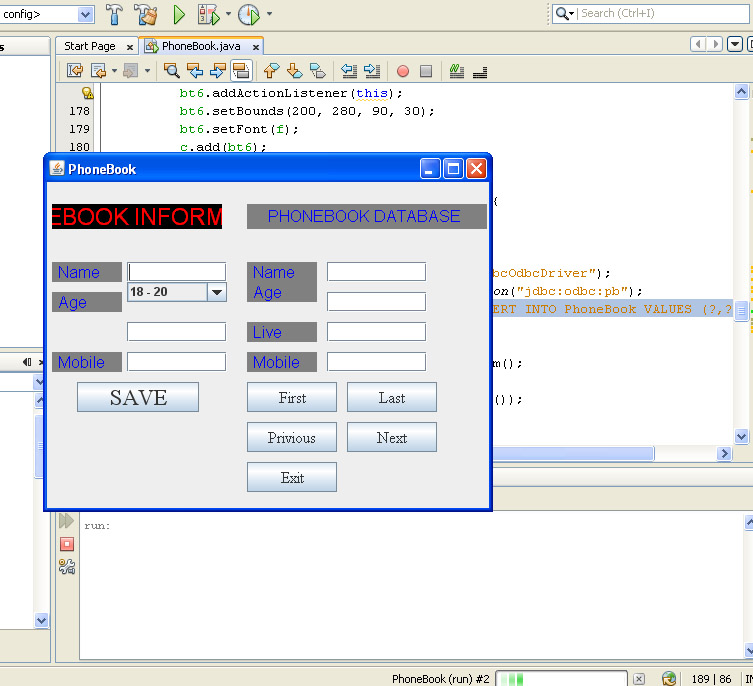
السلام عليكم ورحمة الله ..!!
بدون مقدمات ..
الدكتور عطانا مشروع في مادة الجافا عن برنامج يدخل معلومات الي قاعدة البيانات .. فلما قمت بعمله وحليت كل الأخطاء الا خطأ عقدني ..
البرنامج ..
import java.awt.Color;
import java.awt.Container;
import java.awt.Font;
import java.awt.Label;
import java.awt.event.ActionEvent;
import java.awt.event.ActionListener;

import java.sql.Connection;
import java.sql.DriverManager;
import java.sql.PreparedStatement;
import java.sql.ResultSet;
import java.sql.SQLException;
import java.sql.Statement;

import javax.swing.JButton;
import javax.swing.JComboBox;
import javax.swing.JFrame;
import javax.swing.JTextField;

public class  PhoneBook extends JFrame implements ActionListener
{
	Container c;
	JButton bt1,bt2,bt3,bt4,bt5,bt6;
	Label l1,l2,l3,l4,l5,l6,l7,l8,l9,l10;
	JTextField t1,t2,t3,t4,t5,t6,t7;
	Font f,f1,f2;
	String ag[]={"18 - 20","21 - 26","27 - 30"},n,a,l;
	int m;
	JComboBox age;
	Connection con=null;
	PreparedStatement ps1=null;
	ResultSet rs;
	Statement st;

	public PhoneBook()
	{
		c = getContentPane();
		c.setLayout(null);

		f = new Font("Times New Roman",Font.PLAIN,16);
		f1 = new Font("Times New Roman",Font.PLAIN,18);
		f2 = new Font("Times New Roman",Font.PLAIN,23);

		l1 = new Label(" PHONEBOOK INFORMATION ",l1.CENTER);
		l1.setBounds(5 ,22 ,170 ,25);
		l1.setBackground(Color.black);
		l1.setForeground(Color.red);
		l1.setFont(f2);
		c.add(l1);

		l2 = new Label(" Name ");
		l2.setBounds(5 ,80 ,70 ,20);
		l2.setBackground(Color.gray);
		l2.setForeground(Color.blue);
		l2.setFont(f);
		c.add(l2);

		l3 = new Label(" Age ");
		l3.setBounds(5 ,110 ,70 ,20);
		l3.setBackground(Color.gray);
		l3.setForeground(Color.blue);
		l3.setFont(f);
		c.add(l3);

		l4 = new Label(" Live ");
		l4.setBounds(5 ,1400 ,70 ,20);
		l4.setBackground(Color.gray);
		l4.setForeground(Color.blue);
		l4.setFont(f);
		c.add(l4);

		l5 = new Label(" Mobile ");
		l5.setBounds(5 ,170 ,70 ,20);
		l5.setBackground(Color.gray);
		l5.setForeground(Color.blue);
		l5.setFont(f);
		c.add(l5);

		l6 = new Label("PHONEBOOK DATABASE " , l1.CENTER);
		l6.setBounds(200 ,22 ,240 ,25);
		l6.setBackground(Color.gray);
		l6.setForeground(Color.blue);
		l6.setFont(f);
		c.add(l6);

		l7 = new Label(" Name ");
		l7.setBounds(200 ,80 ,70 ,20);
		l7.setBackground(Color.gray);
		l7.setForeground(Color.blue);
		l7.setFont(f);
		c.add(l7);

		l8 = new Label(" Age ");
		l8.setBounds(200 ,100 ,70 ,20);
		l8.setBackground(Color.gray);
		l8.setForeground(Color.blue);
		l8.setFont(f);
		c.add(l8);

		l9 = new Label(" Live ");
		l9.setBounds(200 ,140 ,70 ,20);
		l9.setBackground(Color.gray);
		l9.setForeground(Color.blue);
		l9.setFont(f);
		c.add(l9);

		l10 = new Label(" Mobile ");
		l10.setBounds(200 ,170 ,70 ,20);
		l10.setBackground(Color.gray);
		l10.setForeground(Color.blue);
		l10.setFont(f);
		c.add(l10);

		t1 = new JTextField();
		t1.setBounds(80 ,80 ,100 ,20);
		c.add(t1);

		age = new JComboBox(ag);
		age.setBounds(80 , 100 ,100 ,20);
		c.add(age);

		t2 = new JTextField();
		t2.setBounds(80 ,140 ,100 ,20);
		c.add(t2);

		t3 = new JTextField();
		t3.setBounds(80 ,170 ,100 ,20);
		c.add(t3);

		t4 = new JTextField();
		t4.setBounds(280 ,80 ,100 ,20);
		c.add(t4);

		t5 = new JTextField();
		t5.setBounds(280 ,110 ,100 ,20);
		c.add(t5);

		t6 = new JTextField();
		t6.setBounds(280 ,140 ,100 ,20);
		c.add(t6);

		t7 = new JTextField();
		t7.setBounds(280 ,170 ,100 ,20);
		c.add(t7);

		bt1 = new JButton(" SAVE ");
		bt1.addActionListener(this);
		bt1.setBounds(30 ,200 ,122 ,30);
		bt1.setFont(f2);
		c.add(bt1);

		bt2 = new JButton(" First ");
		bt2.addActionListener(this);
		bt2.setBounds(200 ,200 ,90 ,30);
		bt2.setFont(f);
		c.add(bt2);

		bt3 = new JButton(" Last ");
		bt3.addActionListener(this);
		bt3.setBounds(300 ,200 ,90 ,30);
		bt3.setFont(f);
		c.add(bt3);

		bt4 = new JButton(" Privious ");
		bt4.addActionListener(this);
		bt4.setBounds(200 ,240 ,90 ,30);
		bt4.setFont(f);
		c.add(bt4);

		bt5 = new JButton(" Next ");
		bt5.addActionListener(this);
		bt5.setBounds(300 ,240 ,90 ,30);
		bt5.setFont(f);
		c.add(bt5);

		bt6 = new JButton(" Exit ");
		bt6.addActionListener(this);
		bt6.setBounds(200 ,280 ,90 ,30);
		bt6.setFont(f);
		c.add(bt6);
	}
	public void actionPerformed(ActionEvent e)
	{
		if(e.getSource() == bt1)
		{
			try
			{
				Class.forName("sun.jdbc.odbc.JdbcOdbcDriver");
				con =DriverManager.getConnection("jdbc:odbc:pb");
				ps1 =con.PreparedStatement("INSERT INTO PhoneBook VALUES (?,?,?,?)");

				n=t1.getText();
				a=(String)age.getSelectedItem();
				l=t2.getText();
				m=Integer.parseInt(t3.getText());

				ps1.setString(1,n);
				ps1.setString(2,a);
				ps1.setString(3,l);
				ps1.setInt(4,m);
				ps1.executeUpdate();
			}
			catch (ClassNotFoundException cn)
			{
				cn.printStackTrace();
			}
			catch (SQLException ee)
			{
				ee.printStackTrace();
			}
		}

		if(e.getSource() == bt2)
		{
			try
			{
				Class.forName("sun.jdbc.odbc.JdbcOdbcDriver");
				con =DriverManager.getConnection("jdbc:odbc:pb");
				rs = st.executeQuery("SELECT * FROM phonebook");

				rs.first();
				t4.setText(rs.getString(1));
				t5.setText(rs.getString(2));
				t6.setText(rs.getString(3));
				t7.setText(rs.getString(4));
			}
			catch(Exception ex)
			{
			}
		}

		if(e.getSource() == bt3)
		{
			try
			{
				Class.forName("sun.jdbc.odbc.JdbcOdbcDriver");
				con =DriverManager.getConnection("jdbc:odbc:pb");
				rs = st.executeQuery("SELECT * FROM phonebook");

				rs.last();
				t4.setText(rs.getString(1));
				t5.setText(rs.getString(2));
				t6.setText(rs.getString(3));
				t7.setText(rs.getString(4));
			}
			catch(Exception ex)
			{
			}
		}

		if(e.getSource() == bt4)
		{
			try
			{
				Class.forName("sun.jdbc.odbc.JdbcOdbcDriver");
				con =DriverManager.getConnection("jdbc:odbc:pb");
				rs = st.executeQuery("SELECT * FROM phonebook");

				rs.previous();
				t4.setText(rs.getString(1));
				t5.setText(rs.getString(2));
				t6.setText(rs.getString(3));
				t7.setText(rs.getString(4));
			}
			catch(Exception ex)
			{
			}
		}

		if(e.getSource() == bt5)
		{
			try
			{
				Class.forName("sun.jdbc.odbc.JdbcOdbcDriver");
				con =DriverManager.getConnection("jdbc:odbc:pb");
				rs = st.executeQuery("SELECT * FROM phonebook");

				rs.next();
				t4.setText(rs.getString(1));
				t5.setText(rs.getString(2));
				t6.setText(rs.getString(3));
				t7.setText(rs.getString(4));
			}
			catch(Exception ex)
			{
			}
		}

if(e.getSource() == bt6)
		{
			System.exit(0);
		}
	}

	public static void main(String[] args)
	{
		PhoneBook pb = new PhoneBook();
		pb.setSize(450 ,360);
		pb.setLocation(300 ,200);
		pb.setTitle("PhoneBook");
		pb.setVisible(true);
		pb.setDefaultCloseOperation(JFrame.EXIT_ON_CLOSE);

	}
}
الخطأ .. بعد الكومبايل من الكوماند ..
C:\specialclass>javac PhoneBook.java
PhoneBook.java:190: cannot find symbol
symbol  : method PreparedStatement(java.lang.String)
location: interface java.sql.Connection
                                ps1 =con.PreparedStatement("INSERT INTO PhoneBoo
k VALUES (?,?,?,?)");
الحل وبيان أين كان الخطأ للفائدة جزيتم خيرا ..
ورحمة الله على والدين من يأتي بالحل أو يفكر يساعد ..
بالتوفيق ...