السلام عليكم
انا بحثت كثيرًا ولكني لم أجد طريقة لتركيب الأداة freetextbox على مشروع يعمل بالـfremework 3.5
لذا أرجوا ان تساعدوني :wink:
السلام عليكم
انا بحثت كثيرًا ولكني لم أجد طريقة لتركيب الأداة freetextbox على مشروع يعمل بالـfremework 3.5
لذا أرجوا ان تساعدوني :wink:
قم بتحميلها من هنا: http://freetextbox.com/download/
ثم قم باستخراج محتوياته ستجد العديد من الملفات والمجلدات أحدها FreeTextBox.dll
الآن من Visual Studio انقر باليمين في مربع الـ ToolBox واختر Choose Items من القائمة
تظهر لك نافذة فيها زر Browse اضغطه وحدد الملف المسمى FreeTextBox.dll ثم Ok
ستجد المكون FreeTextBox موجوداً في مربع الـ ToolBox
قم بإضافته إلى صفحتك بكل بساطة :)
تم تعديل هذه المشاركة بواسطة Speed_Of_Light في 16 أغسطس 2010 في 03:07
شكرًا لك أخي الحبيب
ولكن المشكلة انو ما يقبل المكون
مع العلم اني حملته جديدًا من الموقع fretextbox
وهو خاص بالإصدار 3.5
وايضًا جربت الأداة الخاصة بالإصدار 3 و 2 وليس هناك إلا الرسالة التالية 


لا أدري ... ربما تكن مشكلة بالتحميل
في الملف الذي ستحمله ستجد مجلد باسم Framework-3.5 وفيه الملف FreeTextBox.dll
بالمختصر قم باستعمال هذا الملف: FreeTextBox.rar
قبل إضافته لصندوق الأدوات ، قم بإضافته كreference للمشروع
لقد قمت بإضافة الملف كمرجع reference للمشروع وبعدها قمت بإستخدام باستعراضه لإضافتة إلى شريط الأدوات ولكنه أبى :(
والنتيجة هي نفس الرسالة السابقة
يا ليت لو واحد يرفعلي مثال جاهز ومبروط معاه الأداة , أو ما هو حل هذه المشكلة
السلام عليكم
اخي الكريم لا يجب ان تضيفه كاداة :D
الحل
1- انسخ الملف وضعه بال bin
2- افتح ملف ال webconfig
وضمن ال httpHandler
ضع السطر التالي
<add verb="GET" path="FtbWebResource.axd" type="FreeTextBoxControls.AssemblyResourceHandler, FreeTextBox" />
وبعدها ضمن اي صفحة تريدها يمكنك وضع الكنترول مع بعض الخصيصات من اظهار القوائم او اخفائها
مثلا
 		<FTB:FreeTextBox id="FreeTextBox1"
   	ToolbarLayout="paragraphmenu,fontsizesmenu;bold,italic,underline|
    	bulletedlist,numberedlist"
   	runat="Server" />
الان الكنترول قابل للعمل وهذا مثال :)
بالتوفيق
In bad state
أشكرك أخي xfile بارك الله فيك
ولكن بعدما أضفت طبقت الخطوات التي ذكرتها في مشروعي ظهر لي هذا الخطأ


وايضًا قمت بتجربة المثال الذي قمت انت برفعة فخرج لي هذا الخطأ

فقلت بيدوا أن هناك مشكلة في صفحة إعادة التحويل إلى الخطأ فقمت بإزالة الأسطر التالية

وبعد إزالة الأسطر وتجربة المثال مرة أخرى خرج لي هذا الخطأ

فما تقول في هذا ؟؟
السلام عليكم
اخي احمد :(:(
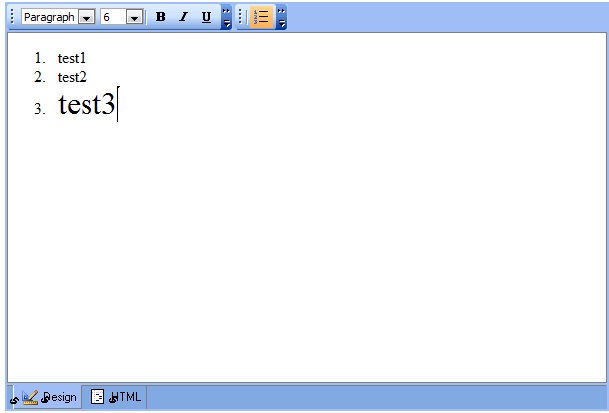
شغال المثال عندي بس القصة انو الو licenses
وهون القصة انو بيجوز اخذو لحاسبي بس ما بتوقع هالشي يكون حاول ان تعمل مثال مفرد من اول وجديد ارفق الكنترول وتعامل معه
لانو بعد عمل تشغيل تم انشاء ملف App_Licenses.dll
طيب ارجاع حمل النسخة من اول وجديد وركبها على موقعك
انا اعتمدت على ال instalation
اقتباسFor furhter installation instructions, please visit http://wiki.freetextbox.com/
*********************************************
Requirements:
*********************************************
- .NET Framework 1.1, 2.0, or 3.5
- IIS 5.0, 6.0, 7.0
*********************************************
Installation of dll
*********************************************
1. Copy the appropriate FreeTextBox.dll from Framework-X.X into your /bin/ folder
2. If you have a license file, copy  FreeTextBox.lic into the /bin/ folder
   next to FreeTextBox.dll
*********************************************
Installing the FreeTextBox support files
*********************************************
FreeTextBox uses JavaScript, images, and xml files. To correctly install FreeTextBox,
you must install these files. FreeTextBox has two ways of accessing these files:
1. Internal Resources - All the images, javascript and xml can be streamed from inside
the FreeTextBox.dll. In ASP.NET 2.0 these files are automatically pulled from
the FreeTextBox.dll. In ASP.NET 1.x, you need to add the following httpHandler to web.config:
<?xml version="1.0" encoding="utf-8" ?>
<configuration>
<system.web>
<httpHandlers>
<add verb="GET" path="FtbWebResource.axd" type="FreeTextBoxControls.AssemblyResourceHandler, FreeTextBox" />
</httpHandlers>
<system.web>
<configuration>
If you are attempting to use this method and having trouble, please view the source code of your page
and see where FtbWebResource.axd is being referenced. If it appears incorrect, please set
FreeTextBox.AssemblyResourceHandlerPath to the appropriate directory where you have set your web.config.
2. External Files - If you prefer not to use the internal JavaScript and image resources
you can also have FreeTextBox link to external files which default to
~/aspnet_client/FreeTextBox/.
To use this, you need to do the following:
- Tell FreeTextBox which kind of files to look for external resources: JavaScriptLocation=ExternalFile, ToolbarImages=ExternalFile, ButtonImagesLocation=ExternalFile
- Set the SupportFolder property of your FreeTextBox instance to the directory where you copied the files. For example, if your website is stored at www.mysite.com/FreeTextBoxFiles/, you should set SupportFolder="/FreeTextBoxFiles/".
<FTB:FreeTextBox id="FreeTextBox1" SupportFolder="~/myfolder/FreeTextBox"
JavaScriptLocation="ExternalFile"
ToolbarImages="ExternalFile
ButtonImagesLocation="ExternalFile"
runat="server" />
*********************************************
Using FreeTextBox
*********************************************
To add FreeTextBox to an ASP.NET page, do the following:
1. Add the following line to the top of your page:
<%@ Register TagPrefix="FTB" Namespace="FreeTextBoxControls" Assembly="FreeTextBox" %>
2. Add the following code between <form runat="server"> tags:
<FTB:FreeTextBox id="FreeTextBox1" runat="Server" />
*********************************************
Customizing FreeTextBox
*********************************************
FreeTextBox has as default set of buttons and dropdownlists in its toolbars. If you
would like to customize the buttons, there are three methods you can use.
1. ToolbarLayout String
This property accepts a string of ToolbarItem names. Use commas ( , ) to separate items. A pipe ( | ) will insert a ToolbarSeparator and a semicolon ( ; ) will start a new Toolbar.
The default way to configure toolbars is to use use the propery ToolbarLayout
<html>
<body>
<form runat="server">
<FTB:FreeTextBox id="FreeTextBox1"
ToolbarLayout="paragraphmenu,fontsizesmenu;bold,italic,underline|
bulletedlist,numberedlist"
runat="Server" />
</form>
</body>
</html>
Valid values for ToolbarButtons and ToolbarDropDownLists are
ParagraphMenu, FontFacesMenu, FontSizesMenu, FontForeColorsMenu,
FontForeColorPicker, FontBackColorsMenu, FontBackColorPicker, Bold, Italic, Underline,
Strikethrough, Superscript, Subscript, InsertImageFromGallery, CreateLink, Unlink,
RemoveFormat, JustifyLeft, JustifyRight, JustifyCenter, JustifyFull, BulletedList,
NumberedList, Indent, Outdent, Cut, Copy, Paste, Delete, Undo, Redo, Print, Save,
ieSpellCheck, StyleMenu, SymbolsMenu, InsertHtmlMenu, InsertRule, InsertDate,
InsertTime, WordClean, InsertImage, InsertTable, EditTable, InsertTableRowBefore,
InsertTableRowAfter, DeleteTableRow, InsertTableColumnBefore, InsertTableColumnAfter,
DeleteTableColumn, InsertForm, InsertForm, InsertTextBox, InsertTextArea,
InsertRadioButton, InsertCheckBox, InsertDropDownList, InsertButton, InsertDiv,
InsertImageFromGallery, Preview, SelectAll, EditStyle
The following values are only available in Pro versions of FreeTextBox (or if running on localhost)
FontForeColorPicker, FontBackColorPicker, EditTable
InsertTableRowAfter, DeleteTableRow, InsertTableColumnBefore, InsertTableColumnAfter,
DeleteTableColumn, InsertForm, InsertForm, InsertTextBox, InsertTextArea,
InsertRadioButton, InsertCheckBox, InsertDropDownList, InsertButton, InsertDiv,
Preview, SelectAll, EditStyle, WordClean
2. Procedurally
You can define which toolbar items appear by adding ToolbarItems in much the same way that one would add DataGrid Columns to a DataGrid. In order to do this, set AutoGenerateToolbarLayoutFromString=false:
<html>
<body>
<form runat="server">
<FTB:FreeTextBox id="FreeTextBox1" AutoGenerateToolbarsFromString="false" runat="server" >
<Toolbars>
<FTB:Toolbar runat="server">
<FTB:ParagraphMenu runat="server" />
<FTB:FontSizesMenu runat="server" />
</FTB:Toolbar>
<FTB:Toolbar runat="server">
<FTB:Bold runat="server" />
<FTB:Italic runat="server" />
<FTB:Underline runat="server" />
<FTB:ToolbarSeparator runat="server" />
<FTB:BulletedList runat="server" />
<FTB:NumberedList runat="server" />
</FTB:Toolbar>
<FTB:Toolbar runat="server">
<FTB:InsertHtmlMenu runat="server">
<Items>
<FTB:ToolbarListItem Text="Cool1" Value="<b>lalala</b>" runat="server" />
<FTB:ToolbarListItem Text="Cool2" Value="<i>lalala</i>" runat="server" />
<FTB:ToolbarListItem Text="Cool3" Value="<u>lalala</u>" runat="server" />
</Items>
</FTB:InsertHtmlMenu>
<FTB:StyleMenu runat="server">
<Items>
<FTB:ToolbarListItem Text="Highlighed" Value="<b>Highlighed</b>" runat="server" />
<FTB:ToolbarListItem Text="SmallCaps" Value="<i>smallcaps</i>" runat="server" />
</Items>
</FTB:StyleMenu>
</FTB:Toolbar>
</Toolbars>
</FTB:FreeTextBox>
</form>
</body>
</html>
3. Code (Page_Load or Code Behind)
ToolbarButtons and ToolbarDropDownLists can also be set through code. You should set the property AutoGenerateToolbarsFromString to false if you want only the ToolbarItems you define.
<script runat="server">
void Page_Load(object Src, EventArgs E) {
Toolbar toolbar1 = new Toolbar();
toolbar1.Items.Add(new ParagraphMenu());
toolbar1.Items.Add(new FontSizesMenu());
FreeTextBox1.Toolbars.Add(toolbar1);
Toolbar toolbar2 = new Toolbar();
toolbar2.Items.Add(new Bold());
toolbar2.Items.Add(new Italic());
toolbar2.Items.Add(new Underline());
toolbar2.Items.Add(new ToolbarSeparator());
toolbar2.Items.Add(new BulletedList());
toolbar2.Items.Add(new NumberedList());
FreeTextBox1.Toolbars.Add(toolbar2);
Toolbar toolbar3 = new Toolbar();
StyleMenu styleMenu = new StyleMenu();
styleMenu.Items.Add(new ToolbarListItem("Highlight","Highlight"));
styleMenu.Items.Add(new ToolbarListItem("SmallCaps","smallcaps"));
toolbar3.Items.Add(styleMenu);
FreeTextBox1.Toolbars.Add(toolbar3);
}
</script>
<html>
<body>
<form runat="server">
<FTB:FreeTextBox id="FreeTextBox1" AutoGenerateToolbarsFromString="false" runat="server" />
</form>
</body>
</html>
مثلما قلت انو ترجع تعمل تنصيب من البداية
تم تعديل هذه المشاركة بواسطة X-File في 17 أغسطس 2010 في 17:53
In bad state
ولكن يا أخي الفقرة الثانية لم استطع فهمها
2. If you have a license file, copy FreeTextBox.lic into the /bin/ folder next to FreeTextBox.dll
حيث انها تقول اذا كان لديك ملف licenseقم بنسخ الملف FreeTextBox.lic بداخل المجلد bin
وأنا لا أدري ما هو الملف license ولا أين هو أو اين اجده وكذلك الملف FreeTextBox.lic
فياليت اذا كان عندك هذين الملفين ترفعهم او ما رأيك في ما أقول ؟
السلام عليكم
كما تم توضحيهبالاعلى يتم بفيديو قصير وبدون صوت :)
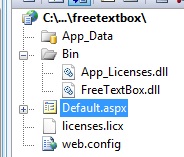
فكرة المفتاح انو فعلا لازم تمتلك مفتاح او بيكون حر
اذا كان حر بعد التشغيل رح يعمل رخصة لموقعك وتتبين بهاي الصورة :)
بالتوفيق
شوف اذا ما مشي الحال بتكون من الملف يلي عما تشتغل عليه حاول ترجع تحملو من الموقع ولا تحمل الاصدار الرابع :)
In bad state
شاهد الفيديو الذي قمت بتسجيله :mellow:
http://www.4shared.com/file/qTm3qVWU/SRFile2010_8_20_23_33_11_250.html
:D
بالمناسبة اخي احمد ايا اصدار فيجوال استديو تستخدم
بالاضافة لم لم تشغل التطبيق ولو شغلته ما هي الرسالة التي سيعطيها
In bad state
المتواجدون خلال آخر ساعة · يتحدّث كل ٣٠ ثانية
جارٍ التحقق من المتواجدين…