حاولت البحث عن اى خصائص لاضافة صور الى الكالندر لكن لم اجد فكيف استطيع اضافة صور ؟
كيف يمكن اضافة صور الى ال calendar ؟
ماذا تقصد بإضافة صور؟ وإلى أين بالضبط؟
أريد منك توضيحاً أكثر لكي أستطيع إفادتك
جزاك الله خيراً
مدونة ابنتي الرضيعة: يوميات رزان
مدونتي التقنية العربية: البرمجة مع عبد المنعم
Technical Blog: Abdul Moniem's Thoughts
LinkedIn: Profile
أحمد عبد المنعم كتب:ماذا تقصد بإضافة صور؟ وإلى أين بالضبط؟
أريد منك توضيحاً أكثر لكي أستطيع إفادتك
جزاك الله خيراً
المقصود هو اضافة خلفية لل calendar واعطاء صور للمفاتيح الخاصة بالايام وتاثيرات عند الضغط على الbutton او المرور علية واضافة صورة للهيدر وصور للاسهم الخاصة بالتالى والسابق
تم تعديل هذه المشاركة بواسطة ramysarwat في 23 مارس 2010 في 17:03
كل هذه الأمور يمكنك التحكم عن طريق ال Themes and Styles
وإليك هذا المثال .. يمكنك استخدام هذا ال Style Sheet .. أو ال CSS وهو خاص بال Calendar وكل جزء فيها:
/************************************
************* Calendar **************
*************************************/

.calendar
{
    background-color: #FFFFFF !important;
    border: 1px solid #3A4F6C;
    font-family: Arial, Helvetica, sans-serif;
    font-size: 14px;
    height: 200px !important;
    width: 220px !important;
    padding: 1px;
    font-weight: bold;
    font-style: normal;
    font-variant: normal;
    text-transform: none;
    text-decoration: none;
}

.calendarSelectedDayStyle
{
    color: #FFFFFF !important;
    vertical-align: middle;
    text-align: center;
    font-family: Arial, Helvetica, sans-serif;
    font-size: 14px;
    font-weight: bold;
    background-image: url('AdminImages/selected.gif') !important;
    background-position: center center !important;
    background-repeat: no-repeat !important;
    text-align: center !important;
    background-color: #FFFFFF !important;
}

.calendarSelectedDayStyle a
{
    color: #FFFFFF !important;
    vertical-align: middle;
    text-align: center;
    font-family: Arial, Helvetica, sans-serif;
    font-size: 14px;
    font-weight: bold;
    background-image: url('AdminImages/selected.gif') !important;
    background-position: center center !important;
    background-repeat: no-repeat !important;
    text-align: center !important;
    background-color: #FFFFFF !important;
    text-decoration: none;
}

.calendarSelectorStyle
{
    background-color: #F5F9FD;
    color: #3A4F6C;
}

.calendarWeekendDayStyle
{
    font-family: Arial, Helvetica, sans-serif;
    font-size: 14px;
    font-weight: bold;
    font-style: normal;
    font-variant: normal;
    text-transform: none;
    color: #3A4F6C !important;
    text-decoration: none;
}


.calendarWeekendDayStyle a
{
    font-family: Arial, Helvetica, sans-serif;
    font-size: 14px;
    font-weight: bold;
    font-style: normal;
    font-variant: normal;
    text-transform: none;
    color: #3A4F6C !important;
    text-decoration: none;
}
.calendarTodayDayStyle
{
    color: #3A4F6C;
    font-family: Arial, Helvetica, sans-serif;
    font-size: 14px;
    font-weight: bold;
    font-style: normal;
    font-variant: normal;
    text-transform: none;
    background-image: url('AdminImages/today.gif') !important;
    background-position: center center !important;
    background-repeat: no-repeat !important;
    text-align: center !important;
    background-color: #FFFFFF !important;
}

.calendarTodayDayStyle a
{
    color: #3A4F6C !important;
    color: #3A4F6C;
    font-family: Arial, Helvetica, sans-serif;
    font-size: 14px;
    font-weight: bold;
    font-style: normal;
    font-variant: normal;
    text-transform: none;
    background-image: url('AdminImages/today.gif') !important;
    background-position: center center !important;
    background-repeat: no-repeat !important;
    text-align: center !important;
    background-color: #FFFFFF !important;
    text-decoration: none;
}

.calendarOtherMonthDayStyle
{
    font-family: Arial, Helvetica, sans-serif;
    font-size: 14px;
    font-weight: bold;
    font-style: normal;
    font-variant: normal;
    text-transform: none;
    color: #3A4F6C !important;
    text-decoration: none;
}

.calendarOtherMonthDayStyle a
{
    font-family: Arial, Helvetica, sans-serif;
    font-size: 14px;
    font-weight: bold;
    font-style: normal;
    font-variant: normal;
    text-transform: none;
    color: #3A4F6C !important;
    text-decoration: none;
}

.calendarNextPrevStyle
{
    font-size: 14px;
    font-family: Arial, Helvetica, sans-serif;
    font-weight: bold;
    font-style: normal;
    font-variant: normal;
    text-transform: none;
}


.calendarNextPrevStyle a
{
    font-size: 14px;
    color: #FFFFFF !important;
    font-family: Arial, Helvetica, sans-serif;
    font-weight: bold;
    font-style: normal;
    font-variant: normal;
    text-transform: none;
}


.calendarDayHeaderStyle
{
    background-color: #F5F9FD;
    color: #3A4F6C;
    height: 1px;
    font-family: Arial, Helvetica, sans-serif;
    font-size: 14px;
    font-weight: bold;
    font-style: normal;
    font-variant: normal;
    text-transform: none;
    border-bottom-color: #3A4F6C;
    border-bottom-style: solid;
    border-bottom-width: 1px;
}

.calendarTitleStyle
{
    background-color: #3A4F6C;
    border: 0px solid #3A4F6C;
    font-weight: bold;
    font-size: 14px;
    color: #F5F9FD;
    height: 25px;
    font-family: Arial, Helvetica, sans-serif;
    font-style: normal;
    font-variant: normal;
    text-transform: none;
}

.calendarTitleStyle tr, .calendarTitleStyle td
{
    padding: 0px;
    margin: 0px;
    border: 0px solid #3A4F6C;
    font-weight: bold;
    font-size: 14px;
    color: #F5F9FD;
    height: auto;
    font-family: Arial, Helvetica, sans-serif;
    font-style: normal;
    font-variant: normal;
    text-transform: none;
    background-image: url('AdminImages/tile_cat.gif');
    vertical-align: middle;
    text-align: center;
}

.calendarDayStyle
{
    font-family: Arial, Helvetica, sans-serif;
    font-size: 14px;
    font-weight: bold;
    font-style: normal;
    font-variant: normal;
    text-transform: none;
    color: #3A4F6C !important;
    text-decoration: none;
}

.calendarDayStyle a
{
    font-family: Arial, Helvetica, sans-serif;
    font-size: 14px;
    font-weight: bold;
    font-style: normal;
    font-variant: normal;
    text-transform: none;
    color: #3A4F6C !important;
    text-decoration: none;
}
ومعه هذا ال Skin ضعه داخل ال Theme:
<asp:Calendar runat="server" CssClass="calendar" DayNameFormat="Shortest">
    <SelectedDayStyle CssClass="calendarSelectedDayStyle" />
    <SelectorStyle CssClass="calendarSelectorStyle" />
    <WeekendDayStyle CssClass="calendarWeekendDayStyle" />
    <TodayDayStyle CssClass="calendarTodayDayStyle" />
    <OtherMonthDayStyle CssClass="calendarOtherMonthDayStyle" />
    <NextPrevStyle CssClass="calendarNextPrevStyle" />
    <DayHeaderStyle CssClass="calendarDayHeaderStyle" />
    <TitleStyle CssClass="calendarTitleStyle" />
    <DayStyle CssClass="calendarDayStyle" />
</asp:Calendar>
وبهذا يمكنك التحكم بكل جزء وتفصيلة في ال Calendar
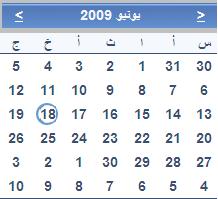
المثال السابق سيعطيك شكل الصورة المرفقة:
وطبعاً عليك أن تقوم بتغيير كل شيء لكل يناسب مشروعك .. هذا مثال من أحد المشاريع القديمة عندي ..
مدونة ابنتي الرضيعة: يوميات رزان
مدونتي التقنية العربية: البرمجة مع عبد المنعم
Technical Blog: Abdul Moniem's Thoughts
LinkedIn: Profile
حياك الله أخ أحمد عبد المنعم وجزاك الله كل خير وأجزل لك الأجر ....
ASP.NET Team Leader
moh_kin_mah@hotmail.com
--------------------------------
لو أعجبك أي من مشاركاتي ... برجاء قم بتقييم المشاركة عبر الأزرار الموجودة أسفل يسار كل مشاركة
جزاك الله خيراً أخ محمد
مدونة ابنتي الرضيعة: يوميات رزان
مدونتي التقنية العربية: البرمجة مع عبد المنعم
Technical Blog: Abdul Moniem's Thoughts
LinkedIn: Profile