الفريق العربي للبرمجةأرشيف المنتديات · 2000 – 2023
نسخة أرشيفية للقراءة فقط — التسجيل والمشاركة مغلقان، والمحتوى محفوظ كما كان.

استفسار عن رسم شكل سداسي

بدأه شايب الديمن في 28 سبتمبر 2009 · 10 رد · 2,532 مشاهدة · في Microsoft Visual Basic.NET
مشاركة: واتساب X فيسبوك تيليجرام
#1 صاحب الموضوع

السلام عليكــم ورحمـة الله وبركاتــه ،،

بحثت كثيرا في المنتدى وقوقل عن طريقة لرسم شكل سداسي

وجدت الكثر منها تتحدث عن الخط والدوائر والمستطيل والمثلث والمربع

أخذ بعض الأكواد وقمت بالتعديل عليها ولكن دون جدوى

قرأت عن

+GDI

ولكن لم أصل للحل

فضلا أريد كود لرسم شكل سداسي والتحكم بموقعه ولونه ومايحتويه من نص

شكرا لكم

#2

مرحباً أخي الكريم،

عليّك استخدام الإجراء ( FillAdvancedPolygon ) :

Public Class Form1

	Private Sub FillAdvancedPolygon(ByVal G As Graphics, ByVal Rect As Rectangle, _
	ByVal BackColor As Color, ByVal ForeColor As Color, ByVal InnerText As String, _
	ByVal UsedFont As Font)
		Dim Sides As Int32 = 6
		Dim CenterX, CenterY As Single
		CenterX = Rect.X + (Rect.Width * 0.5)
		CenterY = Rect.Y + (Rect.Height * 0.5)
		Dim WRadius, HRadius As Single
		WRadius = (Rect.Width * 0.5)
		HRadius = (Rect.Height * 0.5)
		Dim StartAngle As Single = 60
		Dim SweepPer As Single = (360 / Sides)
		Dim Points(Sides - 1) As PointF
		For I As Int32 = 0 To UBound(Points)
			With Points(I)
				.X = (CenterX + WRadius * Math.Cos(StartAngle * Math.PI / 180))
				.Y = (CenterY - HRadius * Math.Sin(StartAngle * Math.PI / 180))
			End With
			StartAngle += SweepPer
		Next
		With G
			Using SBrush As New SolidBrush(BackColor)
				G.FillPolygon(SBrush, Points)
				SBrush.Color = ForeColor
				Dim STFormat As New StringFormat
				STFormat.Alignment = StringAlignment.Center
				STFormat.LineAlignment = StringAlignment.Center
				STFormat.FormatFlags = StringFormatFlags.LineLimit
				G.DrawString(InnerText, UsedFont, SBrush, Rect, STFormat)
			End Using
		End With
	End Sub

	Private Sub Form1_Paint(ByVal sender As Object, ByVal e As System.Windows.Forms.PaintEventArgs) Handles Me.Paint
		Dim RWidth As Int32 = (ClientSize.Width / 5)
		Dim RHeight As Int32 = (ClientSize.Height / 5)
		Dim FT As New Font("Times New Roman", 16, FontStyle.Bold, GraphicsUnit.Point)
		Using G As Graphics = Graphics.FromHwnd(Handle)
			G.Clear(BackColor)
			G.SmoothingMode = Drawing2D.SmoothingMode.AntiAlias
			G.TextRenderingHint = Drawing.Text.TextRenderingHint.AntiAlias
			For X As Int32 = 0 To Width - RWidth Step RWidth
				For Y As Int32 = 0 To Height - RHeight Step RHeight
					FillAdvancedPolygon(G, New Rectangle(X, Y, RWidth, RHeight), _
					RColor, Color.Black, X.ToString & ", " & Y.ToString, FT)
				Next
			Next
		End Using
	End Sub

	Private Function RColor() As Color
		Dim Rand As New Random
		Dim Red, Green, Blue As Byte
		Red = Rand.Next(0, 255)
		Green = Rand.Next(0, 255)
		Blue = Rand.Next(0, 255)
		Return Color.FromArgb(Red, Green, Blue)
	End Function

End Class

بالتوفيق

تم تعديل هذه المشاركة بواسطة Bashar Rabat في 29 سبتمبر 2009 في 10:31

The important thing is not so much

that every child should be taught,

as that every child should be given the wish to learn.

#3
Bashar Rabat كتب:
مرحباً أخي الكريم،

عليّك استخدام الإجراء ( FillAdvancedPolygon ) :

Public Class Form1

	 Private Sub FillAdvancedPolygon(ByVal G As Graphics, ByVal Rect As Rectangle, _
	 ByVal BackColor As Color, ByVal ForeColor As Color, ByVal InnerText As String, _
	 ByVal UsedFont As Font)
		 Dim Sides As Int32 = 6
		 Dim CenterX, CenterY As Single
		 CenterX = Rect.X + (Rect.Width * 0.5)
		 CenterY = Rect.Y + (Rect.Height * 0.5)
		 Dim WRadius, HRadius As Single
		 WRadius = (Rect.Width * 0.5)
		 HRadius = (Rect.Height * 0.5)
		 Dim StartAngle As Single = 60
		 Dim SweepPer As Single = (360 / Sides)
		 Dim Points(Sides - 1) As PointF
		 For I As Int32 = 0 To UBound(Points)
			 With Points(I)
				 .X = (CenterX + WRadius * Math.Cos(StartAngle * Math.PI / 180))
				 .Y = (CenterY - HRadius * Math.Sin(StartAngle * Math.PI / 180))
			 End With
			 StartAngle += SweepPer
		 Next
		 With G
			 Using SBrush As New SolidBrush(BackColor)
				 G.FillPolygon(SBrush, Points)
				 SBrush.Color = ForeColor
				 Dim STFormat As New StringFormat
				 STFormat.Alignment = StringAlignment.Center
				 STFormat.LineAlignment = StringAlignment.Center
				 STFormat.FormatFlags = StringFormatFlags.LineLimit
				 G.DrawString(InnerText, UsedFont, SBrush, Rect, STFormat)
			 End Using
		 End With
	 End Sub

	 Private Sub Form1_Paint(ByVal sender As Object, ByVal e As System.Windows.Forms.PaintEventArgs) Handles Me.Paint
		 Dim RWidth As Int32 = (ClientSize.Width / 5)
		 Dim RHeight As Int32 = (ClientSize.Height / 5)
		 Dim FT As New Font("Times New Roman", 16, FontStyle.Bold, GraphicsUnit.Point)
		 Using G As Graphics = Graphics.FromHwnd(Handle)
			 G.Clear(BackColor)
			 G.SmoothingMode = Drawing2D.SmoothingMode.AntiAlias
			 G.TextRenderingHint = Drawing.Text.TextRenderingHint.AntiAlias
			 For X As Int32 = 0 To Width - RWidth Step RWidth
				 For Y As Int32 = 0 To Height - RHeight Step RHeight
					 FillAdvancedPolygon(G, New Rectangle(X, Y, RWidth, RHeight), _
					 RColor, Color.Black, X.ToString & ", " & Y.ToString, FT)
				 Next
			 Next
		 End Using
	 End Sub

	 Private Function RColor() As Color
		 Dim Rand As New Random
		 Dim Red, Green, Blue As Byte
		 Red = Rand.Next(0, 255)
		 Green = Rand.Next(0, 255)
		 Blue = Rand.Next(0, 255)
		 Return Color.FromArgb(Red, Green, Blue)
	 End Function

 End Class

بالتوفيق

الله يعطيك العافية

جربت الكود فقام بملئء الفورم بالأشكال السداسية

والكود لم أستطع فهمه فهو معقد بعض الشيء بالنسبة لي

ففضلا لا أمرا

أريد كود رسم شكل سداسي واحد فقط لأني لو فهمته راح أستطيع عمل أكثر من شكل

أيضا كود تحديد موقع الشكل داخل الفورم

وأيضا كود تلوين الشكل

وأخيرا كود الكتابة

وأتمنى أن يكون بدون دوال التكرار أو الدوران

أكثرت عليكم لكني لم أجد مايساعدني في أي موقع عربي

#4
Bashar Rabat كتب:
عليّك استخدام الإجراء ( FillAdvancedPolygon )

اي :

Private Sub FillAdvancedPolygon(ByVal G As Graphics, ByVal Rect As Rectangle, _
	 ByVal BackColor As Color, ByVal ForeColor As Color, ByVal InnerText As String, _
	 ByVal UsedFont As Font)

هذه تتطلب العوامل التالي :

G = كائن الـ( Graphics ) التابعة لكائن ما ( Form, Control, Image, Etc... )

Rect = مستطيل ( المكان الذي سوف يتم رسم الشكل السداسي فيه )

BackColor = لون ( اللون الخاص بالشكل السداسي )

ForColor = لون ( اللون الخاص بالنص الذي سيرسم داخل الشكل السداسي )

InnerText = نص ( النص الذي تريد عرضه داخل الشكل السداسي )

UsedFont = خط ( الخط الذي سوف يكون مستخدم في عملية رسم النص المرسل عبر العامل ( InnerText ) )

لرسم شكل سداسي :

Dim Rect As New Rectangle( 0, 0, 150, 100 )
Dim BColor As Color = Color.Blue
Dim FColor As Color = Color.Yellow
Dim IText As String = "Welcome to my world!"
Dim FT As Font = New Font("Arial", 12, FontStyle.Bold, GraphicsUnit.Point )
Dim G As Graphics = 'GraphicsObject'
FillAdvancedPolygon( G, Rect, BColor, FColor, IText, FT )

استبدل الـ( GraphicsObject ) بكائن الـ( Graphics ) المسؤول عن رسم الشكل السداسي .

The important thing is not so much

that every child should be taught,

as that every child should be given the wish to learn.

#5
Bashar Rabat كتب:
اي :

Private Sub FillAdvancedPolygon(ByVal G As Graphics, ByVal Rect As Rectangle, _
	  ByVal BackColor As Color, ByVal ForeColor As Color, ByVal InnerText As String, _
	  ByVal UsedFont As Font)

هذه تتطلب العوامل التالي :

G = كائن الـ( Graphics ) التابعة لكائن ما ( Form, Control, Image, Etc... )

Rect = مستطيل ( المكان الذي سوف يتم رسم الشكل السداسي فيه )

BackColor = لون ( اللون الخاص بالشكل السداسي )

ForColor = لون ( اللون الخاص بالنص الذي سيرسم داخل الشكل السداسي )

InnerText = نص ( النص الذي تريد عرضه داخل الشكل السداسي )

UsedFont = خط ( الخط الذي سوف يكون مستخدم في عملية رسم النص المرسل عبر العامل ( InnerText ) )

لرسم شكل سداسي :

Dim Rect As New Rectangle( 0, 0, 150, 100 )
 Dim BColor As Color = Color.Blue
 Dim FColor As Color = Color.Yellow
 Dim IText As String = "Welcome to my world!"
 Dim FT As Font = New Font("Arial", 12, FontStyle.Bold, GraphicsUnit.Point )
 Dim G As Graphics = 'GraphicsObject'

استبدل الـ( GraphicsObject ) بكائن الـ( Graphics ) المسؤول عن رسم الشكل السداسي .

قمت باستبدال rect بـ tabel1 لأنني أريد الشكل داخله

بالنسبة للكود

Dim G As Graphics = 'GraphicsObject'

قلت

استبدل الـ( GraphicsObject ) بكائن الـ( Graphics ) المسؤول عن رسم الشكل السداسي .

ممكن توضيح لم أفهم

فضلا كود تحديد مكان الشكل في label أو الفورم عن طريق الإحداثيات أو غيرها

#6
شايب الديمن كتب:
قمت باستبدال rect بـ tabel1 لأنني أريد الشكل داخله

بالنسبة للكود

Dim G As Graphics = 'GraphicsObject'

قلت

استبدل الـ( GraphicsObject ) بكائن الـ( Graphics ) المسؤول عن رسم الشكل السداسي .

ممكن توضيح لم أفهم

فضلا كود تحديد مكان الشكل في label أو الفورم عن طريق الإحداثيات أو غيرها

أخي الكريم الـ( Rect ) هو عبارة عن كائن ( Rectangle ) والذي يمثل خصائص مستطيل وليس شكل أو أي شيء أخر معروض أو قابل لأن يكون معروض، ولذلك هذا المستطيل يمثل مكان رسم الشكل السداسي أي ( س، ع، العرض، الطول ) :

س = قيمة مكان الشكل على الإحداثي ( س ) .

ع = قيمة مكان الشكل على الإحداثي ( ع ) .

العرض = عرض الشكل .

الطول = طول الشكل .

دقق بالصورة التالية لتفهم سبب استخدام :

Recta.jpg

اعتبر المساحة البيضاء من الصورة ( Control ) أو ( Form ) واللون الأبيض يمثله، كما ترى أن الشكل السداسي محتوى داخل مستطيل ( Rectangle ) هذا المستطيل يمثل :

قمت باستبدال Rect بـ tabel1 لأنني أريد الشكل داخله >

وهذه هي الفكرة الخطأ،

على فرض أن التحكم ( Control ) أو النموذج ( Form ) الذي تريد الرسم عليّه حجمه ( 640x480 ) ولكنك لاتريد رسم الشكل السداسي بهذا الحجم الكبير، فما العمل ؟

العمل هو تحديد مكان رسم الشكل السداسي بكائن مستطيل جديد عوضاً عن استخدام خصائص مستطيل الكائن المستخدم في الرسم اي الـ( Control ) أو الـ( Form ) كما استخدمنا في الأمثلة السابقة :)

Dim Rect As New Rectangle( 179, 121, 268, 233 )
Dim BColor As Color = Color.Blue
Dim FColor As Color = Color.Yellow
Dim IText As String = "Welcome to my world!"
Dim FT As Font = New Font("Arial", 12, FontStyle.Bold, GraphicsUnit.Point )
Dim G As Graphics = Form1.CreateGraphics()
 FillAdvancedPolygon(G, Rect, BColor, FColor, IText, FT )

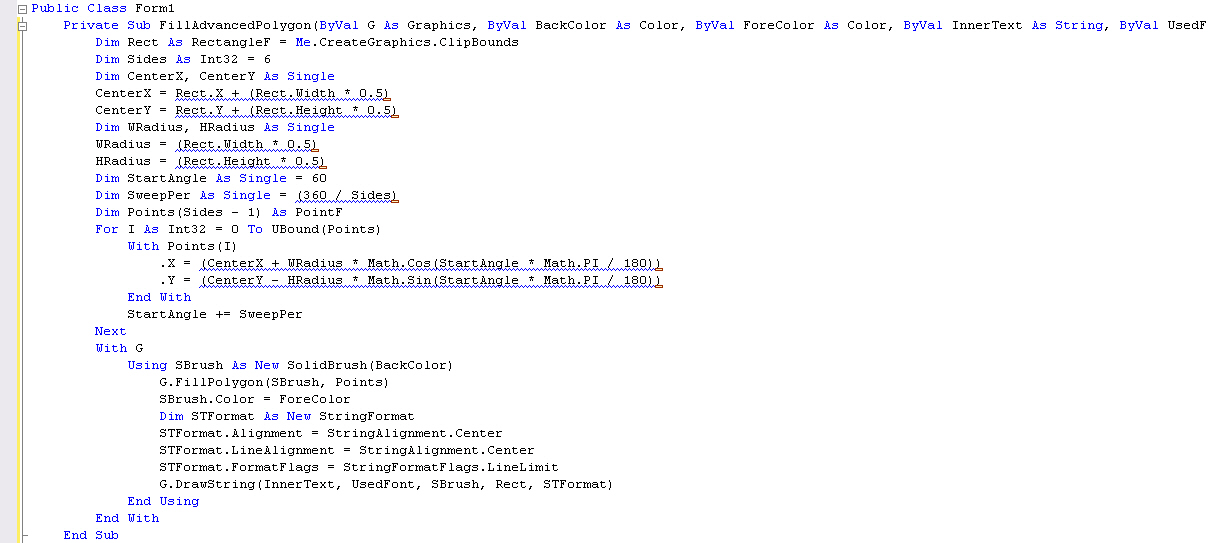
إذا كنت تريد ملء الشكل السداسي بحجم الكائن المستخدم في الرسم قم باستخدام الإجراء التالي عوضاً عن الإجراء المذكور سابقاً، علماً أنك لن تحتاج بعد الأن لاستخدام المستطيلات أو إعداد مكان رسم الكشل السداسي :

	 Private Sub FillAdvancedPolygon(ByVal G As Graphics, _
	 ByVal BackColor As Color, ByVal ForeColor As Color, ByVal InnerText As String, _
	 ByVal UsedFont As Font)
		 Dim Rect As RectangleF = Me.CreateGraphics.ClipBounds
		 Dim Sides As Int32 = 6
		 Dim CenterX, CenterY As Single
		 CenterX = Rect.X + (Rect.Width * 0.5)
		 CenterY = Rect.Y + (Rect.Height * 0.5)
		 Dim WRadius, HRadius As Single
		 WRadius = (Rect.Width * 0.5)
		 HRadius = (Rect.Height * 0.5)
		 Dim StartAngle As Single = 60
		 Dim SweepPer As Single = (360 / Sides)
		 Dim Points(Sides - 1) As PointF
		 For I As Int32 = 0 To UBound(Points)
			 With Points(I)
				 .X = (CenterX + WRadius * Math.Cos(StartAngle * Math.PI / 180))
				 .Y = (CenterY - HRadius * Math.Sin(StartAngle * Math.PI / 180))
			 End With
			 StartAngle += SweepPer
		 Next
		 With G
			 Using SBrush As New SolidBrush(BackColor)
				 G.FillPolygon(SBrush, Points)
				 SBrush.Color = ForeColor
				 Dim STFormat As New StringFormat
				 STFormat.Alignment = StringAlignment.Center
				 STFormat.LineAlignment = StringAlignment.Center
				 STFormat.FormatFlags = StringFormatFlags.LineLimit
				 G.DrawString(InnerText, UsedFont, SBrush, Rect, STFormat)
			 End Using
		 End With
	 End Sub

يصبح الاستخدام :

With Label1
FillAdvancedPolygon(.CreateGraphics, .BackColor, .ForeColor, .Text, .Font )
End With

تم استخدام خصائص التحكم ( Label1 )

بالتوفيق :)

تم تعديل هذه المشاركة بواسطة Bashar Rabat في 1 أكتوبر 2009 في 11:44

The important thing is not so much

that every child should be taught,

as that every child should be given the wish to learn.

#7

الله يعطيك العافية الصورة وضحت المقصود

هذا الكود اذي وضعته

Public Class Form1
	Private Sub FillAdvancedPolygon(ByVal G As Graphics, ByVal tabel1 As Rectangle, ByVal BackColor As Color, ByVal ForeColor As Color, ByVal InnerText As String, ByVal UsedFont As Font)
		Dim Rect As New Rectangle(179, 121, 268, 233)
		Dim BColor As Color = Color.Blue
		Dim FColor As Color = Color.Yellow
		Dim IText As String = "Welcome to my world!"
		Dim FT As Font = New Font("Arial", 12, FontStyle.Bold, GraphicsUnit.Point)
		Dim G As Graphics = Form1.CreateGraphics()
		FillAdvancedPolygon(G, Rect, BColor, FColor, IText, FT)
	End Sub
End Class

يخرج لي وجود خطأ في الكود

Dim G As Graphics = Form1.CreateGraphics()

والخطأ هو

Error 'G' is already declared as a parameter of this method.

ومازلت أحتاج إلى كود لتحديد مكان الشكل في الفورم أو غيره

شكرا جزيلا لك

#8
شايب الديمن كتب:
الله يعطيك العافية الصورة وضحت المقصود

هذا الكود اذي وضعته

Public Class Form1
	Private Sub FillAdvancedPolygon(ByVal G As Graphics, ByVal tabel1 As Rectangle, ByVal BackColor As Color, ByVal ForeColor As Color, ByVal InnerText As String, ByVal UsedFont As Font)
		Dim Rect As New Rectangle(179, 121, 268, 233)
		Dim BColor As Color = Color.Blue
		Dim FColor As Color = Color.Yellow
		Dim IText As String = "Welcome to my world!"
		Dim FT As Font = New Font("Arial", 12, FontStyle.Bold, GraphicsUnit.Point)
		Dim G As Graphics = Form1.CreateGraphics()
		FillAdvancedPolygon(G, Rect, BColor, FColor, IText, FT)
	End Sub
End Class

يخرج لي وجود خطأ في الكود

Dim G As Graphics = Form1.CreateGraphics()

والخطأ هو

Error 'G' is already declared as a parameter of this method.

ومازلت أحتاج إلى كود لتحديد مكان الشكل في الفورم أو غيره

شكرا جزيلا لك

أهلاً أخي الكريم :)،

Public Class Form1

	Private Sub FillAdvancedPolygon(ByVal G As Graphics, _
		ByVal BackColor As Color, ByVal ForeColor As Color, ByVal InnerText As String, _
		ByVal UsedFont As Font)
		Dim Rect As RectangleF = G.ClipBounds
		Dim Sides As Int32 = 6
		Dim CenterX, CenterY As Single
		CenterX = Rect.X + (Rect.Width * 0.5)
		CenterY = Rect.Y + (Rect.Height * 0.5)
		Dim WRadius, HRadius As Single
		WRadius = (Rect.Width * 0.5)
		HRadius = (Rect.Height * 0.5)
		Dim StartAngle As Single = 60
		Dim SweepPer As Single = (360 / Sides)
		Dim Points(Sides - 1) As PointF
		For I As Int32 = 0 To UBound(Points)
			With Points(I)
				.X = (CenterX + WRadius * Math.Cos(StartAngle * Math.PI / 180))
				.Y = (CenterY - HRadius * Math.Sin(StartAngle * Math.PI / 180))
			End With
			StartAngle += SweepPer
		Next
		With G
			Using SBrush As New SolidBrush(BackColor)
				G.FillPolygon(SBrush, Points)
				SBrush.Color = ForeColor
				Dim STFormat As New StringFormat
				STFormat.Alignment = StringAlignment.Center
				STFormat.LineAlignment = StringAlignment.Center
				STFormat.FormatFlags = StringFormatFlags.LineLimit
				G.DrawString(InnerText, UsedFont, SBrush, Rect, STFormat)
			End Using
		End With
	End Sub

End Class

هذه الإجراء يجب عليّك فقط استدعائه وليس التعديل عليّه ;) راجع المثال الأول لتفهم الفكرة، المقصود بالإستدعاء هو أن تقوم باستخدام ( FillAdvancedPolygon ) في إجراء أو عملية ما أو تحت حدث معين :) .

	Private Sub Button1_Click(ByVal Sender As Object, ByVal E As System.EventArgs) Handles Button1.Click
		FillAdvancedPolygon(Me.CreateGraphics, Color.Red, Color.Aqua, "Hello!", Me.Font)
	End Sub

بالتوفيق :)

تم تعديل هذه المشاركة بواسطة Bashar Rabat في 1 أكتوبر 2009 في 18:46

The important thing is not so much

that every child should be taught,

as that every child should be given the wish to learn.

#9

قمت باستدعاء الإجراء

وقمت بوضع Button1 في الفورم وقمت بوضع الحدث

الصور في المرفقات

post-144471-1254396972_thumb.jpg

post-144471-1254396992_thumb.jpg

#10

عذراً أخي الكريم كان هناك خطاً بسطر استدعاء الإجراء ( FillAdvancedPolygon ) تم التعديل :)

بالنسبة للمقطع الأول من الـ( Code ) المعروض في الصورة التي قمت بإرفاقها، فليس هناك من خطأ :unsure:

تم تعديل هذه المشاركة بواسطة Bashar Rabat في 1 أكتوبر 2009 في 16:14

The important thing is not so much

that every child should be taught,

as that every child should be given the wish to learn.

#11
Bashar Rabat كتب:
عذراً أخي الكريم كان هناك خطاً بسطر استدعاء الإجراء ( FillAdvancedPolygon ) تم التعديل :)

بالنسبة للمقطع الأول من الـ( Code ) المعروض في الصورة التي قمت بإرفاقها، فليس هناك من خطأ :unsure:

الكود المعدل تمام

لكن الكود الأول المرفق في الصورة الكبيرة به بعض الأخطاء كما هو موضح

هل من حل وشكرا

مواضيع مشابهة

عدد الزوار حالياً

المتواجدون خلال آخر دقيقتين · يتحدّث كل ٣٠ ثانية

—الإجمالي—أعضاء مسجّلون—زوار بدون تسجيل

جارٍ التحقق من المتواجدين…