السلام عليكــم ورحمـة الله وبركاتــه ،،
موضوع حبيت اذكره لانه حدث معي بالفعل
ولا احب احد يقع فيه
تم حذف قاعدة البيانات وحتى مش موجودة في سلة المهملات
فلو حصل وظهرت رسالة كما في التالي
لا تأخذ اي موقف قبل نسخ قاعدة بياناتك
Database may be deleted on compact (Access 2007)
Update: Microsoft has released a hotfix for this bug.
Do not store Access databases in an offline folder. There are known issues where the database can disappear without a trace if you do.
A few users have reported another possible issue where Access 2007 deletes the database when you compact it. At the end of the compact operation, they see a dialog to the effect that Access cannot delete the database as it is "read only", even though the database is not read-only. Once you okay that dialog, the database is gone (not even in the Recycle Bin.)
Michael J Strickland suggested the workaround below.
The dialog reportedly looks like this:
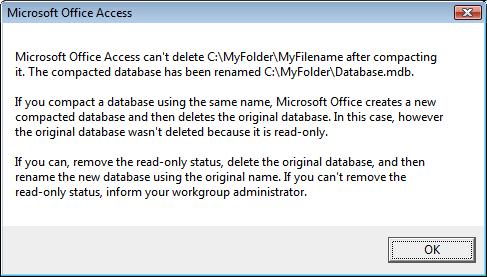
If you see an unexpected message while compacting:
- LEAVE THE DIALOG ON SCREEN UNANSWERED!
- Open the Windows Explorer, and make a copy of your database.
- Ok the dialog only after you have made a copy.
This could be the last chance you have to ever see your database again.
You may also want to ensure the Compact On Close box is unchecked under:
http://allenbrowne.com/bug-DeleteOnCompact.html
وكل عام والجميع بخير
