الفريق العربي للبرمجةأرشيف المنتديات · 2000 – 2023
نسخة أرشيفية للقراءة فقط — التسجيل والمشاركة مغلقان، والمحتوى محفوظ كما كان.

عودة مع إستخراج المعلومات من مواقع الأنترنيت

بدأه 9277463 في 15 سبتمبر 2009 · 20 رد · 2,086 مشاهدة · في Microsoft Visual Basic.NET
مشاركة: واتساب X فيسبوك تيليجرام
#1 صاحب الموضوع

لقد سبق و أجابني أحبتي في الله عن سؤالي في موضوع سابق .

السؤال هنا معقد شيئا ما فمن إستطاع المساعدة فله جزيل الشكر السؤال هو :

كيفية إستخراج بعض المعلومات من موقع محدد ولكن المشكل هنا هو أنه للوصول إلى هذه المعلومات يجب إدخال تعريف و كلمة سر أي يجب أن يكون الشخص مسجلا

ملحوظة: التسجيل بالمجان

الاسم: 9277463

كلمة السر : 9277463

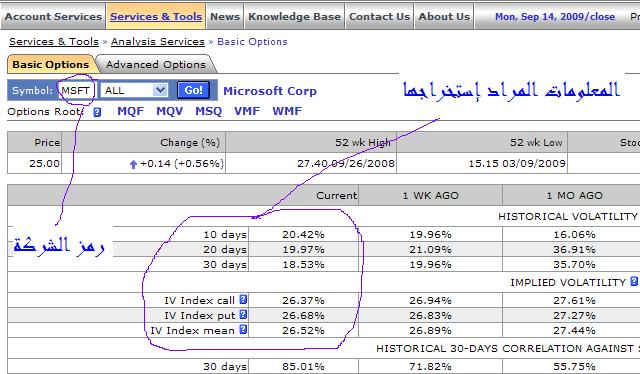
و عنوان الصفحة المراد إستخراج المعلومات منها هنــــــــا :
post-211414-1253026966_thumb.jpg

تحيــــــــاتــي...

تم تعديل هذه المشاركة بواسطة 9277463 في 15 سبتمبر 2009 في 18:07

تحيـــــــاتي...

#2

مرحباً أخي الكريم،

مالذي تريد استخراجه من تلك الصفحات بالضبط ؟

The important thing is not so much

that every child should be taught,

as that every child should be given the wish to learn.

#3

السلام و رحمة الله و بركاته لقد أرفقت صوررة توضيحية مع الموضوع و شكرا على تفهمكم

تحيـــــــاتي...

#4
9277463 كتب:

السلام و رحمة الله و بركاته لقد أرفقت صوررة توضيحية مع الموضوع و شكرا على تفهمكم

أخي الكريم برجاء إعادة تعديل أو كتابة عنوان الصفحة المراد استخراج المعلومات منها :) شكراً .

بالتوفيق :)

The important thing is not so much

that every child should be taught,

as that every child should be given the wish to learn.

#5
Bashar Rabat كتب:
أخي الكريم برجاء إعادة تعديل أو كتابة عنوان الصفحة المراد استخراج المعلومات منها :) شكراً .

بالتوفيق :)

أرج الإستسماح على هذا الخطأ عنوان الصفحة هو كالتالي :https://www.ivolatility.com

تحيـــــــاتي...

#6

السلام و رحمة الله و بركاته

لقد بحت في ال MSDN ووجدت هذا الكود إلا أنني لا أجيد إستعمل الكونسول جيدا

المرجو المساعدة لن فهمه و شكرا :


Imports System.IO
Imports System.Net
Imports System.Text
Namespace Examples.System.Net
Public Class WebRequestGetExample

Public Shared Sub Main()
' Create a request for the URL.
Dim request As WebRequest = WebRequest.Create("http://www.contoso.com/default.html")
' If required by the server, set the credentials.
request.Credentials = CredentialCache.DefaultCredentials
' Get the response.
Dim response As HttpWebResponse = CType(request.GetResponse(), HttpWebResponse)
' Display the status.
Console.WriteLine(response.StatusDescription)
' Get the stream containing content returned by the server.
Dim dataStream As Stream = response.GetResponseStream()
' Open the stream using a StreamReader for easy access.
Dim reader As New StreamReader(dataStream)
' Read the content.
Dim responseFromServer As String = reader.ReadToEnd()
' Display the content.
Console.WriteLine(responseFromServer)
' Cleanup the streams and the response.
reader.Close()
dataStream.Close()
response.Close()
End Sub 'Main
End Class 'WebRequestGetExample
End Namespace
Imports System

تم تعديل هذه المشاركة بواسطة 9277463 في 18 سبتمبر 2009 في 13:15

تحيـــــــاتي...

#7

مرحباً أخي الكريم :)،

ماتريده بالضبط هو عبارة عن صورة وليس هناك اي من الـ( HtmlElements ) لتحصيل القيم الموجودة في ذلك الجدول لأنه عبارة عن صورة وليس ( Table )، يمكنك استخدام العنوان التالي لعرض صورة ذلك الجدول :

http://www.ivolatility.com/design/images/services/BO_2.gif

بالتوفيق :)

The important thing is not so much

that every child should be taught,

as that every child should be given the wish to learn.

#8
Bashar Rabat كتب:
مرحباً أخي الكريم :) ،

ماتريده بالضبط هو عبارة عن صورة وليس هناك اي من الـ( HtmlElements ) لتحصيل القيم الموجودة في ذلك الجدول لأنه عبارة عن صورة وليس ( Table )، يمكنك استخدام العنوان التالي لعرض صورة ذلك الجدول :

http://www.ivolatility.com/design/images/services/BO_2.gif

بالتوفيق :)

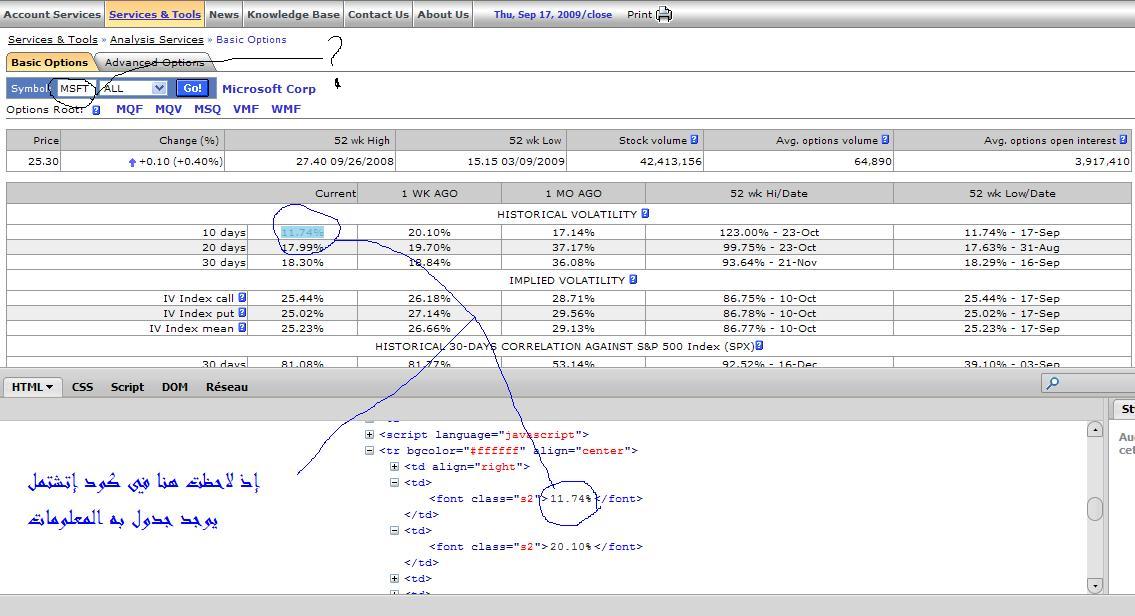
العفو أخي سوف أرفق لك صورة لكي يتضح لك الأمر و شكرا على الإجابة

post-211414-1253282291_thumb.jpg

تحيـــــــاتي...

#9

مرحباً :)،

من أين أتيت بهذا المحرر ؟

أخي الكريم هذا ماأجده عند البحث عن ذلك الجدول :

<table width="100%" border="0" cellspacing="0" cellpadding="0">
<tr>
<td colspan="3"><img src="/design/images/0.gif" width="1" height="5" border="0"></td>
</tr>
<tr>
<td colspan="3" class="s3">This free service provides basic end-of-day information on specified 
underlying - such as
last value of IV index (for Calls, Puts and their average value),<br> 
Historical volatility and correlation against major index. 
<br><br>
<center><img src="/design/images/services/BO_2.gif" border="0"></center>
<br><br>
Also shown options volume and open interest along with ATM contracts implied volatilities and delta. 
<br><br>
<center><img src="/design/images/services/BO_3.gif" border="0"></center>

</td>
</tr>
<tr>
<td colspan="3"><span class="s3">
<br>
<br>
	  Full-featured version of this service - <a href="/adv_options.j">Advanced Options Page</a> - is also available. Subscribers to this service can:
	  <ul>
<li>View a complete option chain for any stock or index, with Implied Volatility and all Greeks for each strike.</li>
<li>See current value of Implied Volatility Index (IV Index or "IVX") as well as the change from yesterday, IVX value a week ago and a month ago. IV index is calculated for a set of fixed terms - 30 days to 180 days.</li>
<li>Chart the strike skew to get a sense for how the volatility of each strike looks in comparison to other strikes in the same month - to see if there is any bias to OTM call or puts, and if so determine what type of strategy you may with to use to take advantage of this situation.</li>
<li>Chart the time skew to get a sense for how volatility is trading in different months for the stocks you are tracking so that you can quickly identify and try to take advantage of any disparity.</li>
</ul>
	  Advanced Options Page service is available in two modes - 'previous day close' mode and 'live' data mode. 'Live' mode of the service is based on 20-minute delayed market quotes
	  </span></td>
</tr>
</table>
<table width="100%" border="0" cellspacing="0" cellpadding="0">
<tr>
<td><img src="/design/images/0.gif" width="1" height="10" border="0"></td>
</tr>
</table>

رجاءً قم باعلامنا برقم السطر الحالي للجدول من نص الـ( html ) :)

The important thing is not so much

that every child should be taught,

as that every child should be given the wish to learn.

#10

حسناً وصلت الفكرة ;) عليّك تسجيل دخولك الى الموقع لقراءة البيانات على صيغة جداول عوضاً عن عرض صور :@

The important thing is not so much

that every child should be taught,

as that every child should be given the wish to learn.

#11

السلام عليكم ورحمة الله وبركاته

أظن أن الصفحة التي تقوم بطلبها هي :

IVolatility.com - Services & Tools -> Analysis Services -> Basic/Advanced Options -> Basic Options

وفي حالة عدم تسجيل الدخول ستوجهك إلى صفحة الدخول

اذا الخطوة الأولى هي كيفية التأكد من أنه تم تسجيل الدخول

ببساطة صفحة تسجيل الدخول تختوي على from للlogin لذلك نحاول البحث عن هذا الفورم اذا كان موجودا

		 Dim firstUrl As String = "http://www.ivolatility.com/options.j?ticker=msft&R=0&x=9&y=8"
			 Dim request As HttpWebRequest = DirectCast(WebRequest.Create(firstUrl), HttpWebRequest)
			 Dim response As HttpWebResponse = DirectCast(request.GetResponse(), HttpWebResponse)

			 Dim dataStream As Stream = response.GetResponseStream()
			 Dim reader As New StreamReader(dataStream)
			 Dim responseFromServer As String = reader.ReadToEnd()


			 Dim aBrowser As WebBrowser = New WebBrowser()
			 aBrowser.Url = New Uri("about:blank")
			 Dim iDoc As HtmlDocument = aBrowser.Document.OpenNew(False)
			 iDoc.Write(responseFromServer)

			 Dim Htmlform As HtmlElement
			 Dim Htmlforms As HtmlElementCollection = iDoc.Forms
			 For Each Htmlform In Htmlforms
				 ' التأكد من أن Htmlform.Name ="login"
			 Next

بعدها تمر إلى عملية تسجيل الدخول

مثال عن عملية تسجيل الدخول من البرنامج

   Private Sub DoLogin(ByVal cBrowser As WebBrowser)
			 Dim iDoc As HtmlDocument
			 Dim Element As HtmlElement
			 Dim DocElements As HtmlElementCollection = Nothing
			 iDoc = cBrowser.Document
			 DocElements = iDoc.GetElementsByTagName("input")
			 For Each Element In DocElements
				 If Element.GetAttribute("type") = "text" Then Element.SetAttribute("value", this_User.UserName)
				 If Element.GetAttribute("type") = "password" Then Element.SetAttribute("value", this_User.Password)
			 Next
			 iDoc.Forms(0).InvokeMember("submit")
		 End Sub

في الأخير تمر إلى البحث داخل الصفحة

#12

أخي الكريم يمكن إستعمال Firbug 1.4.2 في Mozilla firfox كما يمكنني وضع مشروع الأخ رضـــــا كمثال ليتبين لكم المراد الرابط

WindowsApplication4.rar

تم تعديل هذه المشاركة بواسطة طارق إبراهيم في 20 سبتمبر 2009 في 20:52

تحيـــــــاتي...

#13

شكرا أخي الكريم على الرد لقد قمت بعدة محاولات مع المشروع إلا أنني لم أتمكن من الدخول على الموقع فإذا لم تمانع من وضع مثال لكي أستوعب الفكرة جيدا فسوف أكون شاكرا و عيد مبارك سعيـــــــد

تم تعديل هذه المشاركة بواسطة طارق إبراهيم في 20 سبتمبر 2009 في 20:53

تحيـــــــاتي...

#15

مرحباً أخي الكريم :)،

لم تنجح معي اي طريقة لتسجيل الدخول الى الموقع المطلوب :(، قمت بكتابة ( Code ) يساعدك على استخراج المعلومات المخزنة في المصفوفة ( d ) المحتواة في العملية ( wr ) ومن ثم قمت بكتابة بعض الإجراءات التي تملأ الجداول بالقيم المناسبة لكل جدول من الجداول الموجودة في الصفحة المراد استخراج بياناتها .

الإجراءات :


    [color= #000000; font-weight: bold;]Private [color= #000000; font-weight: bold;]Function GetRTable[color= #009900;](ByVal TBName [color= #b1b100;]As String[color= #009900;]) [color= #b1b100;]As DataTable

        Dim DT [color= #b1b100;]As [color= #000000; font-weight: bold;]New DataTable[color= #009900;](TBName[color= #009900;])

        With DT

            [color= #339933;].Columns[color= #339933;].Add[color= #009900;]([color= #0000ff;]"Desc"[color= #009900;])

            [color= #339933;].Columns[color= #339933;].Add[color= #009900;]([color= #0000ff;]"Current"[color= #009900;])

            [color= #339933;].Columns[color= #339933;].Add[color= #009900;]([color= #0000ff;]"1 Week Ago"[color= #009900;])

            [color= #339933;].Columns[color= #339933;].Add[color= #009900;]([color= #0000ff;]"1 Month Ago"[color= #009900;])

            [color= #339933;].Columns[color= #339933;].Add[color= #009900;]([color= #0000ff;]"52 Weeks Hi/Date"[color= #009900;])

            [color= #339933;].Columns[color= #339933;].Add[color= #009900;]([color= #0000ff;]"52 Weeks Low/Date"[color= #009900;])

        [color= #990000;]End With

        [color= #b1b100;]Return DT

    [color= #990000;]End [color= #000000; font-weight: bold;]Function


    [color= #000000; font-weight: bold;]Private Sub SetHistoricalVolatility[color= #009900;](ByRef HVTable [color= #b1b100;]As DataTable[color= #339933;], ByVal Cells [color= #b1b100;]As Cell[color= #009900;]([color= #009900;])[color= #009900;])

        Dim _10DaysHVIndices [color= #b1b100;]As Int32[color= #009900;]([color= #009900;]) [color= #339933;]= [color= #000000; font-weight: bold;]New Int32[color= #009900;]([color= #009900;]) [color= #009900;]{[color= #cc66cc;]543[color= #339933;], [color= #cc66cc;]344[color= #339933;], [color= #cc66cc;]145[color= #339933;], [color= #cc66cc;]676[color= #339933;], [color= #cc66cc;]123[color= #339933;], [color= #cc66cc;]300[color= #339933;], [color= #cc66cc;]477[color= #009900;]}

        Dim _20DaysHVIndices [color= #b1b100;]As Int32[color= #009900;]([color= #009900;]) [color= #339933;]= [color= #000000; font-weight: bold;]New Int32[color= #009900;]([color= #009900;]) [color= #009900;]{[color= #cc66cc;]720[color= #339933;], [color= #cc66cc;]521[color= #339933;], [color= #cc66cc;]322[color= #339933;], [color= #cc66cc;]654[color= #339933;], [color= #cc66cc;]101[color= #339933;], [color= #cc66cc;]278[color= #339933;], [color= #cc66cc;]455[color= #009900;]}

        Dim _30DaysHVIndices [color= #b1b100;]As Int32[color= #009900;]([color= #009900;]) [color= #339933;]= [color= #000000; font-weight: bold;]New Int32[color= #009900;]([color= #009900;]) [color= #009900;]{[color= #cc66cc;]167[color= #339933;], [color= #cc66cc;]698[color= #339933;], [color= #cc66cc;]499[color= #339933;], [color= #cc66cc;]632[color= #339933;], [color= #cc66cc;]79[color= #339933;], [color= #cc66cc;]256[color= #339933;], [color= #cc66cc;]433[color= #009900;]}

        With HVTable[color= #339933;].Rows

            [color= #339933;].Add[color= #009900;]([color= #000000; font-weight: bold;]New String[color= #009900;]([color= #009900;]) [color= #009900;]{[color= #0000ff;]"10 Days"[color= #339933;], GetCellValue[color= #009900;](Cells[color= #339933;], _10DaysHVIndices[color= #009900;]([color= #cc66cc;]0[color= #009900;])[color= #009900;])[color= #339933;], [color= #990000;]_

            GetCellValue[color= #009900;](Cells[color= #339933;], _10DaysHVIndices[color= #009900;]([color= #cc66cc;]1[color= #009900;])[color= #009900;])[color= #339933;], GetCellValue[color= #009900;](Cells[color= #339933;], _10DaysHVIndices[color= #009900;]([color= #cc66cc;]2[color= #009900;])[color= #009900;])[color= #339933;],
[color= #990000;]_

            GetCellValue[color= #009900;](Cells[color= #339933;], _10DaysHVIndices[color= #009900;]([color= #cc66cc;]3[color= #009900;])[color= #009900;]) [color= #339933;]& [color= #0000ff;]"- " [color= #339933;]& GetCellValue[color= #009900;](Cells[color= #339933;], _10DaysHVIndi
ces[color= #009900;]([color= #cc66cc;]4[color= #009900;])[color= #009900;])[color= #339933;], [color= #990000;]_

            GetCellValue[color= #009900;](Cells[color= #339933;], _10DaysHVIndices[color= #009900;]([color= #cc66cc;]5[color= #009900;])[color= #009900;]) [color= #339933;]& [color= #0000ff;]"- " [color= #339933;]& GetCellValue[color= #009900;](Cells[color= #339933;], _10DaysHVIndi
ces[color= #009900;]([color= #cc66cc;]6[color= #009900;])[color= #009900;])[color= #009900;]}[color= #009900;])

            [color= #339933;].Add[color= #009900;]([color= #000000; font-weight: bold;]New String[color= #009900;]([color= #009900;]) [color= #009900;]{[color= #0000ff;]"20 Days"[color= #339933;], GetCellValue[color= #009900;](Cells[color= #339933;], _20DaysHVIndices[color= #009900;]([color= #cc66cc;]0[color= #009900;])[color= #009900;])[color= #339933;], [color= #990000;]_

            GetCellValue[color= #009900;](Cells[color= #339933;], _20DaysHVIndices[color= #009900;]([color= #cc66cc;]1[color= #009900;])[color= #009900;])[color= #339933;], GetCellValue[color= #009900;](Cells[color= #339933;], _20DaysHVIndices[color= #009900;]([color= #cc66cc;]2[color= #009900;])[color= #009900;])[color= #339933;],
[color= #990000;]_

            GetCellValue[color= #009900;](Cells[color= #339933;], _20DaysHVIndices[color= #009900;]([color= #cc66cc;]3[color= #009900;])[color= #009900;]) [color= #339933;]& [color= #0000ff;]"- " [color= #339933;]& GetCellValue[color= #009900;](Cells[color= #339933;], _20DaysHVIndi
ces[color= #009900;]([color= #cc66cc;]4[color= #009900;])[color= #009900;])[color= #339933;], [color= #990000;]_

            GetCellValue[color= #009900;](Cells[color= #339933;], _20DaysHVIndices[color= #009900;]([color= #cc66cc;]5[color= #009900;])[color= #009900;]) [color= #339933;]& [color= #0000ff;]"- " [color= #339933;]& GetCellValue[color= #009900;](Cells[color= #339933;], _20DaysHVIndi
ces[color= #009900;]([color= #cc66cc;]6[color= #009900;])[color= #009900;])[color= #009900;]}[color= #009900;])

            [color= #339933;].Add[color= #009900;]([color= #000000; font-weight: bold;]New String[color= #009900;]([color= #009900;]) [color= #009900;]{[color= #0000ff;]"30 Days"[color= #339933;], GetCellValue[color= #009900;](Cells[color= #339933;], _30DaysHVIndices[color= #009900;]([color= #cc66cc;]0[color= #009900;])[color= #009900;])[color= #339933;], [color= #990000;]_

            GetCellValue[color= #009900;](Cells[color= #339933;], _30DaysHVIndices[color= #009900;]([color= #cc66cc;]1[color= #009900;])[color= #009900;])[color= #339933;], GetCellValue[color= #009900;](Cells[color= #339933;], _30DaysHVIndices[color= #009900;]([color= #cc66cc;]2[color= #009900;])[color= #009900;])[color= #339933;],
[color= #990000;]_

            GetCellValue[color= #009900;](Cells[color= #339933;], _30DaysHVIndices[color= #009900;]([color= #cc66cc;]3[color= #009900;])[color= #009900;]) [color= #339933;]& [color= #0000ff;]"- " [color= #339933;]& GetCellValue[color= #009900;](Cells[color= #339933;], _30DaysHVIndi
ces[color= #009900;]([color= #cc66cc;]4[color= #009900;])[color= #009900;])[color= #339933;], [color= #990000;]_

            GetCellValue[color= #009900;](Cells[color= #339933;], _30DaysHVIndices[color= #009900;]([color= #cc66cc;]5[color= #009900;])[color= #009900;]) [color= #339933;]& [color= #0000ff;]"- " [color= #339933;]& GetCellValue[color= #009900;](Cells[color= #339933;], _30DaysHVIndi
ces[color= #009900;]([color= #cc66cc;]6[color= #009900;])[color= #009900;])[color= #009900;]}[color= #009900;])

        [color= #990000;]End With

    [color= #990000;]End Sub


    [color= #000000; font-weight: bold;]Private Sub SetImpliedVolatility[color= #009900;](ByRef IVTable [color= #b1b100;]As DataTable[color= #339933;], ByVal Cells [color= #b1b100;]As Cell[color= #009900;]([color= #009900;])[color= #009900;])

        Dim _IVCallIndices [color= #b1b100;]As Int32[color= #009900;]([color= #009900;]) [color= #339933;]= [color= #000000; font-weight: bold;]New Int32[color= #009900;]([color= #009900;]) [color= #009900;]{[color= #cc66cc;]389[color= #339933;], [color= #cc66cc;]190[color= #339933;], [color= #cc66cc;]721[color= #339933;], [color= #cc66cc;]522[color= #339933;], [color= #cc66cc;]699[color= #339933;], [color= #cc66cc;]146[color= #339933;], [color= #cc66cc;]323[color= #009900;]}

        Dim _IVPutIndices [color= #b1b100;]As Int32[color= #009900;]([color= #009900;]) [color= #339933;]= [color= #000000; font-weight: bold;]New Int32[color= #009900;]([color= #009900;]) [color= #009900;]{[color= #cc66cc;]566[color= #339933;], [color= #cc66cc;]367[color= #339933;], [color= #cc66cc;]168[color= #339933;], [color= #cc66cc;]500[color= #339933;], [color= #cc66cc;]677[color= #339933;], [color= #cc66cc;]124[color= #339933;], [color= #cc66cc;]301[color= #009900;]}

        Dim _IVMeanIndices [color= #b1b100;]As Int32[color= #009900;]([color= #009900;]) [color= #339933;]= [color= #000000; font-weight: bold;]New Int32[color= #009900;]([color= #009900;]) [color= #009900;]{[color= #cc66cc;]13[color= #339933;], [color= #cc66cc;]544[color= #339933;], [color= #cc66cc;]345[color= #339933;], [color= #cc66cc;]478[color= #339933;], [color= #cc66cc;]655[color= #339933;], [color= #cc66cc;]102[color= #339933;], [color= #cc66cc;]279[color= #009900;]}

        With IVTable[color= #339933;].Rows

            [color= #339933;].Add[color= #009900;]([color= #000000; font-weight: bold;]New String[color= #009900;]([color= #009900;]) [color= #009900;]{[color= #0000ff;]"IV Index Call"[color= #339933;], GetCellValue[color= #009900;](Cells[color= #339933;], _IVCallIndices[color= #009900;]([color= #cc66cc;]0[color= #009900;])[color= #009900;])[color= #339933;], [color= #990000;]_

            GetCellValue[color= #009900;](Cells[color= #339933;], _IVCallIndices[color= #009900;]([color= #cc66cc;]1[color= #009900;])[color= #009900;])[color= #339933;], GetCellValue[color= #009900;](Cells[color= #339933;], _IVCallIndices[color= #009900;]([color= #cc66cc;]2[color= #009900;])[color= #009900;])[color= #339933;], [color= #990000;]_

            GetCellValue[color= #009900;](Cells[color= #339933;], _IVCallIndices[color= #009900;]([color= #cc66cc;]3[color= #009900;])[color= #009900;]) [color= #339933;]& [color= #0000ff;]" - " [color= #339933;]& GetCellValue[color= #009900;](Cells[color= #339933;], _IVCallIndices
[color= #009900;]([color= #cc66cc;]4[color= #009900;])[color= #009900;])[color= #339933;], [color= #990000;]_

            GetCellValue[color= #009900;](Cells[color= #339933;], _IVCallIndices[color= #009900;]([color= #cc66cc;]5[color= #009900;])[color= #009900;]) [color= #339933;]& [color= #0000ff;]" - " [color= #339933;]& GetCellValue[color= #009900;](Cells[color= #339933;], _IVCallIndices
[color= #009900;]([color= #cc66cc;]6[color= #009900;])[color= #009900;])[color= #009900;]}[color= #009900;])

            [color= #339933;].Add[color= #009900;]([color= #000000; font-weight: bold;]New String[color= #009900;]([color= #009900;]) [color= #009900;]{[color= #0000ff;]"IV Index Put"[color= #339933;], GetCellValue[color= #009900;](Cells[color= #339933;], _IVPutIndices[color= #009900;]([color= #cc66cc;]0[color= #009900;])[color= #009900;])[color= #339933;], [color= #990000;]_

            GetCellValue[color= #009900;](Cells[color= #339933;], _IVPutIndices[color= #009900;]([color= #cc66cc;]1[color= #009900;])[color= #009900;])[color= #339933;], GetCellValue[color= #009900;](Cells[color= #339933;], _IVPutIndices[color= #009900;]([color= #cc66cc;]2[color= #009900;])[color= #009900;])[color= #339933;], [color= #990000;]_

            GetCellValue[color= #009900;](Cells[color= #339933;], _IVPutIndices[color= #009900;]([color= #cc66cc;]3[color= #009900;])[color= #009900;]) [color= #339933;]& [color= #0000ff;]" - " [color= #339933;]& GetCellValue[color= #009900;](Cells[color= #339933;], _IVPutIndices[color= #009900;](4
[color= #009900;])[color= #009900;])[color= #339933;], [color= #990000;]_

            GetCellValue[color= #009900;](Cells[color= #339933;], _IVPutIndices[color= #009900;]([color= #cc66cc;]5[color= #009900;])[color= #009900;]) [color= #339933;]& [color= #0000ff;]" - " [color= #339933;]& GetCellValue[color= #009900;](Cells[color= #339933;], _IVPutIndices[color= #009900;](6
[color= #009900;])[color= #009900;])[color= #009900;]}[color= #009900;])

            [color= #339933;].Add[color= #009900;]([color= #000000; font-weight: bold;]New String[color= #009900;]([color= #009900;]) [color= #009900;]{[color= #0000ff;]"IV Index Mean"[color= #339933;], GetCellValue[color= #009900;](Cells[color= #339933;], _IVMeanIndices[color= #009900;]([color= #cc66cc;]0[color= #009900;])[color= #009900;])[color= #339933;], [color= #990000;]_

            GetCellValue[color= #009900;](Cells[color= #339933;], _IVMeanIndices[color= #009900;]([color= #cc66cc;]1[color= #009900;])[color= #009900;])[color= #339933;], GetCellValue[color= #009900;](Cells[color= #339933;], _IVMeanIndices[color= #009900;]([color= #cc66cc;]2[color= #009900;])[color= #009900;])[color= #339933;], [color= #990000;]_

            GetCellValue[color= #009900;](Cells[color= #339933;], _IVMeanIndices[color= #009900;]([color= #cc66cc;]3[color= #009900;])[color= #009900;]) [color= #339933;]& [color= #0000ff;]" - " [color= #339933;]& GetCellValue[color= #009900;](Cells[color= #339933;], _IVMeanIndices
[color= #009900;]([color= #cc66cc;]4[color= #009900;])[color= #009900;])[color= #339933;], [color= #990000;]_

            GetCellValue[color= #009900;](Cells[color= #339933;], _IVMeanIndices[color= #009900;]([color= #cc66cc;]5[color= #009900;])[color= #009900;]) [color= #339933;]& [color= #0000ff;]" - " [color= #339933;]& GetCellValue[color= #009900;](Cells[color= #339933;], _IVMeanIndices
[color= #009900;]([color= #cc66cc;]6[color= #009900;])[color= #009900;])[color= #009900;]}[color= #009900;])

        [color= #990000;]End With

    [color= #990000;]End Sub


    [color= #000000; font-weight: bold;]Private Sub SetHistorical30DaysCorrelationAgainst[color= #009900;](ByRef HCATable [color= #b1b100;]As DataTable[color= #339933;], ByVal Cells 
As Cell[color= #009900;]([color= #009900;])[color= #009900;])

        Dim _30DaysHCAIndices [color= #b1b100;]As Int32[color= #009900;]([color= #009900;]) [color= #339933;]= [color= #000000; font-weight: bold;]New Int32[color= #009900;]([color= #009900;]) [color= #009900;]{[color= #cc66cc;]610[color= #339933;], [color= #cc66cc;]57[color= #339933;], [color= #cc66cc;]234[color= #339933;], [color= #cc66cc;]411[color= #339933;], [color= #cc66cc;]588[color= #339933;], [color= #cc66cc;]35[color= #339933;], [color= #cc66cc;]212[color= #009900;]}

        With HCATable[color= #339933;].Rows

            [color= #339933;].Add[color= #009900;]([color= #000000; font-weight: bold;]New String[color= #009900;]([color= #009900;]) [color= #009900;]{[color= #0000ff;]"30 Days"[color= #339933;], GetCellValue[color= #009900;](Cells[color= #339933;], _30DaysHCAIndices[color= #009900;]([color= #cc66cc;]0[color= #009900;])[color= #009900;])[color= #339933;], [color= #990000;]_

            GetCellValue[color= #009900;](Cells[color= #339933;], _30DaysHCAIndices[color= #009900;]([color= #cc66cc;]1[color= #009900;])[color= #009900;])[color= #339933;], GetCellValue[color= #009900;](Cells[color= #339933;], _30DaysHCAIndices[color= #009900;]([color= #cc66cc;]2[color= #009900;])
[color= #009900;])[color= #339933;], [color= #990000;]_

            GetCellValue[color= #009900;](Cells[color= #339933;], _30DaysHCAIndices[color= #009900;]([color= #cc66cc;]3[color= #009900;])[color= #009900;]) [color= #339933;]& [color= #0000ff;]" - " [color= #339933;]& GetCellValue[color= #009900;](Cells[color= #339933;], _30DaysHCAI
ndices[color= #009900;]([color= #cc66cc;]4[color= #009900;])[color= #009900;])[color= #339933;], [color= #990000;]_

            GetCellValue[color= #009900;](Cells[color= #339933;], _30DaysHCAIndices[color= #009900;]([color= #cc66cc;]5[color= #009900;])[color= #009900;]) [color= #339933;]& [color= #0000ff;]" - " [color= #339933;]& GetCellValue[color= #009900;](Cells[color= #339933;], _30DaysHCAI
ndices[color= #009900;]([color= #cc66cc;]6[color= #009900;])[color= #009900;])[color= #009900;]}[color= #009900;])

        [color= #990000;]End With

    [color= #990000;]End Sub

جرب المثال المرفق لفهم الفكرة بشكل كامل :)

بالتوفيق

IVolatility.zip

تم تعديل هذه المشاركة بواسطة Bashar Rabat في 24 سبتمبر 2009 في 13:21

The important thing is not so much

that every child should be taught,

as that every child should be given the wish to learn.

#16

شكرا يا إخواني على الأجوبة الجميلة التي وضعتم

لقد قمت بقراءة جواب الأخ dreamnet و حاولت تجربة الأمر فنجح

أما بالنسبة إلى مثالك أخي بشار فهو شامل و مفصل :P

و أشكر الله لأنني وجدت حلين لمشكلة واحة و الفضل يرجع إليكم بطبيعة الحال

تحيـــــــاتي...

#17
9277463 كتب:

شكرا يا إخواني على الأجوبة الجميلة التي وضعتم

لقد قمت بقراءة جواب الأخ dreamnet و حاولت تجربة الأمر فنجح

أما بالنسبة إلى مثالك أخي بشار فهو شامل و مفصل :P

و أشكر الله لأنني وجدت حلين لمشكلة واحة و الفضل يرجع إليكم بطبيعة الحال

لا شكر على واجب ;) الفضل طبعاً يعود لله ومن ثم للأخ ( DreamNet ) :)

بالتوفيق :)

The important thing is not so much

that every child should be taught,

as that every child should be given the wish to learn.

#18

السلام عليكم و رحمة الله

لقد عدت بإذن الله مع سؤال بسيط لك و لأهل الخبرة و إن شاء الله نستفيذ جميعا

هل من الممكن عوض الصفحة الثتي أدمجتها مع الريسورس في المشروع الذي أرفقته بإسم Ivolatility إعطاء فقط عنوان الموقع و تحيله في الويب بروسر مثلا

لتوضيح أكثر فأنا أعمل على هذه الصفحة http://www.dividendinvestor.com/historical.php?no=19590

إلا أن محتوى الجدول فيها يتغير مع تغير الرقم الأخير في عنوان الصفحة الوارد في الأعلى

لذا فقد فكرة أن الطريقة التي إقترحت سوف تحل هذا المشكل

تحيـــــــاتي...

#19

سوف أرفق المشروع لمزيد من التوضيح

و من بعد التحميل ستلاحضون أن المعلومات المتواجدة في الصفح تحمل في ليستبوكس و إذا أردت إستخلاص المعلومات في الجدول لوحده لن يكون الأمر سهلا لأن الجدول يغير من حجمه حيس المعلومات المتواجدة فيه و بالتالي فإن أمكنة المعلومات في اليستبوكس سوف تتغير فما هو الحل في نظركم؟؟؟

dividen_historical.phpno_.rar

تحيــــــــــاتي...

تحيـــــــاتي...

#20
9277463 كتب:

سوف أرفق المشروع لمزيد من التوضيح

و من بعد التحميل ستلاحضون أن المعلومات المتواجدة في الصفح تحمل في ليستبوكس و إذا أردت إستخلاص المعلومات في الجدول لوحده لن يكون الأمر سهلا لأن الجدول يغير من حجمه حيس المعلومات المتواجدة فيه و بالتالي فإن أمكنة المعلومات في اليستبوكس سوف تتغير فما هو الحل في نظركم؟؟؟

dividen_historical.phpno_.rar

تحيــــــــــاتي...

سأعود لك بحل :P

The important thing is not so much

that every child should be taught,

as that every child should be given the wish to learn.

#21

Bashar Rabat كتب:
سأعود لك بحل :P

السلام و رحمة الله و بركاته

لقد حاولت بعض المحاولات الوهنة :wacko: لكني لم أتوصل سوى لهذه النتيجة الضعيفة

و المرجوا إخواني لمن إستطاع الإكمال على الفكرة أو المجيئ بفكرة أخرى فسأكون ممنونا

divisen_first_version_with_tableau.rar

تحيـــــــاتي...

تحيـــــــاتي...

مواضيع مشابهة

عدد الزوار حالياً

المتواجدون خلال آخر دقيقتين · يتحدّث كل ٣٠ ثانية

—الإجمالي—أعضاء مسجّلون—زوار بدون تسجيل

جارٍ التحقق من المتواجدين…