الفريق العربي للبرمجةأرشيف المنتديات · 2000 – 2023
نسخة أرشيفية للقراءة فقط — التسجيل والمشاركة مغلقان، والمحتوى محفوظ كما كان.

مشكلة Compaq Presario Cq61-100ee Notebook Pc مع Windows Xp

بدأه rober في 18 أغسطس 2009 · 5 رد · 4,014 مشاهدة · في نظام تشغيل Windows
مشاركة: واتساب X فيسبوك تيليجرام
#1 صاحب الموضوع

حاولت تنصيب Windows XP على حاسب Compaq Presario CQ61-100EE Notebook PC

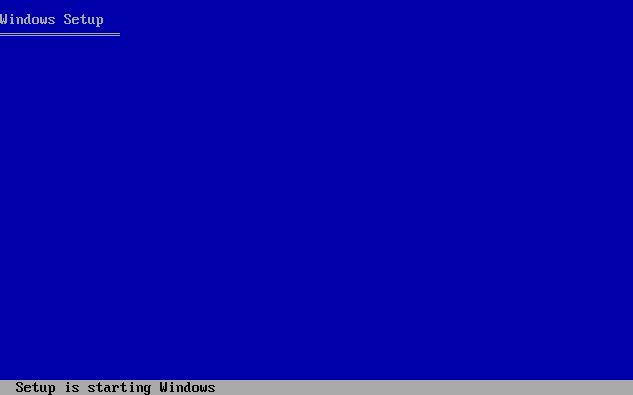
لكن عند الوصول للمرحلة التي في الصورة تحديداً
post-143282-1250595410_thumb.jpg

تظهر شاشة زرقاء تشير إلى خطأ في الـ Hardware

بعد سؤال الدعم الفني عند الوكيل أخبرني أن نسخة الـ Windows يجب أن تضمن شيء خاص غير الـ SATA ( لم أقتنع بهذا الكلام )

طبعا لم يخبرني ما هو لأنه يريد مني أن أخذ الجهاز إلى الشركة

وشخص أخر أخبرني أنه يجب عمل تحديث للـ Bios لأنه لا يحتوي على خيار معاملة الـ Hard Disk كـ IDE بدلا من SATA

فهل من أحد يخبرنا ما المشكلة ... و ما هو مايجب أن تتضمنه نسخة الـ Windows

I'm Away For Sometimes

I'll Finish My Works

Come Back Soon

More Study > More Search > More Try > More Learning > Great Success

#2

هذه مشكلة تكون في احدى مكونات الجهاز حاول عمل تعطيل لهذه المكونات موديم او شبكة او حتى ممكن ان تكون من الهارد ديسك او الرام

هذه في النهاية تبقى مشكلة هارديور .

نموت وتحيا ...................فلسطين .

#3

شكرا أخي محمد على تجاوبك

بحسب ما سمعت من أن هذه المشكلة تظهر بسبب أن تعريف الـ SATA المدمج في نسخة الويندوز قديم و أنني أحتاج لدمج تعريف الرقاقة الجديد

بالمناسبة : Vista يعمل دون أي مشاكل -_-

I'm Away For Sometimes

I'll Finish My Works

Come Back Soon

More Study > More Search > More Try > More Learning > Great Success

#4

بالفعل كان سبب المشكلة هو أن تاريخ تعريف الـ Sata كان قديما و يحتاج إلى تحديث و تم حل مشكلة تنصيب النظام

لكن الأن وقعنا في ورطة عدم وجود التعريفات

حتى الأن ينقص

1- تعريف بطاقة الصوت

2- تعريف بطاقة الشاشة

3- تعريف بطاقة الشبكة

حاولت مراسلة شركة HP لكن بحسب وصفهم :angry:

Thank you for contacting HP Total Care.

 We appreciate your interest in Hewlett-Packard products. Currently we are not able to answer your question because your country is under a U.S. embargo.  Please contact your nearest dealer for help with your issue. We apologize for the inconvenience. 

 If you need furtherassistance, please reply to this message and we will be happy to assist you further.

 For information on keeping your HP and Compaq products up and running, please visit our Web site
at:
http://www.hp.com/go/totalcare

  Sincerely,

 Anusua

 HP Total Care

Our advice is strictly limited to the question(s) asked and is based on the information provided to us.  HP does not assume any responsibility or liability for the advice given and shall not be liable for any direct, indirect, special, incidental or consequential damages in connection with the use of this information.  Always back up yourdata. 
For more information, including technical information updates, please visit our Web site at http://www.hp.com/support.
HP does not require you to send any financial data in your reply to this email. As a prudent reminder, do not insert credit card details or other financial information in any e-mail replies.

فهل من طريقة لجلب التعريفات الخاصة بالـ XP

I'm Away For Sometimes

I'll Finish My Works

Come Back Soon

More Study > More Search > More Try > More Learning > Great Success

#5

اخي الكريم

حصلت معي ذات المشكلة في كمبيوتر محمول ACER والحمد لله تمكنت من جلب التعاريف لويندوز XP علما ان الشركة لم تزودنا سوى بتعاريف فستا

ولكن فككت الجهاز وبحثت عن رقم الشيب ومن ثم بحثت في عمو GOOGLE عن التعاريف

لا تجعل الله أهون الناظرين اليك موقعي الشخصي www.hindawi-sy.com

#6

المفترض في حالة مثل هذه عدم اظهار رسالة خطأ مثل التي قلتها اذا لم يكون يحتوى تعريف الساتا يظهر لك رسالة بالشكل التالي

windows did ont found any hard disk drivs installed on your computer

نموت وتحيا ...................فلسطين .

مواضيع مشابهة