انا بعمل نظام تصويت
وعايز اعمل شكل توضيحى زى مستطيل ملون يوضح النسبة المئويه
فكيف يمكننى عمل ذلك
شكرا
انا بعمل نظام تصويت
وعايز اعمل شكل توضيحى زى مستطيل ملون يوضح النسبة المئويه
فكيف يمكننى عمل ذلك
شكرا
فكرة جدا رائعة
يا ليت بقية الاعضاء يفيدونا في هذي الفكرة
وجزاكم الله خير
ممكن تستخدم Div tags لعمل ذلك كما هو موضح في المشاركة رقم 6 في الموضوع التالي
او شوف الادوات دي
A Look at WebCharts, a Free .NET Charting Control
Free Chart control for ASP.NET.
علي فكرة الموضوع مكرر, استخدم البحث فيما بعد
تم تعديل هذه المشاركة بواسطة AhmedElbaz في 17 نوفمبر 2008 في 10:19
بســم الله الـرحمــن الرحيــم
الحل جدا بسيط ان شاء الله
اولا قم بانشاء مستطيل صغير باي برنامج رسم فوتوشوب او غيره
ثانيا : بعد ان قمت بتصميمه اجعل عرض الصورة 0px واحدبيكسل فقط
ثالثا(الخطوة الاهم)
عندما يتم التصويت على احد محتويات الموضوع فسوف تظهر النتائج اليس كذلك
خذ قيمة كل موضوع واسندها الى خاصية عرض الصورة كما في الاسفل
ImageName.Width=Unit.Pixel(Your Value)
لكي تتضح الصورة اكثر
لنفترض ان لديك تصويت عبارة عن " مارايك في منتديات الفريق العربي للبرمجة "
1-ممتاز 59%
2-جيد جدا 41%
3-مقبول 0%
كما ترى من المثال ناخذ كل قيمة ونضعها في الكود السابق الذي يقوم بوضع قيمة عرض الصورة عن طريق استخدام Unit.Pixel
اتمنى ان يكون الشرح واضحا باذن الله
وفق الله الجميع لما يحب ويرضى
يمكن عمل ذلك بدون صور
بعمل جدول مكون من صف واحد و2 عمود ، والتحكم بعرض كل عمود من خلال القيمة width ، الاول له خلفية ملونه ويمثل النسبة.
<table border="0" width="100%" cellspacing="0" cellpadding="0"><tr><td width="12%" align="center" bgcolor="#000080"><font color="#FFFFFF">11.94 %</font></td><td width="88%"> </td></tr></table>
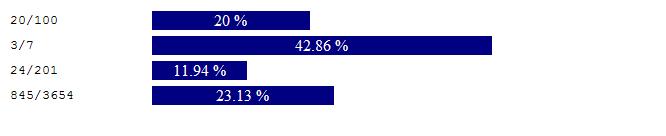
| الكود بـ #C |
| الكود بـ VB |
	Protected Sub Page_Load(ByVal sender As Object, ByVal e As System.EventArgs) Handles Me.Load		Response.Write(Indicator(20, 100))		Response.Write(Indicator(3, 7))		Response.Write(Indicator(24, 201))		Response.Write(Indicator(845, 3654))	End Sub
	Protected Function Indicator(ByVal score As Integer, ByVal total As Integer) As String		Dim percent As Double		Dim ipercent As Double		Dim sInd As String
		percent = Math.Round((score * 100) / total, 2)		ipercent = Math.Round(percent)		sInd = ""
		sInd = sInd + "<table border=0 width=100%><tr><td nowrap width=15%><code>" + score.ToString() + "/" + total.ToString() + "</code></td></td><td nowrap width=85%>"		sInd = sInd + "<table border=0 width=100% cellspacing=0 cellpadding=0><tr>"
		sInd = sInd + "<td width=" + ipercent.ToString() + "% align=center bgcolor=#000080><font color=#FFFFFF>" + percent.ToString() + " %</font></td>"		sInd = sInd + "<td width=" + (100 - ipercent).ToString() + "%> </td>"
		sInd = sInd + "</tr></table>"		sInd = sInd + "</td></tr></table>"
		Indicator = sInd	End Function
من خلال جدول مكون من صف واحد و 100 عمود ، بأعتبار أن كل عمود يمثل 1%
او 50 عمود ، بأعتبار أن كل عمود يمثل 2% ... او 25 عمود ، بأعتبار أن كل عمود يمثل 4%

| الكود بـ #C |
| الكود بـ VB |
	Protected Sub Page_Load(ByVal sender As Object, ByVal e As System.EventArgs) Handles Me.Load
		Response.Write(Indicator(20, 100))
		Response.Write(Indicator(3, 7))
		Response.Write(Indicator(24, 201))
		Response.Write(Indicator(845, 3654))
	End Sub

	Protected Function Indicator(ByVal score As Integer, ByVal total As Integer) As String
		Dim td As Integer
		Dim percent As Double
		Dim ipercent As Double
		Dim sInd As String

		percent = Math.Round((score * 100) / total, 2)
		ipercent = Math.Round(percent)
		sInd = ""

		sInd = sInd + "<table border=0 width=100%><tr><td nowrap width=15%><code>" + score.ToString() + "/" + total.ToString() + "</code></td><td nowrap width=10%><code> = " + percent.ToString() + " %</code></td><td nowrap width=75%>"
		sInd = sInd + "<table border=0 width=100% cellspacing=0 cellpadding=0><tr>"

		For td = 1 To ipercent
			sInd = sInd + "<td bgcolor=#000080> </td>"
		Next
		For td = td To 100
			sInd = sInd + "<td> </td>"
		Next

		sInd = sInd + "</tr></table>"
		sInd = sInd + "</td></tr></table>"

		Indicator = sInd
	End Function
تم تعديل هذه المشاركة بواسطة دحدوح في 17 نوفمبر 2008 في 16:11
مشكووووووووووووور يا اخي الكريم وبارك الله فيك
وزادك من علمه سبحانه