الفريق العربي للبرمجةأرشيف المنتديات · 2000 – 2023
نسخة أرشيفية للقراءة فقط — التسجيل والمشاركة مغلقان، والمحتوى محفوظ كما كان.

منع تشغيل البرنامج مرة اخرى على الجهاز

بدأه aymanmoftah في 10 سبتمبر 2008 · 10 رد · 3,350 مشاهدة · في برمجة الأجهزة الكفية والمحمولة بالدوت نيت
مشاركة: واتساب X فيسبوك تيليجرام
#1 صاحب الموضوع

في البرامج العادية استطيع منع تشغيل البرنامج مرة اخرى اذا كان مشغل بالاصل وهذا باستخدام الكود التالي


Public Function CheckApplicationRun() As Boolean
Dim Diag As New Diagnostics.Process
Dim Pr As Process
Dim MyDate As DateTime
Dim MyCount As Int32 = 0
Dim MyProcess() As Diagnostics.Process
Dim MyFile As IO.FileInfo
Dim Tbl As New DataTable("MyProcess")
Dim Rec As DataRow
Dim Col1 As New DataColumn("PrId")
Dim Col2 As New DataColumn("PrDate")
Dim i As Integer = 0

Col1.DataType = System.Type.GetType("System.Int32")
Tbl.Columns.Add(Col1)

Col2.DataType = System.Type.GetType("System.DateTime")
Tbl.Columns.Add(Col2)

'For Each Pr In Diag.GetProcesses
'MsgBox(Pr.ProcessName)
' If Pr.ProcessName.ToUpper() = My.Application.Info.ProductName.ToUpper() Then
' 'MsgBox(Pr.StartTime)
' 'Pr.StartInfo.WindowStyle = ProcessWindowStyle.Maximized
' Else

' End If
'Next
MyFile = New IO.FileInfo(Application.ExecutablePath)
Dim MyF As String
MyF = MyFile.Name.Replace(MyFile.Extension, "")
'MsgBox(MyFile.Name)
MyProcess = Diag.GetProcessesByName(MyF)
MyCount = MyProcess.Length
'MsgBox(MyCount.ToString())
MyCount = 0
For Each Pr In MyProcess
Rec = Tbl.NewRow
Rec("PrId") = Pr.Id
Rec("PrDate") = Pr.StartTime
Tbl.Rows.Add(Rec)

Next

Dim RRFound() As DataRow = Tbl.Select("1=1", "PrDate")
If RRFound.Length > 1 Then
Rec = RRFound(0)
Pr = Process.GetProcessById(Rec("PrId"))
Pr.StartInfo.WindowStyle = ProcessWindowStyle.Maximized
ShowMsg("النظام لايزال يعمل ....", 2, MessageBoxButtons.OK, MySounds.ApplicationStillWorking)
End If

For i = 1 To RRFound.Length - 1
Rec = RRFound(1)
Try
Pr = Process.GetProcessById(Rec("PrId"))
Pr.Kill()
Catch ex As Exception

End Try
Rec.Delete()
Next

If RRFound.Length > 0 Then
Rec = RRFound(0)
Pr = Process.GetProcessById(Rec("PrId"))
Pr.StartInfo.WindowStyle = ProcessWindowStyle.Maximized
End If
'If MyCount = 0 Then
' MyDate = Pr.StartTime
'Else
' If MyDate <= Pr.StartTime Then
' Pr.Kill()
' Else

' End If
'End If
'MyProcess(0).StartInfo.WindowStyle = ProcessWindowStyle.Normal
'MyProcess(0).StartInfo.WindowStyle = ProcessWindowStyle.Maximized
'MyProcess(0).Refresh()
'MyCount += 1
'Next

End Function

ولكن عندما نقلت الكود لبرنامج pc pocket

اعطى خطأ

الرجاء اعطائي الكود الصحيح لعمل هذه الدالة على جهاز PC pocket
#2

لاحظ هذه المشاركة:

هدف هذا الكود لمعرفة جميع الProcesses التي تعمل في الحاسوب الكف وقد إستعملته لأتأكد برمجيا ما إن كان هناك تواصل عبرActiveSync أم لا.

يمكنك ايضا عمل ذلك بوضع ملف ما عند تشغيل البرنامج و تحذفه عند الانهاء, و عند التشغيل تفحص وجوده فإذا كان موجود يعني أنّ البرنامج قد تم تشغيله من قبل, يمكنك استخدام الريجستري بدل الملف ايضا, اظن هذه الطريقة اسهل على البوكيت, لأن التعامل مع ال Proccess اصعب بسبب نقص التوابع في Compact Framework عن Framework الخاصة بال PC.

رب اجعلني مقيم الصلاة ومن ذريتي ربنا وتقبل دعاء.

لا تنسى: "العقل مثل العضلة كلما استخدمته أكثر كلما ازدادت قوته"

#3

مشكور الاخ المشرف على الاجابة والحمدلله قمت بتجربتها وتمت بشكل صحيح بحيث انني قمت في بداية البرنامج بفتح وانشاء ملف ولم اقم باغلاقه

الا عند كبسة الخروج وقمت بالتشييك في البداية ان افتح الملف او انشأه اذا لم يعطب خطأ ادخل للنظام وغير ذلك اخرج من النظام

#4
aymanmoftah كتب:
مشكور الاخ المشرف على الاجابة والحمدلله قمت بتجربتها وتمت بشكل صحيح بحيث انني قمت في بداية البرنامج بفتح وانشاء ملف ولم اقم باغلاقه

الا عند كبسة الخروج وقمت بالتشييك في البداية ان افتح الملف او انشأه اذا لم يعطب خطأ ادخل للنظام وغير ذلك اخرج من النظام

:S :S :S

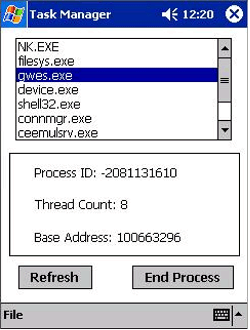
Creating a Microsoft .NET Compact Framework-based Process Manager Application

Process Class

#5
بن العيد كتب:

اخي ابن العيد, المشكلة أنّ Compact Framework لا تدعم جميع الميزات التي في process class, و الميزات المدعومة على ال Pocket pc لا تمكنك من معرفة جميع ال Process التي تعمل على النظام, راجع الميزات المدعومة للتأكد بنفسك من الامر, لذلك يجب استخدام p/invoke لعمل هذه القصة و تصبح طويلة بعض الشيئ و تحتاج إلى الكثير من العمل, لذلك توجه السائل إلى الحل الاسهل صائب ولا أرى مشكلة فيه.

رب اجعلني مقيم الصلاة ومن ذريتي ربنا وتقبل دعاء.

لا تنسى: "العقل مثل العضلة كلما استخدمته أكثر كلما ازدادت قوته"

#6
اقتباس
اخي ابن العيد, المشكلة أنّ Compact Framework لا تدعم جميع الميزات التي في process class

صحيح مع ملاحظة بسيطة ربما تراها بديهية

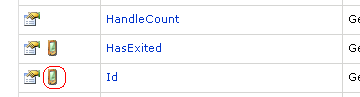
post-91400-1221573265_thumb.png

في الصورة السابقة نميز ان كانت الدالة او الخاصية المعنية تخص فقط حاسوب المكتب او حاسوب الكف ايضا

و من بين الخاصيات المتوفرة هناك المعرف id و الذي يمكن ا عتماده لتحديد دون غيره

post-91400-1221575570_thumb.gif

اقتباس
لذلك يجب استخدام p/invoke لعمل هذه القصة و تصبح طويلة بعض الشيئ و تحتاج إلى الكثير من العمل,

من الأفضل تجنب ال P/Invoke عندما تكون هناك إمكانية لكتابة الشفرة اللازمة بلغة الدوت نت.

ألا يمكن إستغلال كل هذا ؟

private const int TH32CS_SNAPPROCESS = 0x00000002;
[DllImport("toolhelp.dll")]
public static extern IntPtr CreateToolhelp32Snapshot(uint flags, uint processid);
[DllImport("toolhelp.dll")]
public static extern int CloseToolhelp32Snapshot(IntPtr handle);
[DllImport("toolhelp.dll")]
public static extern int Process32First(IntPtr handle, byte[] pe);
[DllImport("toolhelp.dll")]
public static extern int Process32Next(IntPtr handle, byte[] pe);
[DllImport("coredll.dll")]
private static extern IntPtr OpenProcess(int flags, bool fInherit, int PID);
private const int PROCESS_TERMINATE = 1;
[DllImport("coredll.dll")]
private static extern bool TerminateProcess(IntPtr hProcess, uint ExitCode);
[DllImport("coredll.dll")]
private static extern bool CloseHandle(IntPtr handle);
private const int INVALID_HANDLE_VALUE = -1;

اقتباس
لذلك توجه السائل إلى الحل الاسهل صائب ولا أرى مشكلة فيه

ليس هناك مشكلة و لكن الحل المطروح يسمى حل رعواني, و آمل أن لا يغضب هذا الوصف صاحب الحل. فطالما هناك دوال مطورة خصيصا لتتبع ملفات التشغيل النشطة و في بيئة الدوت نت فلماذا لا يتم إستغلالها.

</FONT>

تم تعديل هذه المشاركة بواسطة بن العيد في 16 سبتمبر 2008 في 19:30

#7
اقتباس
صحيح مع ملاحظة بسيطة ربما تراها بديهية

أخي ابن العيد, لا يمكن الحصول على قائمة بال Process التي تعمل في الجهاز باستخدام ال Process class الموجود في لغة الدوت نت,ففي الصورة التي وضعتها أنت تشير إلى ال ID, ماذا سوف يفيد؟

اقصد ما فائدة معرفة ال ID لل Process الحالي وكيف سوف نعرف أنه هناك Process أخر يعمل بنفس الاسم؟!

كل من الدوال:

GetProcesses
GetProcessesByName

غير مدعوما على الاجهزة الكفية و بالتالي لا يمكن معرفة إذا كان هناك Process أخر لنفس البرنامج يعمل باستخدام CF.

اقتباس
من الأفضل تجنب ال P/Invoke عندما تكون هناك إمكانية لكتابة الشفرة اللازمة بلغة الدوت نت.

نعم, معك في هذا, ولكن كما سبق و قلت ليس هناك إمكانية للمعرفة أنه هناك Process أخر بنفس الاسم يعمل في الجهاز باستخدام لغة الدوت نت.

اقتباس
ألا يمكن إستغلال كل هذا ؟

لم أفهم, قلت لا نريد استخدام P/Invoke ومن ثم تقول استغلال P/Invoke, أعرف تمام أنه يمكن عمل ما يريد السائل باستخدام P/Invoke ولكن سوف يصبح الامر اصعب.

اقتباس
ليس هناك مشكلة و لكن الحل المطروح يسمى حل رعواني, و آمل أن لا يغضب هذا الوصف صاحب الحل. فطالما هناك دوال مطورة خصيصا لتتبع ملفات التشغيل النشطة و في بيئة الدوت نت فلماذا لا يتم إستغلالها.

سوف أحاول عمل ما يريده السائل باستخدام P/Invoke إن شاء الله في الايام القادمة و أضعه هنا.

رب اجعلني مقيم الصلاة ومن ذريتي ربنا وتقبل دعاء.

لا تنسى: "العقل مثل العضلة كلما استخدمته أكثر كلما ازدادت قوته"

#8

السلام عليكم و رحمة الله و بركاته

اقتباس
لم أفهم, قلت لا نريد استخدام P/Invoke ومن ثم تقول استغلال P/Invoke, أعرف تمام أنه يمكن عمل ما يريد السائل باستخدام P/Invoke ولكن سوف يصبح الامر اصعب.

إنك على حق لقد ضننتك تعني إستغلال الشفرة سي التي أشرت لها في أول الموضوع في شكل مكتبة ربط ديناميكي


  public static Process[] GetProcesses()
		{

			string strContainer = string.Empty;

			Form1 f1;

			IntPtr handle = CreateToolhelp32Snapshot(TH32CS_SNAPPROCESS, 0);

			if ((int)handle > 0)
			{
				try
				{
					PROCESSENTRY32 peCurrent;
					PROCESSENTRY32 pe32 = new PROCESSENTRY32();
					//Get byte array to pass to the API calls
					byte[] peBytes = pe32.ToByteArray();
					//Get the first process
					int retval = Process32First(handle, peBytes);

					while (retval == 1)
					{
						//Convert bytes to the class
						peCurrent = new PROCESSENTRY32(peBytes);
						//New instance
						//--Process proc = new Process(new IntPtr((int)peCurrent.PID), peCurrent.Name, (int)peCurrent.ThreadCount, (int)peCurrent.BaseAddress);

						strContainer+=peCurrent.Name+"\n";

						retval = Process32Next(handle, peBytes);
					}
				}
				catch (Exception ex)
				{
					throw new Exception("Exception: " + ex.Message);
				}

				//Close handle
				CloseToolhelp32Snapshot(handle);

			MessageBox.Show(strContainer);

			}
			else
			{  throw new Exception("Unable to create snapshot");		  }


			return null;
		}


	private void btn_ProcList_Click(object sender, EventArgs e)
		{
			GetProcesses();

		}

Form1.zip

#9

أخي أبن العيد لا أدري لماذا الكود في الاعلى مشوه, هل من الممكن أن تعيد ترتيبه.

رب اجعلني مقيم الصلاة ومن ذريتي ربنا وتقبل دعاء.

لا تنسى: "العقل مثل العضلة كلما استخدمته أكثر كلما ازدادت قوته"

#10

قمت بالتعديل بسيط على الكود الذي اضافه الاخ ابن العيد, حيث اصبح لدينا الان تابعان, الاول GetProcesses يعيد مصفوفة من Arraylist و أيضا التابع ProcessFound والذي يعيد القيمة True فيما لوكان ال Process موجود.

  1.  
  2. private const int TH32CS_SNAPPROCESS = 0x00000002;
  3. [DllImport("toolhelp.dll")]
  4. public static extern IntPtr CreateToolhelp32Snapshot(uint flags, uint processid);
  5. [DllImport("toolhelp.dll")]
  6. public static extern int CloseToolhelp32Snapshot(IntPtr handle);
  7. [DllImport("toolhelp.dll")]
  8. public static extern int Process32First(IntPtr handle, byte[] pe);
  9. [DllImport("toolhelp.dll")]
  10. public static extern int Process32Next(IntPtr handle, byte[] pe);
  11. [DllImport("coredll.dll")]
  12. private static extern IntPtr OpenProcess(int flags, bool fInherit, int PID);
  13. private const int PROCESS_TERMINATE = 1;
  14. [DllImport("coredll.dll")]
  15. private static extern bool TerminateProcess(IntPtr hProcess, uint ExitCode);
  16. [DllImport("coredll.dll")]
  17. private static extern bool CloseHandle(IntPtr handle);
  18. private const int INVALID_HANDLE_VALUE = -1;
  19.  
  20.  
  21. private class PROCESSENTRY32
  22. {
  23. // constants for structure definition
  24. private const int SizeOffset = 0;
  25. private const int UsageOffset = 4;
  26. private const int ProcessIDOffset = 8;
  27. private const int DefaultHeapIDOffset = 12;
  28. private const int ModuleIDOffset = 16;
  29. private const int ThreadsOffset = 20;
  30. private const int ParentProcessIDOffset = 24;
  31. private const int PriClassBaseOffset = 28;
  32. private const int dwFlagsOffset = 32;
  33. private const int ExeFileOffset = 36;
  34. private const int MemoryBaseOffset = 556;
  35. private const int AccessKeyOffset = 560;
  36. private const int Size = 564;
  37. private const int MAX_PATH = 260;
  38.  
  39. // data members
  40. public uint dwSize;
  41. public uint cntUsage;
  42. public uint th32ProcessID;
  43. public uint th32DefaultHeapID;
  44. public uint th32ModuleID;
  45. public uint cntThreads;
  46. public uint th32ParentProcessID;
  47. public long pcPriClassBase;
  48. public uint dwFlags;
  49. public string szExeFile;
  50. public uint th32MemoryBase;
  51. public uint th32AccessKey;
  52.  
  53. //Default constructor
  54. public PROCESSENTRY32()
  55. {
  56.  
  57.  
  58. }
  59.  
  60. // create a PROCESSENTRY instance based on a byte array
  61. public PROCESSENTRY32(byte[] aData)
  62. {
  63. dwSize = GetUInt(aData, SizeOffset);
  64. cntUsage = GetUInt(aData, UsageOffset);
  65. th32ProcessID = GetUInt(aData, ProcessIDOffset);
  66. th32DefaultHeapID = GetUInt(aData, DefaultHeapIDOffset);
  67. th32ModuleID = GetUInt(aData, ModuleIDOffset);
  68. cntThreads = GetUInt(aData, ThreadsOffset);
  69. th32ParentProcessID = GetUInt(aData, ParentProcessIDOffset);
  70. pcPriClassBase = (long)GetUInt(aData, PriClassBaseOffset);
  71. dwFlags = GetUInt(aData, dwFlagsOffset);
  72. szExeFile = GetString(aData, ExeFileOffset, MAX_PATH);
  73. th32MemoryBase = GetUInt(aData, MemoryBaseOffset);
  74. th32AccessKey = GetUInt(aData, AccessKeyOffset);
  75. }
  76.  
  77. #region Helper conversion functions
  78. // utility: get a uint from the byte array
  79. private static uint GetUInt(byte[] aData, int Offset)
  80. {
  81. return BitConverter.ToUInt32(aData, Offset);
  82. }
  83.  
  84. // utility: set a uint int the byte array
  85. private static void SetUInt(byte[] aData, int Offset, int Value)
  86. {
  87. byte[] buint = BitConverter.GetBytes(Value);
  88. Buffer.BlockCopy(buint, 0, aData, Offset, buint.Length);
  89. }
  90.  
  91. // utility: get a ushort from the byte array
  92. private static ushort GetUShort(byte[] aData, int Offset)
  93. {
  94. return BitConverter.ToUInt16(aData, Offset);
  95. }
  96.  
  97. // utility: set a ushort int the byte array
  98. private static void SetUShort(byte[] aData, int Offset, int Value)
  99. {
  100. byte[] bushort = BitConverter.GetBytes((short)Value);
  101. Buffer.BlockCopy(bushort, 0, aData, Offset, bushort.Length);
  102. }
  103.  
  104. // utility: get a unicode string from the byte array
  105. private static string GetString(byte[] aData, int Offset, int Length)
  106. {
  107. String sReturn = Encoding.Unicode.GetString(aData, Offset, Length);
  108. return sReturn;
  109. }
  110.  
  111. // utility: set a unicode string in the byte array
  112. private static void SetString(byte[] aData, int Offset, string Value)
  113. {
  114. byte[] arr = Encoding.ASCII.GetBytes(Value);
  115. Buffer.BlockCopy(arr, 0, aData, Offset, arr.Length);
  116. }
  117. #endregion
  118.  
  119. // create an initialized data array
  120. public byte[] ToByteArray()
  121. {
  122. byte[] aData;
  123. aData = new byte[Size];
  124. //set the Size member
  125. SetUInt(aData, SizeOffset, Size);
  126. return aData;
  127. }
  128.  
  129. public string Name
  130. {
  131. get
  132. {
  133. return szExeFile.Substring(0, szExeFile.IndexOf('\0'));
  134. }
  135. }
  136.  
  137. public ulong PID
  138. {
  139. get
  140. {
  141. return th32ProcessID;
  142. }
  143. }
  144.  
  145. public ulong BaseAddress
  146. {
  147. get
  148. {
  149. return th32MemoryBase;
  150. }
  151. }
  152.  
  153. public ulong ThreadCount
  154. {
  155. get
  156. {
  157. return cntThreads;
  158. }
  159. }
  160. }
  161. public static bool ProcessFound(string ProcessName)
  162. {
  163. IntPtr handle = CreateToolhelp32Snapshot(TH32CS_SNAPPROCESS, 0);
  164. bool flag = false;
  165. if ((int)handle > 0)
  166. {
  167. try
  168. {
  169. PROCESSENTRY32 peCurrent;
  170. PROCESSENTRY32 pe32 = new PROCESSENTRY32();
  171. //Get byte array to pass to the API calls
  172. byte[] peBytes = pe32.ToByteArray();
  173. //Get the first process
  174. int retval = Process32First(handle, peBytes);
  175. while (retval == 1)
  176. {
  177. //Convert bytes to the class
  178. peCurrent = new PROCESSENTRY32(peBytes);
  179. if (ProcessName == peCurrent.Name)
  180. {
  181. flag = true;
  182. }
  183. retval = Process32Next(handle, peBytes);
  184. }
  185. }
  186. catch (Exception ex)
  187. {
  188. flag = false;
  189. throw new Exception("Exception: " + ex.Message);
  190. }
  191. CloseToolhelp32Snapshot(handle);
  192. }
  193. else
  194. {
  195. flag = false;
  196. throw new Exception("Unable to create snapshot");
  197.  
  198. }
  199. return flag;
  200. }
  201.  
  202. public static ArrayList GetProcesses()
  203. {
  204. ArrayList arr = new ArrayList();
  205. IntPtr handle = CreateToolhelp32Snapshot(TH32CS_SNAPPROCESS, 0);
  206.  
  207. if ((int)handle > 0)
  208. {
  209. try
  210. {
  211. PROCESSENTRY32 peCurrent;
  212. PROCESSENTRY32 pe32 = new PROCESSENTRY32();
  213. //Get byte array to pass to the API calls
  214. byte[] peBytes = pe32.ToByteArray();
  215. //Get the first process
  216. int retval = Process32First(handle, peBytes);
  217. while (retval == 1)
  218. {
  219. //Convert bytes to the class
  220. peCurrent = new PROCESSENTRY32(peBytes);
  221. arr.Add(peCurrent.Name);
  222. retval = Process32Next(handle, peBytes);
  223. }
  224. }
  225. catch (Exception ex)
  226. {
  227. throw new Exception("Exception: " + ex.Message);
  228. }
  229.  
  230. //Close handle
  231. CloseToolhelp32Snapshot(handle);
  232.  
  233.  
  234. }
  235. else
  236. { throw new Exception("Unable to create snapshot"); }
  237.  
  238.  
  239. return arr;
  240. }
  241.  
  242.  

الان لاستدعاء التابع الاول و تحميل اسماء ال Processes في ListBox نستخدم ما يلي:

  1.  
  2. private void btn_ProcList_Click(object sender, EventArgs e)
  3. {
  4. listBox1.Items.Clear();
  5. ArrayList Processlst = GetProcesses();
  6. for(int i =0;i < Processlst.Count;i++)
  7. {
  8. listBox1.Items.Add(Processlst[i]);
  9. }
  10. }
  11.  

لمعرفة Process هل هو يعمل ام لا نستخدم

  1.  
  2.  
  3. private void button1_Click(object sender, EventArgs e)
  4. {
  5. if (ProcessFound(textBox1.Text))
  6. label1.Text = "Found";
  7. else
  8. label1.Text = "not found";
  9. }
  10.  

لتحميل التطبيق كاملا:

GetProcesses.rar

رب اجعلني مقيم الصلاة ومن ذريتي ربنا وتقبل دعاء.

لا تنسى: "العقل مثل العضلة كلما استخدمته أكثر كلما ازدادت قوته"

#11

السلام عليكم و رحمة الله و بركاته

اقتباس
مشكور الاخ المشرف على الاجابة والحمدلله قمت بتجربتها وتمت بشكل صحيح بحيث انني قمت في بداية البرنامج بفتح وانشاء ملف ولم اقم باغلاقه

الا عند كبسة الخروج وقمت بالتشييك في البداية ان افتح الملف او انشأه اذا لم يعطب خطأ ادخل للنظام وغير ذلك اخرج من النظام

إقتنعت الآن أن هذا الحل رعواني أم لا؟ :)

مواضيع مشابهة