السلام عليكم
هل من الممكن يا اخوان تزويدي بمثال ل نقل بيانات من list item الى list item اخرى باستخدام Javascript
ولكم جزيل الشكر
السلام عليكم
هل من الممكن يا اخوان تزويدي بمثال ل نقل بيانات من list item الى list item اخرى باستخدام Javascript
ولكم جزيل الشكر
ممكن يكون الكود asp.net
Web Development
Mohamed T.Amar
Asp.net , Ajex , MSSQL , MySQL , VB.Net,Java, Xml,DomHtml
m216tt@yahoo.com
هل يجب أن تكون JavaScript ؟؟؟
ولو لازم استخدم AJAX واستعمل الأداة CascadingDropDown .. ويمكنك الإطلاع عليها من هنا ..
http://www.asp.net/AJAX/AjaxControlToolkit...ngDropDown.aspx
ASP.NET Team Leader
moh_kin_mah@hotmail.com
--------------------------------
لو أعجبك أي من مشاركاتي ... برجاء قم بتقييم المشاركة عبر الأزرار الموجودة أسفل يسار كل مشاركة
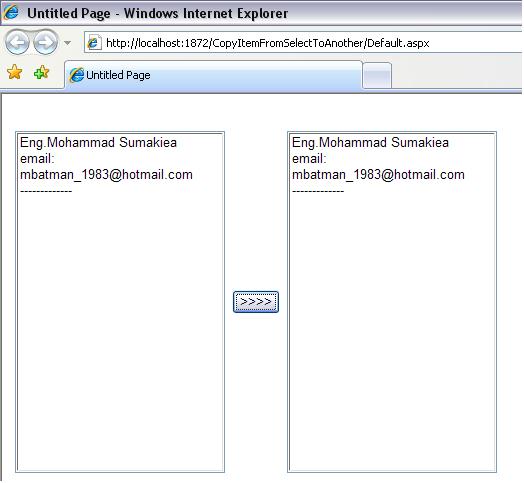
<html xmlns="http://www.w3.org/1999/xhtml" >
<head runat="server">
	<title>Untitled Page</title>
<script language=javascript>
	function copyTo(fbox, tbox) {
		var fbox_=document.getElementById(fbox);
		var tbox_=document.getElementById(tbox);
		for (var i = 0; i < fbox_.options.length; i++) {
		  var newOpt = new Option(fbox_.options.text, fbox_.options.value);
		  var selLength = tbox_.length;
		  tbox_.options[selLength] = newOpt;
		}
	}
</script>

</head>
<body>
	<form id="form1" runat="server">
	<div>
						 <table style="width: 446px;
			height: 340px">
			<tr>
				<td style="width: 120px">
					<asp:ListBox ID="lb1" runat="server" Height="343px" Width="210px">
						<asp:ListItem>Eng.Mohammad Sumakiea</asp:ListItem>
						<asp:ListItem>email:</asp:ListItem>
						<asp:ListItem>mbatman_1983@hotmail.com</asp:ListItem>
						<asp:ListItem>-------------</asp:ListItem>
					</asp:ListBox></td>
				<td style="width: 176px">
					<table>
						   <tr>
							<td>
								<asp:Button ID="Button2" runat="server" Text=">>>>" OnClientClick="java script:copyTo('lb1','lb2');return false;" /></td>
						</tr>
					</table>
				</td>
				<td style="width: 175px">
					<asp:ListBox ID="lb2" runat="server" Height="343px" Width="210px"></asp:ListBox></td>
			</tr>

		</table>

	</div>
	</form>
</body>
</html>
CopyItemFromSelectToAnother.zip
تم تعديل هذه المشاركة بواسطة محمد سماقية في 10 مارس 2008 في 11:43
-----------------------------------------------------------------------------------------------------------------------------
ـــــــــــــــــــــــــــــــــــــــــــــــــــــــــ
Mohammad Sonaiea
شكرا لك اخي العزيز محمد
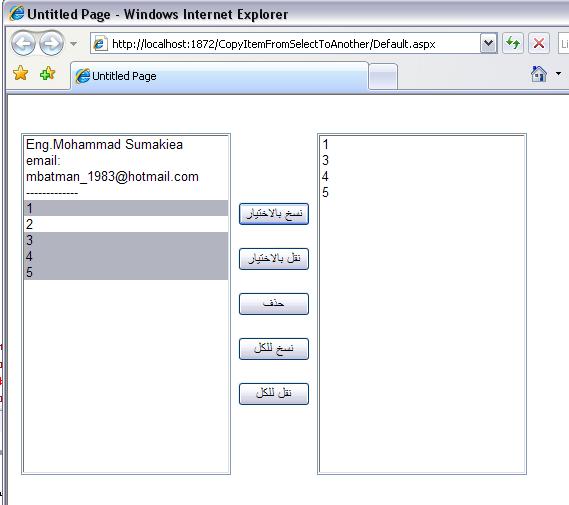
ولكن اريد نقل كامل وليس فقط عملية نسخ
واريد ان يكون هناك 4 خيارات
اما نقل item واحد
او نقل الكل
او اعادة item واحد
او اعادة الكل
و يجب ان تكون javascript
ولك جزيل الشكر
<html xmlns="http://www.w3.org/1999/xhtml">
<head runat="server">
	<title>Untitled Page</title>

	<script language="javascript">
	function copyTo(fbox, tbox) {
		var fbox_=document.getElementById(fbox);
		var tbox_=document.getElementById(tbox);
		for (var i = 0; i < fbox_.options.length; i++) {
		  var newOpt = new Option(fbox_.options.text, fbox_.options.value);
		  var selLength = tbox_.length;
		  tbox_.options[selLength] = newOpt;
		}
	}
	function addOption(theSel, theText, theValue)
	{
	  var newOpt = new Option(theText, theValue);
	  var selLength = theSel.length;
	  theSel.options[selLength] = newOpt;
	}
	function deleteOption(theSel, theIndex)
	{
	  var selLength = theSel.length;
	  if(selLength>0)
	  {
		theSel.options[theIndex] = null;
	  }
	}
	function deleteOptionsel(theSel_)
	{
	  theSel=document.getElementById(theSel_);
	  var selLength = theSel.length;
	  for(i=selLength-1; i>=0; i--)
	  {
		if(theSel.options.selected)
		{
		  deleteOption(theSel, i);
		}
	  }
	}
	function moveTo(fbox, tbox) {
		var fbox_=document.getElementById(fbox);
		var tbox_=document.getElementById(tbox);
		for (var i = 0; i < fbox_.options.length; i++) {
		  var newOpt = new Option(fbox_.options.text, fbox_.options.value);
		  var selLength = tbox_.length;
		  tbox_.options[selLength] = newOpt;
		}
	  for(i=fbox_.options.length-1; i>=0; i--)
	  {
		 deleteOption(fbox_, i)
	  }

	}
	function moveOptions(theSelFrom_, theSelTo_)
	{
	  var theSelFrom=document.getElementById(theSelFrom_);
	  var theSelTo=document.getElementById(theSelTo_);
	  var selLength = theSelFrom.length;
	  var selectedText = new Array();
	  var selectedValues = new Array();
	  var selectedCount = 0;

	  var i;

	  for(i=selLength-1; i>=0; i--)
	  {
		if(theSelFrom.options.selected)
		{
		  selectedText[selectedCount] = theSelFrom.options.text;
		  selectedValues[selectedCount] = theSelFrom.options.value;
		  deleteOption(theSelFrom, i);
		  selectedCount++;
		}
	  }

	  for(i=selectedCount-1; i>=0; i--)
	  {
		addOption(theSelTo, selectedText, selectedValues);
	  }
	}
	function copyOptions(theSelFrom_, theSelTo_)
	{
	  var theSelFrom=document.getElementById(theSelFrom_);
	  var theSelTo=document.getElementById(theSelTo_);
	  var selLength = theSelFrom.length;
	  var selectedText = new Array();
	  var selectedValues = new Array();
	  var selectedCount = 0;

	  var i;

	  for(i=selLength-1; i>=0; i--)
	  {
		if(theSelFrom.options.selected)
		{
		  selectedText[selectedCount] = theSelFrom.options.text;
		  selectedValues[selectedCount] = theSelFrom.options.value;
		  selectedCount++;
		}
	  }

	  for(i=selectedCount-1; i>=0; i--)
	  {
		addOption(theSelTo, selectedText, selectedValues);
	  }
	}

	</script>

</head>
<body>
	<form id="form1" runat="server">
		<div>
			                 <table style="width: 404px;
				height: 324px">
				<tr>
					<td style="width: 126px; height: 345px;">
						<asp:ListBox ID="lb1" runat="server" Height="343px" Width="210px" SelectionMode="Multiple">
							<asp:ListItem>Eng.Mohammad Sumakiea</asp:ListItem>
							<asp:ListItem>email:</asp:ListItem>
							<asp:ListItem>mbatman_1983@hotmail.com</asp:ListItem>
							<asp:ListItem>-------------</asp:ListItem>
							<asp:ListItem>1</asp:ListItem>
							<asp:ListItem>2</asp:ListItem>
							<asp:ListItem>3</asp:ListItem>
							<asp:ListItem>4</asp:ListItem>
							<asp:ListItem>5</asp:ListItem>
						</asp:ListBox></td>
					<td style="width: 118px; height: 345px;">

						<br />
						<br />
						<br />
						<table style="height: 227px">
							<tr>
								<td>
									<asp:Button ID="Button1" runat="server" Text="نسخ بالاختيار" OnClientClick="java script:copyOptions('lb1','lb2');return false;"
										Width="72px" /></td>
							</tr>
							<tr>
								<td>
									<asp:Button ID="Button4" runat="server" Text="نقل بالاختيار" OnClientClick="java script:moveOptions('lb1','lb2');return false;"
										Width="72px" /></td>
							</tr>
							<tr>
								<td>
									<asp:Button ID="Button5" runat="server" Text="حذف" OnClientClick="java script:deleteOptionsel('lb1','lb2');return false;"
										Width="72px" /></td>
							</tr>
							<tr>
								<td>
									<asp:Button ID="Button3" runat="server" Text="نسخ للكل" OnClientClick="java script:copyTo('lb1','lb2');return false;"
										Width="72px" /></td>
							</tr>
							<tr>
								<td>
									<asp:Button ID="Button2" runat="server" Text="نقل للكل" OnClientClick="java script:moveTo('lb1','lb2');return false;"
										Width="72px" /></td>
							</tr>
						</table>
						<br />
						 <br />
						<br />
					</td>
					<td style="width: 175px; height: 345px;">
						<asp:ListBox ID="lb2" runat="server" Height="343px" Width="210px"></asp:ListBox></td>
				</tr>
			</table>
		</div>
	</form>
</body>
</html>
CopyItemFromSelectToAnother.zip
تم تعديل هذه المشاركة بواسطة محمد سماقية في 10 مارس 2008 في 13:50
-----------------------------------------------------------------------------------------------------------------------------
ـــــــــــــــــــــــــــــــــــــــــــــــــــــــــ
Mohammad Sonaiea
مشكولر اخ محمد على الاجابة
ولكن عندي سؤال انا اعمل على بيئة vb.net 2003
وهذا المرفق على بيئة 2005
فهل سيكون هناك اي فروقات
لا علاقه ابدا بين الجافا سكريبت والنسخه المستعمله.
omar_ocp كتب:مشكولر اخ محمد على الاجابةولكن عندي سؤال انا اعمل على بيئة vb.net 2003
وهذا المرفق على بيئة 2005
فهل سيكون هناك اي فروقات
الجافا سكريبت متعلق بالمتصفح
-----------------------------------------------------------------------------------------------------------------------------
ـــــــــــــــــــــــــــــــــــــــــــــــــــــــــ
Mohammad Sonaiea
فى البدايه انشئ صفحه Default2.aspx
<script language="javascript">
	function fnMoveItems(lstbxFrom,lstbxTo)
{
 var varFromBox = document.all(lstbxFrom);
 var varToBox = document.all(lstbxTo);
 if ((varFromBox != null) && (varToBox != null))
 {
  if(varFromBox.length < 1)
  {
   alert('There are no items in the source ListBox');
   return false;
  }
  if(varFromBox.options.selectedIndex == -1) // when no Item is selected the index will be -1
  {
   alert('Please select an Item to move');
   return false;
  }
  while ( varFromBox.options.selectedIndex >= 0 )
  {
   var newOption = new Option(); // Create a new instance of ListItem
   newOption.text = varFromBox.options[varFromBox.options.selectedIndex].text;
   newOption.value = varFromBox.options[varFromBox.options.selectedIndex].value;
   varToBox.options[varToBox.length] = newOption; //Append the item in Target Listbox
   varFromBox.remove(varFromBox.options.selectedIndex); //Remove the item from Source Listbox
  }
 }
 return false;
}

	</script>
</head>
<body>
	<form id="form1" runat="server">
	<div>
		<asp:ListBox ID="ListBox1" runat="server" Height="119px" Style="position: static"
			Width="88px">
			<asp:ListItem>Yasser</asp:ListItem>
			<asp:ListItem>Hany</asp:ListItem>
			<asp:ListItem>Osama</asp:ListItem>
			<asp:ListItem>Anas</asp:ListItem>
		</asp:ListBox>  <asp:Button ID="btnMoveRight" runat="server" Font-Bold="True"
			Style="position: static" Text=">>" /> <asp:Button ID="btnMoveLeft" runat="server"
				Font-Bold="True" Style="position: static" Text="<<" />
					<asp:ListBox ID="ListBox2" runat="server" Font-Bold="False" Style="position: static" Height="119px" Width="88px"></asp:ListBox>
		<br />
		<br />
		<br />
		<strong>Using Javascript<br />
		</strong>
		<br />
		This Article is usefull to move the list items between 2 listbox or combo or dropdown,
		it will also give an alert message if no items of the listbox are selected</div>
	</form>
</body>
</html>
اما فى صفحه Default2.aspx.cs
using System;
using System.Data;
using System.Configuration;
using System.Collections;
using System.Web;
using System.Web.Security;
using System.Web.UI;
using System.Web.UI.WebControls;
using System.Web.UI.WebControls.WebParts;
using System.Web.UI.HtmlControls;

public partial class Default3 : System.Web.UI.Page
{
	protected void Page_Load(object sender, EventArgs e)
	{
		btnMoveRight.Attributes.Add("onclick", "return fnMoveItems('ListBox1','ListBox2')");
		btnMoveLeft.Attributes.Add("onclick", "return fnMoveItems('ListBox2','ListBox1')");

	}


}
بالتوفيق
المتواجدون خلال آخر ساعة · يتحدّث كل ٣٠ ثانية
جارٍ التحقق من المتواجدين…