اسلام عليكم
كيف اعمل Export لهذا المفاتيح من Registry ?
بواسطة Vb6
المسار هيا . HKEY_CURRENT_USER\Software\VB and VBA Program Settings\YFK_Book\Settings
شكراً...............................
اسلام عليكم
كيف اعمل Export لهذا المفاتيح من Registry ?
بواسطة Vb6
المسار هيا . HKEY_CURRENT_USER\Software\VB and VBA Program Settings\YFK_Book\Settings
شكراً...............................
regedit /e c:\YFK_Books "HKEY_CURRENT_USER\Software\VB and VBA Program Settings\YFK_Book\Settings"
تم تعديل هذه المشاركة بواسطة msayed2004 في 25 سبتمبر 2007 في 14:07
إقرأ معى:

----
المثقفون العرب .. المزورون العرب: تأبين محمود درويش نموذجا
ماذا خسر العالم بانحطاط المسلمين ؟!! للعلامه: أبو الحسن الندوى (كتاب هام لكل مسلم).
المنهجية ومقدمات في الطلب (لطلاب العلم الشرعى)
شكراً يا اخ العزيز
انا جربت هذا الكود ولكن ما يشتغل. الكود Shell "regedit /e C:\ HKEY_CURRENT_USER\Software\VB and VBA Program Settings\YFK_Books \Settings"
ممكن توضيح شوي كيف استعمل في VB6
شكراً..............
تم تعديل هذه المشاركة بواسطة Yousaf_Lnx في 26 سبتمبر 2007 في 10:04
Shellexecute توفر وسيلة أكثر ضمانا من الـ Shell عند تشغيل ملف و أرسال Command Lines له , عموما فى حل بسيط هو وضع السطر اللى كنت كتبتهولك فى ملف Bat ثم تشغيله ثم مسحه.
إقرأ معى:
----
المثقفون العرب .. المزورون العرب: تأبين محمود درويش نموذجا
ماذا خسر العالم بانحطاط المسلمين ؟!! للعلامه: أبو الحسن الندوى (كتاب هام لكل مسلم).
المنهجية ومقدمات في الطلب (لطلاب العلم الشرعى)
شكراً يا اخي
صراحة جربت نفس الكود في .Bat فايل و في VB6 ما نجخ عندي ممكن ترفع لي مثال او كود كامل اشان حل مشكلتي ؟
ممكن تشوف المثال
شكراً.......
تم تعديل هذه المشاركة بواسطة Yousaf_Lnx في 27 سبتمبر 2007 في 10:15
اليك كود صغنطوط قوى قوى قوى (مع العلم أنى لو لقيت API تعمل كبديل للفيلم ده فالكود هيكون من سطرين تلاته !)
Option Explicit
'Code by Mohammed Sayed
'http://msayed2004.wordpress.com/
'This is a SIMPLE method to export a registry key to a file , taking all
'possibilities of errors in account , so SIMPLE hah , enjoy coding !

'Credits of the ShellEXEandWait function go to somebody I don't remember @ vbForums.

Private Declare Function GetVersion Lib "kernel32" () As Long

Private Declare Function IsNTAdmin Lib "advpack.dll" (ByVal dwReserved As Long, ByRef lpdwReserved As Long) As Long

Private Declare Function GetTempPath Lib "kernel32" Alias "GetTempPathA" (ByVal nBufferLength As Long, ByVal lpBuffer As String) As Long

Private Const STILL_ACTIVE As Long = &H103
Private Const PROCESS_QUERY_INFORMATION As Long = &H400
Private Declare Function OpenProcess Lib "kernel32" (ByVal dwDesiredAccess As Long, ByVal bInheritHandle As Long, ByVal dwProcessId As Long) As Long
Private Declare Function GetExitCodeProcess Lib "kernel32" (ByVal hProcess As Long, lpExitCode As Long) As Long
Private Declare Sub Sleep Lib "kernel32" (ByVal dwMilliseconds As Long)

Private Declare Function PathFileExists Lib "shlwapi.dll" Alias "PathFileExistsA" (ByVal pszPath As String) As Long

Private Sub ExportKeyToRegFile(KeyPath As String, RegFilePath As String)
On Error GoTo ErrorHandler

If IsNT = True Then
    If CBool(IsNTAdmin(ByVal 0&, ByVal 0&)) = False Then
        MsgBox "Ooooops , your daddy don't want me to continue , ask him for enough privileges to let me work !", vbCritical + vbSystemModal, "Error !"
        Exit Sub
    End If
End If

Dim strTemp As String
Dim intFF As Integer

strTemp = String(100, Chr$(0))
GetTempPath 100, strTemp
strTemp = Left$(strTemp, InStr(strTemp, Chr$(0)) - 1)
If Right$(strTemp, 1) <> "\" Then strTemp = strTemp & "\"

If FileExists(RegFilePath) = True Then
    SetAttr strTemp & "REGExport.Bat", vbNormal
    Kill RegFilePath
End If

If FileExists(strTemp & "REGExport.Bat") = True Then
    SetAttr strTemp & "REGExport.Bat", vbNormal
    Kill strTemp & "REGExport.Bat"
End If

intFF = FreeFile()
Open strTemp & "REGExport.Bat" For Output As #intFF
    Print #intFF, "regedit /e " & Chr$(34) & RegFilePath & Chr$(34) & " " & Chr$(34) & KeyPath & Chr$(34)
Close #intFF

If ShellEXEandWait(strTemp & "REGExport.Bat", , vbHide) = False Then
    MsgBox "Ooooops , something wrong happened , your machine ask you to use Linux to work again or it will explode", vbCritical + vbSystemModal, "Error !"
    Kill strTemp & "REGExport.Bat"
    Exit Sub
End If

If FileExists(RegFilePath) = True And Len(RegFilePath) <> 0 Then
        MsgBox "YES !" & vbNewLine & "I did it , I did it !", vbInformation + vbApplicationModal, "YaBaDaBaDo"
    Else
        Kill strTemp & "REGExport.Bat"
        Err.Raise 17
End If

Kill strTemp & "REGExport.Bat"

Exit Sub
ErrorHandler:
    If Err = 53 Then Resume Next
    MsgBox "Ooooops , Error No. " & Err & " occurred , please call 911 or jump through the nearest window !", vbCritical + vbSystemModal, "Error !"
End Sub

Private Function IsNT() As Boolean
If GetVersion() And &H80000000 Then
        IsNT = False
    Else
        IsNT = True
End If
End Function

Private Function FileExists(FilePath As String) As Boolean
FileExists = CBool(PathFileExists(FilePath))
End Function

Private Function ShellEXEandWait(EXEFilePath As String, Optional TimeOutValue As Long = 0, Optional WindowStyle As VbAppWinStyle = vbNormalFocus) As Boolean
On Error GoTo ErrorHandler

Dim sExeName As String
Dim lProcessId As Long, lExitCode As Long, lTimeToQuit As Long, lInst As Long, lStart As Long
Dim bPastMidnight As Boolean

lStart = CLng(Timer)
sExeName = EXEFilePath

If TimeOutValue > 0 Then
    If lStart + TimeOutValue < 86400 Then
        lTimeToQuit = lStart + TimeOutValue
    Else
        lTimeToQuit = (lStart - 86400) + TimeOutValue
        bPastMidnight = True
    End If
End If
lInst = Shell(sExeName, WindowStyle)
If lInst = 0 Then Exit Function

lProcessId = OpenProcess(PROCESS_QUERY_INFORMATION, False, lInst)
If lProcessId = 0 Then Exit Function
Call GetExitCodeProcess(lProcessId, lExitCode)

Do While lExitCode = STILL_ACTIVE

    Call GetExitCodeProcess(lProcessId, lExitCode)
    Sleep 20
    DoEvents
    Sleep 20
    If TimeOutValue And Timer > lTimeToQuit Then
        If bPastMidnight Then
             If Timer < lStart Then Exit Do
        Else
             Exit Do
        End If
    End If
Loop

If lExitCode = 0 Then ShellEXEandWait = True

Exit Function
ErrorHandler:
    ShellEXEandWait = False
End Function
Private Sub cmdExport_Click() ExportKeyToRegFile "HKEY_CURRENT_USER\Software\Microsoft\Windows\CurrentVersion\Run", "c:\M REG.reg" End Sub
---
تعديل : نفض للفيلم الهندى اللى فوق ده و أستعمل دالة RegSaveKeyEx , :lol: , سأترك الكود لأنى أعتقد أنه مثال جيد عن الصداع و فيه أفكار عبيطة مش بطالة خصوصا الـ MsgBoxes اللى فيه :lol: !
تم تعديل هذه المشاركة بواسطة msayed2004 في 27 سبتمبر 2007 في 20:57
إقرأ معى:
----
المثقفون العرب .. المزورون العرب: تأبين محمود درويش نموذجا
ماذا خسر العالم بانحطاط المسلمين ؟!! للعلامه: أبو الحسن الندوى (كتاب هام لكل مسلم).
المنهجية ومقدمات في الطلب (لطلاب العلم الشرعى)
الكود ما يشتغل عندي هل من صعب واحد يقدم مثال كامل ؟؟؟
شكراً................
ايه اللى مش شغال فيه ؟
أنا جربته مليون مره.
و بعدين مش أنا قلت نفض للكود الطويل ده و خليك مع RegSaveKeyEx ؟!!!!
تم تعديل هذه المشاركة بواسطة msayed2004 في 30 سبتمبر 2007 في 18:26
إقرأ معى:
----
المثقفون العرب .. المزورون العرب: تأبين محمود درويش نموذجا
ماذا خسر العالم بانحطاط المسلمين ؟!! للعلامه: أبو الحسن الندوى (كتاب هام لكل مسلم).
المنهجية ومقدمات في الطلب (لطلاب العلم الشرعى)
شكراً يا اخي صراحة تعبتك
احسن حل يا اخ العزيز انا بارفق لك مثال مع المفتاح الذي يريد منها بيك اب .
صراحة جربت عدت طرق ولكن ما تنجخ معي اذا تكرمت ممكن ترفع لي مثال كامل ؟
شكراً....
تم تعديل هذه المشاركة بواسطة Yousaf_Lnx في 3 أكتوبر 2007 في 11:44
الرحمة من عندك يا رب.
ممكن تريح ******** و تجاوب على سؤالى ده ؟
يعنى ايه اللى بيحصل عندك بالضبط؟اقتباسايه اللى مش شغال فيه ؟
الكود شغال حتى اللى أنت حططيته فى مشروعك !
إقرأ معى:
----
المثقفون العرب .. المزورون العرب: تأبين محمود درويش نموذجا
ماذا خسر العالم بانحطاط المسلمين ؟!! للعلامه: أبو الحسن الندوى (كتاب هام لكل مسلم).
المنهجية ومقدمات في الطلب (لطلاب العلم الشرعى)
المشكلة ليحصل عندي تظهر في الصورة
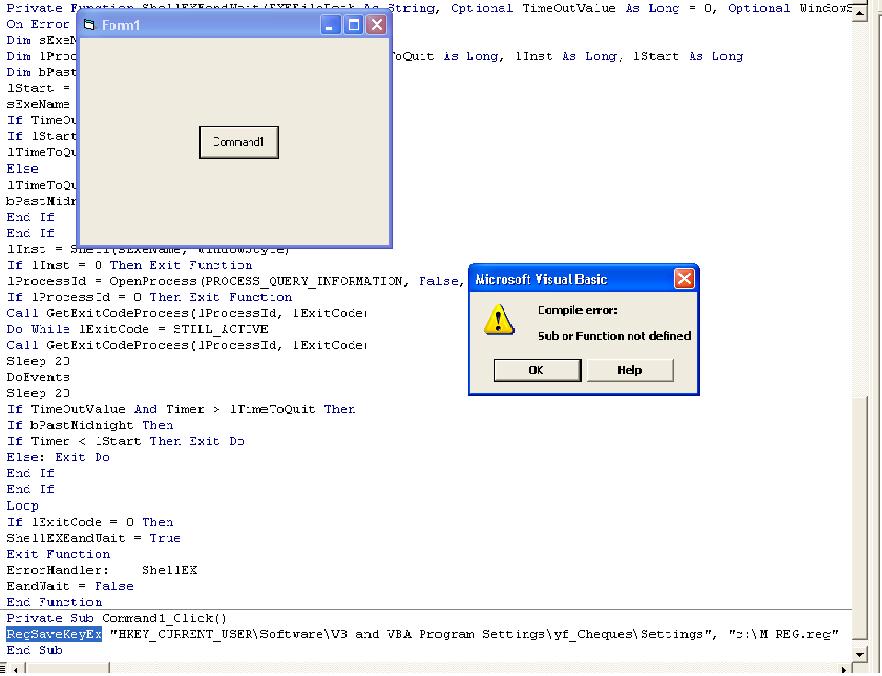
تم تعديل هذه المشاركة بواسطة Yousaf_Lnx في 6 أكتوبر 2007 في 22:24
أنت نسخت الدالة ExportKeyToRegFile لمشروعك و لا لأ  ؟!
؟!
إقرأ معى:
----
المثقفون العرب .. المزورون العرب: تأبين محمود درويش نموذجا
ماذا خسر العالم بانحطاط المسلمين ؟!! للعلامه: أبو الحسن الندوى (كتاب هام لكل مسلم).
المنهجية ومقدمات في الطلب (لطلاب العلم الشرعى)
شكراً
الحمدالله وشكر الكود نجح اشكرك يا اخي العزيز .
الملف يحفظ درايف سي ممكن نخزن في مجلد معين انا جربت الكود مثل هذا.
Private Sub Command2_Click()
On Error Resume Next
MkDir App.Path & "\SaveReg\"
ExportKeyToRegFile "HKEY_CURRENT_USER\Software\VB and VBA Program Settings\yf_Cheques\Settings", App.Path + "\SaveReg\"
End Sub
تم تعديل هذه المشاركة بواسطة Yousaf_Lnx في 8 أكتوبر 2007 في 09:58
مثالك بعد عمل تعديل بسيط عليه : RegBackup.rar
بالمناسبة لا تزيل Option Explicit من الكود فهى هامة و أنا لم أضعها منظر و خلاص ;)
تم تعديل هذه المشاركة بواسطة msayed2004 في 18 أكتوبر 2007 في 12:10
إقرأ معى:
----
المثقفون العرب .. المزورون العرب: تأبين محمود درويش نموذجا
ماذا خسر العالم بانحطاط المسلمين ؟!! للعلامه: أبو الحسن الندوى (كتاب هام لكل مسلم).
المنهجية ومقدمات في الطلب (لطلاب العلم الشرعى)
كل عام إن شاء الله جميع المسلمين بخير و عيد كم مبارك
شكراً يا اخي الكود اشتغل 100%100
شكراً
مع سلامة
هذا الموضوع مغلق.
المتواجدون خلال آخر ساعة · يتحدّث كل ٣٠ ثانية
جارٍ التحقق من المتواجدين…