السلام عليكم أخوني
اريد عمل برنامج يقوم بعرض صفحة و يب معينة مع زر لتحديث الصفحة
و اذا كانت اريد عرض صورة من الانترنت في برنامج إعلان مثل كيف ؟؟
و شكراً مقدماً
السلام عليكم أخوني
اريد عمل برنامج يقوم بعرض صفحة و يب معينة مع زر لتحديث الصفحة
و اذا كانت اريد عرض صورة من الانترنت في برنامج إعلان مثل كيف ؟؟
و شكراً مقدماً

عربي , دورات فيجوال بيسك 6 & دونت نت & HTML & JAVA Script & تصميم مواقع & دورات في الأوفيس
2003
السلام عليك
webBrowser1.Navigate("http://fr.sports.yahoo.com/");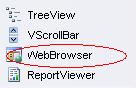
السلام عليكم
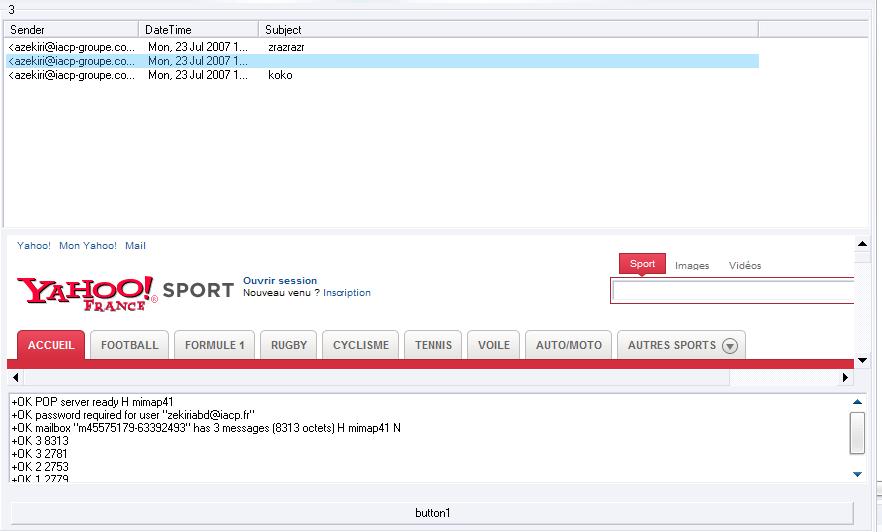
انا استعمل POP لعرض رسائل الالكترونية و يجب عليا اظهارها كصفحة واب هل من فكرة ?
using System;
using System.Drawing;
using System.Diagnostics;
using System.Collections;
using System.ComponentModel;
using System.Net.Sockets;
using System.Windows.Forms;
using System.Data;
using System.IO;
using Microsoft.Win32;

namespace mailChk
{
	public class Form1 : System.Windows.Forms.Form
	{
		private System.Windows.Forms.ListView lvMail;
		private System.Windows.Forms.ColumnHeader Sender;
		private System.Windows.Forms.ColumnHeader DateTime;
		private System.ComponentModel.IContainer components;
		private String sServer;
		private String sUser;
		private String sPass;
		private System.Net.Sockets.TcpClient sockServer;
		private System.Net.Sockets.NetworkStream ns;
		private System.IO.StreamReader sr;
		private System.Windows.Forms.GroupBox gbM;
		private System.Windows.Forms.ColumnHeader Subject;
		private int inbMsg;
		private int interval;
		private Button button1;
		private WebBrowser webBrowser1;
		private RichTextBox rtbLog;

		public Form1()
		{
			InitializeComponent();
		}

		protected override void Dispose( bool disposing )
		{
			if( disposing )
			{
				if (components != null)
				{
					components.Dispose();
				}
			}
			base.Dispose( disposing );
		}

		#region Windows Form Designer generated code
		private void InitializeComponent()
		{
			this.gbM = new System.Windows.Forms.GroupBox();
			this.webBrowser1 = new System.Windows.Forms.WebBrowser();
			this.rtbLog = new System.Windows.Forms.RichTextBox();
			this.button1 = new System.Windows.Forms.Button();
			this.lvMail = new System.Windows.Forms.ListView();
			this.Sender = new System.Windows.Forms.ColumnHeader();
			this.DateTime = new System.Windows.Forms.ColumnHeader();
			this.Subject = new System.Windows.Forms.ColumnHeader();
			this.gbM.SuspendLayout();
			this.SuspendLayout();
			//
			// gbM
			//
			this.gbM.Controls.Add(this.webBrowser1);
			this.gbM.Controls.Add(this.rtbLog);
			this.gbM.Controls.Add(this.button1);
			this.gbM.Controls.Add(this.lvMail);
			this.gbM.Dock = System.Windows.Forms.DockStyle.Fill;
			this.gbM.FlatStyle = System.Windows.Forms.FlatStyle.System;
			this.gbM.Location = new System.Drawing.Point(0, 0);
			this.gbM.Name = "gbM";
			this.gbM.Size = new System.Drawing.Size(874, 529);
			this.gbM.TabIndex = 1;
			this.gbM.TabStop = false;
			//
			// webBrowser1
			//
			this.webBrowser1.Location = new System.Drawing.Point(8, 232);
			this.webBrowser1.MinimumSize = new System.Drawing.Size(20, 20);
			this.webBrowser1.Name = "webBrowser1";
			this.webBrowser1.Size = new System.Drawing.Size(864, 151);
			this.webBrowser1.TabIndex = 5;
			//
			// rtbLog
			//
			this.rtbLog.AutoSize = true;
			this.rtbLog.Location = new System.Drawing.Point(9, 389);
			this.rtbLog.Name = "rtbLog";
			this.rtbLog.Size = new System.Drawing.Size(860, 92);
			this.rtbLog.TabIndex = 4;
			this.rtbLog.Text = "";
			//
			// button1
			//
			this.button1.Location = new System.Drawing.Point(12, 499);
			this.button1.Name = "button1";
			this.button1.Size = new System.Drawing.Size(843, 23);
			this.button1.TabIndex = 2;
			this.button1.Text = "button1";
			this.button1.UseVisualStyleBackColor = true;
			this.button1.Click += new System.EventHandler(this.button1_Click);
			//
			// lvMail
			//
			this.lvMail.Columns.AddRange(new System.Windows.Forms.ColumnHeader[] {
			this.Sender,
			this.DateTime,
			this.Subject});
			this.lvMail.Dock = System.Windows.Forms.DockStyle.Top;
			this.lvMail.FullRowSelect = true;
			this.lvMail.ImeMode = System.Windows.Forms.ImeMode.NoControl;
			this.lvMail.LabelWrap = false;
			this.lvMail.Location = new System.Drawing.Point(3, 16);
			this.lvMail.MultiSelect = false;
			this.lvMail.Name = "lvMail";
			this.lvMail.Size = new System.Drawing.Size(868, 210);
			this.lvMail.TabIndex = 0;
			this.lvMail.UseCompatibleStateImageBehavior = false;
			this.lvMail.View = System.Windows.Forms.View.Details;
			//
			// Sender
			//
			this.Sender.Text = "Sender";
			this.Sender.Width = 135;
			//
			// DateTime
			//
			this.DateTime.Text = "DateTime";
			this.DateTime.Width = 120;
			//
			// Subject
			//
			this.Subject.Text = "Subject";
			this.Subject.Width = 500;
			//
			// Form1
			//
			this.AutoScaleBaseSize = new System.Drawing.Size(5, 13);
			this.ClientSize = new System.Drawing.Size(874, 529);
			this.Controls.Add(this.gbM);
			this.Name = "Form1";
			this.Text = "Em@il Check";
			this.TopMost = true;
			this.gbM.ResumeLayout(false);
			this.gbM.PerformLayout();
			this.ResumeLayout(false);

		}
		#endregion


		[STAThread]
		static void Main()
		{
			Application.Run(new Form1());
		}


		public void setUser(string user)
		{
			this.sUser = user;
		}

		public void setPop(string pop)
		{
			this.sServer = pop;
		}

		public void setPass(string pass)
		{
			this.sPass = pass;
		}

		public void setParam(string user, string pass, string pop)
		{
			setPass(pass);
			setPop(pop);
			setUser(user);
		}

		private int getNewMessInfo(int mode,params int[] index)
		{
			String sOutStream="";
			if(mode==1)
				sOutStream="stat\r\n";
			else if (mode==2)
				sOutStream="list " + index[0].ToString() +"\r\n";

			String[] tempS={"0"};
			try
			{
				send(sOutStream);
				String tempLog=sr.ReadLine();
				aLog(tempLog);
				tempS =tempLog.Split(' ');

			}
			catch (Exception e){}
			return int.Parse(tempS[1]);
		}


		private void fillMessObj()
		{
			for(int i=inbMsg;i>=1;i--)
			{
				int intSizeMsg=getNewMessInfo(2,i);
				send("retr " + i.ToString() + "\r\n");
				parseMail(intSizeMsg);
			}
		}

		private void parseMail(int size)
		{
			string szTemp = sr.ReadLine();
			string szSubject="";
			string szDate="";
			int temp;

			if (szTemp!="-")
			{
				szTemp=sr.ReadLine();
				string szSender;

				if (( temp=szTemp.IndexOf("<"))!=-1)
					szSender=szTemp.Substring(temp);
				else
					szSender="Inconnu||Erreur";

				System.Windows.Forms.ListViewItem curItem=lvMail.Items.Add(szSender);
				szTemp=sr.ReadLine();

				while(szTemp!=".")
				{
					if(szTemp.IndexOf("Date:")!=-1)		szDate=szTemp.Substring(5,szTemp.Length-5);

					if(szTemp.IndexOf("Subject:")!=-1)	szSubject=szTemp.Substring(8,szTemp.Length-8);


					szTemp=sr.ReadLine();
				}
				curItem.SubItems.Add(szDate);
				curItem.SubItems.Add(szSubject);
			}
		}
		//Convertit un string en tableau de Byte[]
		private byte[] bCast(String s)
		{
			return System.Text.ASCIIEncoding.ASCII.GetBytes(s);
		}
		//Envoit une commande au pop
		private void send(String bToSend)
		{
			Byte[] bOutStream;
			ns.Write(bOutStream=bCast(bToSend),0,bOutStream.Length);
		}
		//Log l'echange
		private void aLog()
		{
			rtbLog.AppendText(sr.ReadLine()+"\r\n");
			sr.BaseStream.Flush();
		}
		//Log manuel :) triche un peu
		private void aLog(String strlog)
		{
			rtbLog.AppendText(strlog+"\r\n");
		}
		public void guiUpdate(object sender, System.EventArgs e)
		{
			Application.DoEvents();
		}
		private void button1_Click(object sender, EventArgs e)
		{
			// try
			//{
			sServer = "pop3.***.fr";
			sUser = "zekiriabd@***.fr";
			sPass = "password";
			interval = 1;
			String sOutStream = "user " + sUser + "\r\n";
			lvMail.Items.Clear();
			sockServer = new TcpClient(sServer, 110);
			ns = sockServer.GetStream();
			sr = new StreamReader(ns);
			aLog();
			send(sOutStream);//user
			aLog();
			sOutStream = "pass " + sPass + "\r\n";
			send(sOutStream);//pass
			aLog();
			inbMsg = getNewMessInfo(1);
			gbM.Text = "  (" + inbMsg.ToString() + ")";
			fillMessObj();
			/* }
			 catch (Exception e)
			 {
				 panAct.Visible = false;
			 }*/
			webBrowser1.Navigate("http://fr.sports.yahoo.com/");
		}
   }
}
يعطيك الف عافية اخوي العزيز زكيري
عربي , دورات فيجوال بيسك 6 & دونت نت & HTML & JAVA Script & تصميم مواقع & دورات في الأوفيس
2003
اخوي الاداة webBrowser غير موجوده عندي ياليت تعلميني كيف اجيبها و شكراً
عربي , دورات فيجوال بيسك 6 & دونت نت & HTML & JAVA Script & تصميم مواقع & دورات في الأوفيس
2003
السلام عليكم
الاداة موجودة في VS 2005 وانا مبتدأ
عذرا
اما عن سؤالي غريب لا احد جرب عرض مايل كصفحة واب في الاداة webBrowser ارجوا من الاخوة الافادة
thxxxxxxxxxxxxxx
المتواجدون خلال آخر ساعة · يتحدّث كل ٣٠ ثانية
جارٍ التحقق من المتواجدين…