الفريق العربي للبرمجةأرشيف المنتديات · 2000 – 2023
نسخة أرشيفية للقراءة فقط — التسجيل والمشاركة مغلقان، والمحتوى محفوظ كما كان.

ازاي اكلم الكائن text اللى في التقرير واخليه = ال text اللي في الفورم

مغلق
بدأه MohamedAliSalim في 30 مارس 2007 · 3 رد · 635 مشاهدة · في لغة Ms Visual Basic 6 وما قبلها من إصدارات
مشاركة: واتساب X فيسبوك تيليجرام
#1 صاحب الموضوع

السلام عليكم

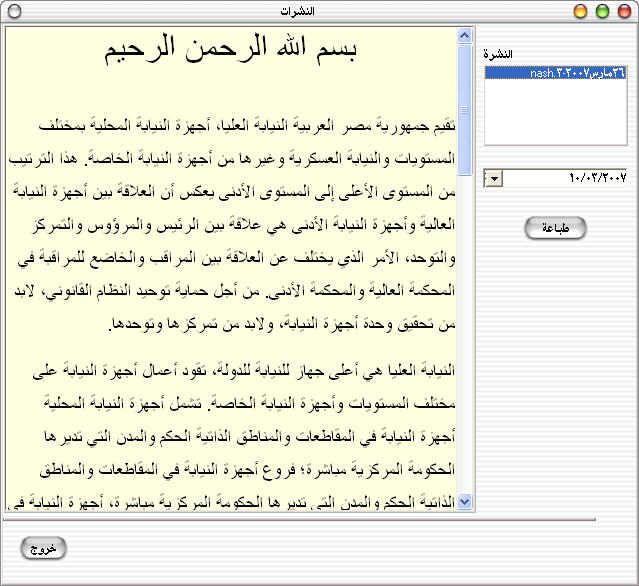
انا دلوقتي عندي فورمة عليها RichTextBox

هي أداه مثل التيكست بوكس العادي بس بيتم تنسيق الكلام فيها

الأداه دي مش جايبها من برة

لا

دي مع الفيجوال بيزك
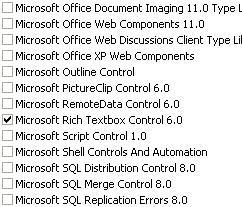
post-73411-1175211812_thumb.jpg

المهم

الفورمة دي

post-73411-1175211871_thumb.jpg

عاوز اول لما ادوس على زر طباعة

يتم طباعة الكلام المكتوب على الفور او يتم فتح الكريستال ريبورت ومكتوب فيه الكلام ده بنفس التنسيق وكل حاجة

حد فاهمني ويقدر يساعدني ؟

Mohamed Ali Salim

0.1..0...4....7.....6......2.......7........4.........8

#2
اقتباس
يتم طباعة الكلام المكتوب على الفور :D

ضع هذا الكود في الفورم

Option Explicit
Private Sub Command2_Click()
	'الملف
	RichTextBox1.FileName = App.Path & "\NOUR.RTF"
End Sub

Private Sub Command1_Click()
	' Print the contents of the RichTextBox with a one inch margin
	PrintRTF RichTextBox1, 1440, 1440, 1440, 1440		  ' 1440 Twips = 1 Inch
End Sub

وضع هذا الكود في الموديول

'Add this code to a module:

Option Explicit

Private Type Rect
	Left As Long
	Top As Long
	Right As Long
	Bottom As Long
End Type

Private Type CharRange
	cpMin As Long										  ' First character of range (0 for start of doc)
	cpMax As Long										  ' Last character of range (-1 for end of doc)
End Type

Private Type FormatRange
	hdc As Long											' Actual DC to draw on
	hdcTarget As Long									  ' Target DC for determining text formatting
	rc As Rect											 ' Region of the DC to draw to (in twips)
	rcPage As Rect										 ' Region of the entire DC (page size) (in twips)
	chrg As CharRange									  ' Range of text to draw (see above declaration)
End Type

Private Const WM_USER As Long = &H400
Private Const EM_FORMATRANGE As Long = WM_USER + 57
Private Const EM_SETTARGETDEVICE As Long = WM_USER + 72
Private Const PHYSICALOFFSETX As Long = 112
Private Const PHYSICALOFFSETY As Long = 113

Private Declare Function GetDeviceCaps Lib "gdi32" ( _
		ByVal hdc As Long, ByVal nIndex As Long) As Long
Private Declare Function SendMessage Lib "USER32" Alias "SendMessageA" _
		(ByVal hWnd As Long, ByVal msg As Long, ByVal wp As Long, _
		lp As Any) As Long

Private Declare Function CreateDC Lib "gdi32" Alias "CreateDCA" _
		(ByVal lpDriverName As String, ByVal lpDeviceName As String, _
		ByVal lpOutput As Long, ByVal lpInitData As Long) As Long

Public Function WYSIWYG_RTF(RTF As RichTextBox, LeftMarginWidth As Long, _
RightMarginWidth As Long) As Long

	Dim LeftOffset As Long, LeftMargin As Long, RightMargin As Long
	Dim LineWidth As Long
	Dim PrinterhDC As Long
	Dim r As Long

	' Start a print job to initialize printer object
	Printer.Print Space(1)
	Printer.ScaleMode = vbTwips

	' Get the offset to the printable area on the page in twips
	LeftOffset = Printer.ScaleX(GetDeviceCaps(Printer.hdc, _
			PHYSICALOFFSETX), vbPixels, vbTwips)

	' Calculate the Left, and Right margins
	LeftMargin = LeftMarginWidth - LeftOffset
	RightMargin = (Printer.Width - RightMarginWidth) - LeftOffset

	' Calculate the line width
	LineWidth = RightMargin - LeftMargin

	' Create an hDC on the Printer pointed to by the Printer object
	' This DC needs to remain for the RTF to keep up the WYSIWYG display
	PrinterhDC = CreateDC(Printer.DriverName, Printer.DeviceName, 0, 0)

	' Tell the RTF to base it's display off of the printer
	' at the desired line width
	r = SendMessage(RTF.hWnd, EM_SETTARGETDEVICE, PrinterhDC, _
			ByVal LineWidth)

	' Abort the temporary print job used to get printer info
	Printer.KillDoc

	WYSIWYG_RTF = LineWidth
End Function

Public Sub PrintRTF(RTF As RichTextBox, LeftMarginWidth As Long, _
TopMarginHeight, RightMarginWidth, BottomMarginHeight)
	Dim LeftOffset As Long, TopOffset As Long
	Dim LeftMargin As Long, TopMargin As Long
	Dim RightMargin As Long, BottomMargin As Long
	Dim fr As FormatRange
	Dim rcDrawTo As Rect
	Dim rcPage As Rect
	Dim TextLength As Long
	Dim NextCharPosition As Long
	Dim r As Long

	' Start a print job to get a valid Printer.hDC
	Printer.Print Space(1)
	Printer.ScaleMode = vbTwips

	' Get the offsett to the printable area on the page in twips
	LeftOffset = Printer.ScaleX(GetDeviceCaps(Printer.hdc, _
			PHYSICALOFFSETX), vbPixels, vbTwips)
	TopOffset = Printer.ScaleY(GetDeviceCaps(Printer.hdc, _
			PHYSICALOFFSETY), vbPixels, vbTwips)

	' Calculate the Left, Top, Right, and Bottom margins
	LeftMargin = LeftMarginWidth - LeftOffset
	TopMargin = TopMarginHeight - TopOffset
	RightMargin = (Printer.Width - RightMarginWidth) - LeftOffset

	BottomMargin = (Printer.Height - BottomMarginHeight) - TopOffset

	' Set printable area rect
	rcPage.Left = 0
	rcPage.Top = 0
	rcPage.Right = Printer.ScaleWidth
	rcPage.Bottom = Printer.ScaleHeight

	' Set rect in which to print (relative to printable area)
	rcDrawTo.Left = LeftMargin
	rcDrawTo.Top = TopMargin
	rcDrawTo.Right = RightMargin
	rcDrawTo.Bottom = BottomMargin

	' Set up the print instructions
	fr.hdc = Printer.hdc								   ' Use the same DC for measuring and rendering
	fr.hdcTarget = Printer.hdc							 ' Point at printer hDC
	fr.rc = rcDrawTo									   ' Indicate the area on page to draw to
	fr.rcPage = rcPage									 ' Indicate entire size of page
	fr.chrg.cpMin = 0									  ' Indicate start of text through
	fr.chrg.cpMax = -1									 ' end of the text

	' Get length of text in RTF
	TextLength = Len(RTF.Text)

	' Loop printing each page until done
	Do
		' Print the page by sending EM_FORMATRANGE message
		NextCharPosition = SendMessage(RTF.hWnd, EM_FORMATRANGE, True, fr)
		If NextCharPosition >= TextLength Then Exit Do	 'If done then exit
		fr.chrg.cpMin = NextCharPosition				   ' Starting position for next page
		Printer.NewPage									' Move on to next page
		Printer.Print Space(1)							 ' Re-initialize hDC
		fr.hdc = Printer.hdc
		fr.hdcTarget = Printer.hdc
	Loop

	' Commit the print job
	Printer.EndDoc

	' Allow the RTF to free up memory
	r = SendMessage(RTF.hWnd, EM_FORMATRANGE, False, ByVal CLng(0))
End Sub

وفي المرفقات مثال يوضح العملية

بالتوفيق

و السلام عليكم

NOUR_print.rar

ألا بذكر الله تطمئن القلوب

#3

الأخ الفاضل ...

كذلك يوجد Microsoft Knowledge Base تتحدث عن هذا الموضوع مع مثال، رقم: 146022

يمكنك كذلك تجربة الأداة Microsoft Developer Support Office Framer ActiveX Control

شكراً

Eng. Usama El-Mokadem

Nothing is impossible, the word impossible itself says that: I M - Possible

#4

انا مش عارف اشكرك ازاي يا اخ المزمجر

ولا انت يا اسامة

مشكورين كلكم والله

Mohamed Ali Salim

0.1..0...4....7.....6......2.......7........4.........8

هذا الموضوع مغلق.

مواضيع مشابهة

عدد الزوار حالياً

المتواجدون خلال آخر دقيقتين · يتحدّث كل ٣٠ ثانية

—الإجمالي—أعضاء مسجّلون—زوار بدون تسجيل

جارٍ التحقق من المتواجدين…