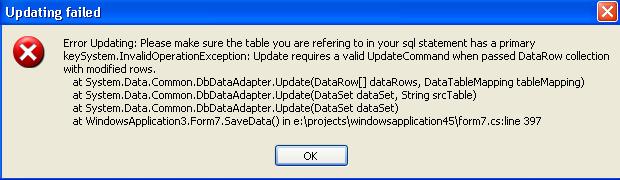
عندما استخدم الكود التالي تطلع رسالة خطأ مرفقة مع الشرح
وهو لحفظ التعديلات من DataGrid الى جدول بالداتا بيس.
حيث يعرض بيانات وأريده عندما يتم تعديل الداتا قريد يحفظها بالجدول ، للأمانة حاولت استخدم SQLCommand وكذلك SQLCommandBuilder لكن للأسف لم تزبط.. أرجو أن يكون سؤالي مختصا وموضوعيا
هذا هو الكود
			if (dSet.GetChanges() != null)
			{

				SqlCommandBuilder builder = new  SqlCommandBuilder(this.dAdapter );
				try
				{
					MessageBox.Show(this.dAdapter.Update(dSet.GetChanges()) + " row(s) updated","Data Saved",MessageBoxButtons.OK,MessageBoxIcon.Information);

					dSet.AcceptChanges();
				}
				catch (Exception h)
				{
					MessageBox.Show("Error Updating: Please make sure the table you are refering to in your sql statement has a primary key"+ h.ToString (),"Updating failed",MessageBoxButtons.OK,MessageBoxIcon.Error );

					//######### Rejecting changes made to the dataset ########//
					//############# through the datagrid control #############//
					dSet.RejectChanges();
					//########################################################//
				}
			}
			else
			{
				MessageBox.Show("nothing to update", "Not new data", MessageBoxButtons.OK, MessageBoxIcon.Information);
			}

		}
		private void Form7_Load(object sender, System.EventArgs e)
		{
			loadCombo();

			Fill( (this.comboBox1.SelectedValue.ToString ()  ));


		}


		private  void Fill(string class_no)
		{
				string sql;
			try
			{
				label1.Text =(this.comboBox1.SelectedValue.ToString ());

				if ( (class_no) =="")
				{
					sql ="SELECT * FROM tbl_calc ";
				}
				else
					sql ="SELECT  * FROM tbl_calc where CLASS = " + Convert.ToInt16  (class_no);

				cmd.CommandText =sql;
				cmd.Connection =Form1.myConnection;
				dAdapter.SelectCommand =cmd;
				//this.dAdapter = new SqlDataAdapter(cmd);
				dSet = new DataSet();
				dAdapter.Fill(dSet);
				//dataGrid1.;
				//		dSet.
				//	DataTable dTable = new DataTable("Kids");


				dataGrid1.DataSource = dSet.Tables[0];

				//GridFormatter format1=new GridFormatter();
				//format1.AddColumnFormatter("FirstName","FirstName",typeof(DataGridTextBoxColumn));


			}
			catch (Exception ww)
			{
				MessageBox.Show("Please make sure you type in a correct SQL statement\n Err: "+" * - * "+ ww.ToString (),"Invalid SQL statement\n" ,MessageBoxButtons.OK,MessageBoxIcon.Error);
			}