الفريق العربي للبرمجةأرشيف المنتديات · 2000 – 2023
نسخة أرشيفية للقراءة فقط — التسجيل والمشاركة مغلقان، والمحتوى محفوظ كما كان.

قراءة ملف باللغة العربية

مغلق
بدأه عناد في 29 مارس 2006 · 21 رد · 3,823 مشاهدة · في لغة C و ++C
مشاركة: واتساب X فيسبوك تيليجرام
#1 صاحب الموضوع

السلام عليكم.......

اردت ان اسأل عن امكانية قراءة ملف باللغة العربية والتعامل معه باستخدام لغة السي القياسية (ANSI C)......

حيث اني اريد ان اعمل برنامج يقوم بالبحث عن كلمة عربية في ملف نصي مكتوب باللغة العربية ولم اتمكن لن السي ترفض التعامل باللغة العربية حتى ولو استخدمت دوال مكتبة <wchar.h> الخاصة بالتعامل باليونيكود......

فهل هناك حل لهذه المشكلة؟؟؟؟؟

#2

تستطيع التعامل مع الحروف العربية و لكن سيكون عليك التعامل مع اكواد الحروف بالـ hexadecimal او شي من هذا القبيل,

يعني لا تكتب مثلا

if( x == 'ب' )

بل اكتب:

if( x == 0x0628 )

على الأقل هذا ما فعلته انا في احد مشاريعي ..

تستطيع الحصول على اكواد الحروف من هنا:

http://www.unicode.org/charts/PDF/U0600.pdf

#3

طب فى حالة طباعة أى حرف عربى وليكن "ب" بأى دالة أستخدمها لطباعة ذلك الحرف مع العلم ان putch ما تنفعش :(

Muhammad Allam

Computer Science

@Resource(MappedURL="My Blog" )

#4

شكراً لك على الرد اخي hasan_aljudy.....

والله يعينا على التعامل مع الحروف العربية :wacko:

#5

اريد معلومة من من يعرفها

ما هى الية بناء جداول Ascii او unicode

يعنى ما هى الفكرة الذى يعتمد عليها بناء هذه الجداول ولماذا جدول الاسيكى ياخذ byte = 255 احتمال

وجدول unicode ياخذ Byte + Byte = 2Byte لحرف الواحد لماذا

#6
eng_3llam كتب:
طب فى حالة طباعة أى حرف عربى وليكن "ب" بأى دالة أستخدمها لطباعة ذلك الحرف  مع العلم ان putch ما تنفعش :(

في الشاشة السوداء بتاعت الـ command line لا تستطيع فعل ذلك!!

اما عن كيفية رسمها في الوندوز نفسه, فاعتقد ان ويندوز يرسم الحروف بقرائتها من ملفات الخطوط fonts

و يمكن ايضا ان تقوم بها بنفسك بطريقة بدائية شوية, و ذلك بعمل ملف به جميع اشكال الحروف و من ثم تستخدم جدول لتحويل كود الحرف الى رقم معين يدلك على الشكل المطلوب .. مثلا يعني. و بعدين تاخذ هذا الشكل من الصورة و ترسمه على الشاشة, و طبعا هذا الكلام لا تستطيع فعله في الشاشة السوداء. لا ادري ان كانت الفكرة قد وصلت ام لا.

Nokia_2006 كتب:
اريد معلومة  من  من يعرفها

ما هى الية بناء جداول Ascii  او unicode 

يعنى   ما هى الفكرة الذى يعتمد عليها بناء هذه الجداول  ولماذا  جدول  الاسيكى  ياخذ byte  =  255 احتمال 

وجدول unicode  ياخذ  Byte + Byte  = 2Byte  لحرف الواحد لماذا

الفكرة بسيطة جدا, هي مجرد ارقام نستخدمها نحن البشر من اجل تخزين معلومات معينة في الحاسوب. الكومبيوتر نفسه لا يعرف شي عن هذه الجداول.

الـ ascii ياخد 255 حالة فقط لأنه قديم و متخلف. اللذين فكروا بإنشاء هذا الجدول او هذه الطريقة في الـ encoding لم يكن في بالهم ان هناك لغات اخرى في العالم غير اللغة الانجليزية!! و هذا خلق مشكلة في انه اصحاب اللغات الأخرى اصبحوا يستخدمون ارقاما معينة من اجل تشفير حروف لغتهم, و لكن كل واحد كان يستخدم جدول خاص به.

الـ Unicode هو طريقة standard موحدة لتمثيل الرموز و الحروف الموجودة في كل لغات العالم.

تم تعديل هذه المشاركة بواسطة hasan_aljudy في 31 مارس 2006 في 10:39

#7

شكرا اخى hasan_aljudy

ردودكم تفيدنى جدا بتعرفنى اشياء لم افكر فيها تماما

شكرا

لكن لى استفسار اخر

1- هل هذه الجداول يمكن لاى شخص تصميمها ام تكون موجودة داخل الشريحة بيوس ؟

او انها تكون مجرد ملفات يتم تحميلها الى الذاكرة عند بداء النظام اى الفكرتين اصح او اقرب الى الحقيقة

اكاد افهم الفكرة الان

ان النظام يقوم ببناء الجدول وتحميله الى ram (الذاكرة) ثم يتعامل معها على انها صور

ولكن بدلا من انى اعيد كتابة جدول مثله كامل

2- هل يمكن استخدام جدول unicode من خلال لغة الاسمبلى او لغة الالة يعنى كيف اوصل له ؟

تم تعديل هذه المشاركة بواسطة Nokia_2006 في 31 مارس 2006 في 13:56

#8
Nokia_2006 كتب:
1- هل هذه الجداول يمكن لاى شخص تصميمها ام تكون موجودة  داخل الشريحة بيوس ؟

او انها  تكون مجرد ملفات  يتم تحميلها الى الذاكرة عند بداء النظام  اى الفكرتين اصح  او اقرب الى الحقيقة

اكاد  افهم الفكرة الان

ان النظام يقوم ببناء الجدول  وتحميله الى ram  (الذاكرة)  ثم يتعامل معها على انها صور

لا انت تفكيرك بعيد خالص.

هذه الجداول ليست موجودة سوى في خيال المبرمج.

مش عارف ازاي اشرحها لك ..

يعني كل المبرمجين في العالم يتعاملون مع الحروف على انها ارقام, و كلهم متفقين على طريقة معينة لتخزين الحروف على شكل ارقام معينة.

لا يوجد مكان معين في الكومبيوتر يحتوي على "جدول الآسكي", انما هو في "دماغ" المبرمج.

يعني, انت لما تضغط حرف معين في الكيبورد, الكومبيوتر سيستقبل اشارة يفهم منها ما هو الحرف اللذي ضغطت عليه.

لما تكتب حرف معين على الشاشة, فأنت تقوم بارسال اشارة معينة الى الشاشة او نظام التشغيل لطباعة هذا الحرف.

علشان نظام الآسكي يشتغل, لازم البرامج المعنية بالأمر تتعامل معها بهذا الشكل.

يعني هو ليس جدول تحمله في مكان معين, بل هو جزء من منطق البرنامج.

لا ادري اذا كنت فاهم علية ..

مثلا, احيانا لما الواحد يبرمج, يضطر يعبر عن الأشياء بالأرقام. مثلا, اريد ان اعطي المستخدم مجموعة خيارات, على الشكل الآتي:

1. add two numbers

2. find the square root

3. say hello

4. quit

هنا انا ساحدد لنفسي طريقة للتعامل مع الارقام على انها تمثل رسائل معينة. رقم 1 هو خيار اضافة رقمين. رقم 2 هو خيار ايجاد الجذر التربيعي, .. الخ كما هو واضح من القائمة.

ركز معي,

الان يمكننا القول اننا عرفنا نظاما معينا للتعامل مع الأرقام على انها رموز تحمل رسائل معينة. عرفنا اربعة ارقام و عرفنا كل رقم ماذا يعني.

طيب, كيف سأقوم بتطتبيق هذا النظام؟!

هذا نمط برنامج بسيط, يعني دائما يطلب من المبتدئين كتابة برنامج من هذا النوع على اساس انه تدريب.

بشكل عام, البرنامج يكون بهذا الشكل:

while( input != 4 )
{
    cout << "1. add two numbers \n"
         <<    "2. find the square root \n"
         <<    "3. say hello \n"
         <<    "4. quit \n"
         << endl;
         
    input = getInput(); //what ever .. assume this gets the input from the keyboard.
    
    switch( input )
    {
    case 1:
        addTwoNumbers(); //call a function ..
        break;
    case 2:
        findSquareRoot(); //call a function ..
        break;
    case 3:
        sayHello(); //call a function ..
        break;
    case 4:
        sayGoodBey();  //call a function ..
        break;
    }
}

(طبعا هذا الكود مش حقيقي و لكنه تقريبي)

ما اللذي فعلناه هنا؟! هل حملنا نظام التشفير اللذي اتفقنا عليه في الذاكرة في جدول معين؟!

لا,

هذاالنظام هو مثل "بروتوكول", يعني انا كمبرمج اعرفه, و اتعامل معه على انه واقع. و لكن الكومبيوتر لا يعرف بوجوده. كل ما في الأمر ان تصرقات البرنامج تعتمد على هذا النظام.

فهو يقوم بشيئين من اجل تطبيق هذا النظام:

أولا: عرض الخيارات مرقمة بحسب النظام المتفق عليه, بحيث المستخدم يفهم ما هي الخيارات المتوفرة و ما هو رقم كل خيار.

ثانيا: البرنامج يقوم باستقبال المدخلات input من المستخدم, و ينظر الى قيمتها, و بناءا على هذه القيمة يتصرف البرنامج بالتصرف المناسب اللذي يتفق مع النظام اللذي حددناه.

فإذا, النظام حددناه و اتفقنا عليه, و لكن هذا الكلام فقط لنا كمبرمجين.

من الممكن ان اعبر عن هذا النظام بجدول يمكن قرائته من قبل البشر .. و لكن بالنسبة للحاسوب, لا يوجد اي معنى لهذا الجدول, و لن يفيده ان احمله في مكان معين من الذاكرة.

بامكانك التفكير في تطبيق نظام الآسكي على خطوتين:

اولا: المستخدم حين يضغط على زر الكيبورد, يرسل اشارة الى الحاسوب على شكل رقم .. هذا الرقم يجب ان يتفق مع الحرف اللذي ضغطه, يعني يكون نفس الرقم التابع للحرف في جدول الآسكي.

ثانيا: لما البرنامج يطلب من الشاشة طباعة حرف معين, سيقوم بإرسال "رقم", هذا الرقم هو ما يقابل الحرف في جدول الآسكي, و سوف يتوقع المبرمج ان تقوم الشاشة بطباعة الشكل الصحيح للحرف اللذي يقابل هذا الرقم في جدول الآسكي.

اذا لم تفهم الكلام فأعد قرائته مرة أخرى, و تذكر ان الكومبيوتر ليس جهازا ذكيا.

#9

متشكر اخوى hasan_aljudy

يعنى الفكرة كلها ان عندما اختار نمط لغة عربية من النظام

يقوم النظام بتحميل الزر الذى تم ضغطه

ومعرفة انه زر الحرف T فاذا كان النظام او طريقة الكتابة على النمط >>>> عربى

يقوم بطباعة الحرف ف عن طريق رسم الحرف على الشاشة pixel + pixel وهكذا

اهذا هو ماتقصده صحيح

اقتباس
ثانيا: لما البرنامج يطلب من الشاشة طباعة حرف معين, سيقوم بإرسال "رقم", هذا الرقم هو ما يقابل الحرف في جدول الآسكي, و سوف يتوقع المبرمج ان تقوم الشاشة بطباعة الشكل الصحيح للحرف اللذي يقابل هذا الرقم في جدول الآسكي

العبارة السابقة انا مش فاهم تقصد ايه

تم تعديل هذه المشاركة بواسطة Nokia_2006 في 31 مارس 2006 في 15:16

#10
Nokia_2006 كتب:
متشكر اخوى hasan_aljudy

يعنى الفكرة كلها  ان عندما اختار  نمط لغة عربية من النظام 

يقوم النظام بتحميل الزر الذى تم ضغطه

ومعرفة انه زر الحرف T  فاذا كان النظام او طريقة الكتابة على النمط >>>>  عربى 

يقوم بطباعة الحرف  ف  عن طريق رسم الحرف على الشاشة pixel  + pixel  وهكذا

اهذا  هو ماتقصده  صحيح

تقريبا ايوة .. انت كدة قربت من الفكرة.

#11

شكرا انا كده اتاكدت الفكرة عندى

#12

السلام عليكم

اقتباس
في الشاشة السوداء بتاعت الـ command line لا تستطيع فعل ذلك!!

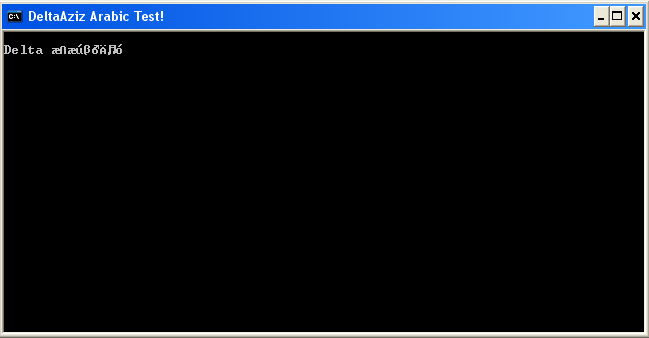
هل جرب أحدكم هذا

d4baa0.gif
#13

طيب ولو كتبت عربي من غير نظام تشغيل أصلا ؟ (h)

من لحظة الاقلاع

مش محتاجين كود , اعمل ديأسمبلي هتلاقي الكود علطول :P

Arabic.zip

#14
DeltaAziz كتب:

السلام عليكم

هل جرب أحدكم هذا

طيب هل نظرت الى هذا :P اقصد المرفق.

برنامجك يعمل فقط في الـ full screen و لكن اول ما تنزله الى نافذة عادية يخرب!!

لكن هذا تقدم ..

how did you do it?‎

post-43175-1144031543_thumb.png

تم تعديل هذه المشاركة بواسطة hasan_aljudy في 3 أبريل 2006 في 05:35

#16
hasan_aljudy كتب:
برنامجك يعمل فقط في الـ full screen و لكن اول ما تنزله الى نافذة عادية يخرب!!

لكن هذا تقدم ..

how did you do it?‎

التخريب يحصل من Wind0ws

و تعمل من دون نظام تشغيل...

كا قال أخي Asm4All

int 10

d4baa0.gif
#17

بالعودة للسؤال الرئيسي:

هناك فصل رائع في كتاب : Programming Applications for Microsoft Windows / Jeffrey Richter

هذا الفصل يتحدث عن الـ unicode في كافة الحالات اقتبس لك منه ما يلي:

اقتباس
Windows 2000 supports Unicode and ANSI—you can develop for either one

Windows 98 supports ANSI only—you must develop for ANSI

Windows CE supports Unicode only—you must develop for Unicode

اقتباس


How to Write Unicode Source Code

Microsoft designed the Windows API for Unicode so that it would have as little impact on your code as possible. In fact, it is possible to write a single source code file so that it can be compiled with or without using Unicode—you need only define two macros (UNICODE and _UNICODE) to make the change and then recompile.

Unicode Support in the C Run-Time Library
To take advantage of Unicode character strings, some data types have been defined. The standard C header file, String.h, has been modified to define a data type named wchar_t, which is the data type of a Unicode character:

typedef unsigned short wchar_t;


For example, if you want to create a buffer to hold a Unicode string of up to 99 characters and a terminating zero character, you can use the following statement:

wchar_t szBuffer[100];


This statement creates an array of one hundred 16-bit values. Of course, the standard C run-time string functions, such as strcpy, strchr, and strcat, operate on ANSI strings only; they don't correctly process Unicode strings. So, ANSI C also has a complementary set of functions. Figure 2-1 shows some of the standard ANSI C string functions followed by their equivalent Unicode functions.

Figure 2-1. Standard ANSI C string functions and their Unicode equivalents

char * strcat(char *, const char *);
wchar_t * wcscat(wchar_t *, const wchar_t *);

char * strchr(const char *, int);
wchar_t * wcschr(const wchar_t *, wchar_t);

int strcmp(const char *, const char *);
int wcscmp(const wchar_t *, const wchar_t *);

char * strcpy(char *, const char *);
wchar_t * wcscpy(wchar_t *, const wchar_t *);

size_t strlen(const char *);
size_t wcslen(const wchar_t *);


Notice that all the Unicode functions begin with wcs, which stands for wide character string. To call the Unicode function, simply replace the str prefix of any ANSI string function with the wcs prefix. 


NOTE
--------------------------------------------------------------------------------
 One very important point that most developers don't remember is that the C run-time library provided by Microsoft conforms to the ANSI standard C run-time library. ANSI C dictates that the C run-time library supports Unicode characters and strings. This means that you can always call C run-time functions to manipulate Unicode characters and strings—even if you're running on Windows 98. In other words, wcscat, wcslen, wcstok, and so on all work just fine on Windows 98; it's the operating system functions you need to worry about.

Code that includes explicit calls to either the str functions or the wcs functions cannot be compiled easily for both ANSI and Unicode. Earlier in this chapter, I said that it's possible to make a single source code file that can be compiled for both. To set up the dual capability, you include the TChar.h file instead of including String.h.

TChar.h exists for the sole purpose of helping you create ANSI/Unicode generic source code files. It consists of a set of macros that you should use in your source code instead of making direct calls to either the str or the wcs functions. If you define _UNICODE when you compile your source code, the macros reference the wcs set of functions. If you do not define _UNICODE, the macros reference the str set of functions.

For example, there is a macro called _tcscpy in TChar.h. If _UNICODE is not defined when you include this header file, _tcscpy expands to the ANSI strcpy function. However, if _UNICODE is defined, _tcscpy expands to the Unicode wcscpy function. All C run-time functions that take string arguments have a generic macro defined in TChar.h. If you use the generic macros instead of the ANSI/Unicode specific function names, you'll be well on your way to creating source code that can be compiled natively for ANSI or Unicode.

Unfortunately, you need to do a little more work than just use these macros. TChar.h includes some additional macros.

To define an array of string characters that is ANSI/Unicode generic, use the following TCHAR data type. If _UNICODE is defined, TCHAR is declared as follows:

typedef wchar_t TCHAR;


If _UNICODE is not defined, TCHAR is declared as

typedef char TCHAR;


Using this data type, you can allocate a string of characters as follows:

TCHAR szString[100];


You can also create pointers to strings:

TCHAR *szError = "Error";


However, there is a problem with the previous line. By default, Microsoft's C++ compiler compiles all strings as though they were ANSI strings, not Unicode strings. As a result, the compiler will compile this line correctly if _UNICODE is not defined, but will generate an error if _UNICODE is defined. To generate a Unicode string instead of an ANSI string, you would have to rewrite the line as follows:

TCHAR *szError = L"Error";


An uppercase L before a literal string informs the compiler that the string should be compiled as a Unicode string. When the compiler places the string in the program's data section, it intersperses zero bytes between every character. The problem with this change is that now the program will compile successfully only if _UNICODE is defined. We need another macro that selectively adds the uppercase L before a literal string. This is the job of the _TEXT macro, also defined in TChar.h. If _UNICODE is defined, _TEXT is defined as

#define _TEXT(x) L ## x


If _UNICODE is not defined, _TEXT is defined as

#define _TEXT(x) x


Using this macro, we can rewrite the line above so that it compiles correctly whether or not the _UNICODE macro is defined, as shown here:

TCHAR *szError = _TEXT("Error");


The _TEXT macro can also be used for literal characters. For example, to check whether the first character of a string is an uppercase J, write the following code:

if (szError[0] == _TEXT('J')) {
   // First character is a 'J'


} else {
   // First character is not a 'J'


}


Unicode Data Types Defined by Windows
The Windows header files define the data types listed in the following table.

Data Type Description 
WCHAR Unicode character 
PWSTR Pointer to a Unicode string 
PCWSTR Pointer to a constant Unicode string 


These data types always refer to Unicode characters and strings. The Windows header files also define the ANSI/Unicode generic data types PTSTR and PCTSTR. These data types point to either an ANSI string or a Unicode string, depending on whether the UNICODE macro is defined when you compile the module.

Notice that this time the UNICODE macro is not preceded by an underscore. The _UNICODE macro is used for the C run-time header files and the UNICODE macro is used for the Windows header files. You usually need to define both macros when compiling a source code module.

Unicode and ANSI Functions in Windows
I implied earlier that two functions are called CreateWindowEx: a CreateWindowEx that accepts Unicode strings and a second CreateWindowEx that accepts ANSI strings. This is true, but the two functions are actually prototyped as follows:

HWND WINAPI CreateWindowExW(
   DWORD dwExStyle, 
   PCWSTR pClassName,
   PCWSTR pWindowName, 
   DWORD dwStyle, 
   int X, 
   int Y,
   int nWidth, 
   int nHeight, 
   HWND hWndParent, 
   HMENU hMenu,
   HINSTANCE hInstance, 
   PVOID pParam);

HWND WINAPI CreateWindowExA(
   DWORD dwExStyle, 
   PCSTR pClassName,
   PCSTR pWindowName, 
   DWORD dwStyle, 
   int X, 
   int Y,
   int nWidth, 
   int nHeight, 
   HWND hWndParent, 
   HMENU hMenu,
   HINSTANCE hInstance, 
   PVOID pParam);


CreateWindowExW is the version that accepts Unicode strings. The uppercase W at the end of the function name stands for wide. Unicode characters are 16 bits each, so they are frequently referred to as wide characters. The uppercase A at the end of CreateWindowExA indicates that the function accepts ANSI character strings. 

But usually we just include a call to CreateWindowEx in our code and don't directly call either CreateWindowExW or CreateWindowExA. In WinUser.h, CreateWindowEx is actually a macro defined as

#ifdef UNICODE
#define CreateWindowEx CreateWindowExW
#else
#define CreateWindowEx CreateWindowExA
#endif // !UNICODE


Whether UNICODE is defined when you compile your source code module determines which version of CreateWindowEx is called. When you port a 16-bit Windows application, you probably won't define UNICODE when you compile. Any calls you make to CreateWindowEx expand the macro to call CreateWindowExA—the ANSI version of CreateWindowEx. Because 16-bit Windows offers only an ANSI version of CreateWindowEx, your porting will go much easier. 

Under Windows 2000, Microsoft's source code for CreateWindowExA is simply a thunking, or translation, layer that allocates memory to convert ANSI strings to Unicode strings; the code then calls CreateWindowExW, passing the converted strings. When CreateWindowExW returns, CreateWindowExA frees its memory buffers and returns the window handle to you. 

If you're creating dynamic-link libraries (DLLs) that other software developers will use, consider using this technique: supply two exported functions in the DLL—an ANSI version and a Unicode version. In the ANSI version, simply allocate memory, perform the necessary string conversions, and call the Unicode version of the function. (I'll demonstrate this process later in this chapter.)

Under Windows 98, Microsoft's source code for CreateWindowExA is the function that does the work. Windows 98 offers all the entry points to all the Windows functions that accept a Unicode parameter, but these functions do not translate Unicode strings to ANSI strings—they just return failure. A call to GetLastError returns ERROR_CALL_NOT_IMPLEMENTED. Only ANSI versions of these functions work properly. If your compiled code makes calls to any of the wide-character functions, your application will not run under Windows 98.

Certain functions in the Windows API, such as WinExec and OpenFile, exist solely for backward compatibility with 16-bit Windows programs and should be avoided. You should replace any calls to WinExec and OpenFile with calls to the CreateProcess and CreateFile functions. Internally, the old functions call the new functions anyway. The big problem with the old functions is that they don't accept Unicode strings. When you call these functions, you must pass ANSI strings. All the new and nonobsolete functions, on the other hand, do have both ANSI and Unicode versions on Windows 2000.

Windows String Functions
Windows also offers a comprehensive set of string manipulation functions. These functions are similar to the C run-time string functions, such as strcpy and wcscpy. However, the operating system functions are part of the OS, and many OS components use these functions instead of the C run-time library. I recommend that you favor the OS functions over the C run-time string functions. This will help your application's performance slightly because the OS string functions are used frequently by heavyweight applications such as the operating system's shell process, Explorer.exe. Since the functions are used heavily, they will probably already be loaded into RAM while your application runs.

To use these functions, the system must be running Windows 2000 or Windows 98. The functions are also available on earlier versions of Windows if Internet Explorer 4.0 or later is installed.

In classic OS function style, the OS string function names contain both uppercase and lowercase letters and look like this: StrCat, StrChr, StrCmp, and StrCpy (to name just a few). To use these functions, you must include the ShlWApi.h header file. Also, as previously discussed, these string functions come in both ANSI and Unicode versions, such as StrCatA and StrCatW. Because these are operating system functions, the symbols will expand to their wide versions if you define UNICODE (without the preceding underscore) when you build your application.

تم تعديل هذه المشاركة بواسطة إسماعيل ابراهيم في 4 أبريل 2006 في 21:47

#18

توضيح : أول ثلاث جمل : المقصود أن ويندوز 98 تدعم فقط ANSI أي في الحالة الافتراضية وكل تعاملك في ويندوز 98 باليونيكود يتم تحويله (دون أن تدري) الى ANSI قبل أن يمرّر الى دوال ويندوز98 . زعندما تريد تلقي يونيكود من دالة في ويندوز 98 يتم تحويلها من ANSI الى يونيكود وتمرر لك.

ويندوز سي إس لا يدعم ANSI بالمرّة.

#19

السلام عليكم و رحمه الله و بركاته

كيف اميز بين الحرف العربى و الحرف الأنجليزى الذى اقراءه و , حيث ان الحرف العربى يمثل فى اثنين بايت و الحرف الأنجليزى فى بايت واحد و كيف اعلم ان هذا حرف عربى و ليس مجرد بايت عادى

sign2.gif

رحم الله امرىء أهدى لى عيوبى

سبحان الله و بحمده سبحان الله العظيم

#20
ahmed_eltalkhawy كتب:
السلام عليكم و رحمه الله و بركاته

كيف اميز بين الحرف العربى و الحرف الأنجليزى الذى اقراءه و , حيث ان الحرف العربى يمثل فى اثنين بايت و الحرف الأنجليزى فى بايت واحد و كيف اعلم ان هذا حرف عربى و ليس مجرد بايت عادى

الحرف عربى أو هندى أو حتى صينى يتم معرفته عن طريق اليونيكود و يمثل فى بايتين

وهو يمثل حرف الأسكى + ترميز يبين اللغة على حسب النظام

هذا و الله أعلم

لا تراجع و لا إستسلام

#21

أولاً لم تحدد ما نوعية الملف ؟ كيف تم حفظ المعلومات إليه؟

مثلاً بامكان أي شخص حفظ الأحرف العربية بطريقته الخاصة وحينها لا بد من أن تعرف كيف تم حفظها لتستطيع قراءة الملف بشكل صحيح

يبدو السؤال سهلاً للغاية ولكن وراءه العديد من الأشياء التي ينبغي فهمها مسبقاً

ألقي نظرة على

http://unicode.org/faq/utf_bom.html

http://www.cs.tut.fi/~jkorpela/chars/index.html

هذا فقط جزء بسيط

في مرة قادمة حاول وضع سؤال غير مبهم حتى تجد إجابة بوقت أسرع وحتى لا تختلط عليك الأشياء

"First they ignore you, then they laugh at you, then they attack you, then you win"

===

اقتباس

حُكَّامُـنَا إِنْ تَصَـدّوا لِلْحِمَــى اقْتَحَمُـوا ***** وَإِنْ تَصَدَّى لَـهُ المُسْتَعْمِـرُ انْسَحَبُـوا

هُمْ يَفْرشـُونَ لِجَيْـشِ الغَــزْوِ أَعْيُنَـهُـمْ ***** وَيَدَّعُــونَ وُثُـوبَـاً قَـبْـلَ أَنْ يَثِـبُــوا

الحَاكِمُـونَ و«وَاشُنْـطُـنْ» حُكُومَتُـهُـمْ ***** وَاللامِعُــونَ وَمَـا شَعَّـوا وَلا غَرَبُــوا

القَاتِلُـــونَ نُبُــوغَ الشَّـعْــبِ تَرْضِـيَـــةً ***** لِلْمُعْتَدِيــنَ وَمَـا أَجْـدَتْـهُـمُ الـقُــرَبُ

لَهُمْ شُمُـوخُ «المُثَنَّـى» ظَاهِـرَاً وَلَهُـمْ ***** هَـوَىً إِلَـى بَابَـك الخَرْمِـيّ يُنْتَسَـبُ

البردوني "أبو تمام وعروبة اليوم" 1971

===

اقتباس
عبيد الهوى يحكمون البـلاد ***** ويحكمهــم كلّهـــم درهــــــم

و تقتـادهـم شهـوة لا تنــام ***** وهـــم فـي جـهالتهــم نــــوّم

ففــي كـــلّ ناحيــة ظـالـــم ***** غبــــــيّ يسـلـّطــــه أظلـــم

أيا من شبعتم على جوعــنا ***** وجـــوع بنينـا ألـم تتخمـــوا ؟

ألم تفهموا غضبة الكادحين ***** على الظلـم ؟ لا بدّ أن تفهموا

البردوني "نحن و الحاكمون "

#22

السلام عليكم و رحمه الله و بركاته

ما قصدته يا اخى هو انى اقراء الملف حرف حرف او بايت بايت باستخدام :

getc()
أو
fscanf("%c")

فكيف اقراء الحرف اليونيكود المكون من اثنين بايت و هل له دوال خاصة به و هل الملف اليونيكود يفتح باسلوب غير الملف العادى الذى افتحه باستخدام الدالة

fopen()
sign2.gif

رحم الله امرىء أهدى لى عيوبى

سبحان الله و بحمده سبحان الله العظيم

هذا الموضوع مغلق.

مواضيع مشابهة