الفريق العربي للبرمجةأرشيف المنتديات · 2000 – 2023
نسخة أرشيفية للقراءة فقط — التسجيل والمشاركة مغلقان، والمحتوى محفوظ كما كان.

مشروع مافكسبي 2003 ب C#

رائج
بدأه زكيري عبد العالي في 20 أغسطس 2008 · 68 رد · 7,598 مشاهدة · في Microsoft Visual C#.NET
مشاركة: واتساب X فيسبوك تيليجرام
#51

اولا حمد لله على السلامة واتمنى انك تكون وفقت في عملك

ثانيا اعذرني انا لا افقه شئ في الدلفي لذلك لو تكرمت تشرح المطلوب في هذه الخطوة ولو حتى باللغة الفرنسية في رسالة خاصة وانا ساترجمها بعد ذلك لأني بصراحة في كلام كتير بيقع مني عند شرحك باللغة العربية ( اذا كنت لا تريد وضع هسذه المشاركة بغير اللغة العربية )
#52

السلام و عليكم

اولا بارك الله فيك وفقك ايضا في ما تحب .

ثانيا :

اقتباس
لو تكرمت تشرح المطلوب في هذه الخطوة

سأحاول وضع المطلوب تقطه نقطة كما فعل اخي محمد في مشروع N0Player

أذا توكلنا على الله :

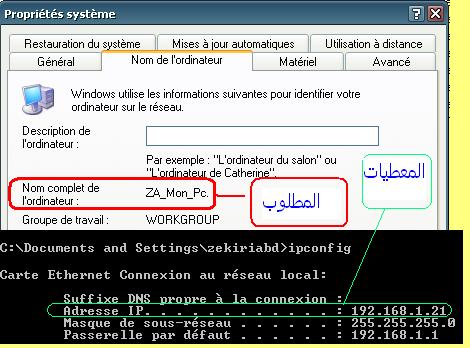
النقطه 1 -

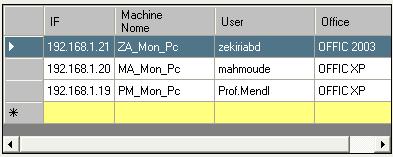
نكتب aderesse IP في edt_IP.txt مثلا "192.168.1.21" المطلوب ايجاد اسم الجهاز المربوط بالشبكة والذي عنوانه 192.168.1.21 مثلا

اي ZA_Mon_PC

post-1034-1223717240_thumb.jpg

تم تعديل هذه المشاركة بواسطة زكيري عبد العالي في 11 أكتوبر 2008 في 12:29

#53

this a function returns the machine name from IP

public string GetMachineName(string IPAddress)
		{
			String strHostName = IPAddress;
			string machineName;
			try
			{
				IPHostEntry ipEntry = Dns.GetHostEntry(strHostName);
				machineName = ipEntry.HostName;
			}
			catch
			{
				MessageBox.Show("Error getting details", "Error");
				return "";
			}
			return machineName;
		}
#54

وهذا الكود لزرار الاضافة

private void btnAdd_Click(object sender, EventArgs e)
		{
			string[] values = {this.cListeIP1.txtIPAddress.Text, Dns.GetHostEntry(this.cListeIP1.txtIPAddress.Text).HostName};
			this.cListeIP1.dgvDetails.Rows.Add(values);
			this.cListeIP1.dgvDetails.Update();

		}

وقد عدلت خاصية modifier في CListIP custome Control الى public حتى نستطيع التعامل مع احداثه وايضا بالنسبة لباقي العناصر الموجوده باداتنا

وبالطبع اضفت EventHandler

this.cListeIP1.btnAdd.Click += new EventHandler(btnAdd_Click);
#56

السلام عليكم

اخ بارك الله فيك لكن البرمجة تتم في الكلاس CListeIP.cs في الحدث

private void btnAdd_Click(object sender, EventArgs e)

وليس على الفورم الرئيسة frmHome.cs اي ان الفورم الرئيس هدفها الوحيد هو العرض فقط

والا لما استعملنا UserControl اي لتقسيم الاكواد كل واجهة مع الكود الخاص بها .

XPto2003OfficeConverter.rar

تم تعديل هذه المشاركة بواسطة زكيري عبد العالي في 12 أكتوبر 2008 في 00:41

#57

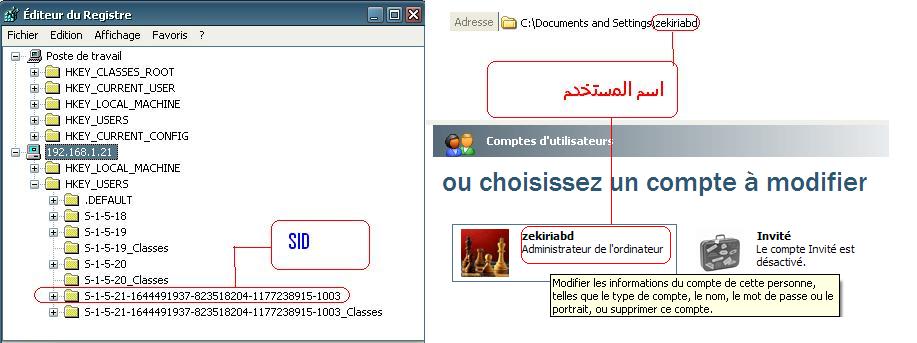
النقطه 2-

استخراج اسم المستخدم الحالي و الذي فتح الجهاز *-

رقم sid و الذي يمثل هذا المستخدم في الرجيستري *-

post-1034-1223762277_thumb.jpg

#58

حسناً فهمت قصدك والان سأحاول البحث عن استرجاع اسم المستخدم من الريسجتري

#59

هناك سؤال خاص بالريجستري وهو

هناك مكانين خاصين بالمستخدمين CurrentUseer , Users وستجد في الاثنين مفتاح فرعي

HKEY_CURRENT_USER\Software\Microsoft\Installed Components\{.....}

وداخل هذا المفتاح UserName

فهل ما بين القوسين هو SID المطلوب واسم المستخدم الذي بداخله هو اسم المستخدم الحالي

اذا كان كذلك فهناك مفتاح اخر في المسار

HKEY_USERS\{.....}\Software\Microsoft\Active Setup\Installed Components\{.....}

ويوجد ايضا اسم المستخدم ( اسم مستخدم الجهاز )

فايهم هو رقم SID

مع ملاحظة ان تلك المفاتيح {.....} تختلف في كل واحد

#60

لمعرفة SID للمستخدم الحالي

Console.WriteLine(System.Security.Principal.WindowsIdentity.GetCurrent().User.ToString());

ولمعرفة اسم المستخدم الحالي

Console.WriteLine(System.Security.Principal.WindowsIdentity.GetCurrent().Name);
#61

السلام عليكم

اخ شكرا على المحاولة لكن هذه ترجع معلومات حول المستخدم المالي للجهاز ذاته لكننا نريد جلب معلومات عن طريق ip لكل الاجهزة على الشبكة

اسف ان لم اوفق في شرح النقطه 2.

المثال في الصورة .

post-1034-1223925037_thumb.jpg

تم تعديل هذه المشاركة بواسطة زكيري عبد العالي في 13 أكتوبر 2008 في 22:10

#62

السلام عليكم

للتوضيح اسم المستخدم نجده في المفتاح

'SOFTWARE\Microsoft\Windows NT\CurrentVersion\Winlogon\DefaultUserName'

اذن يجب فتح اللرجيستري للجهاز المحدد ب IP هنا يجب استعمال اسم الحهاز كأحد المعطيات

		private string GetUSerName(string NomPC )
#63

السلام علبكم

طال الانتضار

الا يوجد احد يعرف كيف نتصل بالرجيستري لجهاز مربوط على الشبكة اي عن طريق الابي IP

#64

انا ما زلت ابحث وان كنت قد توصلت الى شيئ فشاركنا به

ثم اني لم اجد هذا المفتاح داخل الريجستري ( انا استخدم Win XP sp2)

#65

اقتباس
.NET Framework Class Library

RegistryHive Enumeration

See Also Example

Collapse All Expand All Language Filter: All Language Filter: Multiple Language Filter: Visual Basic Language Filter: C# Language Filter: C++ Language Filter: J# Language Filter: JScript

Visual Basic (Declaration)

Visual Basic (Usage)

C#

C++

J#

JScript

Represents the possible values for a top-level node on a foreign machine.

Namespace: Microsoft.Win32

Assembly: mscorlib (in mscorlib.dll)

Syntax

Visual Basic (Declaration)

<SerializableAttribute> _

<ComVisibleAttribute(True)> _

Public Enumeration RegistryHive

Visual Basic (Usage)

Dim instance As RegistryHive

C#

[serializableAttribute]

[ComVisibleAttribute(true)]

public enum RegistryHive

C++

[serializableAttribute]

[ComVisibleAttribute(true)]

public enum class RegistryHive

J#

/** @attribute SerializableAttribute() */

/** @attribute ComVisibleAttribute(true) */

public enum RegistryHive

JScript

SerializableAttribute

ComVisibleAttribute(true)

public enum RegistryHive

Members

Member name Description

ClassesRoot Represents the HKEY_CLASSES_ROOT base key on another computer. This value can be passed to the OpenRemoteBaseKey method, to open this node remotely.

CurrentConfig Represents the HKEY_CURRENT_CONFIG base key on another computer. This value can be passed to the OpenRemoteBaseKey method, to open this node remotely.

CurrentUser Represents the HKEY_CURRENT_USER base key on another computer. This value can be passed to the OpenRemoteBaseKey method, to open this node remotely.

DynData Represents the HKEY_DYN_DATA base key on another computer. This value can be passed to the OpenRemoteBaseKey method, to open this node remotely.

LocalMachine Represents the HKEY_LOCAL_MACHINE base key on another computer. This value can be passed to the OpenRemoteBaseKey method, to open this node remotely.

PerformanceData Represents the HKEY_PERFORMANCE_DATA base key on another computer. This value can be passed to the OpenRemoteBaseKey method, to open this node remotely.

Users Represents the HKEY_USERS base key on another computer. This value can be passed to the OpenRemoteBaseKey method, to open this node remotely.

Remarks

RegistryHive values are used by the OpenRemoteBaseKey method to represent the top-level node of a requested key on a foreign (remote) machine. The node that can be opened with the OpenRemoteBaseKey method must be one of these top-level RegistryKeys. Further access to the subkeys of the identified node is available using using methods in RegistryKey, so long as the the user has appropriate permission.

Example

The following code example shows how to open a registry key on a remote computer and enumerate the values of the key. The remote computer must be running the remote registry service. Specify the name of the remote computer as a command-line argument when invoking the program.

Visual Basic Copy Code

Imports Microsoft.VisualBasic

Imports System

Imports System.IO

Imports System.Security.Permissions

Imports Microsoft.Win32

<Assembly: RegistryPermissionAttribute( _

SecurityAction.RequestMinimum, _

Read := "HKEY_CURRENT_USER\Environment")>

<Assembly: SecurityPermissionAttribute( _

SecurityAction.RequestMinimum, UnmanagedCode := True)>

Public Class RemoteKey

Shared Sub Main(commandLineArgs As String())

Dim environmentKey As RegistryKey

' Check that an argument was specified when the

' program was invoked.

If commandLineArgs.Length = 0 Then

Console.WriteLine("Error: The name of the remote " & _

"computer must be specified as input on the " & _

"command line.")

Return

End If

Try

' Open HKEY_CURRENT_USER\Environment on a remote computer.

environmentKey = RegistryKey.OpenRemoteBaseKey( _

RegistryHive.CurrentUser, _

commandLineArgs(0)).OpenSubKey("Environment")

Catch ex As IOException

Console.WriteLine("{0}: {1}", _

ex.GetType().Name, ex.Message)

Return

End Try

' Print the values.

Console.WriteLine("\nThere are {0} values For {1}.", _

environmentKey.ValueCount.ToString(), environmentKey.Name)

For Each valueName As String In environmentKey.GetValueNames()

Console.WriteLine("{0,-20}: {1}", valueName, _

environmentKey.GetValue(valueName).ToString())

Next

' Close the registry key.

environmentKey.Close()

End Sub

End Class

C# Copy Code

using System;

using System.IO;

using System.Security.Permissions;

using Microsoft.Win32;

[assembly: RegistryPermissionAttribute(SecurityAction.RequestMinimum,

Read = @"HKEY_CURRENT_USER\Environment")]

[assembly: SecurityPermissionAttribute(SecurityAction.RequestMinimum,

UnmanagedCode = true)]

class RemoteKey

{

static void Main(string[] args)

{

RegistryKey environmentKey;

string remoteName;

// Check that an argument was specified when the

// program was invoked.

if(args.Length == 0)

{

Console.WriteLine("Error: The name of the remote " +

"computer must be specified when the program is " +

"invoked.");

return;

}

else

{

remoteName = args[0];

}

try

{

// Open HKEY_CURRENT_USER\Environment

// on a remote computer.

environmentKey = RegistryKey.OpenRemoteBaseKey(

RegistryHive.CurrentUser, remoteName).OpenSubKey(

"Environment");

}

catch(IOException e)

{

Console.WriteLine("{0}: {1}",

e.GetType().Name, e.Message);

return;

}

// Print the values.

Console.WriteLine("\nThere are {0} values for {1}.",

environmentKey.ValueCount.ToString(),

environmentKey.Name);

foreach(string valueName in environmentKey.GetValueNames())

{

Console.WriteLine("{0,-20}: {1}", valueName,

environmentKey.GetValue(valueName).ToString());

}

// Close the registry key.

environmentKey.Close();

}

}

C++ Copy Code

using namespace System;

using namespace System::IO;

using namespace System::Security::Permissions;

using namespace Microsoft::Win32;

[assembly:RegistryPermissionAttribute(SecurityAction::RequestMinimum,

Read="HKEY_CURRENT_USER\\Environment")];

[assembly:SecurityPermissionAttribute(SecurityAction::RequestMinimum,

UnmanagedCode=true)];

int main( int argc, char *argv[] )

{

RegistryKey ^ environmentKey;

// Check that an argument was specified when the

// program was invoked.

if ( argc == 1 )

{

Console::WriteLine( "Error: The name of the remote computer "

"must be specified as input on the command line." );

return -1;

}

try

{

// Open HKEY_CURRENT_USER\Environment on a remote computer.

environmentKey = RegistryKey::OpenRemoteBaseKey( RegistryHive::CurrentUser, gcnew String(argv[ 1 ]) )->OpenSubKey( "Environment" );

}

catch ( IOException^ e )

{

Console::WriteLine( "{0}: {1}", e->GetType()->Name, e->Message );

return -1;

}

// Print the values.

Console::WriteLine( "\nThere are {0} values for {1}.", environmentKey->ValueCount.ToString(), environmentKey->Name );

array<String^>^valueNames = environmentKey->GetValueNames();

for ( int i = 0; i < environmentKey->ValueCount; i++ )

{

Console::WriteLine( "{0,-20}: {1}", valueNames[ i ], environmentKey->GetValue( valueNames[ i ] )->ToString() );

}

// Close the registry key.

environmentKey->Close();

}

J# Copy Code

import System.*;

import System.IO.*;

import System.Security.Permissions.*;

import Microsoft.Win32.*;

/** @assembly RegistryPermissionAttribute(SecurityAction.RequestMinimum,

Read = "HKEY_CURRENT_USER\\Environment")

*/

/** @assembly SecurityPermissionAttribute(SecurityAction.RequestMinimum,

UnmanagedCode = true)

*/

class RemoteKey

{

public static void main(String[] args)

{

RegistryKey environmentKey;

String remoteName;

// Check that an argument was specified when the

// program was invoked.

if (args.get_Length() == 0) {

Console.WriteLine("Error: The name of the remote "

+ "computer must be specified when the program is "

+ "invoked.");

return;

}

else {

remoteName = args[0];

}

try {

// Open HKEY_CURRENT_USER\Environment

// on a remote computer.

environmentKey = RegistryKey.OpenRemoteBaseKey(

RegistryHive.CurrentUser, remoteName).OpenSubKey("Environment");

}

catch (IOException e) {

Console.WriteLine("{0}: {1}", e.GetType().get_Name(),

e.get_Message());

return;

}

// Print the values.

Console.WriteLine("\nThere are {0} values for {1}.",

Convert.ToString(environmentKey.get_ValueCount()),

environmentKey.get_Name());

for (int iCtr = 0; iCtr < environmentKey.GetValueNames().get_Length();

iCtr++) {

String valueName = (String)environmentKey.GetValueNames().

get_Item(iCtr);

Console.WriteLine("{0,-20}: {1}", valueName,

environmentKey.GetValue(valueName).ToString());

}

// Close the registry key.

environmentKey.Close();

} //main

} //RemoteKey

Platforms

Windows 98, Windows 2000 SP4, Windows Millennium Edition, Windows Server 2003, Windows XP Media Center Edition, Windows XP Professional x64 Edition, Windows XP SP2, Windows XP Starter Edition

The .NET Framework does not support all versions of every platform. For a list of the supported versions, see System Requirements.

Version Information

.NET Framework

Supported in: 2.0, 1.1, 1.0

See Also

Reference

Microsoft.Win32 Namespace

OpenRemoteBaseKey

RegistryKey

Send comments about this topic to Microsoft.

تم تعديل هذه المشاركة بواسطة Prof.Mendl في 24 أكتوبر 2008 في 01:18

#66

اعتقد ان هذا المقال يفيد ولكن للاسف ليس عندي الامكانية للتجربة

وفكرتي انه من خلال IP نستطيع ان نحصل على اسم الجهاز الذي نمرره الى طريقة بنفس اسلوب المقال للدخول على الريجستري ومنها نعرف اسم المستخدم وغيرها من المعلومات المطلوبة

#67

أخ زكري أتصور الشباب بقسم الشبكات ممكن أن يفيدو في هذا الموضوع

لأنه عند عمل group policy لمجموعة معينة عند دخول اليوزر على الحاسب يقوم بالتعديل في الرجستري حسب ماحدد في group policy في السيرفر

ممكن يفيدونا :huh:

بالنسبة للأي بي هل من الضروري الحصول عليه لو تمكنا من معرفة إسم الحاسب ؟

مجرد إقتراح :

عمل نسخة client و نسخة server يهذا يمكن إرسال الأمر للنسخة الكلينت و هي يلي تعدل على الريجستري وتقوم بكثير من الأعمال ؟؟

تم تعديل هذه المشاركة بواسطة rober في 24 أكتوبر 2008 في 06:31

I'm Away For Sometimes

I'll Finish My Works

Come Back Soon

More Study > More Search > More Try > More Learning > Great Success

#68

up

#69

هل حاول احد المحاولة للاستفادة من المقالة المذكورة بأعلى انا ليس لدي شبكة حتى اجرب عليها

اما بخصوص الحماية وما الى تلك الامور من الممكن ان نتعامل مبدئيا على شبكة محلية ليس بها حماية حتى نصل الى الكود ومن ثم التطوير فيه حتى يتعامل مع تلك الامور

انتم ليه وقفتم المشروع ؟؟؟؟

اخ ذكيري اذا كنت عملت البرنامج ده بالدلفي فاعتقد من السهل البحث لك وتحويله الى السي شارب

او ادلي بأي مساعدة

مواضيع مشابهة