الفريق العربي للبرمجةأرشيف المنتديات · 2000 – 2023
نسخة أرشيفية للقراءة فقط — التسجيل والمشاركة مغلقان، والمحتوى محفوظ كما كان.

مشكلة في Dialog Window و Ie6

بدأه TareqVB في 15 أبريل 2008 · 8 رد · 896 مشاهدة · في ASP.NET
مشاركة: واتساب X فيسبوك تيليجرام
#1 صاحب الموضوع

السلام عليكم

تظهر عندي مشكلة ي عند استخدام Dialog window وبداخلها جريد فيو بحيث عند اختيار صف او الانتقال الى صفحة اخرى في الجريد فيو يتم فتح صفحة جديدة وبها الرابط

javascript dopostback...

وهذه المشكلة تظهر فقط في انترنت اكسبلورر 6 ولا تظهر في 7 ولا في الفايرفوكس

فهل من حل ؟؟

الجريد فيو في صفحة Dialog
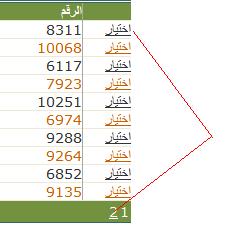
post-112904-1208242467_thumb.jpg

#2

على الإقلل أكتب رسالة الخطأ

اللهم أطل عمري وأحسن عملي واختم بالشهادة أجلي

#4

السلام عليكم

مرفق جزء من المشروع والذي به المشكلة لكنه بحاجة الى قاعدة بيانات والجدول كما يلي

CREATE   TABLE dbo.Members
	(
	code smallint NOT NULL IDENTITY (1, 1),
	name nvarchar(50) NOT NULL,
	Address nvarchar(50) NULL
	)
insert into  dbo.Members values('TareqVb','Anywhere')
insert into  dbo.Members values('moh','Anywhere')

popup.rar

#5

اخي طارق

في صفحة PopSrchClients.aspx اضف هذا السطر

<base target="_self" />

ضمن قسم الـhead كالتالي

<head runat="server">
<base target="_self" />
	<title>البحث </title>
</head>

-----------------------------------------------------------------------------------------------------------------------------


ـــــــــــــــــــــــــــــــــــــــــــــــــــــــــ

Mohammad Sonaiea
 

#6
محمد سماقية كتب:
في صفحة PopSrchClients.aspx اضف هذا السطر

<base target="_self" />

شكرا اخي محمد فعلا اشتغلت

لكن عندي سؤال اذا سمحت ايش فائدتها انا انه في اكثر من قيمه بتوخذ

اذا في مجال شرح بسيط

شكراا

abdullahf4.jpg
#7
اقتباس
ايش فائدتها انا انه في اكثر من قيمه بتوخذ اذا في مجال شرح بسيط

المشكلة كانت في IE6 انه يتم عمل PostBack الى صفحة جديدة وبالتالي هذه الصفحة لا تفهم هذا الامر فعند ما وضعنا الامر _self اصبح يتم عمل PostBack لنفس الصفحة الحالية والتي هي PopUp Window

وشكرا لك انك طمنتني انها اشتغلت لاني لم اجربها عندي الى الان وذلك بسبب عدم وجود IE6

#8
Targets

You can specify a target window or frame for a hyperlink. This is where the linked page will open. If no target is specified, the link will open in the same window/frame. The format is this (where the target is "self"):

<a href="page1.html" target="_self">Go To Page 1</a>

The target window options are:
_self : Opens in the same window and same frame.
_top : Opens in the same window, taking the full window if there is more than one frame.
_parent : Opens in the parent frame.
_blank : Opens in a new window.

If you have a frameset defined, you can set your target as any particular frame. For example, if you have a navigation frame called"nav" and a main frame called "main", set the target of your navigation links like so:

<a href="page1.html" target="main">Go To Page 1</a>
<a href="page2.html" target="main">Go To Page 2</a>
...etc.

Note: Instead of specifying a target for each individual link, you can define a "base target" for an entire frame or page. This means that every link on the page will use the base target by default. Place the base target tag in the page's head. Example:

<base target="_blank">

-----------------------------------------------------------------------------------------------------------------------------


ـــــــــــــــــــــــــــــــــــــــــــــــــــــــــ

Mohammad Sonaiea
 

#9

شكرا لك اخي

شرح ممتاز

abdullahf4.jpg

مواضيع مشابهة