الفريق العربي للبرمجةأرشيف المنتديات · 2000 – 2023
نسخة أرشيفية للقراءة فقط — التسجيل والمشاركة مغلقان، والمحتوى محفوظ كما كان.

مشكلة في استعراض المشروع من خلال ال Iis

مغلق
بدأه al sayed633 في 1 فبراير 2008 · 4 رد · 862 مشاهدة · في ASP.NET
مشاركة: واتساب X فيسبوك تيليجرام
#1 صاحب الموضوع

بسم الله الرحمن الرحيم

الاخوة الاعزاء اعضاء ومشرفي منتديات الفريق العربي للبرمجة السلام عليكم ورحمته الله وبركاته

اخواني الاعزاء ارجوا ان اجد حل لهذه المشكلة في هذا المنتدى والذي لا اعرف ماهو سبب ظهورها والمشكلة هي

قمت بتصميم مشروع بسيط باستخدام الـ asp.net باستخدام vb.net 2005 وكنت استخدم السيرفر الذي يأتي مدمج مع الـ vb.net 2005 لاستعراض ما اقوم بعملة . وبعد ان انتهيت تقريباً من المشروع حببت أن اقوم بتركيب هذه المشروع على الـ IIS واستعراض المشروع من خلاله ولكني فوجئت عندما اقوم بعمل أو كتابة الرابط للصفحة الرئيسية مثل هذا

http://localhost/project/index.aspx

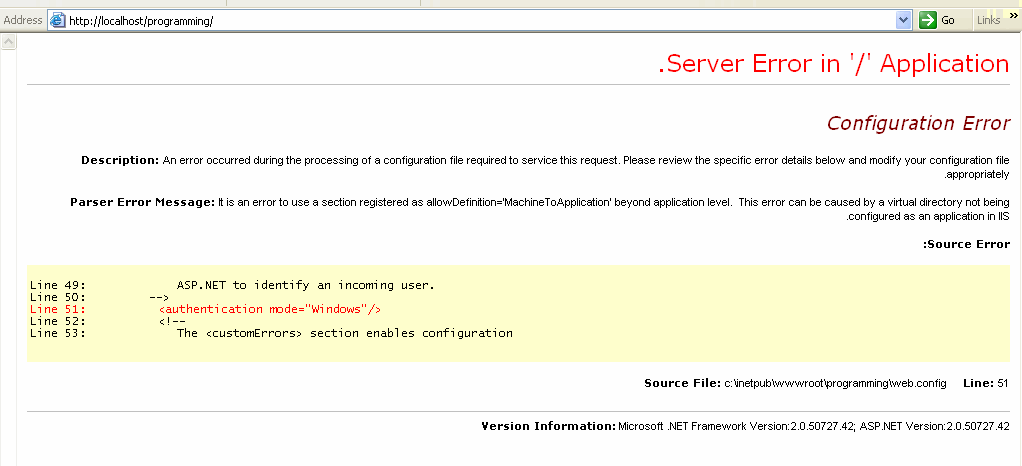
تظهر لي رسالة كما في الصورة التي في المرفقات :
post-129845-1201847410_thumb.gif

ارجوا من كان لدية الحل أن لايبخل عليه بها ، علماً اني قمت بوضع هذا السؤال في مشاركة احدى الاخوان ولكني لم اجد أي رداً له سواً من قبل الاخ الذي طرح المشاركة أو أي شخص اخر

منتظررررررررررر الردد

#2

اتصور المشكلة في عدم استخدام asp.net2 فريمورك لهذا الموقع .

يمكن عملها من خصائص virual directory في ال IIS ثم على تبويب asp.net وهناك اختار 2 وليس 1.1

#3
/index.ph...%CA%D3%CC%ED%E1

-----------------------------------------------------------------------------------------------------------------------------


ـــــــــــــــــــــــــــــــــــــــــــــــــــــــــ

Mohammad Sonaiea
 

#4
محمد سماقية كتب:

استاذي العزيز / محمد سماقية السلام عليكم ورحمته الله وبركاته

اولاً شكراً لك الف شكر استاذي العزيز على مرورك الكرام

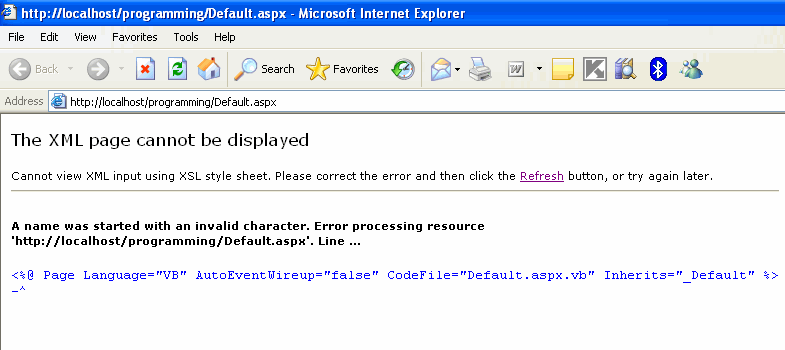
قمت بقرائه الموضوع الذي في اعطيتني أيه وقمت باستخدم البرنامج لعمل تسجيل للـ IIS ، ولكن للأسف بعد ان قمت بتثبيته قمت باستعراض إحدى برامجي فظهر لي الخطئ الذي في الصورة التالية :

post-129845-1201967651_thumb.gif

ارجو منك استاذي المساعدة وجزاك الله الف خير مقدماً

#5
You may get this error when trying to browse an asp.net application.

The debug information shows that "This error can be caused by a virtual directory not being configured as an application in IIS."

However, this error occurs primarily out of 2 scenarios.

1. When you create an new web application using visual studio.net, it automatically creates the virtual directory and configures it as an application.
However, if you manually create the virtual directory and it is not configured as an application, then you will not be able to browse the application and
may get the above error. The debug information you get as mentioned above, is applicable to this scenario.

To resolve it, Right Click on the virtual directory - select properties and then click on "Create" next to the "Application" Label and the textbox. It will
automatically create the "application" using the virtual directory's name. Now the application can be accessed.


2. When you have sub-directories in your application, you can have web.config file for the sub-directory. However, there are certain properties which cannot
be set in the web.config of the sub-directory such as authentication, session state (you may see that the error message shows the line number where the
authentication or sessionstate is declared in the web.config of the sub-directory). The reason is, these settings cannot be overridden at the sub-directory level 
unless the sub-directory is also configured as an application (as mentioned in the above point).

Mostly we have the practice of adding web.config in the sub-directory if we want to protect access to the sub-directory files (say, the directory is admin and we
wish to protect the admin pages from unathorized users).

But actually, this can be achieved in the web.config at the application's root level itself, by specifing the location path tags and authorization, as follows:-

<location path="Admin">
<system.web>
<authorization>
<allow roles="administrators" />
<deny users="*" />
</authorization>
</system.web>
</location>

However, if you wish to have a web.config at the sub-directory level and protect the sub-directory, you can just specify the Authorization mode as follows:-

<configuration>
<system.web>
<authorization>
<allow roles="administrators" />
<deny users="*" />
</authorization>
</system.web>
</configuration>

Thus you can protect the sub-directory from unauthorized access.

http://geekswithblogs.net/ranganh/archive/...4/25/37609.aspx

How To Create a Virtual Directory in Internet Information Services (IIS)

http://support.microsoft.com/kb/172138/en-us

Using Virtual Directories (IIS 6.0)

http://www.microsoft.com/technet/prodtechn...d.mspx?mfr=true

اعتقد ان المعلومات السابقة كافية من أجل حل مشكلتك .......

تم تعديل هذه المشاركة بواسطة محمد سماقية في 3 فبراير 2008 في 10:31

-----------------------------------------------------------------------------------------------------------------------------


ـــــــــــــــــــــــــــــــــــــــــــــــــــــــــ

Mohammad Sonaiea
 

هذا الموضوع مغلق.

مواضيع مشابهة

عدد الزوار حالياً

المتواجدون خلال آخر دقيقتين · يتحدّث كل ٣٠ ثانية

—الإجمالي—أعضاء مسجّلون—زوار بدون تسجيل

جارٍ التحقق من المتواجدين…